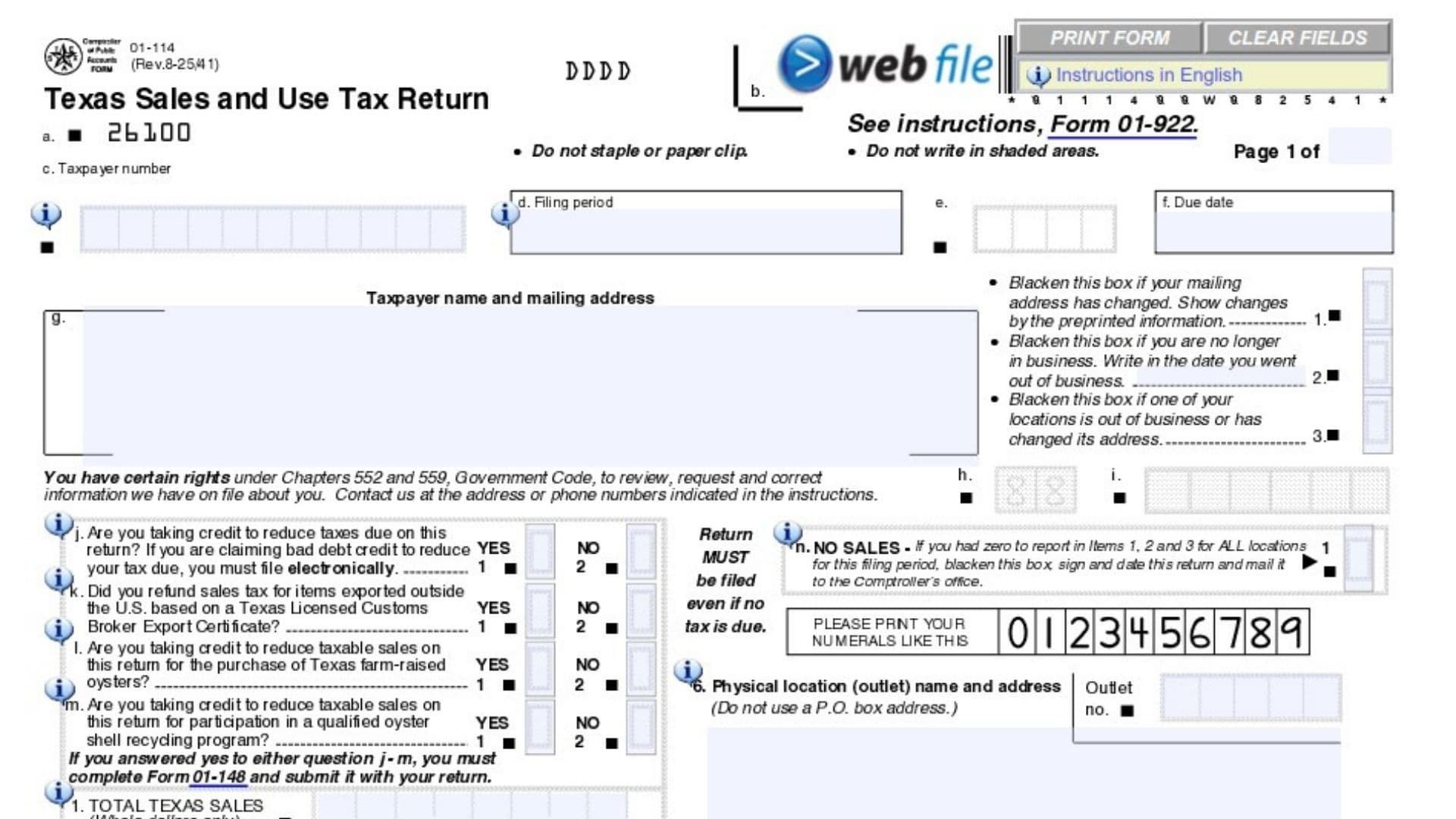
Form 01-114 is the official Sales and Use Tax Return document used by businesses operating in Texas. Administered by the Texas Comptroller of Public Accounts, this form is required to report and remit the sales and use taxes collected from customers during a specific filing period. It collects essential financial data, including gross overall revenues, taxable sales, and taxable purchases made by the business. Completing this return accurately is critical for maintaining good standing with state tax authorities, avoiding late penalties, and ensuring local jurisdictions receive their correct share of tax revenues.
How To File Form 01-114
This return must be filed for every designated reporting period, even if your business had zero sales or owes no tax for that timeframe.
Before completing the document, you should gather your gross sales records, receipts of untaxed business purchases, and tax data for all specific physical locations or outlets your business operates. If you claim certain specific tax credits or refunds, you will also need to complete and attach Form 01-148 to this return.
Paper filings along with a check payable to the State Comptroller should be mailed directly to the Comptroller of Public Accounts in Austin, Texas. However, note that some specific circumstances, such as claiming a bad debt deduction, require the return to be filed electronically rather than by mail.

How to Complete Texas Form 01-114
General Business Information
Before entering your financial data, you must confirm or update your basic business information at the top of the form.
Address Change Box If your company’s mailing address has changed from the preprinted information on the document, darken this box to notify the Comptroller of the update.
Out of Business Box If your entire company has ceased operations permanently, darken this box and write in the exact date your business closed.
Location Change Box Mark this box if a specific branch or individual outlet has either closed down or moved to a new address.
No Sales Box If your business generated absolutely no sales and made no taxable purchases across all locations during this filing period, darken this box. You do not need to fill out the mathematical calculations, but you must still sign, date, and mail the return.
Qualification Questions
The form asks four specific questions to determine if you are claiming certain credits or refunds. If you answer “Yes” to any of these questions, you are required to complete Form 01-148 and submit it alongside this return.
Question J: Tax Reduction Credits Indicate “Yes” or “No” to state whether you are claiming any credits to reduce the amount of tax you owe. If you are claiming a credit specifically for bad debt, you are legally required to file your return electronically.
Question K: Customs Broker Export Refunds Select “Yes” or “No” to indicate if you refunded sales taxes to customers for items that were exported outside of the United States, based on a Texas Licensed Customs Broker Export Certificate.
Question L: Texas Farm-Raised Oysters Credit Mark “Yes” or “No” to show if you are claiming a credit to reduce your taxable sales based on the purchase of farm-raised oysters from Texas.
Question M: Oyster Shell Recycling Credit Indicate “Yes” or “No” to declare whether you are taking a credit against your taxable sales for participating in an approved, qualified oyster shell recycling program.
Sales and Tax Calculations
This section requires calculating your gross revenues, taxable amounts, and final tax liabilities. State tax figures belong in Column A, while local tax figures belong in Column B.
Item 1: Total Texas Sales Enter your absolute total gross receipts from all business operations within the state. This figure must include both taxable transactions and non-taxable transactions. Round this figure to whole dollars.
Item 2: Taxable Sales Report the total amount of your sales that are legally subject to Texas state sales tax. Exclude any tax-exempt sales from this number. Round to whole dollars.
Item 3: Taxable Purchases Enter the total value of any taxable items or equipment you purchased for your business without paying sales tax at the time of purchase, which are now subject to the state use tax. Round to whole dollars.
Item 4: Amount Subject to State Tax Add the amounts from Item 2 and Item 3 together. This combined figure represents the baseline amount that will be multiplied by the state tax rate.
Item 5: Amount Subject to Local Tax Record the total sales volume that is subject to local jurisdiction taxes. The amounts reported for city, transit, county, and special purpose districts must be equal.
Item 6: Physical Location Name and Address Write down the exact physical street address and the specific outlet number for the location generating these taxes. Do not use a P.O. Box for this field.
Item 7a: State Tax Due for This Outlet Multiply your taxable amount by the Texas state tax rate (0.0625). Record the exact state tax owed for this specific location in dollars and cents.
Item 7b: Local Tax Due for This Outlet Multiply your local taxable amount by your specific local tax rate to determine the local tax liability for this location. Record the exact amount in dollars and cents.
Item 8: Total Tax Due Combine the tax liabilities from all your business outlets. Enter the total state tax due in Column A and the total local tax due in Column B.
Item 9: Prepayment Credit If you previously made advanced tax payments for this specific filing period, enter the approved credit amount here to offset your current balance.
Item 10: Adjusted Tax Due Subtract your prepayment credit (Item 9) from your total tax due (Item 8) to calculate your adjusted balance.
Item 11: Timely Filing Discount If you are submitting this return and paying the balance on or before the official due date, you may claim a discount. Multiply the eligible tax amount by 0.005 and enter the result here.
Item 12: Prior Payments Enter any other payments you have already made toward this specific tax period that have not been accounted for in the prepayment credit line.
Item 13: Net Tax Due Calculate your net liability by taking the adjusted tax due (Item 10) and subtracting both the timely filing discount (Item 11) and your prior payments (Item 12).
Item 14: Penalty and Interest If you are filing this return or paying your taxes after the mandated due date, calculate and enter the mandatory late filing penalties and any accrued interest.
Item 15a: Total State Amount Due Enter the final state tax liability by adding the state portion of your net tax due to any applicable state penalties or interest.
Item 15b: Total Local Amount Due Enter the final local tax liability by adding the local portion of your net tax due to any applicable local penalties or interest.
Item 15: Total State and Local Amount Due Add your total net tax due (Item 13) to your penalty and interest calculations (Item 14) to find the combined total balance.
Item 16: Total Amount Paid Add the final state balance (Item 15a) and the local balance (Item 15b) together. This represents the exact monetary payment you are submitting alongside this return.
Signature Box The taxpayer, business owner, or an authorized filing agent must sign their name in this field and provide the current date to legally certify that all information is true and correct.
Final Review Before Filing
Before you seal the envelope or submit your return, run through this checklist to ensure everything is accurate and ready for processing:
- Verify that you have filed a return even if your business had zero sales (by marking the “No Sales” box).
- Ensure that all total sales and taxable sales amounts in Items 1 through 3 are written in whole dollars only.
- Check that exact dollars and cents are used for all actual tax calculations from Item 7 onward.
- Confirm that you have completed and attached Form 01-148 if you answered “Yes” to Questions J, K, L, or M.
- Double-check your math, particularly the subtraction of discounts and prior payments.
- Ensure the return is signed and dated by an authorized individual.
- Verify that your check is made payable directly to the State Comptroller for the exact amount listed in Item 16.