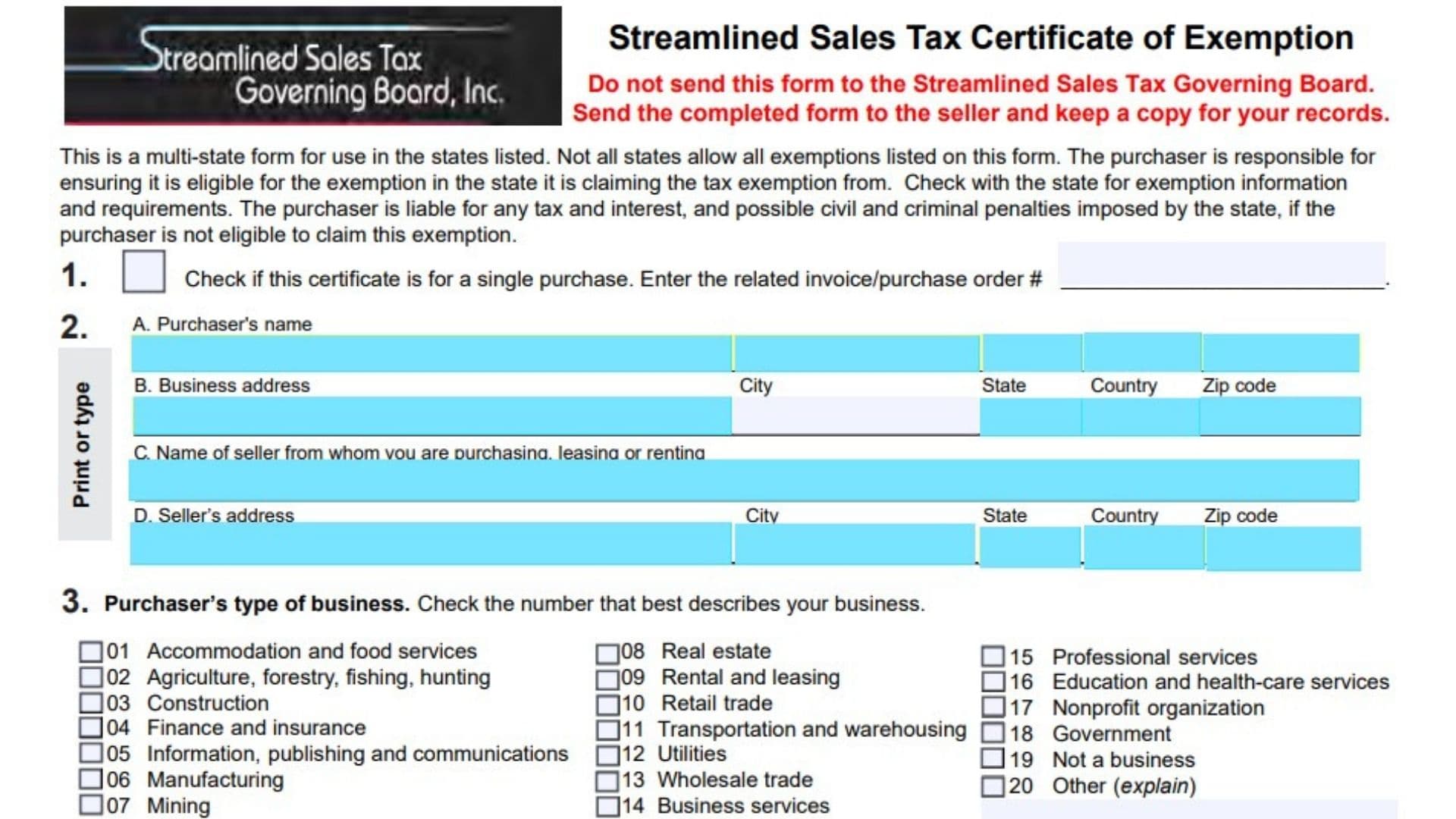
Kentucky Form 51A260 is a Streamlined Sales Tax Certificate of Exemption used by purchasers who want to claim an exemption from sales and use tax on eligible purchases. The form allows a purchaser to provide information about their business, the seller, the reason for exemption, and the identification information required by applicable states.
This certificate is designed as a multi-state exemption form. However, not every state accepts every exemption category listed on the form. The purchaser is responsible for confirming that they qualify for the exemption being claimed in the state where the tax exemption is requested. If a purchaser claims an exemption incorrectly, they may become responsible for unpaid tax, interest, and applicable penalties.
The form collects important information including the purchaser’s name, business address, seller details, business type, exemption reason, tax identification numbers, and authorized purchaser approval. Completing the certificate accurately helps both the purchaser and seller maintain proper records for exempt transactions.
How To File Form 51A260
Form 51A260 should not be sent to the Streamlined Sales Tax Governing Board. After completing the certificate, the purchaser should provide the completed form to the seller and keep a copy for their own records.
Before completing the form, prepare the following information:
- Purchaser’s legal business name
- Purchaser’s business address
- Seller’s name and address
- Business classification
- Reason for requesting exemption
- Required tax identification numbers
- Authorized purchaser signature information
Sections 1 through 6 contain required information. For electronic versions of the form, a signature may not be required depending on the format being used.

How To Complete Form 51A260
Section 1: Single Purchase Certificate
Section 1 identifies whether the certificate applies only to one specific purchase or whether it will be used as a continuing exemption certificate.
Section 1: Single Purchase Checkbox
Check this box if the certificate applies only to one purchase.
Invoice/Purchase Order Number
Enter the related invoice number or purchase order number for the specific transaction.
If this box is not selected, the certificate is generally treated as a blanket certificate. A blanket certificate remains valid until cancelled by the purchaser when purchases occur within the allowed time period established by applicable state rules.
Section 2: Purchaser And Seller Information
Section 2 collects identifying information for both the purchaser and seller involved in the transaction.
A. Purchaser’s Name
Enter the full legal name of the person, company, or organization purchasing the goods or services.
B. Business Address
Enter the purchaser’s complete business address.
Include:
- Street address
- City
- State
- Country
- ZIP code
C. Name Of Seller
Enter the name of the seller from whom you are purchasing, leasing, or renting the item.
D. Seller’s Address
Provide the seller’s complete address.
Include:
- Street address
- City
- State
- Country
- ZIP code
Section 3: Purchaser’s Type Of Business
Select the business category that best describes the purchaser’s organization. If none of the listed categories apply, select “Other” and provide a short explanation.
01: Accommodation And Food Services
Select this option for businesses providing lodging, restaurants, catering, or similar hospitality services.
02: Agriculture, Forestry, Fishing, Hunting
Select this category for businesses involved in agricultural activities, forestry, fishing, or hunting.
03: Construction
Select this option for construction-related businesses.
04: Finance And Insurance
Select this category for financial institutions, insurance companies, and related services.
05: Information, Publishing And Communications
Select this option for businesses involved in information services, publishing, or communications activities.
06: Manufacturing
Select this category for businesses producing manufactured goods.
07: Mining
Select this option for mining-related operations.
08: Real Estate
Select this category for real estate businesses.
09: Rental And Leasing
Select this option for businesses involved in rental or leasing activities.
10: Retail Trade
Select this category for businesses selling goods directly to customers.
11: Transportation And Warehousing
Select this option for transportation and storage businesses.
12: Utilities
Select this category for utility service providers.
13: Wholesale Trade
Select this option for wholesale businesses.
14: Business Services
Select this category for businesses providing business-related services.
15: Professional Services
Select this option for professional service providers.
16: Education And Health-Care Services
Select this category for educational institutions and healthcare-related organizations.
17: Nonprofit Organization
Select this option for qualifying nonprofit organizations.
18: Government
Select this category for government entities.
19: Not A Business
Select this option if the purchaser is not operating as a business.
20: Other
Select this option if none of the categories apply. Provide a brief description explaining the type of organization.
Section 4: Reason For Exemption
Choose the letter that represents the reason the purchaser qualifies for exemption. If the needed exemption reason is not listed, select “Other” and provide an explanation. Not every state allows all exemption types shown on the form.
A: Federal Government
Select this option when the exemption applies because the purchaser is a federal government department or agency.
B: State Or Local Government
Select this option for qualifying state or local government purchases. Enter the government entity name.
C: Tribal Government
Select this option for qualifying tribal government purchases. Enter the required government name.
D: Foreign Diplomat
Select this option for qualifying foreign diplomatic purchases.
E: Charitable Organization
Select this option when the exemption is based on charitable organization status.
F: Religious Organization
Select this option when the exemption applies to a religious organization.
G: Resale
Select this option when purchases are intended for resale and qualify under applicable resale exemption rules.
H: Agricultural Production
Select this option when purchases qualify for agricultural production exemption.
I: Industrial Production/Manufacturing
Select this option when purchases qualify for industrial production or manufacturing exemption.
J: Direct Pay Permit
Select this option when the purchaser uses an approved direct pay permit.
K: Direct Mail
Select this option when the exemption relates to direct mail purchases.
L: Other
Select this option if the exemption reason is not listed. Provide a clear explanation of the exemption being claimed.
M: Educational Organization
Select this option when the exemption applies to an educational organization.
Section 5: Identification (ID) Number
Section 5 requires identification information based on the state where the exemption is being claimed. The purchaser must enter the required ID number, state or country, and the exemption reason code from Section 4.
ID Number
Enter the required identification number for each state where an exemption is being claimed.
The required number depends on the exemption type and state requirements.
State/Country
Enter the state issuing the identification number. If using a foreign identification number, enter the country that issued it.
Reason
Enter the exemption reason letter from Section 4.
For example, if claiming a resale exemption, enter the applicable reason code for resale.
Identification Numbers For Exemptions Other Than Resale
For exemptions other than resale, the purchaser must provide the identification number required by the taxing state. The purchaser should confirm the state’s exemption requirements before filing.
Foreign Diplomat Identification Number
Foreign diplomats and consular personnel should enter the individual tax identification number shown on their sales tax exemption card issued by the U.S. Department of State’s Office of Foreign Missions.
Identification Numbers For Resale Purchases
For resale exemption claims, the required identification depends on the purchaser’s registration status.
Registered In The State Where Exemption Is Claimed
Enter the sales tax identification number issued by that state.
Not Registered In The State Where Exemption Is Claimed
Provide a sales tax identification number issued by another state.
No Sales Tax Identification Number Available
If the purchaser is not required to register and does not have a sales tax ID number, provide one of the following:
- Federal Employer Identification Number (FEIN)
- Another state-issued business identification number
- State driver’s license number if no other identification number exists
Foreign Purchaser Identification
Foreign purchasers without qualifying U.S. identification numbers may use accepted foreign tax identification numbers for certain listed states. Other states may require alternative identification.
Not Required Identification
Certain states allow the purchaser to enter “Not Required” along with the exemption reason when no qualifying identification number exists.
Section 6: Declaration And Signature
Section 6 confirms that the purchaser certifies the information provided is accurate and complete to the best of their knowledge.
Signature Of Authorized Purchaser
The authorized person responsible for the purchase should sign the certificate.
Print Name
Enter the printed name of the person signing the form.
Title
Provide the signer’s job title or position within the organization.
Date
Enter the date the certificate is completed and signed.
Final Review Before Filing
Before submitting Form 51A260 to the seller, review the following checklist:
- Confirm the correct purchaser name is entered.
- Verify the purchaser and seller addresses are complete.
- Select the correct business type category.
- Choose the correct exemption reason.
- Confirm the exemption is allowed in the applicable state.
- Enter all required identification numbers.
- Verify the exemption reason codes match the selected exemption.
- Ensure the authorized purchaser information is complete.
- Sign and date the certificate when required.
- Provide the completed form to the seller.
- Keep a copy of the completed certificate for your records.