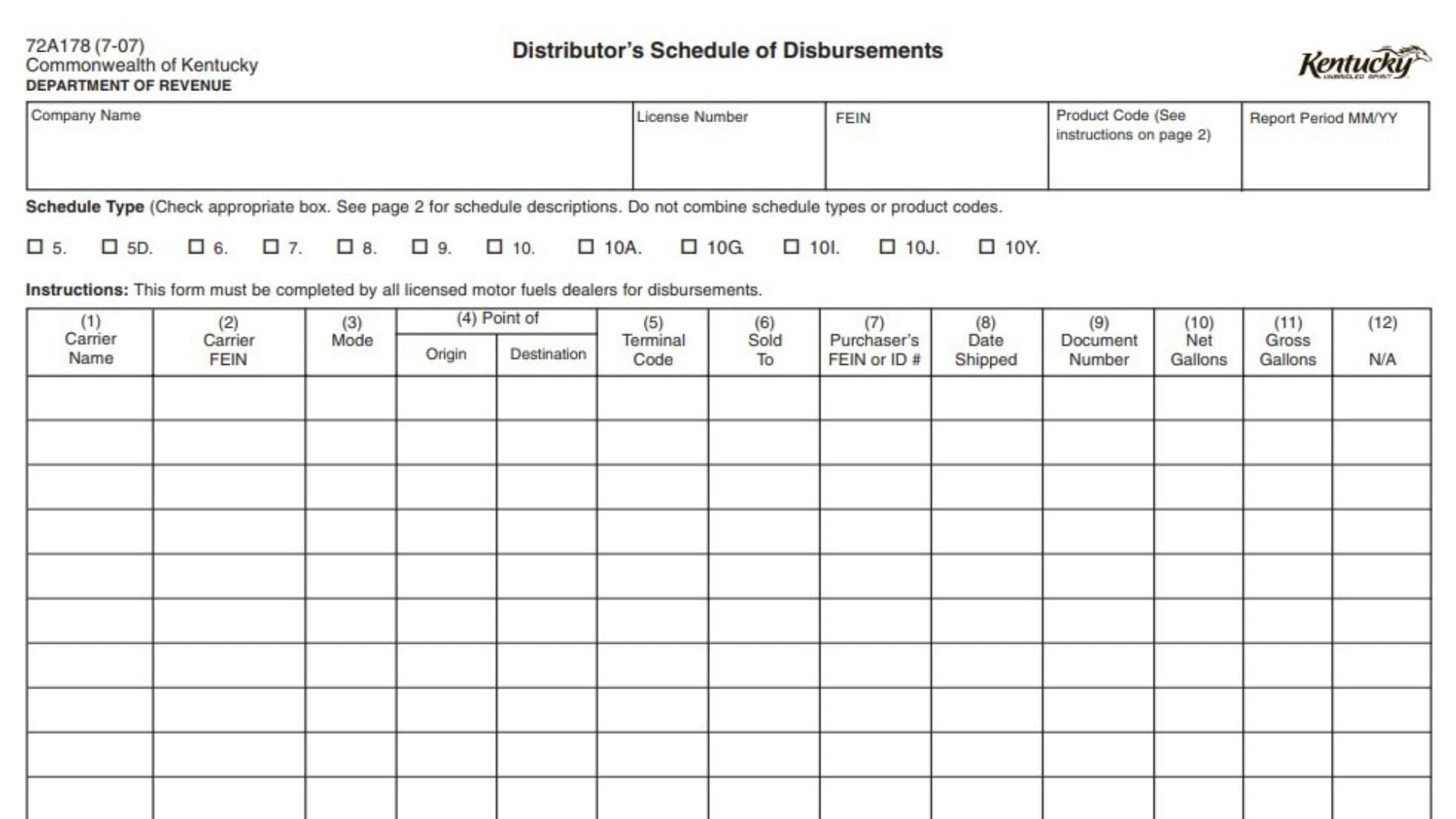
Form 72A178, Distributor’s Schedule of Disbursements, is a reporting schedule used by licensed motor fuel dealers in Kentucky to provide detailed information about fuel product disbursements. The form supports the disbursement amounts reported on the Licensed Gasoline, Special Fuels, or Liquefied Petroleum Dealer’s Monthly Report. Each product disbursement must be reported separately so the Department of Revenue can track fuel movements, tax treatment, and exempt or taxable deliveries.
Licensed motor fuel dealers complete this schedule when reporting fuel distributions. The form collects identifying details about the distributor, the type of disbursement being reported, transportation information, buyer details, shipment information, and gallon amounts. Completing each field accurately is important because the schedule provides supporting details for amounts reported on related motor fuel tax filings.
Before completing Form 72A178, the filer should gather the distributor’s company information, license details, FEIN, product code, shipment records, carrier information, purchaser information, shipping dates, documentation numbers, and gallon totals. The form requires the filer to select the correct schedule type and report only one schedule type and product code at a time.
How To File Form 72A178
Form 72A178 is completed as a supporting schedule for the distributor’s motor fuel monthly reporting. The information entered on this schedule should match the disbursement amounts reported on the applicable Licensed Gasoline, Special Fuels, or Liquefied Petroleum Dealer’s Monthly Report.
Prepare a separate entry for each fuel disbursement. Do not combine different schedule types or product codes on the same schedule. Select the appropriate schedule category, enter the product code, and complete each transaction line with the required transportation, purchaser, shipment, and gallon information.

How To Complete Form 72A178
The top section identifies the distributor and reporting information. The transaction table below records each fuel movement or delivery.
Distributor Information
Company Name
Enter the legal name of the distributor responsible for the report. The company name should match the distributor information used on the related distributor report.
License Number
Enter the distributor’s motor fuel license number. This identifies the licensed business submitting the schedule.
FEIN
Enter the distributor’s Federal Employer Identification Number. This identifies the reporting business for tax purposes.
Product Code
Enter the correct product code for the fuel product being reported. Use the appropriate code for the product listed on the schedule.
Report Period MM/YY
Enter the month and year reporting period covered by the schedule.
Schedule Type Selection
Select the box that matches the type of disbursement being reported. A separate schedule should be used for each schedule type and product code.
Schedule Type 5: Gallons Delivered With Tax Collected
Use this category for liquefied petroleum deliveries where tax has been collected.
Schedule Type 5D: Gallons Sold With Tax Collected for Import
Use this category for gallons sold with tax collected for imports from the specified location.
Schedule Type 6: Gallons Delivered to Licensed Motor Fuel Distributors Without Tax Collection
Use this category when fuel is delivered to licensed motor fuel distributors and tax is not collected. A separate form is required for each distributor.
Schedule Type 7: Gallons Exported to Another State
Use this category for gallons exported to another state. A separate schedule is required for each state.
Schedule Type 8: Gallons Delivered to the U.S. Government Tax Exempt
Use this category for tax-exempt deliveries made to the federal government.
Schedule Type 9: Gallons Delivered to State and Local Governments Tax Exempt
Use this category for tax-exempt deliveries made to state or local government entities.
Schedule Type 10: Gallons Delivered to Other Tax-Exempt Entities
Use this category for liquefied petroleum deliveries to other qualifying tax-exempt entities.
Schedule Type 10A: Gallons Sold for Nonhighway Use
Use this category for fuel sold for nonhighway purposes.
Schedule Type 10G: Gallons Delivered to Nonprofit Religious, Charitable, or Educational Organizations
Use this category for qualifying deliveries to nonprofit religious, charitable, or educational organizations.
Schedule Type 10I: Gallons Delivered Tax Exempt for Farming
Use this category for qualifying tax-exempt agricultural fuel deliveries.
Schedule Type 10J: Gallons Delivered Tax Exempt for Residential Heating
Use this category for qualifying residential heating fuel deliveries.
Schedule Type 10Y: Gallons Delivered Tax Exempt to Railroad
Use this category for qualifying tax-exempt railroad fuel deliveries.
Transaction Detail Columns
Each row in the transaction table represents one fuel disbursement. Complete a separate row for every product movement reported.
Column (1): Carrier Name
Enter the name of the company that transported the fuel product.
Column (2): Carrier FEIN
Enter the Federal Employer Identification Number of the carrier transporting the product.
Column (3): Mode of Transport
Enter the transportation method used for the shipment. Use the appropriate code:
- J = Truck
- R = Rail
- B = Barge
- PL = Pipeline
- S = Ship (Great Lakes or ocean marine vessel)
- BA = Book Adjustment
- ST = Stationary Transfer
- CE = Summary
- RT = Removal from Terminal other than by truck or rail for sale or consumption
Column (4): Point of Origin
Enter the location where the fuel was transported from. If the shipment originated from a terminal, use the applicable uniform terminal code.
Column (4): Destination
Enter the location where the fuel was delivered or transported to. Terminal shipments should use the required terminal coding information when applicable.
Column (5): Terminal Code
Enter the IRS Terminal Control Number for the applicable terminal location.
Column (6): Sold To
Enter the name of the company that purchased the fuel product.
Column (7): Purchaser’s FEIN or ID Number
Enter the purchaser’s FEIN or purchaser identification number for the company receiving the fuel.
Column (8): Date Shipped
Enter the date the fuel product was shipped.
Column (9): Document Number
Enter the identifying number from the shipment documentation. For fuel removed over the rack, use the manifest number issued at the terminal. For pipeline or barge movements, use the pipeline or barge ticket number.
Column (10): Net Gallons
Enter the net number of gallons disbursed. Use whole numbers only.
Column (11): Gross Gallons
Enter the gross number of gallons disbursed. Use whole numbers only.
Column (12): N/A Total
Complete this total field as applicable for the schedule reporting requirements.
Final Review Before Filing
Before submitting Form 72A178, verify that:
- The distributor’s company name, license number, and FEIN are correct.
- The correct report period is entered.
- The correct schedule type has been selected.
- Only one schedule type and product code are included on the schedule.
- A separate entry has been provided for each fuel disbursement.
- Carrier information is complete and accurate.
- Transportation mode codes are entered correctly.
- Origin, destination, and terminal information are complete when required.
- Purchaser information matches the transaction records.
- Shipment dates and document numbers agree with supporting records.
- Net and gross gallon amounts are entered as whole numbers and match the reported disbursements.