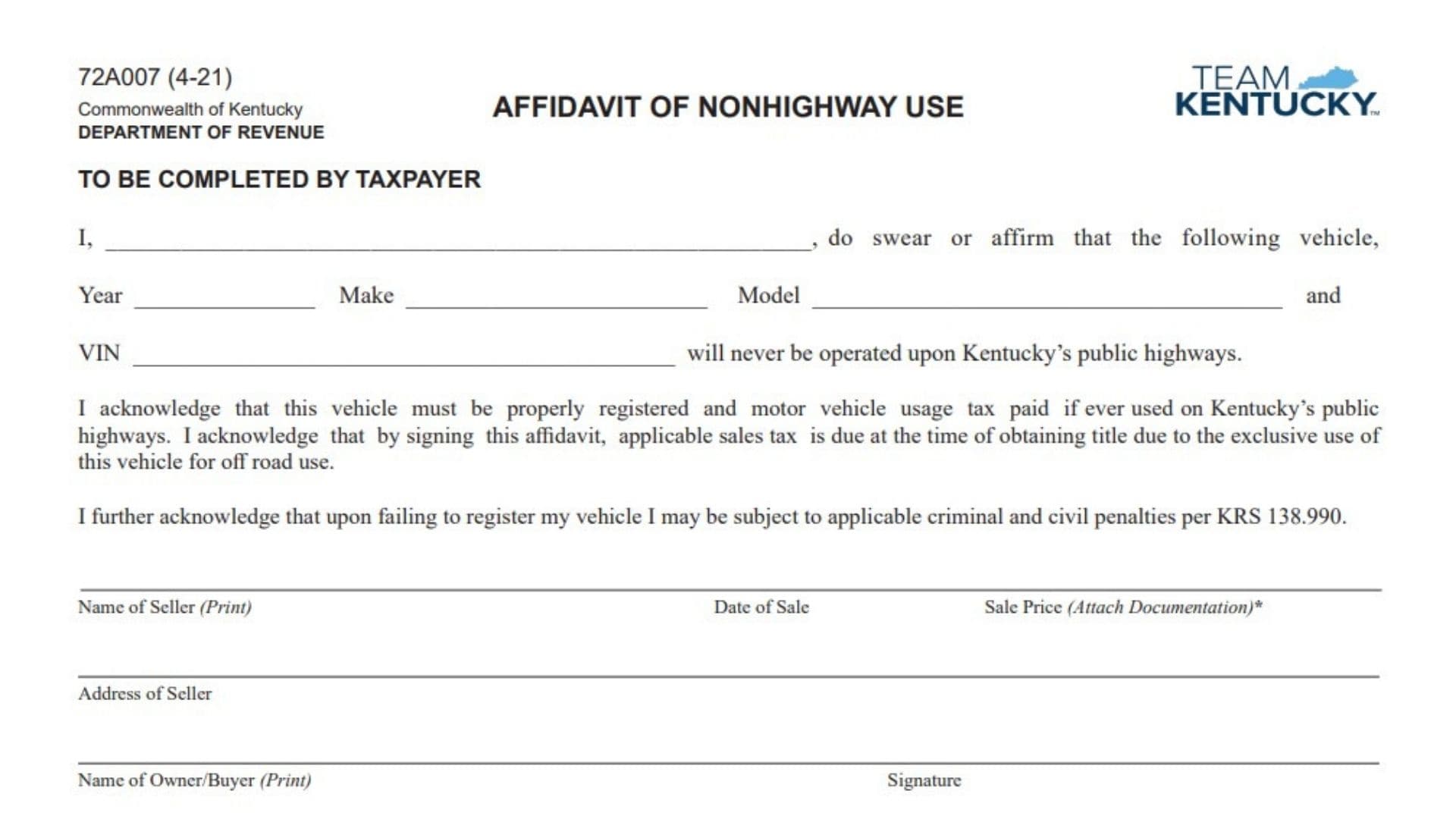
Form 72A007 is the Kentucky Department of Revenue Affidavit of Nonhighway Use used by taxpayers who are declaring that a vehicle will not be operated on Kentucky public highways. The form collects a sworn statement from the vehicle owner confirming that the vehicle identified on the affidavit will only be used for nonhighway purposes. It requires information about the taxpayer, vehicle details, seller, buyer, sale information, signatures, and notary verification. The affidavit also explains the taxpayer’s responsibility if the vehicle is later used on public highways, including the requirement to properly register the vehicle and pay applicable motor vehicle usage tax. The form helps document why sales tax requirements apply when obtaining title for a vehicle intended exclusively for off-road use. Completing the affidavit accurately is important because it serves as a formal declaration regarding how the vehicle will be operated and provides documentation for tax and registration records.
How To File Form 72A007
Form 72A007 is completed by the taxpayer and also requires information from the county clerk. The completed affidavit is used as part of the vehicle title and tax documentation process.
Before completing the form, gather the vehicle information, including the year, make, model, and VIN. You should also have the seller’s information, sale date, sale price documentation, buyer information, and any required tax-related documents ready.
The taxpayer should keep a copy of the completed form along with the registration receipt document as proof of sales tax paid or any claimed exemption.

How To Complete Form 72A007
The form contains two main sections. The first section is completed by the taxpayer, and the second section is completed by the county clerk.
Taxpayer Section
Vehicle Declaration
Taxpayer Name Statement
Enter your full name on the affidavit statement. By signing the form, you are confirming that the vehicle listed will never be operated on Kentucky public highways.
Vehicle Year
Enter the model year of the vehicle being declared for nonhighway use.
Vehicle Make
Provide the manufacturer or make of the vehicle.
Vehicle Model
Enter the specific model name or designation of the vehicle.
VIN
Enter the complete Vehicle Identification Number. Verify that the VIN matches the vehicle records and title documents.
Nonhighway Use Declaration
Confirm that the vehicle will not be operated on Kentucky public highways. The taxpayer acknowledges that the vehicle must be registered and motor vehicle usage tax paid if it is later used on public highways.
Acknowledgment Of Sales Tax Requirement
Recognize that applicable sales tax is due when obtaining title because the vehicle is being declared for exclusive off-road use.
Penalty Acknowledgment
Acknowledge that failure to register the vehicle when required may result in civil and criminal penalties under KRS 138.990.
Seller And Buyer Information
Name Of Seller (Print)
Enter the printed name of the person or business that sold the vehicle.
Date Of Sale
Provide the date when the vehicle transaction occurred.
Sale Price (Attach Documentation)
Enter the purchase price of the vehicle. Attach supporting documentation as required.
Address Of Seller
Provide the seller’s complete address.
Name Of Owner/Buyer (Print)
Enter the printed name of the person purchasing or owning the vehicle.
Signature
The owner or buyer must sign the affidavit to confirm the information provided is accurate.
Address Of Owner/Buyer (Print)
Enter the buyer’s complete address.
Notary Information
Attesting Official Title
Enter the title or position of the official who verifies the affidavit.
Subscribed And Sworn Date
Provide the date when the taxpayer appeared before the notary or authorized official and affirmed the information.
My Commission Expires
Enter the expiration date of the notary commission.
County Clerk Section
The county clerk completes the remaining tax collection section of the form.
Amount Of Sales Tax Collected (Code SU)
Enter the amount of sales tax collected for the transaction.
Sales Tax Not Collected Options
If sales tax is not collected, the county clerk must select the applicable reason.
Occasional Sale (Code S1)
Select this option when the transaction qualifies as an occasional sale under KRS 139.010(17). Documentation is not required for this selection.
Resale Certificate (Code S2)
Select this option when a resale certificate applies. Attach the completed Form 51A105.
Purchase Exemption Certificate (Code S3)
Select this option when a purchase exemption certificate applies. Attach the completed Form 51A126.
Sales Tax Credit Options
If a sales tax credit is provided, select the applicable credit type.
Credit For State Sales Tax Paid Out Of State (Code S8)
Choose this option when credit is being claimed for sales tax paid in another state. Attach a copy of the receipt.
Credit For Sales Tax Paid Kentucky Vendor (Code S9)
Choose this option when credit is being claimed for sales tax paid to a Kentucky vendor. Attach a copy of the receipt.
Sales Tax Documentation Submission
The county clerk must attach all sales tax documents related to the transaction and submit them to the Motor Vehicle Usage Tax Section separately from other usage tax documents.
Copy Distribution
White Copy
The white copy is sent to the Department of Revenue.
Canary Copy
The canary copy is retained by the county clerk.
Pink Copy
The pink copy is provided to the taxpayer for their records.
Final Review Before Filing
Before submitting Form 72A007, review the following items:
- Confirm the vehicle year, make, model, and VIN are correct.
- Make sure the nonhighway use declaration is accurate.
- Verify seller and buyer information is complete.
- Confirm the sale date and sale price are entered correctly.
- Ensure required signatures and notary information are completed.
- Review the county clerk sales tax section for accuracy.
- Attach any required supporting documentation for exemptions or credits.
- Keep a copy of the completed affidavit and registration receipt document for your records.
A properly completed Form 72A007 provides documentation that a vehicle is intended for nonhighway use and helps ensure the related tax and registration requirements are handled correctly.