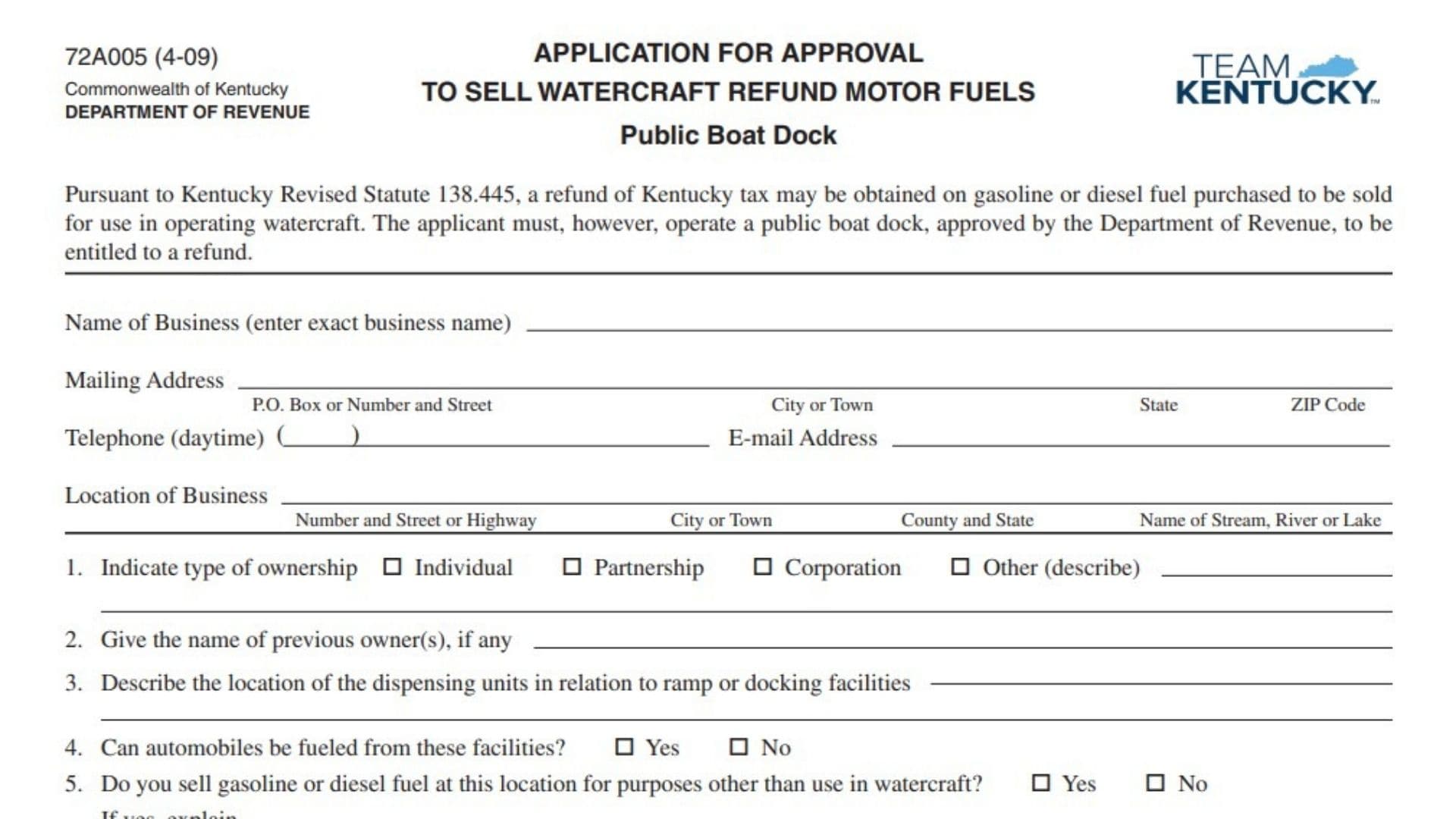
Kentucky Form 72A005, Application for Approval to Sell Watercraft Refund Motor Fuels – Public Boat Dock, is used to request approval from the Kentucky Department of Revenue to operate as an approved public boat dock selling gasoline or diesel fuel for use in watercraft. Under Kentucky Revised Statute 138.445, qualifying Kentucky tax may be refunded on gasoline or diesel fuel purchased for resale for use in operating watercraft. However, the form states that the applicant must operate a public boat dock approved by the Department of Revenue to qualify for the refund. The application collects the business’s legal name, mailing and physical location information, ownership details, fuel-dispensing information, supplier information, and information about owners, partners, or corporate officers. Completing the application accurately is important because approval applies to the specific establishment seeking authorization to sell watercraft refund motor fuels.
Who Should Use Kentucky Form 72A005?
This application is intended for an operator of a public boat dock seeking Kentucky Department of Revenue approval to sell gasoline or diesel fuel for use in operating watercraft.
The application is specifically connected with the watercraft motor-fuel tax refund provisions described on the form.
A separate approval is required for each establishment that wants to sell watercraft refund motor fuels. Therefore, a business operating more than one qualifying location should not assume that approval of one establishment automatically covers another location.
How To File Kentucky Form 72A005
The application must be prepared in duplicate, meaning two copies of the completed application are required.
Both copies should be sent to:
Motor Fuels Tax Compliance Section
Division of Miscellaneous Taxes
Department of Revenue
P.O. Box 1303
Frankfort, Kentucky 40602-1303
The Department returns one copy to the applicant.
If the location is approved, the returned copy should be kept on file as the establishment’s authority to sell watercraft refund motor fuels.
Before completing the application, gather:
- Exact legal business name
- Business mailing address
- Daytime telephone number
- Email address
- Physical location of the business
- Name of the stream, river, or lake where the business operates
- Ownership type
- Previous owner’s name, if applicable
- Information about fuel dispensing units
- Information about fuel storage and signage
- Primary fuel supplier’s name and address
- Secondary fuel supplier’s name and address
- Owner information if individually owned
- Partner information if organized as a partnership
- Corporate name, FEIN, and officer information if incorporated
- Name, title, and signature of the person authorized to certify the application

How To Complete Kentucky Form 72A005
Begin with the general business information at the top of the application. Then answer Questions 1 through 7 and complete the ownership section that applies to your business.
Business Identification Information
Name of Business
Enter the exact business name.
Use the legal or official business name associated with the establishment applying for approval. Do not shorten or alter the business name simply to fit a preferred trade style if that would make it inconsistent with the applicant’s official information.
Mailing Address
Enter the address where the business receives mail.
The form separates the mailing address into several parts.
P.O. Box or Number and Street
Enter the applicable post office box or street number and street name.
City or Town
Enter the city or town associated with the mailing address.
State
Enter the state for the mailing address.
ZIP Code
Enter the correct ZIP code.
Review the entire mailing address to make sure all components belong to the same address.
Telephone – Daytime
Enter a daytime telephone number where the applicant or business representative can be reached.
The form provides space for the area code and telephone number.
E-mail Address
Enter the business or applicant email address used for correspondence.
Location of Business
The physical location section is separate from the mailing address. Enter information describing where the public boat dock actually operates.
Number and Street or Highway
Enter the street number and street name, highway, or other applicable physical-location information.
City or Town
Enter the city or town where the establishment is physically located.
County and State
Enter the county and state of the business location.
Name of Stream, River or Lake
Enter the name of the body of water where the public boat dock is located.
This may be a stream, river, or lake, depending on the establishment.
Business and Fuel Operation Questions
Ownership and Operating Information
Question 1: Type of Ownership
Select the box that describes the business’s ownership structure.
The available choices are:
- Individual
- Partnership
- Corporation
- Other
Select only the classification that applies to the applicant.
If you select Other, use the space provided to describe the ownership type.
Your answer to this question determines which ownership-information section you should complete later in the application.
Question 2: Previous Owner(s)
Enter the name of any previous owner or owners of the establishment, if applicable.
If there was no previous owner, this field does not require you to invent a name. Complete it based on the actual ownership history of the establishment.
Question 3: Location of Dispensing Units
Describe where the fuel dispensing units are located in relation to the boat ramp or docking facilities.
The goal is to identify how the fuel-dispensing equipment is positioned relative to the facilities used by watercraft.
Provide enough information to make the relationship between the dispensing units and the ramp or dock clear.
Question 4: Can Automobiles Be Fueled From These Facilities?
Select either:
- Yes
- No
Answer based on whether automobiles can actually receive fuel from the dispensing facilities covered by this application.
Do not answer based simply on whether automobiles are permitted on the property. The question specifically concerns whether automobiles can be fueled from the facilities.
Question 5: Fuel Sold for Purposes Other Than Watercraft
Indicate whether gasoline or diesel fuel is sold at this location for purposes other than use in watercraft.
Select:
- Yes, if fuel from the location is also sold for another purpose.
- No, if the applicable fuel sales are limited to watercraft use.
If Yes, Explain
If you answered Yes to Question 5, use the space provided to explain the other purposes for which gasoline or diesel fuel is sold.
Keep the explanation specific to the actual operation.
Question 6: “Not For Highway Use” Markings
Indicate whether the applicable fuel facilities have the required “Not For Highway Use” markings described on the application.
The form asks whether:
- Above-ground storage facilities, when applicable, and the dispensing facilities are marked “Not For Highway Use.”
- The lettering is at least two inches high.
- The lettering is a color that contrasts with the storage facility.
Select Yes only if the facilities meet the conditions described in the question.
Otherwise, select No.
Do not overlook the lettering requirements when reviewing the facilities before completing this question.
Question 7: Primary and Secondary Fuel Suppliers
Provide the names and addresses of the businesses that supply your watercraft refund motor fuels.
The form requests information for both a primary and secondary supplier.
Primary Supplier
Enter the full name and address of your primary supplier of watercraft refund motor fuels.
This should identify the supplier that serves as the establishment’s primary source for the applicable fuel.
Secondary Supplier
Enter the full name and address of your secondary supplier.
Use the information for the secondary supplier that provides or is expected to provide the applicable motor fuel to the establishment.
The form specifically asks for both the name and address of each supplier.
Complete If Individual Ownership
Complete this section when Individual was selected as the ownership type in Question 1.
Do not complete partnership or corporation information simply because those sections appear on the same application.
Name of Owner
Enter the full name of the individual who owns the business.
Social Security No.
Enter the owner’s Social Security number in the space provided.
Review the number carefully before submitting the application.
Driver’s License No.
Enter the owner’s driver’s license number.
Make sure the number belongs to the same individual identified as the owner.
Complete If Partnership
Complete this section when Partnership was selected in Question 1.
The partnership section provides separate spaces for partner information.
Name of Owner
Enter the full name of a partner or owner in each applicable row.
Do not combine multiple people’s names into a single field when separate rows are available.
Social Security No.
Enter the corresponding Social Security number for the person listed on that row.
Be careful not to place one partner’s Social Security number beside another partner’s name.
Driver’s License No.
Enter the driver’s license number belonging to the partner identified on that row.
Repeat these entries for each partner for whom space is provided.
Attach List if Necessary
If the partnership has more owners or partners than can be entered in the available spaces, the application instructs you to attach a list.
The attached information should clearly identify the additional owners and provide the corresponding information required by the partnership section.
Complete If Corporation
Complete this section when Corporation was selected as the ownership type.
Corporation Identification
Name of Corporation
Enter the corporation’s complete legal name.
Use the corporation name associated with the entity applying for approval.
FEIN
Enter the corporation’s Federal Employer Identification Number.
Check the number carefully for accuracy before filing.
Corporate Officer Information
Corporate Officers
Enter the names of the corporation’s officers in the spaces provided.
Use a separate line for each officer.
Social Security No.
Enter the Social Security number corresponding to each corporate officer listed.
Make sure each number is placed on the same row as the correct officer.
The form provides multiple rows so information can be entered for more than one corporate officer.
Certification
The certification section is completed after the applicant has reviewed all information entered on the application.
By signing, the authorized person certifies that the statements made in the application are correct to the best of that person’s knowledge and belief and that the signer is authorized to execute the application.
Who Should Sign?
The signature requirement depends on the ownership structure.
The form specifies that:
- An owner may sign for an individually owned business.
- A partner may sign for a partnership.
- An officer must sign if the applicant is a corporation.
Make sure the person signing has the authority to complete the certification.
Signed
The authorized owner, partner, or corporate officer should sign the application in this space.
Do not substitute a typed name where an actual signature is required on the completed application unless the filing method being used specifically permits it.
Title
Enter the signer’s business or organizational title.
The title should explain the signer’s capacity to execute the application.
Date
Enter the date the application is signed.
Review the date before submission to make sure it accurately reflects when certification was completed.
Preparing the Application in Duplicate
Two completed copies of the application are required.
Before mailing, review both copies to ensure they contain the same information and required signatures.
Both copies are sent to the Department of Revenue.
One copy will be returned to the applicant. If approval is granted, that returned copy should be kept on file as the establishment’s authority to sell watercraft refund motor fuels.
Separate Approval for Each Establishment
Approval applies to the establishment covered by the application.
If the applicant operates multiple establishments that want to sell watercraft refund motor fuels, separate approval must be obtained for each establishment.
This means the information about the physical business location, body of water, dispensing facilities, and related operations should correspond specifically to the establishment covered by that application.
Department Use Only
The bottom portion of the application is marked DO NOT COMPLETE—FOR DEPARTMENT USE ONLY.
Applicants should leave this entire section blank.
Approved Checkbox
Do not check this box. It is for the Department of Revenue to indicate that the application has been approved.
Disapproved Checkbox
Do not check this box. It is for the Department to record a disapproval decision.
By
Leave this field blank. It is intended for the department representative handling the application.
Title
Do not enter anything here. The Department uses this field for the title of the reviewing or approving representative.
Date
Leave this field blank. It is completed by the Department as part of its internal processing.
Common Mistakes to Avoid
Make sure the business name is entered exactly and consistently throughout the application.
Do not confuse the mailing address with the physical location of the business. The application requests both separately.
Remember to identify the stream, river, or lake where the public boat dock operates.
Select the correct ownership type and complete only the ownership section that applies to the business.
For Questions 4, 5, and 6, check the appropriate Yes or No box rather than leaving the response unclear.
If Question 5 is answered Yes, provide the requested explanation.
When completing Question 7, provide both names and addresses for the primary and secondary suppliers.
For partnerships, attach an additional list if the available owner spaces are insufficient.
For corporations, make sure the FEIN and corporate officer information are entered in the correct fields.
Do not forget the certification signature, title, and date.
Prepare two copies, not one.
Finally, do not enter anything in the section reserved for Department use.
Final Review Before Filing
Before submitting Kentucky Form 72A005, verify that:
- The exact business name is entered.
- The full mailing address is complete.
- The daytime telephone number is correct.
- The email address is accurate.
- The physical location of the business is complete.
- The number and street or highway are provided.
- The city or town is correct.
- The county and state are entered.
- The stream, river, or lake is identified.
- The correct ownership type is selected.
- Any previous owner is identified when applicable.
- The dispensing-unit location is clearly described.
- Question 4 about automobile fueling is answered.
- Question 5 about other fuel uses is answered.
- An explanation is provided if Question 5 is answered Yes.
- Question 6 about “Not For Highway Use” markings is answered.
- The primary supplier’s name and address are provided.
- The secondary supplier’s name and address are provided.
- The individual ownership section is completed if applicable.
- The partnership section is completed if applicable.
- An additional partnership list is attached if necessary.
- The corporation section is completed if applicable.
- The corporation’s FEIN is accurate.
- Corporate officer information is complete when applicable.
- The authorized person has signed the certification.
- The signer’s title is entered.
- The signature date is entered.
- The application has been prepared in duplicate.
- Both copies are ready to be sent to the Kentucky Department of Revenue.
- The Department-use-only section has been left blank.
- A separate application is prepared for each establishment that requires approval.