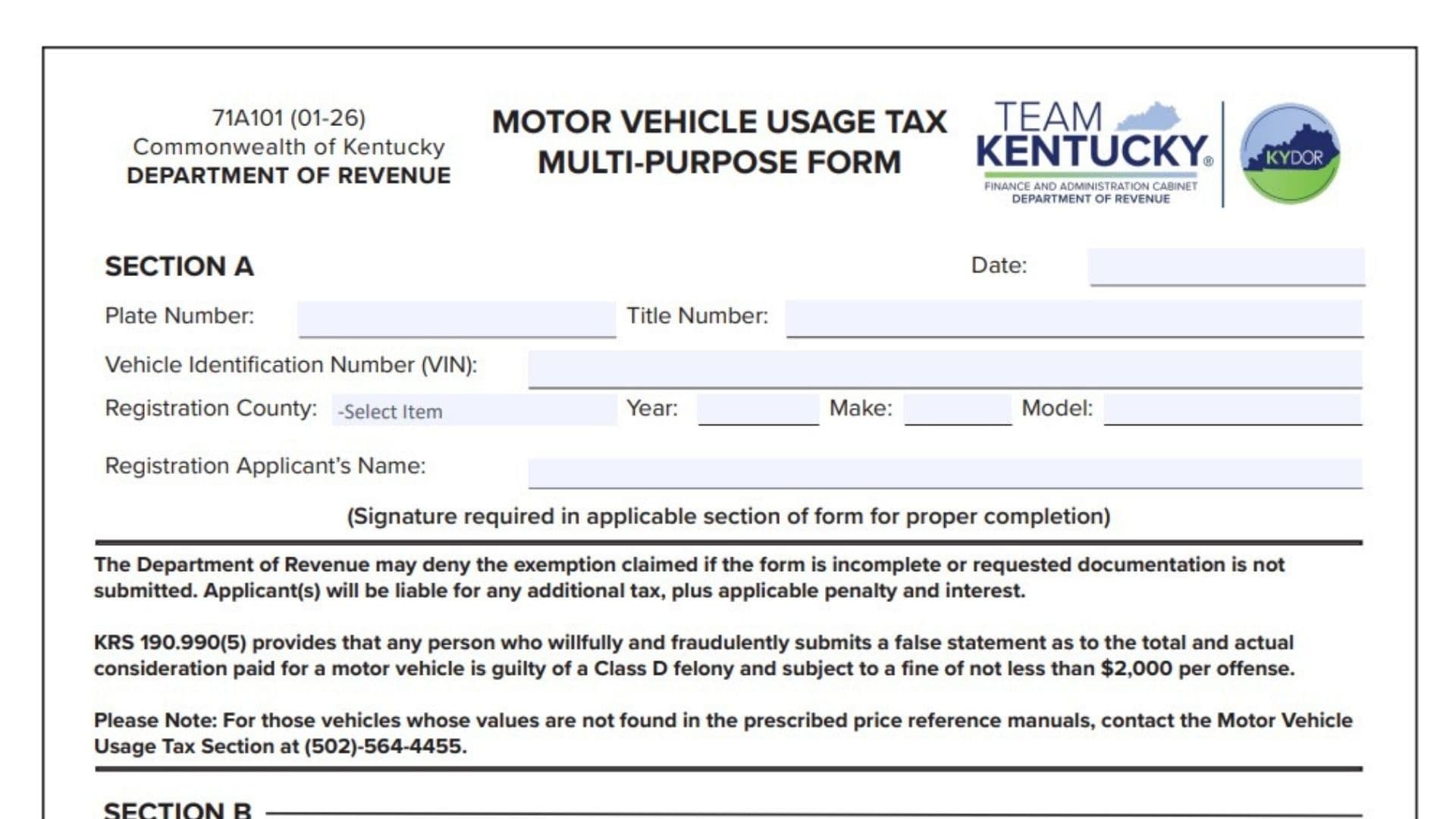
Kentucky Form 71A101, the Motor Vehicle Usage Tax Multi-Purpose Form, is used to document several special motor vehicle usage tax situations and exemptions in Kentucky. The form can be used for qualifying military vehicle purchases, exemptions for equipment or adaptive devices installed to accommodate a handicapped person, certain transfers between qualifying family members, and modified, customized, or converted vehicles. Every filer begins with the general vehicle information in Section A and then completes only the section or sections that apply to the transaction. Supporting documentation is particularly important because the Kentucky Department of Revenue may deny a claimed exemption when the form is incomplete or the requested evidence is missing. An applicant can also become responsible for additional tax, penalty, and interest if an exemption is not allowed. The form further warns that knowingly providing fraudulent information about the actual consideration paid for a motor vehicle can result in serious criminal penalties.
How To File Form 71A101
Complete Section A for the vehicle and registration information, then complete the applicable exemption or transaction section:
- Section B for qualifying military personnel.
- Section C for qualifying handicapped equipment or adaptive devices.
- Section D for qualifying family relationship transfers.
- Section E for modified, customized, converted, or specially equipped vehicles.
A signature is required in whichever section applies to the transaction.
Attach all documentation required by that section. The Department may reject an exemption claim when required information or supporting records are missing.
The form itself does not provide a separate mailing address or universal submission address. It should be provided as part of the applicable Kentucky motor vehicle title, registration, or motor vehicle usage tax transaction.
Before completing the form, gather:
- Vehicle plate number, if applicable.
- Kentucky title number, if available.
- Vehicle Identification Number.
- Registration county.
- Vehicle year, make, and model.
- Registration applicant’s name.
- Documents supporting the particular exemption being claimed.
- Military orders or a current Leave and Earnings Statement if completing Section B.
- Documentation showing the cost of handicapped equipment or adaptive devices if completing Section C.
- Information about both parties to a qualifying family transfer if completing Section D.
- Purchase documents and modification information if completing Section E.

How To Complete Form 71A101
Section A: Vehicle And Registration Information
Section A applies regardless of which exemption or transaction section you complete.
Date
Enter the date on which Form 71A101 is being completed or submitted as part of the motor vehicle transaction.
Plate Number
Enter the vehicle’s license plate number if one has already been assigned.
Make sure the number belongs to the vehicle identified elsewhere on the form.
Title Number
Enter the Kentucky title number associated with the vehicle when available.
Vehicle Identification Number (VIN)
Enter the complete Vehicle Identification Number.
Check the VIN carefully against the title, registration documents, or VIN plate on the vehicle.
Registration County
Enter or select the Kentucky county in which the vehicle is being registered.
Year
Enter the vehicle’s model year.
Make
Enter the vehicle manufacturer or make.
Model
Enter the vehicle’s model.
Registration Applicant’s Name
Enter the full name of the person applying to register the vehicle.
Use the name that will appear on the vehicle’s Kentucky registration records.
Important General Requirements
The form specifically states that a signature is required in the applicable section.
The Kentucky Department of Revenue may deny the exemption if:
- The form is incomplete; or
- Required supporting documentation is not submitted.
If an exemption is denied, the applicant may become responsible for additional tax as well as applicable penalty and interest.
The form also warns that deliberately and fraudulently providing a false statement about the total and actual consideration paid for a motor vehicle can constitute a Class D felony and may carry a fine of at least $2,000 for each offense.
If the vehicle’s value cannot be found in the prescribed price reference manuals, the form directs filers to contact the Kentucky Motor Vehicle Usage Tax Section at (502) 564-4455.
Section B: Military Exemption
Complete Section B when claiming the military treatment covered by the form.
This section applies to military personnel stationed in Kentucky who purchase a vehicle from a Kentucky dealer.
Name
Enter the full name of the military service member claiming the exemption.
Grade
Enter the service member’s military grade or rank information in the field provided.
Service Number
Enter the service number requested by the form.
Military Base
Enter the Kentucky military installation or base where the service member is stationed.
By completing this statement, the service member is declaring under penalties of perjury that they are stationed in Kentucky on active military duty under orders of the United States Government.
Military Status Checkbox
Select the box that accurately describes the service member’s status.
Kentucky Resident
Check this box when the service member is a Kentucky resident.
Documentation showing that the individual is serving in the Commonwealth under U.S. Government orders must be attached.
Non-Resident Military
Check this box when the service member is stationed in Kentucky but remains a nonresident for the purpose covered by the form.
Attach a copy of the service member’s current Leave and Earnings Statement.
The Leave and Earnings Statement must be less than 120 days old.
Signature of Service Person Claiming Exemption
The military service member claiming the exemption must sign the form.
The signature certifies the information contained in the military section.
Date
Enter the date the service member signs Section B.
Section B Supporting Documents
Before submitting the military exemption section, make sure you have attached the correct evidence:
- Kentucky residents: documentation demonstrating duty in Kentucky under U.S. Government orders.
- Nonresident military members: a current Leave and Earnings Statement less than 120 days old.
Do not submit Section B without the documentation required for the status selected.
Section C: Handicapped Equipment Or Adaptive Devices
Section C applies to qualifying equipment or adaptive devices added to a new motor vehicle to facilitate or accommodate a handicapped person.
The portion of the vehicle’s retail price attributable to this qualifying equipment or these adaptive devices is exempt from Kentucky motor vehicle usage tax.
Documentation showing the amount paid for the qualifying equipment or adaptive devices must accompany the certification.
Price Without Trade or Before Trade
Enter the vehicle’s price before accounting for a trade-in.
Use the price applicable to the vehicle transaction before the trade-in adjustment.
Portion of Price Attributable to Handicapped Equipment or Adaptive Devices
Enter the dollar amount of the vehicle’s price attributable specifically to the qualifying equipment or adaptive devices.
Do not enter the full vehicle price unless the entire amount represents qualifying equipment, which would be unusual.
The amount claimed should be supported by documentation showing what was paid for the equipment or adaptive devices.
Signature of Person Claiming Exemption
The person claiming the exemption must sign Section C.
Date
Enter the date the exemption claimant signs the certification.
Section C Supporting Documentation
Attach evidence showing the amount paid for the equipment or adaptive devices.
The documentation should make it possible to distinguish the qualifying equipment cost from the rest of the vehicle’s price.
Section D: Family Relationship Exemption
Section D is used for qualifying motor vehicle transfers between certain family members.
The form provides three qualifying relationship categories:
- Spouse / Spouse
- (Step) Parent / (Step) Child
- Grandparent / Grandchild
Relationship Checkbox
Check the box corresponding to the relationship between the individuals involved in the transfer.
Do not select a relationship category that does not accurately describe the parties.
Family Transfer Statement
Section D contains repeated certification blocks. Complete the applicable block or blocks for the individuals involved.
First Printed Name
Enter the full printed name of the first person involved in the family transfer.
Relationship
Enter the relationship of that person to the other individual.
For example, the relationship entered should correspond with one of the qualifying categories selected at the top of Section D.
Second Printed Name
Enter the full printed name of the other person involved in the vehicle transfer.
Signature of Person Claiming the Exemption
The person claiming the family relationship exemption signs in the designated area.
Attestation And Notarization
Each completed family relationship certification contains an attestation area.
Attesting Official / Notary Signature
The appropriate attesting official or notary signs in this field.
Do not sign this field yourself unless you are the authorized official performing the attestation.
Date
Enter the date associated with the attesting official’s or notary’s signature.
Subscribed and Sworn Statement
The attesting official completes the date on which the statement was sworn.
Enter:
- The day.
- The month.
- The year.
The repeated certification blocks should be completed only as necessary for the transaction rather than filling unused blocks with unrelated information.
Section D Residency And Vehicle Requirements
The form imposes two important conditions for the family relationship exemption:
- The vehicle must have been titled in Kentucky on or after July 1, 2005, or previously registered in Kentucky.
- All persons involved in the transfer must be living Kentucky residents.
Verify both conditions before relying on Section D.
Section E: Modified Or Converted Vehicles
Complete Section E for transactions involving:
- Modified vehicles.
- Customized vehicles.
- Converted vehicles.
- Vehicles to which major equipment has been added.
This section applies when the transaction is not being documented using Form 71A100 and/or TC 96-182 as described on Form 71A101.
The form will not be accepted without proper supporting documentation. Examples listed on the form include a contract, bill of sale, and the front and back of a cancelled check.
Valuation Rule
When Section E is used, the taxable value of a modified, customized, or converted vehicle cannot be less than the retail value shown in the prescribed price reference manual for the vehicle without the modification.
Do not automatically reduce the taxable value below the underlying vehicle’s applicable reference value simply because modifications or conversions are involved.
Modification Type Checkboxes
Check the box that best describes the vehicle or equipment involved.
The available categories are:
Box/Flatbed
Check this box for a vehicle equipped or converted with a box or flatbed configuration.
Bus/Limousine
Check this box when the applicable modification or conversion is for a bus or limousine.
Tank/Sprayer
Check this box for qualifying tank or sprayer equipment.
Bucket/Lift/Cherry Picker
Check this box for vehicles fitted with a bucket, lift, or cherry-picker configuration.
Packer/Garbage
Check this box for vehicles equipped for packing or garbage operations.
Drill Body/Winch
Check this box for vehicles equipped with a drill body or winch.
Custom Truck/Van
Check this box for an applicable customized truck or van.
Ambulance/Hearse
Check this box for an ambulance or hearse conversion.
Dump/Mixer
Check this box for a dump or mixer configuration.
Other
Check this box if the applicable modification, equipment, or conversion does not fit one of the listed categories.
Purchase Price
Enter the purchase price for the vehicle transaction.
The amount should be supported by the transaction records submitted with the form.
If “Other,” Specify
If you checked the Other box, describe the modification, conversion, or major equipment.
Be specific enough for the Department to understand what was added or changed.
Do not leave this field blank when claiming the Other category.
Revenue Code Number
Enter the applicable Revenue Code Number when required.
The form specifically states that vehicles that are not listed in the prescribed reference manual, and vehicles that are not modified, customized, or converted, must have a Revenue Code Number accompanying the form.
Signature of Person Claiming Exemption
The person claiming the applicable treatment or exemption signs Section E.
Date
Enter the date on which Section E is signed.
Section E Supporting Documentation
Section E will not be accepted without proper documentation.
Depending on the transaction, supporting records may include:
- Contract.
- Bill of sale.
- Front of a cancelled check.
- Back of a cancelled check.
- Other records establishing the purchase price and transaction.
Submit documentation sufficient to support both the transaction amount and the nature of the modified or converted vehicle.
Which Section Should You Complete?
The form serves several different purposes, so most filers should not complete every exemption section.
Use:
Section A for the general vehicle and applicant information.
Then complete the applicable section:
- Section B – Military exemption.
- Section C – Handicapped equipment or adaptive-device exemption.
- Section D – Qualifying family relationship transfer.
- Section E – Modified, customized, converted, or specially equipped vehicle.
If more than one section legitimately applies to the transaction, complete each applicable section and provide the required supporting documentation.
Supporting Document Checklist
The exact attachments depend on the section being completed.
For Section B
Attach either:
- Documentation showing Kentucky duty under U.S. Government orders for a Kentucky resident; or
- A current Leave and Earnings Statement that is less than 120 days old for nonresident military personnel.
For Section C
Attach:
- Documentation showing the amount paid for qualifying handicapped equipment or adaptive devices.
For Section D
Make sure:
- The qualifying family relationship is properly certified.
- Required signatures are present.
- The appropriate attesting official or notary completes the certification.
- All persons involved are living Kentucky residents.
- The vehicle satisfies the Kentucky title or prior-registration requirement.
For Section E
Attach proper transaction documentation, such as:
- Contract.
- Bill of sale.
- Front and back of a cancelled check.
- Other documentation substantiating the purchase price and transaction.
Include a Revenue Code Number when the form requires one.
False Statement Warning
The information entered on Form 71A101 must accurately reflect the motor vehicle transaction.
The form states that a person who willfully and fraudulently submits false information about the total and actual consideration paid for a motor vehicle may be guilty of a Class D felony.
The form also states that the offense may be subject to a fine of not less than $2,000 per offense.
For this reason, do not alter the reported purchase price or transaction information simply to obtain an exemption or reduce tax.
What Happens If the Form Is Incomplete?
An incomplete Form 71A101 can result in denial of the exemption.
The Department may also deny the claim when supporting documentation requested by the form has not been submitted.
If the exemption is denied, the applicant can be liable for:
- Additional motor vehicle usage tax.
- Applicable penalties.
- Applicable interest.
Review both pages and all attachments before submitting the form.
Final Review Before Filing
Before submitting Form 71A101, verify the following:
- Confirm the date in Section A.
- Enter the correct plate number when applicable.
- Verify the vehicle title number.
- Check the Vehicle Identification Number carefully.
- Enter or select the correct registration county.
- Confirm the vehicle year, make, and model.
- Make sure the registration applicant’s name is correct.
- Determine which exemption or transaction section applies.
- Do not complete unrelated exemption sections unnecessarily.
- Make sure the applicable section contains the required signature and date.
- If completing Section B, enter the service member’s name, grade, service number, and military base.
- Check the correct Kentucky Resident or Non-Resident Military box.
- Attach military orders when required.
- For nonresident military personnel, attach a Leave and Earnings Statement less than 120 days old.
- Confirm that the Section B transaction involves qualifying military personnel stationed in Kentucky purchasing from a Kentucky dealer.
- If completing Section C, enter the price before trade.
- Enter the portion attributable specifically to qualifying handicapped equipment or adaptive devices.
- Attach documentation showing the amount paid for that equipment.
- Sign and date Section C.
- If completing Section D, select the correct qualifying family relationship.
- Enter the printed names of the parties correctly.
- Enter the relationship accurately.
- Obtain the signature of the person claiming the exemption.
- Complete the appropriate notary or attesting-official certification.
- Confirm that all persons involved in a Section D transfer are living Kentucky residents.
- Verify that the vehicle meets the Kentucky title or previous-registration requirement.
- If completing Section E, select the correct modification or equipment category.
- If Other is selected, describe the modification.
- Enter the correct purchase price.
- Provide the Revenue Code Number when required.
- Attach adequate purchase and transaction documentation.
- Make sure the modified or converted vehicle’s taxable value is not reported below the applicable underlying retail reference value.
- Sign and date Section E.
- Confirm that all supporting documents are included.
- Review all purchase-price and consideration information for accuracy.
- Do not leave required fields incomplete.
- Review the entire form before submission because an incomplete claim or missing documentation may result in denial of the exemption and additional tax, penalty, and interest.