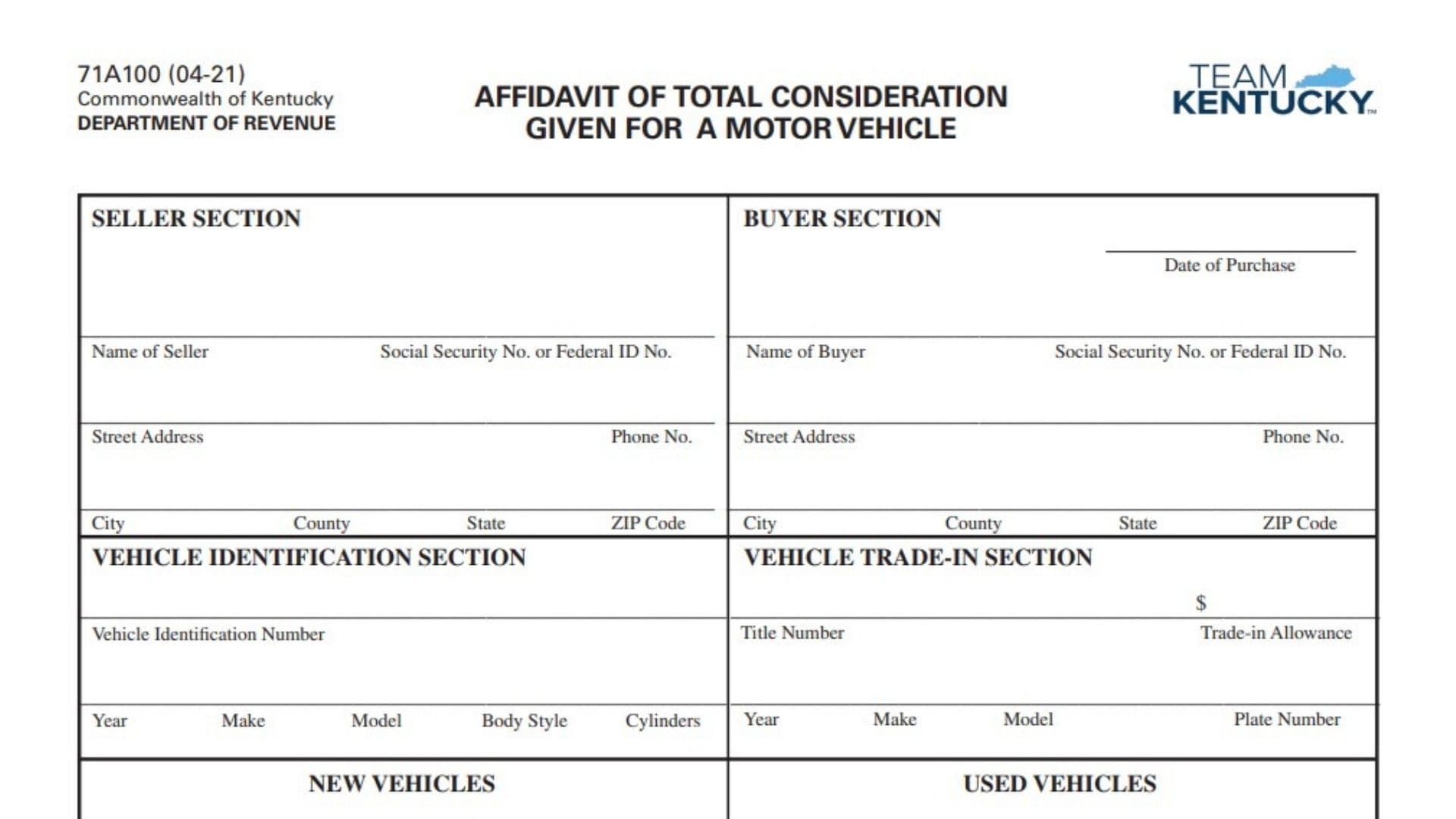
Kentucky Form 71A100, the Affidavit of Total Consideration Given for a Motor Vehicle, is used to document the complete value exchanged when a motor vehicle is purchased or transferred. The form records information about both the seller and buyer, identifies the vehicle involved in the transaction, reports any trade-in vehicle and trade-in allowance, and calculates the total consideration given for either a new or used vehicle. For purposes of the form, total consideration is broader than simply the cash paid to the seller. It may include cash, financed amounts, and the monetary value of other property or items provided as part of the transaction, as well as amounts attributable to vehicle equipment and accessories. Certain amounts, including rebates, service contracts, extended warranties, and finance charges, are excluded from the total consideration calculation. Both the seller and buyer certify the information, and the affidavit includes separate attestation sections for the signatures to be sworn before an authorized official. Completing the affidavit accurately matters because an incomplete form may cause Kentucky motor vehicle usage tax to be calculated using another prescribed vehicle value rather than the consideration reported by the parties.
When Is Form 71A100 Used?
Form 71A100 is used when the total consideration paid or given for a motor vehicle needs to be documented for Kentucky motor vehicle tax purposes.
The form accommodates both:
- New vehicle transactions.
- Used vehicle transactions.
It also contains a separate section for a vehicle accepted as a trade-in.
Because the form is an affidavit, the seller and buyer are affirming that the reported selling price, rebates, trade-in allowance, and total consideration accurately represent the transaction.
How To File Form 71A100
Complete all sections that apply to the vehicle transaction and make sure both the seller and buyer complete the required certification and attestation areas.
The form itself does not provide a specific mailing address or separate filing destination. It is intended to accompany the applicable Kentucky motor vehicle transaction documentation when the affidavit is required. Follow the submission procedure provided by the office handling the title, registration, or motor vehicle usage tax transaction.
Before completing the affidavit, gather:
- Seller’s full legal name.
- Seller’s Social Security Number or Federal Identification Number.
- Seller’s address and telephone number.
- Buyer’s full legal name.
- Buyer’s Social Security Number or Federal Identification Number.
- Buyer’s address and telephone number.
- Date of purchase.
- Vehicle Identification Number.
- Vehicle year, make, model, body style, and number of cylinders.
- Selling price.
- Rebate amount for a new vehicle, if applicable.
- Information about any trade-in vehicle.
- Trade-in allowance.
- Details of any cash, financing, property, equipment, accessories, or other consideration included in the transaction.
- An authorized attesting official when required for completion of the affidavit.

How To Complete Form 71A100
Seller Section
The seller completes the identifying information in the upper-left portion of the affidavit.
Name of Seller
Enter the seller’s full legal name.
The name should identify the person or entity transferring the vehicle to the buyer.
Social Security Number or Federal ID Number
Enter the seller’s Social Security Number if the seller is an individual, or the appropriate Federal Identification Number if the seller is a business or other entity.
Use the identifying number associated with the seller involved in the transaction.
Street Address
Enter the seller’s complete street address.
Phone Number
Enter a telephone number where the seller can be contacted if information concerning the transaction needs to be verified.
City
Enter the city associated with the seller’s address.
County
Enter the seller’s county.
State
Enter the two-letter state abbreviation or otherwise clearly identify the state.
ZIP Code
Enter the seller’s complete ZIP Code.
Buyer Section
The buyer completes the identifying information in the upper-right portion of the affidavit.
Date of Purchase
Enter the date on which the vehicle was purchased.
Use the actual transaction date associated with the sale or transfer.
Name of Buyer
Enter the buyer’s full legal name.
The name should correspond with the person or entity acquiring the vehicle.
Social Security Number or Federal ID Number
Enter the buyer’s Social Security Number if the buyer is an individual or the applicable Federal Identification Number if the buyer is an entity.
Street Address
Enter the buyer’s complete street address.
Phone Number
Enter a telephone number where the buyer can be contacted concerning the transaction.
City
Enter the city associated with the buyer’s address.
County
Enter the buyer’s county.
State
Enter the buyer’s state.
ZIP Code
Enter the buyer’s ZIP Code.
Vehicle Identification Section
This section identifies the motor vehicle being sold or transferred.
Complete the vehicle information carefully so the affidavit can be matched with the correct title and registration records.
Vehicle Identification Number
Enter the complete Vehicle Identification Number, or VIN, for the vehicle being purchased.
Check the VIN against the vehicle and title documentation before submitting the form.
Year
Enter the model year of the vehicle being purchased.
Make
Enter the vehicle manufacturer or make.
Model
Enter the vehicle model.
Body Style
Enter the vehicle’s body style.
Use the description applicable to the vehicle, such as sedan, coupe, truck, SUV, van, or another appropriate body classification.
Cylinders
Enter the number of engine cylinders for the vehicle when applicable.
Vehicle Trade-In Section
Complete this section when another vehicle is being traded as part of the transaction.
If there is no trade-in vehicle, do not create a trade-in allowance.
Title Number
Enter the title number of the vehicle being traded in.
This should be the title number for the trade-in vehicle, not the vehicle being purchased.
Trade-in Allowance
Enter the dollar amount allowed for the trade-in vehicle.
This is the amount credited to the buyer as part of the transaction.
Year
Enter the model year of the trade-in vehicle.
Make
Enter the manufacturer or make of the trade-in vehicle.
Model
Enter the model of the trade-in vehicle.
Plate Number
Enter the license plate number assigned to the vehicle being traded in.
Verify that the information in this section describes the trade-in vehicle and not the newly purchased vehicle.
New Vehicles
Complete the New Vehicles calculation when the motor vehicle being purchased is new.
Selling Price
Enter the selling price of the new vehicle before subtracting applicable rebates or the trade-in allowance.
The selling price should reflect the transaction amount before those adjustments.
Less Rebates
Enter the total amount of applicable rebates.
Rebates are deducted in the new vehicle calculation and are not included in total consideration given.
Less Trade-in Allowance
Enter the amount allowed for any vehicle accepted as a trade-in.
This amount should agree with the trade-in allowance reported in the Vehicle Trade-In Section.
Total Consideration Given
Calculate the total consideration for the new vehicle after accounting for the applicable exclusions and trade-in amount.
Based on the structure of the form, begin with the selling price and subtract the applicable rebates and trade-in allowance.
Also make sure the reported total properly reflects all consideration that the form requires to be included in the transaction.
Used Vehicles
Complete the Used Vehicles calculation when the motor vehicle being purchased is used.
Selling Price
Enter the selling price of the used vehicle.
Use the complete selling price associated with the transaction before deducting any trade-in allowance.
Less Trade-in Allowance
Enter the dollar value allowed for any vehicle traded as part of the purchase.
The amount should match the trade-in allowance entered in the Vehicle Trade-In Section.
Total Consideration Given
Determine the total consideration provided for the used vehicle after taking the trade-in allowance into account and including all other consideration required by the affidavit.
The form provides the basic calculation:
Selling Price − Trade-in Allowance = Total Consideration Given
However, the reported consideration must also reflect any additional value that is considered part of the transaction under the affidavit’s total-consideration definition.
What Is Included in Total Consideration Given?
The meaning of total consideration given is important when completing either the new or used vehicle section.
The amount can include:
- Cash paid toward the vehicle.
- Amounts financed.
- The monetary value of other items or property provided as part of the transaction.
- Consideration provided at the time of purchase.
- Consideration that will be provided at a later date as part of the transaction.
- Amounts paid or given for standard equipment.
- Amounts paid or given for optional equipment.
- Accessories included in the transaction.
The form gives examples of other property that could have monetary value in the transaction, including boats, trailers, and other items.
Do not report only the cash down payment when other consideration was also provided.
What Is Not Included in Total Consideration?
The affidavit specifically excludes certain amounts from total consideration.
Do not include the value of:
- Rebates.
- Service contracts.
- Extended warranties.
- Finance charges.
These amounts should not be added to total consideration merely because they appear elsewhere in the transaction paperwork.
Seller and Buyer Declaration
Before signing the affidavit, both parties should review the transaction information carefully.
The seller and buyer declare that, to the best of their knowledge and belief, the information provided correctly represents:
- The total consideration given in exchange for the vehicle; and
- The trade-in allowance granted for any vehicle traded as part of the transaction.
Because this is a sworn affidavit, the figures should reflect the actual transaction rather than an estimated, reduced, or artificially assigned amount.
Notice About False Statements
The form contains a significant legal warning concerning false information.
It states that making a false statement regarding the total consideration paid is a Class D felony and carries a minimum fine of $2,000 under the statute cited on the affidavit.
For that reason, both parties should verify the purchase price, trade-in allowance, rebates, and other consideration before signing.
What Happens If the Affidavit Is Incomplete?
The affidavit includes a specific notice to buyers about incomplete forms.
If the affidavit is incomplete, the vehicle’s taxable value may be determined using:
- The MSRP for a new vehicle; or
- The retail value from the prescribed reference manual for a used vehicle.
The buyer may then become responsible for additional tax as well as any applicable penalty and interest.
This makes it important to complete every applicable identification, transaction, calculation, signature, and attestation field before filing.
Seller Signature and Attestation
The seller’s certification appears at the bottom-left portion of the form.
Seller’s Signature
The seller signs the affidavit to certify the transaction information.
The seller should not sign until all applicable seller, vehicle, trade-in, and transaction amounts have been reviewed.
Date
Enter the date on which the seller signs the affidavit.
Attesting Official
The authorized official witnessing or administering the seller’s sworn statement completes this field.
Title
Enter the official title or capacity of the person who attests to the seller’s signature.
Subscribed and Sworn Date
The attesting official completes the statement showing the day, month, and year on which the affidavit was subscribed and sworn before them.
Complete:
- Day.
- Month.
- Year.
My Commission Expires
The attesting official enters the expiration date of their commission.
This section should be completed by the appropriate official rather than being prefilled by the seller.
Buyer Signature and Attestation
The buyer has a corresponding signature and attestation section at the bottom-right portion of the affidavit.
Buyer’s Signature
The buyer signs the affidavit after reviewing the information and confirming that the stated consideration and trade-in allowance are accurate.
Date
Enter the date on which the buyer signs the affidavit.
Attesting Official
The authorized person witnessing or administering the buyer’s sworn statement completes this field.
Title
Enter the attesting official’s title.
Subscribed and Sworn Date
Enter the day, month, and year on which the buyer’s statement was sworn before the attesting official.
My Commission Expires
The attesting official enters the date on which their commission expires.
How To Calculate Total Consideration
The exact calculation depends on whether the vehicle is new or used and whether a trade-in or rebate is involved.
New Vehicle Example Structure
For a new vehicle, the form provides fields for:
Selling Price
minus
Rebates
minus
Trade-in Allowance
to arrive at:
Total Consideration Given
Any other consideration that must be included under the form’s definition should also be properly reflected in the transaction amount.
Used Vehicle Example Structure
For a used vehicle, the calculation shown on the form is:
Selling Price
minus
Trade-in Allowance
equals
Total Consideration Given
Again, total consideration should represent the complete value exchanged rather than only the cash portion of the transaction.
Final Review Before Filing
Before submitting Form 71A100, verify the following:
- Confirm the seller’s full legal name.
- Enter the seller’s Social Security Number or Federal Identification Number.
- Verify the seller’s complete street address.
- Enter the seller’s telephone number.
- Confirm the seller’s city, county, state, and ZIP Code.
- Enter the correct purchase date.
- Confirm the buyer’s full legal name.
- Enter the buyer’s Social Security Number or Federal Identification Number.
- Verify the buyer’s complete street address.
- Enter the buyer’s telephone number.
- Confirm the buyer’s city, county, state, and ZIP Code.
- Verify the Vehicle Identification Number.
- Confirm the vehicle’s year.
- Confirm the vehicle’s make.
- Confirm the vehicle’s model.
- Enter the correct body style.
- Enter the number of cylinders when applicable.
- If a vehicle was traded in, enter its title number.
- Verify the trade-in allowance.
- Enter the trade-in vehicle’s year, make, and model.
- Enter the trade-in vehicle’s plate number.
- Use the New Vehicles calculation only when the purchased vehicle is new.
- Use the Used Vehicles calculation when the purchased vehicle is used.
- Verify the selling price.
- Enter applicable rebates for a new vehicle.
- Confirm that the trade-in allowance in the calculation matches the Vehicle Trade-In Section.
- Include cash, financed amounts, and other required consideration in determining total consideration.
- Include applicable equipment and accessories in the consideration amount.
- Do not include excluded amounts such as rebates, service contracts, extended warranties, or finance charges as part of total consideration.
- Recalculate the total consideration before signing.
- Make sure the affidavit is complete to avoid having the vehicle’s taxable value determined using MSRP or a prescribed used-vehicle retail value.
- Have the seller sign and date the affidavit.
- Have the buyer sign and date the affidavit.
- Complete the seller’s attestation before the appropriate official.
- Complete the buyer’s attestation before the appropriate official.
- Make sure each attesting official provides the required title.
- Complete the subscribed-and-sworn dates.
- Make sure the applicable commission expiration dates are entered.
- Review the affidavit carefully because false information concerning total consideration can carry serious legal penalties.