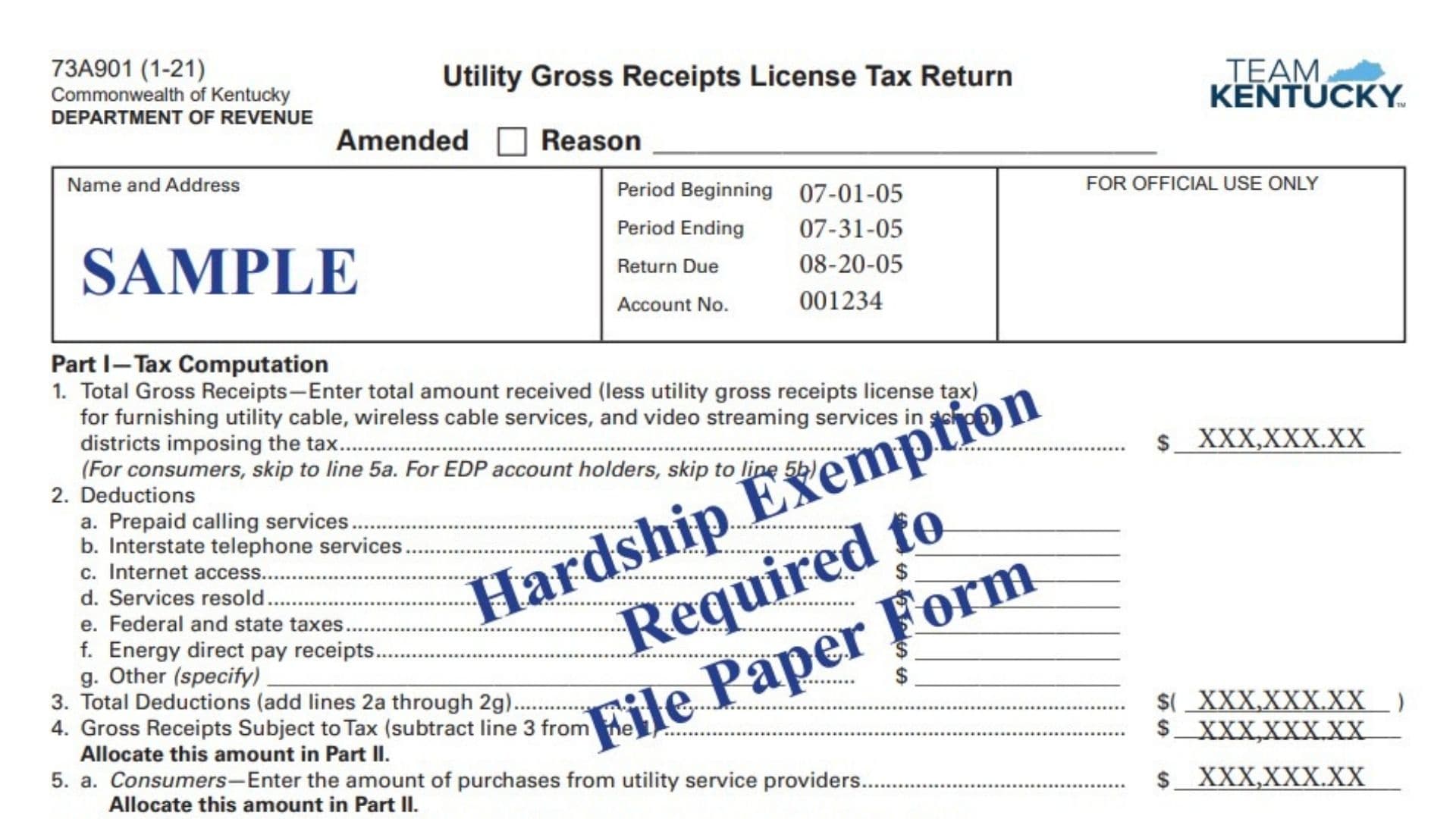
Kentucky Form 73A901, the Utility Gross Receipts License Tax Return, is used to report and calculate Kentucky utility gross receipts license tax associated with utility, cable, wireless cable, and video streaming services provided in school districts that impose the tax. The return accommodates several types of filers, including utility service providers reporting taxable gross receipts, consumers reporting purchases from utility service providers, and Energy Direct Pay, or EDP, account holders reporting amounts from their Kentucky sales and use tax return. The form first determines the amount subject to tax, then requires that amount to be allocated among the appropriate school districts. The applicable district tax rate is applied to the amount assigned to each district, and the resulting tax amounts are combined to determine the total tax due. The return also provides lines for interest and penalties and requires signatures from both the preparer and an authorized business representative when applicable. Accurate reporting is especially important because the gross receipts or purchases reported in Part I must reconcile with the school district allocations reported in Part II.
How To File Form 73A901
The completed return and any payment due are submitted to the Kentucky Department of Revenue.
The return must be postmarked by the 20th day of the month following the taxable month to avoid applicable penalty and interest.
If tax is due, make the check payable to:
Kentucky State Treasurer
Mail the return and payment to:
Department of Revenue
Frankfort, KY 40619
The form shown also identifies paper filing as being associated with a hardship exemption. Filers using this paper version should make sure they satisfy the applicable paper-filing requirements.
Before completing the return, gather:
- The taxpayer’s name and address.
- The utility gross receipts license tax account number.
- The beginning and ending dates of the reporting period.
- Total qualifying gross receipts for the period.
- Records supporting all claimed deductions.
- Utility purchases if filing as a consumer.
- The applicable amount from the Kentucky sales and use tax return if filing as an EDP account holder.
- The school district names and district codes associated with the reported receipts or purchases.
- The applicable tax rate for each school district.
- Records needed to calculate any interest or penalties.
- Supporting information if the return is being amended.

How To Complete Form 73A901
Taxpayer And Return Information
Complete the identification section at the top of the return before working through the tax calculation.
Name And Address
Enter the legal name and mailing address of the taxpayer or business filing the return.
Use the address associated with the utility gross receipts license tax account.
Amended Return Checkbox
Check the Amended box if you are correcting a return that was previously filed for the same reporting period.
Reason For Amendment
If the return is amended, briefly state why the original return is being changed.
The explanation should identify the reason for the correction, such as a change to reported receipts, deductions, allocation information, or another item affecting the return.
Period Beginning
Enter the first date of the taxable period covered by the return.
Period Ending
Enter the final date of the reporting period.
Return Due
Enter or verify the due date for the return.
Account Number
Enter the Kentucky utility gross receipts license tax account number assigned to the taxpayer.
For Official Use Only
Do not enter information in the section designated for Department of Revenue use.
Part I: Tax Computation
Part I determines the gross receipts, purchases, or EDP amount that must be allocated among school districts in Part II.
Different filing instructions apply depending on whether the filer is a service provider, consumer, or EDP account holder.
Gross Receipts And Deductions
Line 1: Total Gross Receipts
Enter the total amount received from providing qualifying utility, cable, wireless cable, and video streaming services within Kentucky school districts that impose the utility gross receipts license tax.
The amount should be reported after removing the utility gross receipts license tax itself.
This line applies to filers reporting gross receipts from furnishing the covered services.
If you are filing as a consumer, do not complete the gross receipts and deductions calculation. Proceed to line 5a.
If you are an EDP account holder, proceed to line 5b.
Deductions
Lines 2a through 2g identify amounts that may be deducted from the gross receipts reported on line 1.
Enter each applicable amount separately.
Line 2a: Prepaid Calling Services
Enter the portion of line 1 attributable to prepaid calling services that qualifies for the deduction.
Line 2b: Interstate Telephone Services
Enter qualifying receipts attributable to interstate telephone services.
Line 2c: Internet Access
Enter qualifying amounts attributable to internet access.
Line 2d: Services Resold
Enter qualifying receipts for services that were resold.
Line 2e: Federal And State Taxes
Enter qualifying federal and state tax amounts included in the gross receipts reported on line 1.
Line 2f: Energy Direct Pay Receipts
Enter qualifying receipts associated with Energy Direct Pay transactions.
Line 2g: Other Deduction
Enter any other applicable deduction not already reported on lines 2a through 2f.
Specify the type of deduction on the blank line provided and enter the corresponding dollar amount.
Do not combine an unidentified amount with this line. Describe what the deduction represents.
Line 3: Total Deductions
Add lines 2a through 2g.
Enter the combined deductions on line 3.
The form displays this amount as a subtraction from gross receipts.
Line 4: Gross Receipts Subject To Tax
Subtract line 3 from line 1.
Use:
Line 1 − Line 3 = Line 4
Enter the result on line 4.
The amount on line 4 must then be allocated among the applicable school districts in Part II.
Consumer And EDP Reporting
Line 5a: Consumer Purchases
Complete this line if you are filing as a consumer rather than reporting gross receipts as a utility service provider.
Enter the amount of purchases made from utility service providers.
The amount entered on line 5a must be allocated among the appropriate school districts in Part II.
Line 5b: EDP Account Holders
Complete this line if you are an EDP account holder.
Enter the amount reported on line 23b of the Kentucky sales and use tax return for the same reporting period.
The amount entered on line 5b must also be allocated by school district in Part II.
Part II: Allocation Schedule
Part II assigns the taxable gross receipts or purchases from Part I to the individual Kentucky school districts in which the amounts are taxable.
Enter a separate row for each applicable school district.
The return instructs filers to use the district code, district name, and tax rate information provided in the applicable instructions.
The totals reported in Part II must reconcile with the applicable Part I amounts.
How To Complete Each Allocation Row
District Name
Enter the name of the school district associated with the taxable gross receipts or purchases.
Use a separate row for each district.
District Code
Enter the code assigned to the school district.
Make sure the code corresponds to the district name entered in the same row.
Gross Receipts From Line 4
If you completed line 4 in Part I, enter the portion of those taxable gross receipts attributable to this particular school district.
Do not enter the entire line 4 amount for every district.
Allocate only the amount attributable to that district.
When all district rows are added together, the total of this column should equal line 4.
Consumer Purchases From Line 5a
If you are reporting consumer purchases, enter the portion of line 5a attributable to the school district shown on that row.
The combined total for this column should equal the amount entered on line 5a.
EDP Account Holders Amount From Line 5b
If you are an EDP account holder, enter the portion of line 5b attributable to the applicable school district.
The combined total for this column should equal line 5b.
Tax Rate
Enter the tax rate that applies to the school district.
Use the applicable district rate rather than applying one general rate to every district.
Tax Amount
Multiply the taxable gross receipts or purchases assigned to the school district by that district’s tax rate.
Use:
Applicable Gross Receipts Or Purchases × District Tax Rate = Tax Amount
Enter the calculated tax in the Tax Amount column for that district.
Repeat this calculation for every school district reported.
Part II Totals
After completing all applicable school district rows, total the monetary allocation columns.
Total Gross Receipts From Line 4
Add all amounts in the Gross Receipts column.
The result must equal line 4 in Part I if line 4 applies to the return.
Total Consumer Purchases From Line 5a
Add all amounts in the Consumer Purchases column.
The total must equal line 5a when consumer purchases are being reported.
Total EDP Account Holder Amounts From Line 5b
Add all amounts in the EDP Account Holders column.
The result must equal line 5b when that line applies.
Total Tax Amount
Add the tax amounts calculated for all school districts.
Enter the combined tax amount in the Total Tax Amount field at the bottom of Part II.
This total is transferred to line 6 in Part III.
Continuation Sheet For Part II
Use the continuation sheet when the space provided in Part II on the first page is not sufficient to list every applicable school district.
The continuation page uses the same allocation structure as Part II.
For each additional district, complete:
- District name.
- District code.
- Gross receipts from line 4, if applicable.
- Consumer purchases from line 5a, if applicable.
- EDP account holder amount from line 5b, if applicable.
- District tax rate.
- Calculated tax amount.
Continue using one row for each additional district.
Continuation Sheet Totals
Gross Receipts Total
Add the gross receipts entered on the continuation sheet.
Include this amount when determining the overall Part II gross receipts total.
Consumer Purchases Total
Add the consumer purchases reported on the continuation sheet.
Include this amount with the corresponding totals from the first page.
EDP Account Holder Total
Add the line 5b amounts allocated on the continuation sheet.
Include this amount in the total EDP allocation for Part II.
Continuation Sheet Total Tax Amount
Add the tax amounts for all districts listed on the continuation sheet.
Include this amount when calculating line 6 in Part III.
If more than one continuation sheet is required, include the totals from all continuation sheets.
Part III: Payment
Part III determines the total payment associated with the return.
Line 6: Total Tax Amount Due
Enter the total tax calculated in Part II.
If continuation sheets were used, include the tax amounts from those sheets as well.
Use the combined total from all allocation rows.
Line 7: Interest
Enter any applicable interest.
The form directs taxpayers to the applicable instructions for determining the interest amount.
Do not estimate an interest charge without using the appropriate calculation rules.
Line 8: Penalties
Enter any applicable penalties.
The return must be postmarked by the 20th day of the month following the taxable month to avoid applicable penalty and interest.
Line 9: Total Amount Due
Add lines 6, 7, and 8.
Use:
Line 6 + Line 7 + Line 8 = Line 9
Enter the resulting amount on line 9.
This is the total amount to remit with the return when payment is required.
Payment And Mailing Instructions
If line 9 shows an amount due, remit the total amount reported on that line.
Make the payment payable to:
Kentucky State Treasurer
Mail the completed return and payment to:
Department of Revenue
Frankfort, KY 40619
The return should be postmarked no later than the 20th day of the month following the taxable month to avoid applicable penalty and interest.
Tax Return Preparer Information
The return includes a section for the individual who prepared the tax return.
Print Name Of Tax Return Preparer And Title
Print the preparer’s name and professional or organizational title.
Signature Of Tax Return Preparer
The preparer should sign the return in the designated space.
Date
Enter the date the preparer signs the return.
Preparer’s Telephone Number
Enter a telephone number where the preparer can be contacted regarding the return.
Preparer’s E-mail Address
Enter the preparer’s email address.
Authorized Taxpayer Signature
The taxpayer certification states that the return has been examined and is believed to be true, correct, and complete.
Print Name And Title Of President, Other Principal Officer, Partner, Or Proprietor
Print the name of the person authorized to certify the return.
Also provide that person’s official title or capacity.
Depending on the taxpayer’s business structure, this may be a president, another principal officer, partner, or proprietor.
Signature Of President, Other Principal Officer, Partner, Or Proprietor
The authorized individual should sign the return.
Date
Enter the date the authorized representative signs the return.
Additional Information
Questions concerning the return can be directed to the Kentucky Department of Revenue’s Financial Tax Section at (502) 564-1810.
Final Review Before Filing
Before submitting Form 73A901, verify the following:
- Confirm the taxpayer’s legal name and address.
- Verify the reporting period beginning and ending dates.
- Confirm the return due date.
- Verify the utility gross receipts license tax account number.
- If this is an amended return, check the Amended box and explain the reason.
- Determine whether you are reporting gross receipts, consumer purchases, or an EDP account holder amount.
- Confirm that line 1 excludes the utility gross receipts license tax itself.
- Verify every deduction reported on lines 2a through 2g.
- Clearly identify any deduction reported as Other on line 2g.
- Recalculate line 3 by adding lines 2a through 2g.
- Confirm that line 4 equals line 1 minus line 3.
- If filing as a consumer, verify the purchases entered on line 5a.
- If filing as an EDP account holder, verify that line 5b agrees with line 23b of the sales and use tax return for the same period.
- Confirm that every applicable school district is included in Part II.
- Verify each school district name and district code.
- Confirm the correct tax rate for each school district.
- Make sure gross receipts are allocated to the correct districts.
- Make sure consumer purchases are allocated to the correct districts when line 5a applies.
- Make sure EDP amounts are allocated correctly when line 5b applies.
- Verify every district tax calculation.
- Confirm that the Part II gross receipts total equals line 4 when applicable.
- Confirm that the Part II consumer purchases total equals line 5a when applicable.
- Confirm that the Part II EDP total equals line 5b when applicable.
- Include all continuation sheets when additional school district rows are required.
- Include continuation-sheet totals in the Part II totals.
- Add all district tax amounts accurately.
- Confirm that line 6 includes the entire Part II tax amount and all continuation-sheet tax amounts.
- Calculate any applicable interest for line 7.
- Calculate any applicable penalties for line 8.
- Confirm that line 9 equals lines 6, 7, and 8 combined.
- Make sure any payment agrees with the total amount due.
- Make the payment payable to Kentucky State Treasurer.
- Complete the preparer’s name, title, signature, date, telephone number, and email address when applicable.
- Make sure an authorized president, principal officer, partner, or proprietor prints their name and title and signs and dates the return.
- Leave the section marked for official use blank.
- Review all pages and continuation sheets before filing.
- Make sure the return is postmarked by the 20th day of the month following the taxable month.