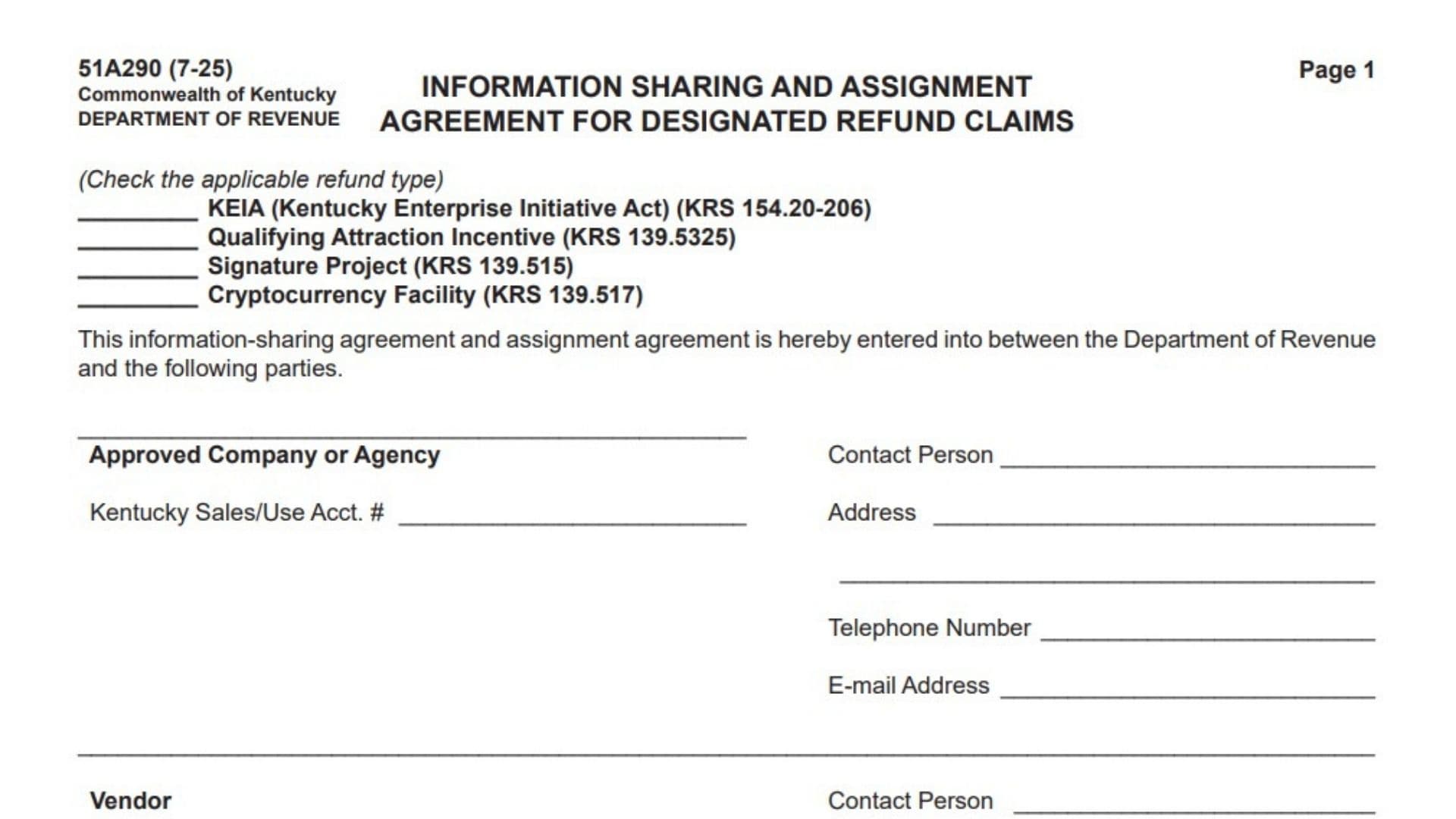
Form 51A290 is an official legal agreement issued by the Kentucky Department of Revenue. Its primary purpose is to allow the legal sharing of confidential tax and purchasing information between an approved company, its vendors, its contractors, and the state government. Under standard state law, taxpayer information is strictly confidential. However, to verify complex economic development tax refunds, the state must review third-party purchase records. This form acts as a waiver, allowing all parties to share relevant data without violating taxpayer confidentiality laws. It is used by businesses applying for sales and use tax refunds under specific incentive programs, such as the Kentucky Enterprise Initiative Act (KEIA) or Signature Projects. The document collects contact details, tax account numbers, and notarized signatures from all involved parties. Completing this form correctly is critical because, without it, the Department of Revenue cannot legally verify the taxes paid by your contractors or vendors, which will halt the processing of your refund claim entirely.
How To File Form 51A290
This agreement is a supporting document, meaning it is not filed on its own.
You must attach the fully executed Form 51A290 to your primary designated refund claim application (such as your KEIA or Signature Project refund application). Because this form requires notarized signatures from multiple independent parties—including your vendors and contractors—you must prepare it well in advance of your refund filing deadline. Send the physical document to the vendors and contractors involved so they can fill out their respective sections and sign them in the presence of a notary public. Once all third-party sections are completed and notarized, compile the agreement with your main refund application and submit it directly to the Kentucky Department of Revenue.

How To Complete Form 51A290
Part 1: Refund Type Selection
Check the applicable refund type You must select the specific incentive program that applies to your refund claim. Check only one box. The options include KEIA (Kentucky Enterprise Initiative Act), Qualifying Attraction Incentive, Signature Project, or Cryptocurrency Facility. Your selection must match the primary refund application you are submitting.
Part 2: Party Information
Approved Company or Agency Enter the full legal name of the primary business entity that was officially approved for the state incentive program and is ultimately claiming the refund.
Contact Person (Approved Company or Agency) Provide the first and last name of the individual at the approved company who is responsible for handling the refund claim and can answer questions regarding the agreement.
Kentucky Sales/Use Acct. # (Approved Company or Agency) Enter the approved company’s designated Kentucky Sales and Use Tax account number.
Address (Approved Company or Agency) Provide the complete mailing address, including the street, city, state, and ZIP code for the approved company.
Telephone Number (Approved Company or Agency) Enter the direct phone number, including the area code, for the company’s designated contact person.
E-mail Address (Approved Company or Agency) Provide a valid, regularly monitored email address for the company’s contact person.
Vendor Enter the full legal name of the vendor or supplier who sold the materials or services. If you have multiple vendors, you will need a separate agreement form for each one.
Contact Person (Vendor) Provide the name of the representative at the vendor’s company who can verify the sales records.
Kentucky Sales/Use Acct. # (Vendor) Enter the vendor’s Kentucky Sales and Use Tax account number. This is crucial for the state to verify that the vendor actually remitted the tax.
Address (Vendor) Provide the complete mailing address for the vendor.
Telephone Number (Vendor) Enter the direct phone number for the vendor’s contact person.
E-mail Address (Vendor) Provide the email address for the vendor’s contact person.
Contractor/Subcontractor (Purchaser) Enter the full legal name of the contractor or subcontractor who actually purchased the materials from the vendor. Note that the form specifies this section is “Not Applicable to Qualifying Attraction Incentive.” If you selected that incentive at the top of the page, leave this section blank.
Contact Person (Contractor/Subcontractor) Provide the name of the representative at the contracting company who can verify the purchase records.
Kentucky Sales/Use Acct. # (Contractor/Subcontractor) Enter the contractor’s Kentucky Sales and Use Tax account number, if they have one.
Address (Contractor/Subcontractor) Provide the full mailing address for the contractor or subcontractor.
Telephone Number (Contractor/Subcontractor) Enter the contractor’s phone number.
E-mail Address (Contractor/Subcontractor) Provide the contractor’s email address.
Part 3: Purpose and Terms of Agreement
Page 2 Terms Summarization Pages 1 and 2 outline the legal terms all parties are agreeing to. While there are no blank fields to fill out on page 2, signing the document means all parties agree to waive confidentiality strictly for the purpose of verifying this specific refund. It confirms that the vendor or contractor paid the taxes, that the approved company is the rightful recipient of the refund, and that the state may reduce the final refund amount by any debts owed to the Commonwealth. It also establishes that any legal disputes regarding this agreement must be handled in the Circuit Court of Franklin County, Kentucky.
Part 4: Signatures and Notarization
Approved Co./Agency: By (Signature) An authorized officer or representative of the approved company must sign the form here. This signature must be done in the presence of a Notary Public.
Approved Co./Agency: Date Enter the exact date the authorized representative signed the document.
Approved Co./Agency: Print Name and Title Print the name of the person who signed on behalf of the approved company, and enter their official corporate title below it.
Approved Co./Agency: Notary Public Block A commissioned Notary Public must complete this section. They will fill in the date, sign their name, state their jurisdiction, and provide their commission expiration date to authenticate the company’s signature.
Vendor: By (Signature) An authorized representative of the vendor must provide their physical signature here, also in the presence of a Notary Public.
Vendor: Date Enter the date the vendor signed the agreement.
Vendor: Print Name and Title Print the name and official title of the vendor’s signing representative.
Vendor: Notary Public Block The vendor’s Notary Public must complete this section to authenticate the vendor’s signature.
Contractor/Subcontractor: By (Signature) An authorized representative of the contractor or subcontractor must sign here in front of a Notary Public. (Skip this if you are filing for a Qualifying Attraction Incentive).
Contractor/Subcontractor: Date Enter the date the contractor signed the document.
Contractor/Subcontractor: Print Name and Title Print the name and official title of the contractor’s representative.
Contractor/Subcontractor: Notary Public Block The contractor’s Notary Public must complete this section to finalize the authentication of the contractor’s signature.
Department of Revenue: Signatures and Notary Block Do not write anything in this final section. This area is strictly reserved for the Kentucky Department of Revenue’s authorized signatory and their respective notary.
Final Review Before Filing
Before attaching this agreement to your main refund application, review this checklist to ensure it will be accepted:
- Verify that you have checked the correct refund type at the top of the form.
- Ensure all applicable contact information, including tax account numbers, is completely filled out for the approved company, the vendor, and the contractor.
- Confirm that you did not fill out the contractor section if you are claiming the Qualifying Attraction Incentive.
- Double-check that all three required parties (Company, Vendor, and Contractor) have signed the document.
- Ensure that every single signature has been individually stamped and authenticated by a Notary Public.
- Verify that you have left the final Department of Revenue signature block completely blank.