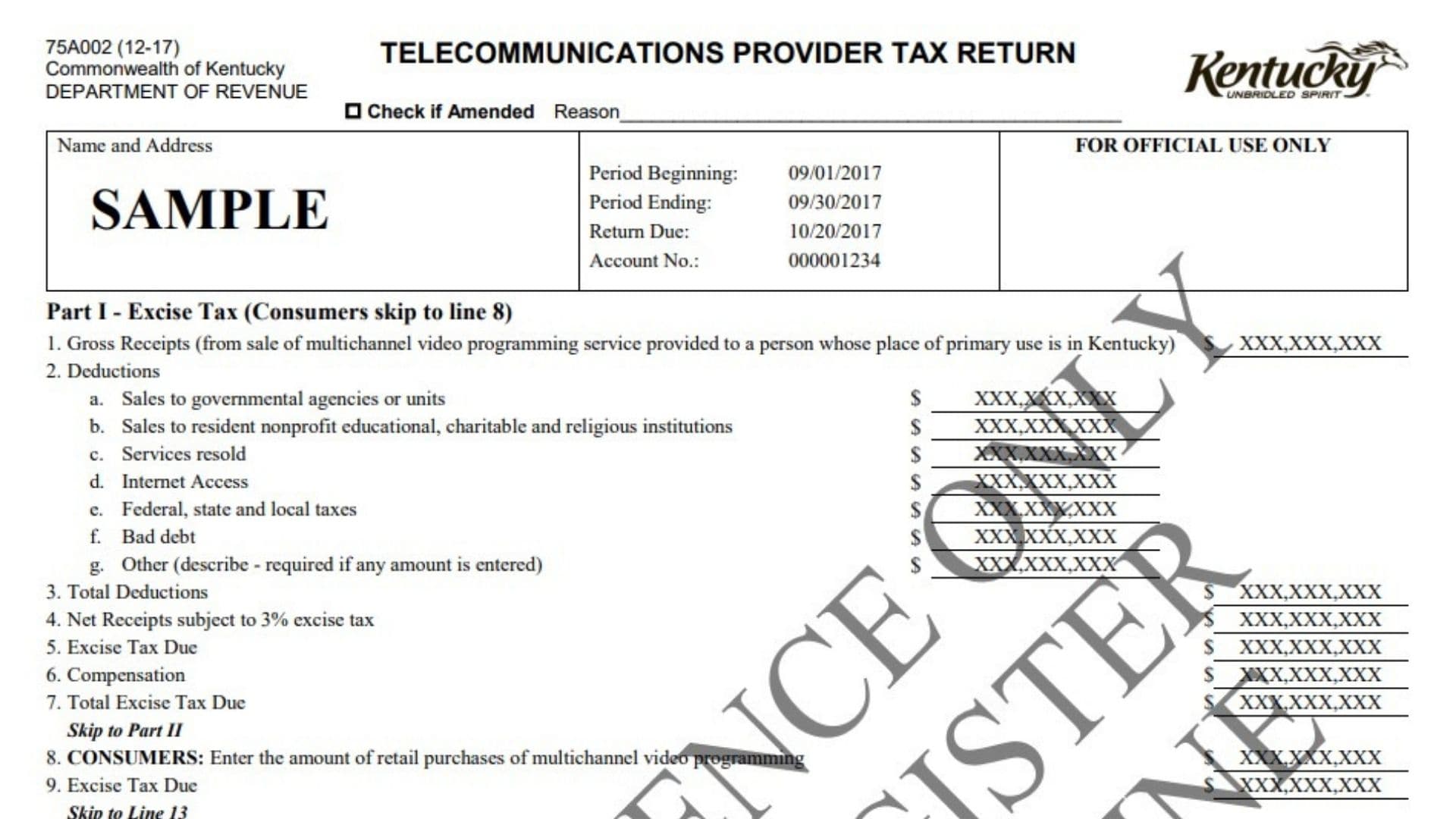
The Kentucky Telecommunications Provider Tax Return is used to report certain Kentucky taxes connected with multichannel video programming services and communications services. The return separates the reporting process into three main parts: excise tax, allocation of gross revenues by county, and the final payment calculation. Telecommunications providers use the return to report applicable gross receipts, permitted deductions, taxable receipts, excise tax, county-level gross revenues, gross revenues tax, franchise fee credits, interest, penalties, and the final amount due. The return also contains a separate reporting path for consumers who need to report retail purchases of multichannel video programming rather than completing the provider portion of the excise tax section. Providers subject to the allocation schedule identify the Kentucky counties connected with their revenues and separately calculate tax on multichannel video programming revenues and communications-service revenues. Municipal utilities are specifically excluded from the allocation schedule. The return also allows an amended filing to be identified and requires the reason for the amendment. At the end, the preparer and an authorized business representative provide identifying information and signatures to certify that the return is accurate and complete. A continuation schedule is available when the county allocation section does not provide enough rows. Because the form combines several tax calculations, filers should complete the sections in order, carry totals carefully from one part to another, and verify all mathematical entries before submitting payment.
How To File The Kentucky Telecommunications Provider Tax Return
The return must be filed for the reporting period shown on the form. Review the Period Beginning, Period Ending, and Return Due fields before preparing the return because these identify the taxable month and its filing deadline.
The filing instructions state that the return should be postmarked no later than the 20th day of the month following the taxable month to avoid applicable penalty and interest assessments.
Complete all required tax sections, determine the total amount due on Line 17, and remit that amount with the return.
When paying by check, make the check payable to:
Kentucky State Treasurer
Mail the completed return and payment to:
Kentucky Department of Revenue
P.O. Box 181 – Station 66
Frankfort, KY 40602
If the filing is an amended return, mark the amended-return box and explain why the previously filed return is being changed.

How To Complete The Kentucky Telecommunications Provider Tax Return Line By Line
Header And Filing Information
Telecommunications Provider Tax Return
This heading identifies the return being prepared. It covers the telecommunications-related tax reporting and payment information requested in the sections below.
Check If Amended
Check this box only when you are correcting or changing information from a return that was previously filed for the same reporting period.
Leave it unchecked when filing the original return.
Reason
If you mark the return as amended, briefly explain why the amendment is being submitted.
Provide enough information to identify the reason for the change without adding unnecessary details.
Name And Address
Enter or verify the taxpayer’s business name and mailing address.
If this information is already printed on the return, confirm that it belongs to the correct taxpayer before proceeding.
Sample
A return displaying the word Sample is an example version used to demonstrate the form’s layout and reporting fields.
Do not treat sample amounts, dates, or account numbers as values that should automatically be entered on an actual return.
For Official Use Only
Do not enter information in this area.
This box is reserved for Department of Revenue processing.
Period Beginning
Enter or verify the first date of the taxable reporting period.
Use the reporting period assigned to the return rather than copying dates from an example form.
Period Ending
Enter or verify the final date of the taxable reporting period.
Make sure the beginning and ending dates represent the same reporting period for which the revenue and tax amounts are being reported.
Return Due
Enter or verify the due date for the return.
Use this date to determine when the completed return and any required payment must be submitted.
Account No.
Enter or verify the Kentucky telecommunications tax account number assigned to the taxpayer.
Check the number carefully so the return is credited to the correct account.
Part I – Excise Tax
Part I calculates the excise tax connected with multichannel video programming services. Providers generally complete Lines 1 through 7. Consumers are instructed to bypass those lines and begin with Line 8.
Line 1 – Gross Receipts
Enter the total gross receipts from sales of multichannel video programming services provided to customers whose place of primary use is in Kentucky.
Report the gross amount before subtracting the deductions listed on Line 2.
Line 2 – Deductions
Use this section to report qualifying amounts that are being excluded from the gross receipts reported on Line 1.
Enter each type of deduction separately.
Line 2a – Sales To Governmental Agencies Or Units
Enter qualifying sales made to governmental agencies or governmental units.
Do not combine unrelated deductions with this amount.
Line 2b – Sales To Resident Nonprofit Educational, Charitable, And Religious Institutions
Enter qualifying sales made to resident nonprofit educational organizations, charitable organizations, or religious institutions.
Include only amounts that belong in this deduction category.
Line 2c – Services Resold
Enter the value of qualifying services that were purchased for resale.
Keep documentation supporting the amount reported as resold services.
Line 2d – Internet Access
Enter the amount attributable to qualifying Internet access.
Separate this amount from other telecommunications or video-programming receipts.
Line 2e – Federal, State, And Local Taxes
Enter qualifying federal, state, and local taxes included in gross receipts that are deductible for this calculation.
Do not include amounts that do not fall within the tax deduction category.
Line 2f – Bad Debt
Enter qualifying bad debt associated with the receipts reported for the return.
Use the amount supported by the taxpayer’s accounting records.
Line 2g – Other
Enter any other qualifying deduction that does not fit Lines 2a through 2f.
If an amount is entered here, a description is required. Clearly identify what the deduction represents.
Line 3 – Total Deductions
Add the amounts entered on Lines 2a through 2g.
Enter the combined deduction amount on Line 3.
Check the addition before proceeding because this total is used to determine taxable receipts.
Line 4 – Net Receipts Subject To 3% Excise Tax
Subtract the total deductions on Line 3 from the gross receipts on Line 1.
Enter the remaining net receipts on Line 4.
This is the amount subject to the 3% excise tax.
Line 5 – Excise Tax Due
Calculate 3% of the net receipts reported on Line 4.
Enter the resulting excise tax on Line 5.
Line 6 – Compensation
Complete this line only when the filing and payment meet the timely-filing requirement for the compensation allowed by the return.
Calculate compensation at 1.75% of the first $1,000 of the tax shown on Line 5, plus 1% of the portion of Line 5 that exceeds $1,000.
The total compensation cannot exceed $1,500.
Enter the allowable compensation on Line 6.
Line 7 – Total Excise Tax Due
Determine the excise tax remaining after applying the allowable compensation from Line 6 to the tax calculated on Line 5.
Enter the resulting total excise tax due on Line 7.
Providers should then continue to Part II.
Consumer Excise Tax Reporting
Consumers do not complete the provider calculations on Lines 1 through 7. They begin with Line 8.
Line 8 – Retail Purchases Of Multichannel Video Programming
Enter the amount of retail purchases of multichannel video programming that must be reported by the consumer.
Report the applicable purchase amount for the taxable period.
Line 9 – Excise Tax Due
Enter the excise tax due on the retail purchases reported on Line 8.
After completing this line, consumers are instructed to skip the provider allocation section and continue to Line 13 in Part III.
Part II – Allocation Schedule
This schedule is used to allocate applicable revenues and gross revenues tax among Kentucky counties.
It does not apply to municipal utilities.
If the main schedule does not contain enough rows, use the continuation schedule to report additional counties.
Column 1 – County Code
Enter the appropriate county code for each county in which reportable revenue is allocated.
Use a separate row for each county.
Column 2 – County Name
Enter the name of the county corresponding to the code shown in Column 1.
Verify that the county code and county name match.
Column 3 – Gross Revenues From MVP
Enter the gross revenues from multichannel video programming, or MVP, attributable to the county listed on that row.
Report only the amount associated with that county.
Column 4 – Gross Revenues Tax From MVP
Multiply the amount in Column 3 by 2.4%.
Enter the calculated gross revenues tax for multichannel video programming in Column 4.
Column 5 – Gross Revenues From Communications Services
Enter the gross revenues from communications services attributable to the county shown on the same row.
Keep communications-service revenue separate from the MVP revenue reported in Column 3.
Column 6 – Gross Revenues Tax From Communications Services
Multiply the amount in Column 5 by 1.3%.
Enter the resulting communications-services gross revenues tax in Column 6.
Totals
After entering every applicable county, total Columns 3, 4, 5, and 6.
Include amounts from the continuation schedule when one is used.
Make sure the column totals include every county reported for the filing period.
Line 10 – Gross Revenues (MVP)
Enter the total multichannel video programming gross revenues from Column 3.
This amount should agree with the completed allocation schedule, including any continuation entries.
Line 11 – Gross Revenues (Communications)
Enter the total gross revenues from communications services shown in Column 5.
Verify that all counties have been included before entering the total.
Line 12 – Total Gross Revenue Tax Due
Combine the gross revenues tax calculated for MVP in Column 4 with the gross revenues tax calculated for communications services in Column 6.
Enter the total gross revenue tax due on Line 12.
Part III – Payment
Use this section to determine the final amount that must be paid with the return.
Line 13 – Net Tax Amount Due
Enter the applicable net tax due from the earlier sections.
For a provider, this line brings together the tax amounts determined from the excise tax and gross revenue tax portions of the return.
Consumers should enter the excise tax amount from Line 9.
Line 14 – Total Allowable Franchise Fee Credit
Enter the total franchise fee credit that may be claimed for the filing period.
The credit cannot be greater than the Net Tax Amount Due reported on Line 13.
If the available credit is higher than Line 13, do not enter an amount that exceeds Line 13.
Line 15 – Interest
Enter applicable interest.
The amount shown or calculated may be estimated, and additional interest may apply.
If the return or payment is late, make sure the interest amount used reflects the filing circumstances.
Line 16 – Penalties
Enter applicable penalties.
As with interest, the amount may be estimated, and additional penalties can apply.
Line 17 – Total Amount Due
Calculate the final amount payable after considering the net tax amount, allowable franchise fee credit, interest, and penalties.
Enter the resulting amount on Line 17.
This is the amount that should accompany the return.
Filing Deadline And Payment Instructions
Postmark Requirement
The return must be postmarked by the 20th day of the month following the taxable month to avoid the assessment of applicable penalties and interest.
Use the taxable period shown near the top of the return to identify the correct filing month.
Remit Total Amount Due
Submit the amount reported as the total due with the return.
Check that the payment agrees with Line 17.
Payable To Kentucky State Treasurer
When paying by check, make the check payable to the Kentucky State Treasurer.
Mailing Address
Mail the return and applicable payment to:
Kentucky Department of Revenue
P.O. Box 181 – Station 66
Frankfort, KY 40602
Certification And Signature Section
The certification section confirms that the return has been reviewed and that the information reported is believed to be true, correct, and complete.
By signing, the appropriate parties certify the return under penalties of perjury.
Print Name Of Tax Return Preparer And Title
Enter the full printed name of the person who prepared the tax return.
Also enter that person’s professional or business title.
Print Name And Title Of President Or Other Principal Officer, Partner, Or Proprietor
Enter the printed name of the business representative who is authorized to certify the return.
Also provide the person’s title, such as president, another principal officer, partner, or proprietor, depending on the business structure.
Signature Of Tax Return Preparer
The person who prepared the return should sign on this line.
Preparer Date
Enter the date the preparer signs the return.
Signature Of President Or Other Principal Officer, Partner, Or Proprietor
The authorized business representative should sign the return in the space provided.
The signature should belong to the person whose printed name and title appear above.
Authorized Representative Date
Enter the date the president, principal officer, partner, or proprietor signs the return.
Preparer’s Telephone Number
Enter the preparer’s telephone number, including the area code.
Use a number where the preparer can be reached if questions arise about the return.
Additional Information Contact
Questions concerning the return may be directed to the Kentucky Department of Revenue’s Division of Sales and Use Tax.
The contact telephone number shown for additional information is (502) 564-5170.
The contact email shown for telecommunications-related questions is DOR.WEB.Response.Telecom@ky.gov.
Part II Continuation Sheet
Use the continuation schedule when the main Part II allocation table does not provide enough rows to report all applicable counties.
The continuation schedule follows the same six-column structure as the main allocation schedule.
Column 1 – County Code
Enter the county code for each additional county.
Column 2 – County Name
Enter the corresponding county name.
Column 3 – Gross Revenues From MVP
Enter the additional multichannel video programming gross revenues allocated to that county.
Column 4 – Gross Revenues Tax From MVP
Multiply the Column 3 amount by 2.4% and enter the result.
Column 5 – Gross Revenues From Communications Services
Enter the additional communications-services gross revenue associated with the county.
Column 6 – Gross Revenues Tax From Communications Services
Multiply the Column 5 amount by 1.3% and enter the result.
Continuation Sheet Totals
Add all amounts reported in Columns 3 through 6 on the continuation schedule.
Include these figures when determining the corresponding totals used on the main return.
Do not treat the continuation schedule as a separate tax calculation. Its purpose is to provide additional rows when more counties must be reported.