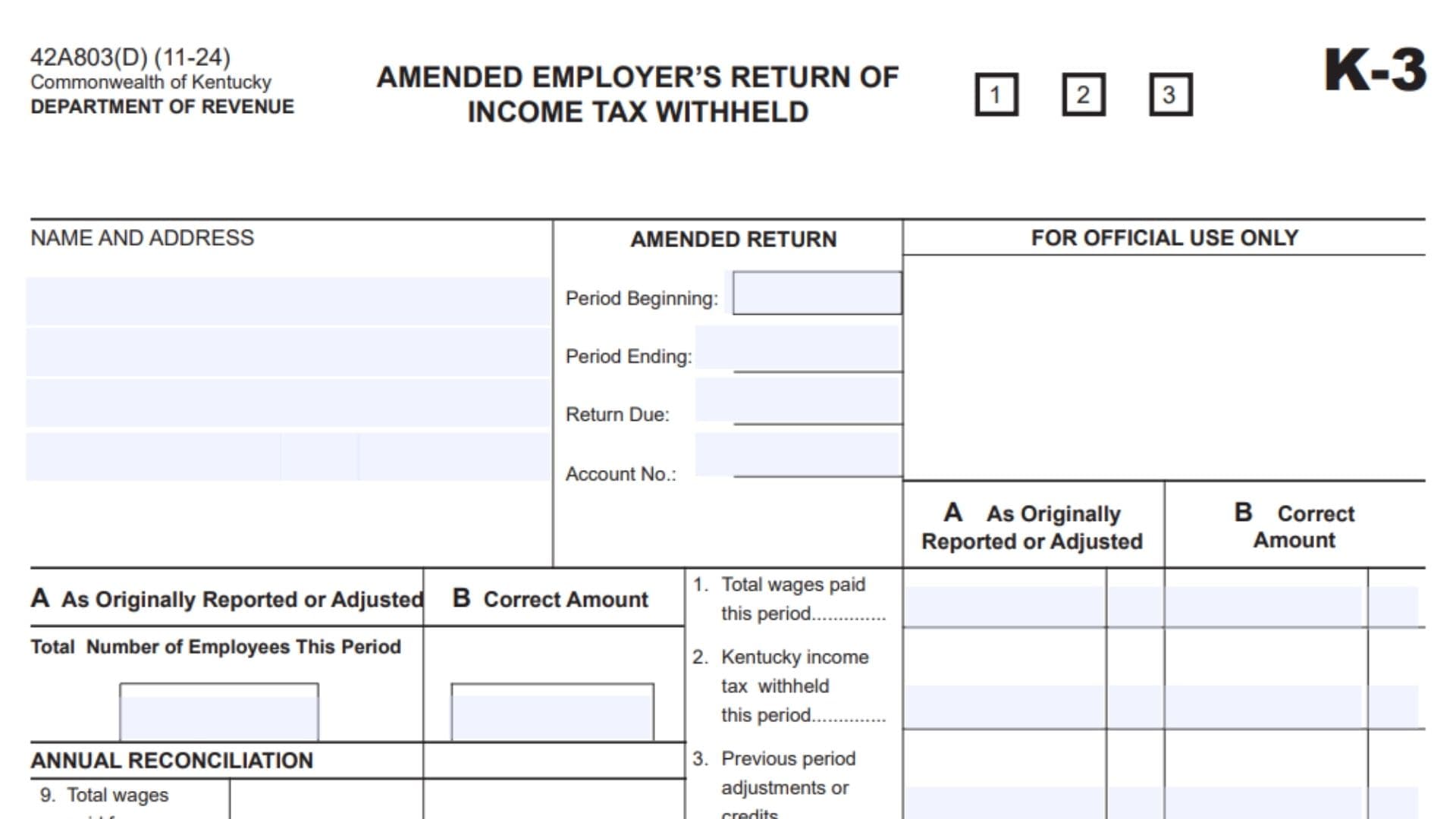
Kentucky Form K-3, titled Amended Employer’s Return of Income Tax Withheld, is used by an employer to correct Kentucky income tax withholding information that was previously reported for a particular filing period. Instead of replacing the earlier return without explanation, the amended return shows the difference between what was originally reported or later adjusted and what the employer now determines to be the correct amount. The form contains two main reporting columns: Column A is used for amounts as originally reported or adjusted, while Column B is used for the corrected amounts. Employers can use the form to amend the number of employees, wages paid during the period, Kentucky income tax withheld, prior-period adjustments or credits, net tax due, penalties, interest, and the resulting total amount due. The form also contains an annual reconciliation section for correcting annual wages, Kentucky withholding reported on W-2s, monthly payments, and quarterly payment totals. If the correction produces an overpayment, the employer can identify an amount requested as a refund or indicate that the credit should be carried forward to another period. The employer must also explain the reason for the changes and complete the certification section by signing, providing a title, and dating the amended return. If additional tax is due, the form directs the employer to remit the amount due and make the payment payable to the Kentucky State Treasurer. Because an amended return changes information that was already reported to the Kentucky Department of Revenue, the figures entered in the corrected column should be based on the employer’s actual payroll, withholding, payment, and previously filed return records rather than estimates.
When Should Kentucky Form K-3 Be Used?
Use the amended K-3 when information previously reported on an employer withholding return needs to be corrected.
Examples can include a change to:
- The number of employees reported for the period.
- Total wages paid.
- Kentucky income tax withheld.
- A previously reported adjustment or credit.
- Net tax due.
- Penalty or interest amounts.
- Annual wage totals.
- Kentucky withholding shown on W-2s.
- Monthly or quarterly payment information.
- A refund or credit resulting from the correction.
The form itself does not provide a separate list of qualifying amendment reasons, so the employer should use the Explanation of Changes section to clearly state what was incorrect and why the corrected information is being reported.
Understanding Column A And Column B
One of the most important parts of Form K-3 is the distinction between Column A and Column B.
Column A — As Originally Reported Or Adjusted
Column A is for the amount that was previously reported for the item being corrected.
If the Department of Revenue or the employer previously adjusted that amount after the original filing, use the applicable adjusted figure rather than treating the original figure as though no adjustment occurred.
The purpose of this column is to show the starting amount before the current amendment.
Column B — Correct Amount
Column B is for the amount that should have been reported.
Enter the corrected figure after reviewing the employer’s payroll, withholding, payment, and other applicable records.
Do not enter only the difference between the old and new amounts. Column B is labeled for the correct amount, so it should reflect the corrected total for that line.
How To File Kentucky Form K-3
Before completing the amended return, gather the previously filed withholding return, any later adjustments, payroll records, Kentucky withholding records, payment records, W-2 information if annual reconciliation is involved, and documentation supporting the correction.
Complete The Employer Identification Section
Enter the employer’s name and address, the amended return period information, and the Kentucky account number.
These details identify which employer and filing period the amendment applies to.
Enter Both The Previous And Corrected Figures
For applicable lines, report the previously reported or adjusted amount in Column A and the corrected amount in Column B.
This makes it possible to see what changed between the earlier return and the amendment.
Complete The Annual Reconciliation When Applicable
If the correction affects annual reconciliation information, complete the annual wages, W-2 withholding, payment schedule, and total fields.
Make sure Line 11 agrees with Line 10 as required on the form.
Determine Whether Additional Tax, A Refund, Or A Credit Results
After entering the corrected amounts, determine whether the amendment results in additional tax due, a refund request, or a credit that should be carried forward to another filing period.
Complete the applicable section rather than entering the same overpayment in both the refund and credit-forward fields.
Explain The Changes
Use the Explanation of Changes area to describe what is being corrected.
The explanation should be specific enough to connect the amendment to the figures that changed.
Sign And Date The Return
An authorized person must sign the amended return, enter their title, and provide the date.
The signature certifies the accuracy and completeness of the amended return.
Submit Any Amount Due
If the corrected return results in an amount due, remit the total amount owed and make the check payable to the Kentucky State Treasurer.
The form directs the amended return and applicable payment to:
Department of Revenue
Frankfort, Kentucky 40619

How To Complete Kentucky Form K-3 Line By Line
The following instructions cover the form from the top identification area through the payment and mailing instructions.
Header Information
Form Identification
The upper-left section identifies the return as a Kentucky Department of Revenue form.
It also identifies the document as an amended employer return rather than an original withholding return.
There is nothing for the employer to enter in the preprinted form identification information.
Boxes 1, 2, And 3
Three small numbered boxes marked 1, 2, and 3 appear near the top of the form.
The form page does not provide instructions explaining what the employer should enter or mark in these boxes. Do not assign your own meaning to them. If they are already populated as part of a Department-generated form, leave the existing information intact. If you have been specifically instructed by the Department of Revenue to use these boxes, follow those instructions.
K-3 Identification
The upper-right area identifies the return as K-3.
This is preprinted form information and does not require an entry.
Name And Address
Enter the employer’s name and mailing address in the large Name and Address area.
Use information that clearly identifies the withholding account for which the amended return is being filed.
The name and address should correspond with the employer connected to the Kentucky withholding account number entered elsewhere on the return.
Amended Return Information
This section identifies the exact reporting period and account being corrected.
Period Beginning
Enter the beginning date of the filing period covered by the amended return.
The date should correspond with the period on the previously filed return that you are correcting.
Period Ending
Enter the ending date for the filing period being amended.
Together, the beginning and ending dates identify the reporting period affected by the correction.
Return Due
Enter the due date associated with the return for the period being amended.
Do not automatically use the date on which you are preparing the amendment. This field refers to the return due date associated with the applicable reporting period.
Account Number
Enter the Kentucky withholding account number connected with the return being corrected.
Verify the number against the employer’s Kentucky withholding records before completing the remaining sections.
For Official Use Only
The section labeled For Official Use Only is reserved for the Kentucky Department of Revenue.
Do not enter employer information, calculations, comments, or amendment explanations in this area.
Total Number Of Employees This Period
This part of the return uses both Column A and Column B.
Column A — Previously Reported Employee Count
Enter the total number of employees for the period as it was originally reported or subsequently adjusted.
Column B — Correct Employee Count
Enter the correct number of employees for the period.
If the original employee count was already correct, the figures may be the same. If this item is being amended, Column B should show the corrected total rather than only the numerical difference.
Income Tax Withholding Calculation
Lines 1 through 8 compare the prior reported amounts with the corrected amounts.
Line 1 — Total Wages Paid This Period
Column A
Enter the total wages for the period as originally reported or adjusted.
Column B
Enter the correct total wages paid during the period.
Use the employer’s corrected payroll records when determining this amount.
Line 2 — Kentucky Income Tax Withheld This Period
Column A
Enter the Kentucky income tax withheld for the period as originally reported or adjusted.
Column B
Enter the correct amount of Kentucky income tax actually withheld for that period.
The corrected amount should be supported by the employer’s payroll and withholding records.
Line 3 — Previous Period Adjustments Or Credits
Column A
Enter the amount of previous-period adjustments or credits that was originally reported or later adjusted.
Column B
Enter the correct amount of applicable previous-period adjustments or credits.
Review earlier withholding periods and related credit records before changing this figure.
Line 4 — Net Tax Due
Column A
Enter the net tax due that was previously reported or adjusted.
Column B
Enter the corrected net tax due based on the amended information.
Use the corrected amounts relevant to the return when determining the figure rather than simply copying the previous net tax amount.
Line 5 — Penalty
Column A
Enter the penalty amount previously reported or adjusted, when applicable.
Column B
Enter the correct penalty amount, when applicable.
The form refers the employer to separate instructions for determining penalties. This page does not provide a penalty rate or calculation formula, so do not estimate a penalty percentage based solely on this form.
Line 6 — Interest
Column A
Enter the interest amount previously reported or adjusted, when applicable.
Column B
Enter the correct interest amount.
As with the penalty line, the form refers to instructions for the applicable interest calculation but does not state an interest rate on this page.
Line 7 — Total Penalty And Interest
Line 7 is the combined amount from Lines 5 and 6.
Column A
Add the previously reported or adjusted penalty from Line 5 to the previously reported or adjusted interest from Line 6.
Enter the result in Column A of Line 7.
Column B
Add the corrected penalty on Line 5 to the corrected interest on Line 6.
Enter that total in Column B of Line 7.
In other words:
Line 5 + Line 6 = Line 7
Line 8 — Total Amount Due
Line 8 represents the total amount due after combining net tax with penalty and interest.
Column A
Add the previously reported or adjusted Line 4 amount to the previously reported or adjusted Line 7 amount.
Column B
Add the corrected Line 4 amount to the corrected Line 7 amount.
The calculation is:
Line 4 + Line 7 = Line 8
Use the corrected Column B result when determining whether additional payment is required because of the amendment.
Annual Reconciliation
The left side of the form includes an Annual Reconciliation section covering Lines 9 through 11 and the payment schedule.
Complete this section when the amendment affects annual reconciliation information.
Line 9 — Total Wages Paid For The Year
Enter the corrected total wages paid for the year.
Use annual payroll records to determine the amount.
This line concerns the full annual wage total rather than only wages for an individual month or quarter.
Line 10 — Total Kentucky Income Tax Withheld As Shown On W-2s
Enter the total Kentucky income tax withheld for the year as reflected on the applicable W-2 statements.
Review the annual W-2 information and make sure the withholding total entered here agrees with the corrected records.
Line 10 is important because the total reported later on Line 11 must equal this amount.
Payment Reconciliation Schedule
Below Lines 9 and 10, the form provides spaces for monthly and quarterly payments.
Two sets of payment columns appear because the amended return compares previously reported information with corrected information.
Column A — Monthly Payments
Use the Column A monthly payment spaces to show the monthly payments as previously reported or adjusted.
The form provides separate entries for:
January
Enter the applicable January payment in the January row.
February
Enter the applicable February payment in the February row.
March
Enter the applicable March payment in the March row.
April
Enter the applicable April payment in the April row.
May
Enter the applicable May payment in the May row.
June
Enter the applicable June payment in the June row.
July
Enter the applicable July payment in the July row.
August
Enter the applicable August payment in the August row.
September
Enter the applicable September payment in the September row.
October
Enter the applicable October payment in the October row.
November
Enter the applicable November payment in the November row.
December
Enter the applicable December payment in the December row.
Column B — Payments By Quarter
The adjacent payment column provides spaces for quarterly totals.
First Quarter
Enter the applicable first-quarter payment total.
This corresponds with the first three months of the annual schedule.
Second Quarter
Enter the applicable second-quarter payment total.
Third Quarter
Enter the applicable third-quarter payment total.
Fourth Quarter
Enter the applicable fourth-quarter payment total.
Corrected Monthly And Quarterly Payments
The form repeats the monthly and quarterly payment columns for the corrected figures.
Use this second set to report the corrected payment amounts.
Corrected January Payment
Enter the correct January payment.
Corrected February Payment
Enter the correct February payment.
Corrected March Payment
Enter the correct March payment.
Corrected First-Quarter Payment
Enter the correct first-quarter total in the quarterly payment field.
Corrected April Payment
Enter the correct April payment.
Corrected May Payment
Enter the correct May payment.
Corrected June Payment
Enter the correct June payment.
Corrected Second-Quarter Payment
Enter the correct second-quarter total.
Corrected July Payment
Enter the correct July payment.
Corrected August Payment
Enter the correct August payment.
Corrected September Payment
Enter the correct September payment.
Corrected Third-Quarter Payment
Enter the correct third-quarter total.
Corrected October Payment
Enter the correct October payment.
Corrected November Payment
Enter the correct November payment.
Corrected December Payment
Enter the correct December payment.
Corrected Fourth-Quarter Payment
Enter the correct fourth-quarter total.
The payment schedule should reflect the employer’s actual corrected payment history rather than estimates.
Line 11 — Total
Add the applicable payment amounts and enter the total on Line 11.
The form specifically requires:
Line 11 must equal Line 10.
This is an important reconciliation check.
If Line 11 does not equal the Kentucky income tax withheld reported on Line 10, review the monthly payments, quarterly amounts, annual W-2 withholding total, and any corrections before filing the amended return.
Do not ignore the difference simply to finish the form.
Refund Requested
If the amended return results in an amount that should be returned to the employer, enter the refund amount in the Refund Requested field.
Enter the dollar amount being requested.
Make sure the refund amount is supported by the corrections reported elsewhere on the amended return.
Do not automatically request the entire amount previously paid. The refund should reflect the result of the corrected withholding information.
Credit Forward To
If the resulting overpayment is to be applied to another period rather than refunded, use the Credit Forward To section.
Credit Amount
Enter the amount that should be carried forward as a credit.
Period
Enter the period to which the credit should be applied.
Identify the intended period clearly so the credit can be associated with the correct withholding reporting period.
If you are requesting a refund instead, make sure you do not unintentionally claim the same amount again as a credit forward.
Explanation Of Changes
Use the Explanation of Changes section to describe why the amended K-3 is being filed.
Explain what was originally reported incorrectly and what has been corrected.
A useful explanation should connect directly to the lines being amended. For example, if wages and withholding changed because payroll information was corrected, explain that relationship rather than simply writing “correction.”
If several items changed for the same underlying reason, explain them together clearly without repeating the same statement for every line.
The goal is to give the Department of Revenue enough information to understand why the figures in Column B differ from those in Column A.
Certification
Near the bottom of the return is a declaration that must be reviewed before signing.
By signing the return, the signer is declaring under penalties of perjury that they have examined the amended return and, to the best of their knowledge and belief, consider it true, correct, and complete.
Review the entire amended return before completing this section.
Sign Here
An authorized person should sign on the signature line.
The signature confirms the certification immediately above it.
Do not treat this as an optional identification field.
Signature
Provide the authorized person’s signature.
The signer should be someone permitted to sign the amended employer withholding return on behalf of the employer.
Title
Enter the signer’s title or position.
This identifies the person’s capacity in relation to the employer.
Date
Enter the date on which the amended return is signed.
Check that the date is complete and legible.
Remitting The Total Amount Due
If the amended return shows an additional total amount due, submit the amount owed with the return.
The form directs the employer to make the check payable to:
Kentucky State Treasurer
Make sure the payment corresponds with the amount determined from the amended return.
Mailing The Amended Return
The form directs the filer to mail the completed return and any amount due to:
Department of Revenue
Frankfort, Kentucky 40619
Before mailing, make sure the amended return identifies the correct account and period and has been signed and dated.
Final Review Before Filing Kentucky Form K-3
Before submitting Kentucky Form K-3, compare the amended return with the previously filed withholding return and the employer’s corrected payroll records. Confirm the employer’s name and address, period beginning date, period ending date, return due date, and Kentucky account number. Review the original or adjusted figures in Column A and make sure Column B contains the full corrected amounts rather than only the differences. Verify the employee count and Lines 1 through 8, including total wages, Kentucky income tax withheld, previous-period adjustments or credits, net tax due, penalty, interest, total penalty and interest, and total amount due. If annual reconciliation information is being amended, check Lines 9 and 10, every applicable January-through-December payment entry, the first-, second-, third-, and fourth-quarter amounts, and Line 11. Confirm that Line 11 equals Line 10 as required. If the correction creates an overpayment, complete either the applicable refund request or credit-forward information. Clearly explain the reason for the amendment in the Explanation of Changes section. Finally, review the certification, obtain the authorized signature, enter the signer’s title and date, and include payment to the Kentucky State Treasurer if the corrected return shows an additional amount due.