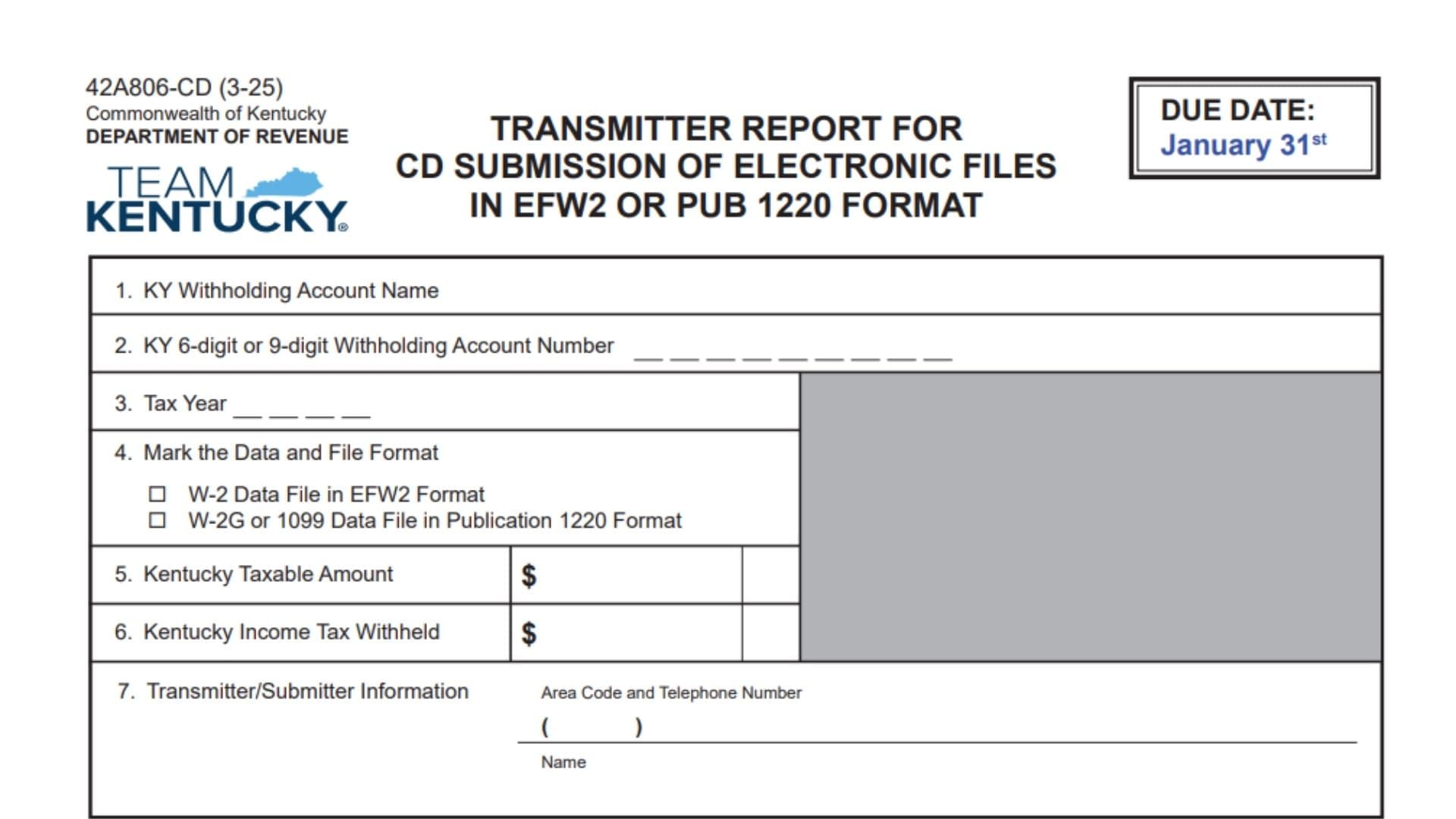
Kentucky Form 42A806-CD, titled Transmitter Report for CD Submission of Electronic Files in EFW2 or Publication 1220 Format, is a Kentucky Department of Revenue form used when submitting certain withholding-related electronic data on a CD. The report acts as a cover sheet that identifies the Kentucky withholding account connected with the electronic file and provides important information about the data being submitted. The filer must provide the Kentucky withholding account name, the applicable six-digit or nine-digit withholding account number, the tax year being reported, the type of data and electronic file format contained on the CD, the Kentucky taxable amount, the Kentucky income tax withheld, and contact information for the transmitter or submitter. W-2 information submitted through this method is reported using the EFW2 format, while W-2G or qualifying 1099 information is submitted using Publication 1220 format. The form also makes clear that 1099 information should be reported through this process only when Kentucky income tax was withheld. If a single electronic file includes data for more than one withholding account, the numbered fields on the transmitter report should contain information for the first account in the file; a separate list of all accounts may be included, although the form does not require it. The transmitter report and the corresponding CD are mailed together to the Kentucky Department of Revenue’s CD Processing unit in Frankfort. The form identifies January 31 as the due date, making timely preparation particularly important for businesses, employers, payroll processors, tax professionals, and other transmitters submitting Kentucky withholding information electronically.
Who Should Use Kentucky Form 42A806-CD?
This form is intended for a filer transmitting Kentucky withholding-related electronic records to the Department of Revenue on a CD in one of the accepted formats shown on the report.
It may be relevant when the CD contains:
- W-2 data prepared in EFW2 format.
- W-2G data prepared in Publication 1220 format.
- 1099 data prepared in Publication 1220 format when Kentucky income tax was withheld.
The transmitter report identifies what is contained on the CD and gives the Department of Revenue a contact person in case questions arise while processing the electronic file.
When Is Kentucky Form 42A806-CD Due?
The due date printed on Form 42A806-CD is January 31.
Plan enough time to prepare the electronic file, verify the totals, complete the transmitter report, create the CD, and mail the package so the submission is handled according to the applicable filing requirements.
How To File Kentucky Form 42A806-CD
The form instructs the filer to complete Items 1 through 7. Each item should correspond with the information contained in the electronic file being submitted.
Step 1 — Prepare The Electronic File
Before completing the transmitter report, make sure the information you intend to submit has been prepared using the appropriate electronic format.
For W-2 records, the applicable option on the form is EFW2.
For W-2G or qualifying 1099 records, the applicable option is Publication 1220.
The form notes that both EFW2 and Publication 1220 contain state-specific fields established by the Kentucky Department of Revenue.
Step 2 — Gather The Withholding Account Information
Have the exact Kentucky withholding account name and withholding account number available before filling out the report.
The account number may contain either six digits or nine digits, depending on the account.
Step 3 — Determine The Tax Year
Identify the tax year represented by the electronic records on the CD.
The year entered on the transmitter report should correspond with the year of the records being submitted.
Step 4 — Verify The Kentucky Totals
Determine the total Kentucky taxable amount represented by the submission and the total Kentucky income tax withheld.
These amounts are reported separately in Items 5 and 6.
Step 5 — Identify A Contact Person
Choose the person who should be contacted if the Kentucky Department of Revenue has questions concerning the electronic file.
Have that person’s name and daytime telephone number, including area code, ready before completing Item 7.
Step 6 — Complete All Seven Items
Fill in Items 1 through 7. Do not treat the transmitter report as complete after entering only the account name and electronic file type.
Review each numbered section against the records contained on the CD.
Step 7 — Mail The Report With The CD
The completed transmitter report must accompany the CD.
Mail both items together to:
Kentucky Department of Revenue
CD Processing
501 High Street, Station 57
Frankfort, KY 40601

How To Complete Kentucky Form 42A806-CD Line By Line
The instructions below follow the form from the identification information at the top through the filing notes at the bottom.
Form Number And Revision
The upper portion identifies the document as Form 42A806-CD with a revision date of 3-25.
This information is already printed on the form and does not require an entry from the filer. It identifies the version of the transmitter report being used.
Commonwealth Of Kentucky Department Of Revenue
The form identifies the Commonwealth of Kentucky Department of Revenue as the issuing agency.
There is nothing to complete in this area. It simply shows which state agency receives and processes the submission.
Form Title
The title identifies the document as a transmitter report for electronic files submitted on CD using EFW2 or Publication 1220 format.
This title describes the purpose of the form and does not require you to enter anything.
Due Date — January 31
The top-right portion of the form displays a due date of January 31.
Use this date when planning the preparation and submission of the transmitter report and its accompanying electronic file.
Items 1 Through 7
The main section of the report consists of seven numbered items. Complete each applicable field carefully.
Item 1 — Kentucky Withholding Account Name
Enter the name associated with the Kentucky withholding account represented by the electronic file.
Use the account name connected with the withholding information being submitted.
If the electronic file contains records for more than one withholding account, enter the information for the first withholding account in the file in this field.
Avoid entering a shortened or unrelated business name if it does not properly identify the withholding account.
Item 2 — Kentucky Six-Digit Or Nine-Digit Withholding Account Number
Enter the Kentucky withholding account number associated with the account reported in Item 1.
The form accepts a Kentucky withholding account number containing either six digits or nine digits.
Check each digit carefully before continuing. The number should identify the same withholding account whose name appears in Item 1.
If multiple accounts are included in the electronic file, use the withholding account number belonging to the first account represented in that file.
Item 3 — Tax Year
Enter the tax year covered by the information being submitted.
Use the four-digit year that corresponds with the electronic records contained on the CD.
For example, the tax year entered here should match the year associated with the W-2, W-2G, or applicable 1099 information in the submission.
Do not enter the date you are completing the transmitter report unless that happens to be the same tax year represented by the electronic records.
Item 4 — Mark The Data And File Format
This section provides two choices. Select the option that correctly describes the electronic information stored on the CD.
Do not mark both choices unless the content and filing situation actually support doing so. The selection should accurately identify the data and format you are transmitting.
W-2 Data File In EFW2 Format
Mark this box when the CD contains W-2 data prepared in EFW2 format.
The EFW2 selection is specifically associated with W-2 information on this transmitter report.
W-2G Or 1099 Data File In Publication 1220 Format
Mark this box when the CD contains W-2G or applicable 1099 information prepared using Publication 1220 format.
Remember that the form places an additional restriction on 1099 reporting: 1099 information should be reported through this process only when Kentucky income tax has been withheld.
Item 5 — Kentucky Taxable Amount
Enter the total Kentucky taxable amount associated with the submission.
The form describes this amount as taxable wages or payment.
Use the Kentucky taxable amount represented by the records being transmitted. Review the electronic file or supporting payroll and payment records to make sure the amount entered here corresponds with the submission.
Enter the amount in the dollar field provided.
Do not confuse the taxable amount with the Kentucky income tax withheld. The tax withheld is entered separately in Item 6.
Item 6 — Kentucky Income Tax Withheld
Enter the total Kentucky income tax withheld for the information being transmitted.
Use the dollar field provided for this amount.
The figure entered here should represent Kentucky income tax that was actually withheld in connection with the records included in the electronic submission.
Keep this amount separate from the Kentucky taxable amount entered in Item 5.
For 1099 submissions, this field is particularly important because the form states that 1099 data should be reported only when Kentucky income tax has been withheld.
Item 7 — Transmitter/Submitter Information
Item 7 identifies the person responsible for transmitting or submitting the electronic file.
The Department of Revenue indicates that this should be the individual who can answer questions about the file.
Provide both the daytime telephone number and the person’s name.
Area Code And Telephone Number
Enter the transmitter or submitter’s daytime telephone number.
Include the area code in the space provided.
Use a telephone number where the person responsible for the submission can reasonably be reached if questions arise concerning the electronic records or the CD.
Double-check the number for accuracy before mailing the report.
Name
Enter the name of the transmitter or submitter who can respond to questions concerning the file.
The name should correspond with the person whose telephone number is entered immediately above.
Choose someone familiar enough with the submission to address questions about the electronic file if the Department of Revenue needs additional information.
What To Do If The File Contains More Than One Withholding Account
A single electronic file may contain records connected with more than one Kentucky withholding account.
When this occurs, complete Items 1 through 7 using information for the first withholding account contained in the file where account-specific information is required.
You may also include a list identifying all withholding accounts contained in the file.
However, the form states that providing such a list is optional rather than mandatory.
Make sure the first account identified on the transmitter report actually corresponds with the first withholding account represented in the electronic file.
Special Rule For 1099 Data
The form contains an important instruction concerning 1099 records.
Only report 1099 data through this submission method when Kentucky income tax has been withheld.
Therefore, the presence of a 1099 by itself does not automatically mean that it should be included in this submission.
Before including 1099 information, confirm that Kentucky income tax was withheld in connection with the reportable payment.
EFW2 And Publication 1220 Format Requirements
The transmitter report recognizes two electronic reporting formats.
EFW2 Format
EFW2 is the format identified on the form for W-2 data files.
When submitting W-2 information using this report, make sure the electronic file follows the applicable EFW2 requirements, including Kentucky-specific state fields required by the Department of Revenue.
Publication 1220 Format
Publication 1220 is the format identified for W-2G and applicable 1099 data.
When using this option, prepare the file according to the appropriate Publication 1220 requirements together with the Kentucky-specific state fields established for the submission.
Kentucky-Specific State Fields
The form explains that EFW2 and Publication 1220 contain state fields defined by the Kentucky Department of Revenue.
This means preparing a generally valid federal-format file may not by itself address every Kentucky-specific electronic reporting requirement.
Review the applicable Kentucky withholding specifications when preparing the electronic records to make sure the required state information is included.
How To Submit The Form And CD
Once Items 1 through 7 have been completed and the electronic file has been placed on the CD, package the transmitter report and CD together.
The form directs filers to mail them to:
Kentucky Department of Revenue
CD Processing
501 High Street, Station 57
Frankfort, KY 40601
The transmitter report serves as identifying information for the electronic submission, so make sure it accompanies the correct CD.
Kentucky Department Of Revenue Web Information
The form provides revenue.ky.gov as the Kentucky Department of Revenue website.
It also directs filers to the Department’s Withholding Tax information for specifications concerning the EFW2 and Publication 1220 formats and their Kentucky-defined state fields.
This information is especially relevant when creating or validating the electronic file before it is placed on the CD.
Final Review Before Submission
Before mailing Kentucky Form 42A806-CD, confirm that all seven numbered items have been completed correctly. Make sure the Kentucky withholding account name matches the account number, the correct tax year has been entered, and the appropriate EFW2 or Publication 1220 option has been selected. Verify the Kentucky taxable amount and Kentucky income tax withheld against the electronic records being submitted. Check that the transmitter or submitter’s daytime telephone number includes the area code and that the contact person’s name is entered. If the file contains multiple withholding accounts, use the first account for the account information on the report and include a separate account list only if you choose to do so. If the submission contains 1099 information, confirm that Kentucky income tax was withheld. Finally, make sure the correct CD accompanies the transmitter report and send the complete package to the Kentucky Department of Revenue, CD Processing, 501 High Street, Station 57, Frankfort, KY 40601, keeping the January 31 due date in mind.
The instructions above are based on every section and filing note contained in the submitted form.