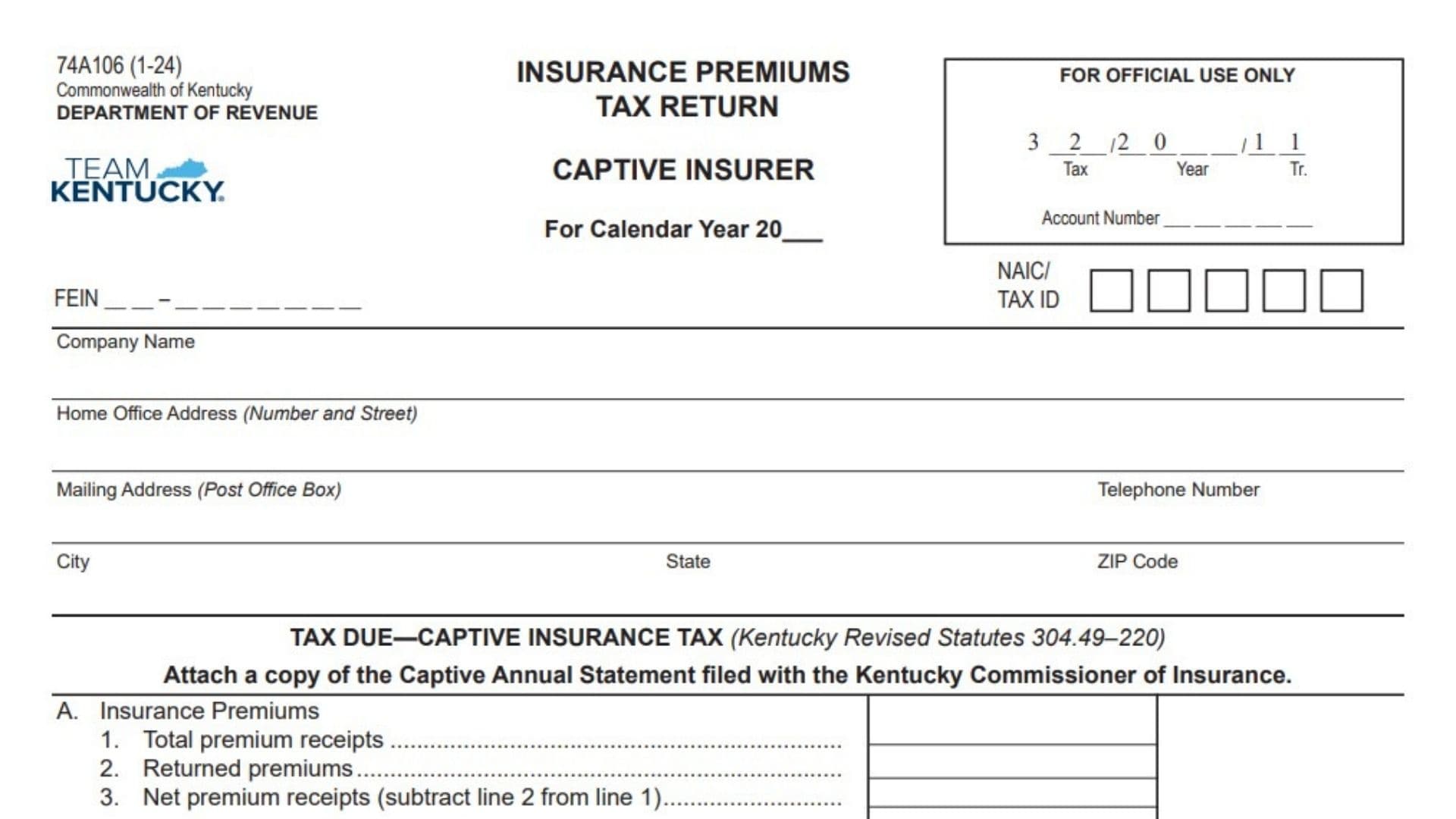
Kentucky Form 74A106 is the Insurance Premiums Tax Return used by domestic and foreign captive insurance companies to calculate and report the captive insurance tax imposed under Kentucky Revised Statutes 304.49-220. The return covers two main types of taxable receipts: direct insurance premium receipts and assumed reinsurance premium receipts. Direct insurance premiums are reported in Section A after subtracting returned premiums, and the resulting net amount is taxed through four graduated rate levels. Assumed reinsurance premiums are reported separately in Section B and are also taxed through four graduated levels, but at lower rates. The tax from both sections is combined to determine the company’s total net liability, subject to a minimum payment of $5,000. The form also collects the captive insurer’s identifying information, including its FEIN, NAIC or tax identification number, company name, office address, mailing address, and telephone number. A copy of the Captive Annual Statement filed with the Kentucky Commissioner of Insurance must accompany the return, along with all required schedules, exhibits, and itemized accounts. The completed filing must be certified by the company’s president or chief accounting officer, and the report preparer must provide the required signature and contact details. The return is due on or before March 1 and must be submitted to the Kentucky Department of Revenue whether the tax is paid by check or online.
Who Must File This Return?
Kentucky Form 74A106 must be completed by:
- Domestic captive insurance companies
- Foreign captive insurance companies
Both domestic and foreign captive insurers must complete Sections A and B, even when one section contains no reportable receipts.
A company should confirm that it is classified as a captive insurer before using this return. It is not intended for individual taxpayers, ordinary businesses purchasing insurance, or insurance companies that are required to use a different Kentucky premiums tax return.
What Information Should Be Gathered?
Before completing the return, gather:
- The calendar year being reported
- The company’s FEIN
- The NAIC number or Kentucky tax identification number
- The company’s legal name
- Home office and mailing addresses
- A current telephone number
- Total insurance premium receipts
- Returned premium records
- Assumed reinsurance premium receipts
- Records of any qualifying commonly controlled reinsurance transaction
- The Captive Annual Statement
- Supporting schedules, exhibits, and itemized accounts
- Online payment confirmation, if applicable
- The names and titles of the signing officer and return preparer
Use records covering the full calendar year entered at the top of the return.
When Is Kentucky Form 74A106 Due?
File the completed return on or before March 1.
The return normally reports premium activity from the preceding calendar year. For example, premiums received during 2025 would generally be reported on the filing due March 1, 2026.
Allow enough time to complete the tiered calculations, obtain the required officer’s signature, and attach the Captive Annual Statement before the deadline.
How To File Kentucky Form 74A106
Filing With A Check
When paying by check:
- Complete all company identification fields.
- Calculate the tax in Sections A and B.
- Determine the total net tax liability.
- Make the check payable to the Kentucky State Treasurer.
- Attach the Captive Annual Statement and other required supplements.
- Mail the return, payment, and attachments to the Kentucky Department of Revenue.
Use the regular mailing address:
Kentucky Department of Revenue
P.O. Box 1303
Frankfort, KY 40602-1303
Filing By Overnight Delivery
For overnight or courier delivery, use:
Kentucky Department of Revenue
501 High Street
Frankfort, KY 40601-2103
Do not send an overnight package to the post office box.
Filing After Paying Online
When the tax is paid electronically:
- Check the Paid Online box.
- Enter the payment confirmation number.
- Attach the Payment Schedule Confirmation page.
- Send the return, annual statement, required supplements, and confirmation page to one of the listed addresses.
An online payment does not replace the requirement to submit the completed tax return.
Required Attachments
Attach a copy of the Captive Annual Statement filed with the Kentucky Commissioner of Insurance.
You must also attach any required:
- Schedules
- Exhibits
- Itemized accounts
- Supporting calculations
- Annual statement supplements
These materials become part of the filed return. Readable reproductions are acceptable.

How To Complete Kentucky Form 74A106
Header Information
Form Number And Revision
The identifying number in the upper-left corner shows that the document is Form 74A106. The information in parentheses identifies the revision date.
This is preprinted information and does not require an entry.
Insurance Premiums Tax Return
The main heading identifies the filing as an insurance premiums tax return.
Do not enter anything on this heading.
Captive Insurer
This subtitle confirms that the return is specifically intended for captive insurance companies.
Verify the company’s classification before completing the return.
Calendar Year
Enter the calendar year covered by the premium figures.
For example:
2025
All receipts, returned premiums, reinsurance amounts, schedules, and annual statement information should relate to the same year.
Do not enter the filing year when it differs from the year in which the premiums were received.
Official Use Only Section
The upper-right box contains fields for the Department’s internal processing.
Tax Code
The tax code is already printed or reserved for Department use.
Do not alter it.
Year Code
The year field in the official-use box is intended for internal processing.
Leave it blank unless the Department specifically instructs the company to complete it.
Transaction Code
The field marked “Tr.” is reserved for a Department transaction code.
Do not enter an online payment confirmation number in this field.
Account Number
The account number spaces in the official-use box are for Department processing.
Leave them blank unless you have received specific instructions to enter the account number there.
Company Identification Information
FEIN
Enter the captive insurance company’s nine-digit federal employer identification number.
Use the FEIN assigned to the legal entity filing the return. Do not enter an owner’s or officer’s Social Security number.
Check the number against the company’s tax and annual statement records before filing.
NAIC Or Tax ID
Enter the company’s NAIC number or applicable Kentucky tax identification number in the boxes provided.
Use the identifier connected to the company named on the return. Do not use the FEIN, online payment number, or preparer identification number in this field.
Company Name
Enter the captive insurer’s complete legal name.
The name should agree with:
- Kentucky insurance records
- The Captive Annual Statement
- Department tax records
- Supporting schedules
- Payment information
Avoid using only a trade name unless it is also the company’s legal name.
Home Office Address
Enter the street address of the company’s home office.
Include the street number, street name, and suite or office number when applicable.
This field requests a physical number-and-street address. Do not enter only a post office box.
Mailing Address
Enter the address where the company receives correspondence.
A post office box may be entered here. When the company’s mailing and physical addresses are different, make sure each address is entered in the correct field.
Telephone Number
Enter a current business telephone number.
Include the area code and use a number where the Department can reach someone familiar with the filing.
City
Enter the city associated with the mailing address.
State
Enter the two-letter state abbreviation for the mailing address.
ZIP Code
Enter the complete ZIP Code. Include the four-digit extension when it is regularly used.
Tax Due: Captive Insurance Tax
This section calculates the captive insurance tax under Kentucky Revised Statutes 304.49-220.
It is divided into:
- Section A for insurance premium receipts
- Section B for assumed reinsurance premium receipts
- Section C for the combined net tax liability
Complete both Sections A and B before calculating Section C.
Section A: Insurance Premiums
Line 1: Total Premium Receipts
Enter the company’s total insurance premium receipts for the calendar year.
Report the gross amount before subtracting returned premiums.
Use the company’s accounting records and Captive Annual Statement to support the amount. Include only receipts that belong in the captive insurance premium calculation.
Line 2: Returned Premiums
Enter the premiums returned to policyholders or otherwise properly treated as returned premiums during the reporting year.
Do not enter unpaid premiums, operating expenses, commissions, claim payments, or general refunds that do not qualify as returned premiums.
Keep supporting records showing how this amount was calculated.
Line 3: Net Premium Receipts
Subtract Line 2 from Line 1.
Use this formula:
Total Premium Receipts − Returned Premiums = Net Premium Receipts
For example:
- Total premium receipts: $10,000,000
- Returned premiums: $500,000
- Net premium receipts: $9,500,000
Enter the result on Line 3. This is the amount used for the Section A tiered tax calculation.
Section A Computation Of Tax
Apply each rate only to the portion of net premium receipts falling within that level. Do not apply the highest applicable rate to the entire amount.
Line A: 0.4% On The First $20 Million
Calculate 0.4% of the first $20 million of net premium receipts.
Convert 0.4% to decimal form as:
0.004
When net premium receipts are $20 million or less, multiply the full Line 3 amount by 0.004.
When receipts exceed $20 million, the maximum amount taxed on this line is $20 million.
The maximum tax for this bracket is:
$20,000,000 × 0.004 = $80,000
Line B: 0.3% On The Next $20 Million
Complete this line only when net premium receipts exceed $20 million.
Apply 0.3% to the portion above $20 million and up to $40 million.
Convert 0.3% to:
0.003
The maximum amount subject to this bracket is $20 million.
The maximum tax for this bracket is:
$20,000,000 × 0.003 = $60,000
Line C: 0.2% On The Next $20 Million
Complete this line when net premium receipts exceed $40 million.
Apply 0.2% to the portion above $40 million and up to $60 million.
Convert 0.2% to:
0.002
The maximum amount subject to this bracket is $20 million.
The maximum tax for this bracket is:
$20,000,000 × 0.002 = $40,000
Line D: 0.075% On Receipts Over $60 Million
When net premium receipts exceed $60 million, apply 0.075% to the amount above $60 million.
Convert 0.075% to:
0.00075
Only the excess over $60 million belongs on this line.
For example, if net premium receipts equal $75 million:
$75,000,000 − $60,000,000 = $15,000,000
Then calculate:
$15,000,000 × 0.00075 = $11,250
Line E: Total Tax On Premium Receipts
Add the tax calculated on Lines A, B, C, and D.
Use this formula:
Section A Line A + Line B + Line C + Line D = Total Tax On Premium Receipts
Enter the total on Line E and carry it to the amount identified as (A).
Section A Calculation Example
Assume net premium receipts are $50 million.
Calculate:
- First $20 million × 0.004 = $80,000
- Next $20 million × 0.003 = $60,000
- Remaining $10 million × 0.002 = $20,000
- No amount is taxed at 0.075%
The total Section A tax is:
$80,000 + $60,000 + $20,000 = $160,000
Section B: Assumed Reinsurance Premium Receipts
Enter the company’s assumed reinsurance premium receipts for the calendar year.
This amount generally represents premiums received by the captive insurer for assuming insurance risks or liabilities from another insurer.
Do not combine these receipts with the direct insurance premium receipts entered in Section A.
Use the company’s accounting records, reinsurance agreements, and annual statement schedules to support the amount.
Common Ownership And Control Exception
A reinsurance premium tax is not payable for a qualifying transaction involving the receipt of assets in exchange for assuming another insurer’s loss reserves and liabilities when all of the following conditions apply:
- The captive insurer and the other insurer are under common ownership and control.
- The transaction is part of a plan to discontinue the other insurer’s operations.
- The parties intend to renew or continue the business through the captive insurer.
A transaction should not be excluded merely because the companies are related. The entire set of conditions must be satisfied.
Retain agreements, corporate records, transfer documents, and other evidence supporting the exclusion.
Section B Computation Of Tax
Apply the rates in graduated levels. Each rate applies only to the portion of assumed reinsurance premium receipts within that bracket.
Line A: 0.225% On The First $20 Million
Apply 0.225% to the first $20 million of taxable assumed reinsurance premium receipts.
Convert 0.225% to:
0.00225
When receipts are $20 million or less, multiply the full taxable amount by 0.00225.
The maximum tax for this bracket is:
$20,000,000 × 0.00225 = $45,000
Line B: 0.150% On The Next $20 Million
When assumed reinsurance receipts exceed $20 million, apply 0.150% to the portion above $20 million and up to $40 million.
Convert 0.150% to:
0.0015
The maximum tax for this bracket is:
$20,000,000 × 0.0015 = $30,000
Line C: 0.050% On The Next $20 Million
When receipts exceed $40 million, apply 0.050% to the portion above $40 million and up to $60 million.
Convert 0.050% to:
0.0005
The maximum tax for this bracket is:
$20,000,000 × 0.0005 = $10,000
Line D: 0.025% On Receipts Over $60 Million
When taxable assumed reinsurance premium receipts exceed $60 million, apply 0.025% to the amount over $60 million.
Convert 0.025% to:
0.00025
For example, if assumed reinsurance receipts equal $70 million:
$70,000,000 − $60,000,000 = $10,000,000
Then calculate:
$10,000,000 × 0.00025 = $2,500
Line E: Total Tax On Assumed Reinsurance Premium Receipts
Add the tax calculated on Section B Lines A through D.
Use this formula:
Section B Line A + Line B + Line C + Line D = Total Tax On Assumed Reinsurance Premium Receipts
Enter the result on Line E and carry it to the amount identified as (B).
Section B Calculation Example
Assume taxable assumed reinsurance premium receipts are $30 million.
Calculate:
- First $20 million × 0.00225 = $45,000
- Remaining $10 million × 0.0015 = $15,000
The total Section B tax is:
$45,000 + $15,000 = $60,000
Section C: Total Net Tax Liability Due
Add the total tax from Section A to the total tax from Section B.
Use this formula:
Section A Total (A) + Section B Total (B) = Combined Tax
The return requires a minimum tax of $5,000.
Therefore:
- If the combined tax is more than $5,000, enter the calculated amount.
- If the combined tax is less than $5,000, enter $5,000.
- If the combined tax equals $5,000, enter $5,000.
For example, if:
- Section A tax is $3,000
- Section B tax is $1,000
The combined calculation is $4,000. Because this is below the required minimum, enter $5,000 on Section C.
Enter the final liability in the dollar field provided.
Online Payment Information
Paid Online Checkbox
Check the box when the company paid the tax electronically.
Do not check it when a paper check is enclosed with the return.
Confirmation Number
Enter the confirmation number generated by the online payment system.
Copy the number exactly. Do not enter the FEIN, NAIC number, Department account number, or bank transaction number unless it is the confirmation number provided for the payment.
Payment Schedule Confirmation Page
Attach the Payment Schedule Confirmation page when the tax is paid online.
The page helps the Department match the electronic payment to the company’s return.
Taxpayer Declaration
The declaration states that the signer has reviewed the return and all accompanying schedules and statements and believes that they are true, correct, and complete.
The declaration is made under penalties of perjury.
Before signing, review:
- The calendar year
- Company identification
- Net premium receipts
- Assumed reinsurance receipts
- Tiered tax calculations
- Minimum tax requirement
- Online payment information
- Annual statement attachment
- Supporting schedules
Do not sign the return until all required entries and attachments have been completed.
Officer Certification
Signature Of President Or Chief Accounting Officer
The company’s president or chief accounting officer must sign the return.
The preparer’s signature does not replace this officer certification.
Print Name
Print or type the signing officer’s full legal name.
Make sure the name clearly identifies the person who signed.
Date
Enter the date the president or chief accounting officer signs the return.
Use a complete month, day, and year.
Report Preparer’s Information
This section is required and must be completed by the person who prepared the return.
Preparer’s Signature
The preparer must sign the return.
The preparer may be a company employee, accountant, controller, tax manager, attorney, or outside tax professional.
Title
Enter the preparer’s job title or professional position.
Examples include:
- Tax manager
- Controller
- Chief financial officer
- Staff accountant
- Insurance tax specialist
- External tax preparer
Date
Enter the date the preparer signs the return.
Print Name
Print or type the preparer’s full name.
Do not use only initials when the full name is available.
Telephone Number
Enter a telephone number where the preparer can be reached.
Include the area code.
Email Address
Enter an active email address for the preparer.
Check the spelling carefully so the Department can contact the preparer if questions arise.
Captive Annual Statement Requirement
Attach a copy of the Captive Annual Statement submitted to the Kentucky Commissioner of Insurance.
The statement should cover the same captive insurance company and calendar year shown on the return.
Review the statement to make sure its premium information is consistent with Sections A and B. When differences exist, attach an explanation or reconciliation when appropriate.
Supplemental Schedules And Exhibits
All required schedules, exhibits, and itemized accounts must be attached to the return.
Once attached, they become an integral part of the filing.
Annual statement supplements may be submitted as clear, readable reproductions. Make sure:
- Every page is legible.
- The company name is visible.
- The reporting year is identified.
- Totals agree with the return.
- Continuation schedules are properly labeled.
- No required page is missing.
Payment Instructions
Check Payee
Make the check payable to:
Kentucky State Treasurer
Do not make it payable to the Kentucky Department of Revenue, an individual employee, or another state agency.
Regular Mailing Address
Send returns filed by regular mail to:
Kentucky Department of Revenue
P.O. Box 1303
Frankfort, KY 40602-1303
Overnight Mailing Address
Send overnight and courier deliveries to:
Kentucky Department of Revenue
501 High Street
Frankfort, KY 40601-2103
Online Payment Reminder
When paying online, send the completed return and Payment Schedule Confirmation page to one of the addresses above.
Also include the Captive Annual Statement and all other required attachments.
Where To Get Help
For additional assistance with the captive insurance premiums tax return, contact the Kentucky Department of Revenue Financial Tax Section at:
Telephone: (502) 564-4810