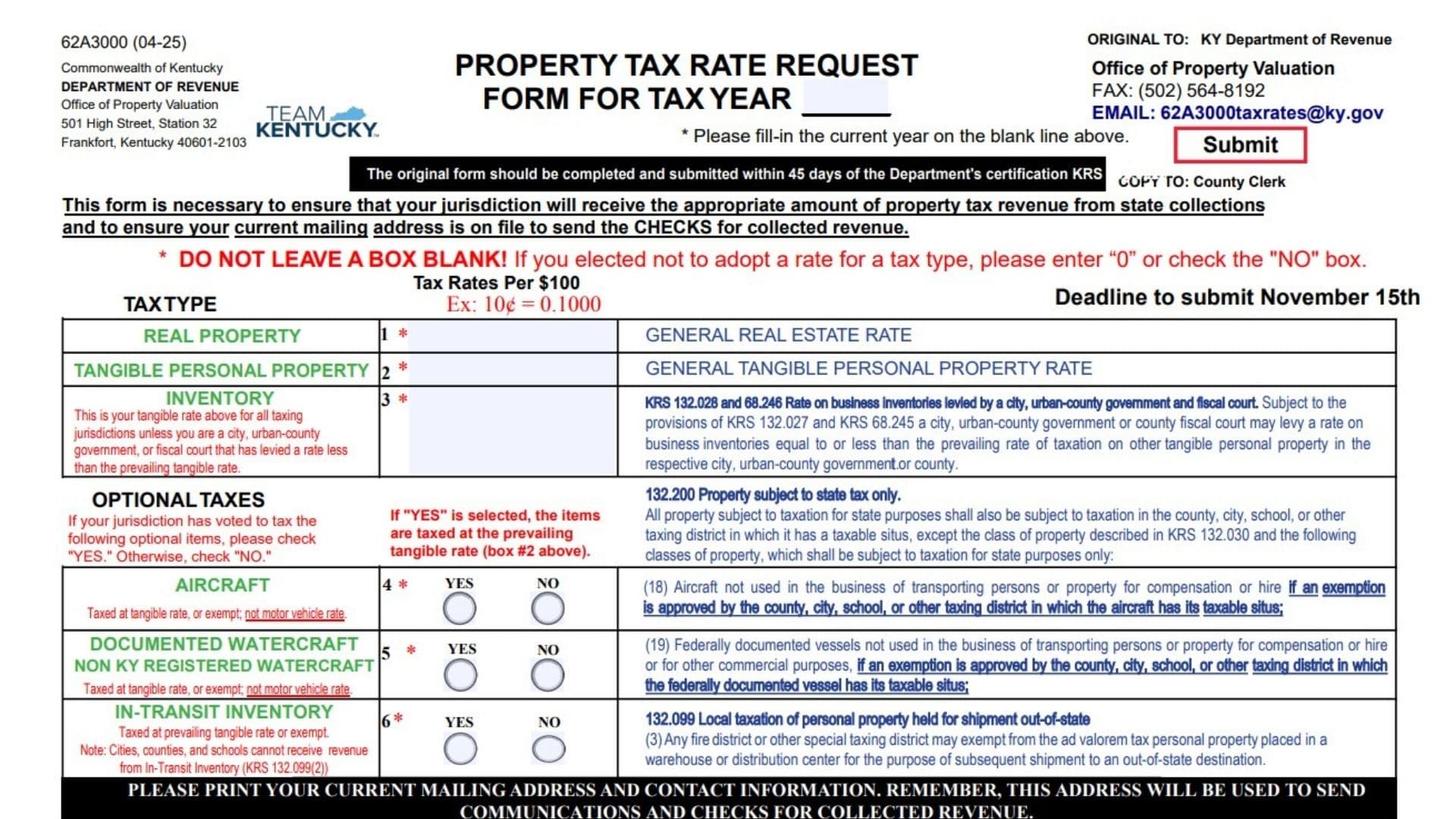
Kentucky Form 62A3000 is the Property Tax Rate Request Form used by counties, cities, schools, special taxing districts, and other qualifying local taxing jurisdictions to report the property tax rates they have established for a particular tax year. It is not an individual property tax return and is generally not completed by ordinary homeowners or business property owners. Instead, an authorized representative of the local jurisdiction uses it to provide the Kentucky Department of Revenue with the jurisdiction’s real property rate, tangible personal property rate, inventory rate, and decisions regarding optional taxation of aircraft, certain watercraft, and in-transit inventory. The Department uses this information to calculate and distribute the correct amount of revenue collected at the state level, including revenue from omitted personal property collections. These distributions are generally made quarterly. The reported rates may also appear in Kentucky’s annual property tax rate booklet. The form collects the jurisdiction’s current mailing address because communications and checks for collected revenue will be sent to that address. Every applicable rate box or Yes/No selection must be completed, even when the jurisdiction does not impose a particular tax. The original is sent to the Kentucky Department of Revenue’s Office of Property Valuation, while a copy is provided to the appropriate county clerk.
Who Should Complete This Form?
The form should be completed by an authorized representative of a Kentucky local taxing jurisdiction that has established property tax rates for the applicable tax year.
This may include representatives of:
- Counties
- Cities
- Urban-county governments
- Fiscal courts
- School districts
- Libraries
- Health departments or health centers
- Hospitals
- Extension service districts
- Fire protection districts
- Ambulance service districts
- Other special taxing districts
The representative completing and signing the form should be familiar with the jurisdiction’s officially adopted tax rates and exemption decisions.
When Must The Form Be Submitted?
The original form should be completed and submitted within 45 days after the Kentucky Department of Revenue certifies the applicable information under KRS 132.0225.
The form also identifies November 15 as the submission deadline. Jurisdictions should therefore complete the form within the required 45-day period and ensure that it is submitted no later than the stated November 15 deadline.
When the certification date creates uncertainty about the applicable deadline, contact the Office of Property Valuation before submitting the form.
How To File Kentucky Form 62A3000
Complete The Original Form
Prepare the original with the tax rates, optional tax selections, current contact information, certification, and signature.
Do not leave any required box empty. If the jurisdiction has not adopted a rate for a particular tax type, enter 0 in the rate box or select No in the applicable optional-tax section.
Send The Original To The Department Of Revenue
Submit the original to:
Kentucky Department of Revenue
Office of Property Valuation
501 High Street, Station 32
Frankfort, Kentucky 40601-2103
The form may also be submitted by fax or email.
Fax: (502) 564-8192
Email: 62A3000taxrates@ky.gov
Provide A Copy To The County Clerk
A copy of the completed form must be provided to the county clerk.
The original goes to the Kentucky Department of Revenue, while the county clerk receives a copy for local records.
Retain A Copy For The Jurisdiction
Keep a completed copy with the jurisdiction’s tax-rate resolutions, meeting minutes, exemption decisions, and other supporting records.
The retained copy may be useful when reviewing revenue distributions or completing the form in a future year.

How To Complete Kentucky Form 62A3000
Form Header Information
Form Number And Revision
The identifier in the upper-left corner shows that this is Form 62A3000 and that the version was revised in April 2025.
This information is already printed and does not require an entry.
Department Information
The Kentucky Department of Revenue and Office of Property Valuation name and mailing address appear in the upper-left portion.
Do not enter information in this area. It identifies the agency responsible for processing the original form.
Property Tax Rate Request Form For Tax Year
Enter the current tax year on the blank line following the title.
Use the year for which the jurisdiction has adopted the property tax rates being reported.
For example, if the jurisdiction is reporting rates adopted for 2026, enter:
2026
Do not enter the date the form was prepared unless it is the same as the applicable tax year.
Original Submission Information
The upper-right area identifies where the original form must be sent. It lists the Office of Property Valuation, fax number, and submission email address.
Use one of the accepted submission methods and send the original information to the Department.
Copy To County Clerk
The form instructs the jurisdiction to provide a copy to the county clerk.
Do not send the only completed copy to the county clerk. The Department must receive the original submission.
Submit Button
An electronic version may display a Submit button near the Department’s contact information. When that function is available and properly configured, it may assist with electronic submission.
Before relying on the button, confirm that all required boxes are complete and that the submission has actually been transmitted. Retain a saved or printed copy for your records.
Forty-Five-Day Submission Notice
The form states that the original should be completed and submitted within 45 days of the Department’s certification.
Calculate the filing period from the relevant certification date and do not postpone completion until the end of the filing window.
Purpose Of The Form
The purpose statement explains that the reported rates help the jurisdiction receive the proper amount of property tax revenue collected by the state.
It also explains why the jurisdiction’s current mailing address is required. The Department will use that address to send communications and checks for collected revenue.
Do Not Leave A Box Blank
Every required tax-rate box and optional-tax selection must contain an answer.
When the jurisdiction did not adopt a rate for a tax type:
- Enter
0in the applicable rate field, or - Select No when the section uses Yes and No choices.
Do not use a blank field to indicate that no tax was adopted.
Tax Rates Per $100
Enter each property tax rate as an amount per $100 of assessed value.
The example shown on the form converts ten cents into the decimal format:
10¢ = 0.1000
Follow the same decimal format for the jurisdiction’s rates. Include enough decimal places to report the adopted rate accurately.
November 15 Deadline
The form displays November 15 as the deadline to submit the rate request.
Complete the rate section, contact section, and certification before that date. Do not assume that an incomplete form will satisfy the deadline.
Tax Rate Information
The main table contains three direct rate fields:
- Real Property
- Tangible Personal Property
- Inventory
The rates entered in Boxes 1 through 3 must be reported per $100 of assessed value.
Box 1: Real Property
Enter the jurisdiction’s general real estate tax rate.
This is the rate imposed on real property within the jurisdiction. Real property commonly includes land, buildings, and other qualifying improvements attached to land.
Enter the officially adopted rate, not an estimate or the previous year’s rate.
If no real property rate was adopted, enter 0 rather than leaving the box blank.
General Real Estate Rate Description
The description printed beside Box 1 confirms that the entry is the jurisdiction’s general real estate rate.
No separate entry is required in the description area. Enter the rate only in the Box 1 rate field.
Box 2: Tangible Personal Property
Enter the jurisdiction’s general tangible personal property tax rate.
This rate applies to taxable tangible personal property subject to the jurisdiction’s prevailing tangible rate.
The Box 2 rate is important because it is also used to determine the rate for several other property categories on the form. When an optional category is taxed, it is generally taxed at the prevailing tangible personal property rate entered in Box 2.
If the jurisdiction did not adopt a tangible personal property rate, enter 0.
General Tangible Personal Property Rate Description
The text beside Box 2 identifies this field as the general tangible personal property rate.
Do not enter an additional rate in the description area. The applicable amount belongs in the Box 2 field.
Box 3: Inventory
Enter the rate that applies to business inventory.
For schools, libraries, health centers, hospitals, extension services, fire protection districts, and ambulance service districts, the inventory rate is normally the same as the prevailing tangible personal property rate in Box 2. These jurisdictions should generally repeat the Box 2 rate in Box 3.
Cities, urban-county governments, and fiscal courts may have authority under KRS 132.028 and KRS 68.246 to impose an inventory rate that is equal to or lower than the prevailing rate applied to other tangible personal property.
When A Lower Inventory Rate Was Adopted
When a city, urban-county government, or fiscal court officially adopted a lower business inventory rate, enter that reduced rate in Box 3.
The rate should reflect the jurisdiction’s approved levy and should not exceed the prevailing tangible rate entered in Box 2.
When No Lower Inventory Rate Was Adopted
When a city, urban-county government, or fiscal court did not choose a lower inventory rate, enter the Box 2 tangible personal property rate again in Box 3.
Do not leave Box 3 blank merely because the rates are identical.
Inventory Note For Other Taxing Jurisdictions
For taxing jurisdictions other than cities, urban-county governments, and fiscal courts, Box 3 generally uses the same tangible rate entered in Box 2.
Review the jurisdiction’s adopted rate documents before entering a different amount.
Optional Taxes
Boxes 4 through 6 ask whether the jurisdiction has voted to tax certain optional property categories.
For each category:
- Select Yes when the jurisdiction taxes the property.
- Select No when the property is exempt or the jurisdiction did not adopt the tax.
Do not select both choices, and do not leave both choices empty.
When Yes is selected, the property is generally taxed at the prevailing tangible personal property rate entered in Box 2. A separate numerical rate is not entered in Boxes 4 through 6.
These optional categories are not taxed at the motor vehicle or Kentucky-registered watercraft rate.
Box 4: Aircraft
Select Yes when the jurisdiction has voted to tax qualifying aircraft.
When Yes is selected, the aircraft is taxed at the prevailing tangible personal property rate from Box 2.
Select No when an exemption has been approved by the county, city, school district, or other taxing district where the aircraft has taxable situs.
The aircraft category covered by this decision concerns aircraft not used to transport people or property for compensation or hire.
Do not apply the motor vehicle tax rate to this category.
Aircraft Exemption Rule
Kentucky law allows the applicable county, city, school district, or other taxing district to approve an exemption for qualifying aircraft.
The aircraft’s taxable situs determines which local jurisdiction’s exemption decision applies.
Use the following approach:
- Tax adopted with no exemption: select Yes
- Exemption approved: select No
- Tax not adopted: select No
Box 5: Documented Watercraft And Non-Kentucky-Registered Watercraft
Select Yes when the jurisdiction taxes qualifying federally documented watercraft or watercraft not registered in Kentucky.
When taxed, the applicable rate is the prevailing tangible personal property rate entered in Box 2.
Select No when the jurisdiction has approved an exemption or has not voted to tax this property.
This category is not taxed at the motor vehicle or Kentucky-registered watercraft rate.
Watercraft Exemption Rule
The exemption applies to qualifying federally documented vessels that are not used:
- To transport people for compensation or hire
- To transport property for compensation or hire
- For other commercial purposes
When an exemption has been approved by the local taxing jurisdiction where the vessel has taxable situs, select No.
When the jurisdiction taxes the qualifying watercraft, select Yes.
Box 6: In-Transit Inventory
In-transit inventory generally refers to qualifying personal property stored in a warehouse or distribution center before shipment to a destination outside Kentucky.
The selection depends on the type of taxing jurisdiction.
Cities, Counties, And Schools
Cities, counties, and schools cannot receive revenue from qualifying in-transit inventory under the rule identified on the form.
These jurisdictions should select No in Box 6.
Libraries, Health Centers, And Other Special Districts
Libraries, health centers, extension services, hospitals, fire protection districts, and ambulance service districts generally use the prevailing tangible rate from Box 2 when in-transit inventory is taxed.
Select Yes when the jurisdiction taxes the property at that rate.
Select No when an exemption has been approved.
Fire District And Special Taxing District Exemptions
A fire district or another qualifying special taxing district may exempt personal property placed in a warehouse or distribution center for later shipment outside Kentucky.
When the jurisdiction has approved that exemption, select No.
State-Only Property Explanation
The statutory information beside the optional-tax section explains that some classes of property may be subject to state taxation while being exempt from local taxation when the appropriate local jurisdiction approves an exemption.
The relevant optional categories on this form include certain aircraft and federally documented vessels.
The form does not require you to rewrite the statutory language. Use it to determine whether Yes or No should be selected for the jurisdiction.
Current Mailing Address And Contact Information
The Department uses this section to send correspondence and checks for collected property tax revenue.
Enter the jurisdiction’s current information rather than copying an outdated address from a prior-year filing.
County
Enter the Kentucky county associated with the taxing jurisdiction.
Use the full county name.
Taxing Jurisdiction Name
Enter the complete legal name of the local taxing jurisdiction.
Examples may include the formal name of a:
- City
- County
- School district
- Library district
- Fire protection district
- Health district
- Ambulance district
- Other special taxing district
Avoid abbreviations that could make the jurisdiction difficult to identify.
Contact Person
Enter the full name of the person who can answer questions about the reported tax rates, mailing information, and optional tax decisions.
This may be a finance officer, clerk, treasurer, administrator, superintendent, or another authorized employee.
Contact Person’s Title
Enter the contact person’s official job title.
The title should explain the person’s role within the jurisdiction.
Mailing Address
Enter the complete mailing address where the jurisdiction wants to receive communications and checks for collected revenue.
Include any applicable:
- Street number
- Street name
- Suite or office number
- Post office box
Review this address carefully. An incorrect address may delay important correspondence or revenue checks.
City
Enter the city associated with the mailing address.
State
Enter the two-letter state abbreviation.
For a Kentucky address, enter:
KY
ZIP Code
Enter the complete ZIP Code for the mailing address.
Include the additional four-digit ZIP Code extension when it is known and regularly used.
Telephone
Enter a current telephone number for the jurisdiction or designated contact person.
Include the area code.
Fax
Enter the jurisdiction’s current fax number.
When the jurisdiction does not maintain a fax number, follow the Department’s instructions for indicating that the field is not applicable. Because the form says not to leave boxes blank, do not simply ignore the field.
Enter an active email address that is regularly monitored.
Use an official government or jurisdiction email address when one is available. Check the spelling before submitting the form.
Certification Section
The certification states that the signer is acting as a representative of the local jurisdiction and confirms that the requested property tax rates were set for the tax year entered at the top.
The signer should review Boxes 1 through 6 and the contact information before signing.
Signature
An authorized representative of the taxing jurisdiction must sign the form.
The signature confirms that the reported rates and optional tax selections were officially established for the applicable year.
Do not have an unauthorized employee sign merely because that person prepared the form.
Date
Enter the date the authorized representative signs the certification.
Use a clear month, day, and year format.
Print Name
Print or type the signer’s full name.
The printed name should make the signature easy to identify.
Title
Enter the signer’s official title within the taxing jurisdiction.
Examples may include:
- Mayor
- County judge-executive
- Superintendent
- Board chair
- Treasurer
- Finance director
- District administrator
- Authorized clerk
The title should demonstrate the signer’s connection to the jurisdiction and authority to certify the filing.
Department Contact Information
Questions about the form or the reported property tax levies may be directed to the contacts listed below.
Ashley Sheeks
Email: Ashley.Sheeks@ky.gov
Telephone: (502) 564-7097
Justin Taylor
Email: Justin.Taylor@ky.gov
Telephone: (502) 564-7098
Contact the Department when you need clarification about rate reporting, optional property categories, exemptions, deadlines, or the correct way to complete a field.
What Happens After Filing?
The Kentucky Department of Revenue uses the submitted information to maintain the jurisdiction’s current tax rates and mailing address.
The rates help the Department determine the appropriate amount of property tax revenue due to the jurisdiction from state collections. Revenue from omitted personal property collections is generally distributed quarterly.
The reported rates may also be included in Kentucky’s annual property tax rate publication.
Checks and communications will be sent to the current address entered on the form, which is why the mailing section must be reviewed each year.
Final Filing Checklist
Before submitting Kentucky Form 62A3000, confirm that you have:
- Entered the correct tax year
- Used tax rates adopted for that year
- Reported every rate per $100 of assessed value
- Entered the real property rate in Box 1
- Entered the tangible personal property rate in Box 2
- Entered the appropriate inventory rate in Box 3
- Repeated the Box 2 rate in Box 3 when required
- Entered a lower inventory rate only when legally adopted
- Selected Yes or No for aircraft in Box 4
- Selected Yes or No for documented and non-Kentucky-registered watercraft in Box 5
- Selected Yes or No for in-transit inventory in Box 6
- Used the Box 2 rate for taxed optional property
- Avoided applying the motor vehicle rate to optional property
- Entered
0when no numerical rate was adopted - Left no required box unanswered
- Entered the county
- Entered the full taxing jurisdiction name
- Identified a current contact person
- Added the contact person’s title
- Provided the current mailing address
- Completed the city, state, and ZIP Code
- Entered the telephone number
- Addressed the fax field
- Entered a monitored email address
- Reviewed the address used for revenue checks
- Obtained the authorized representative’s signature
- Entered the signature date
- Printed the signer’s name
- Entered the signer’s official title
- Prepared the original for the Department
- Prepared a copy for the county clerk
- Retained a copy for the jurisdiction’s records
- Submitted the form within 45 days of certification
- Observed the stated November 15 deadline