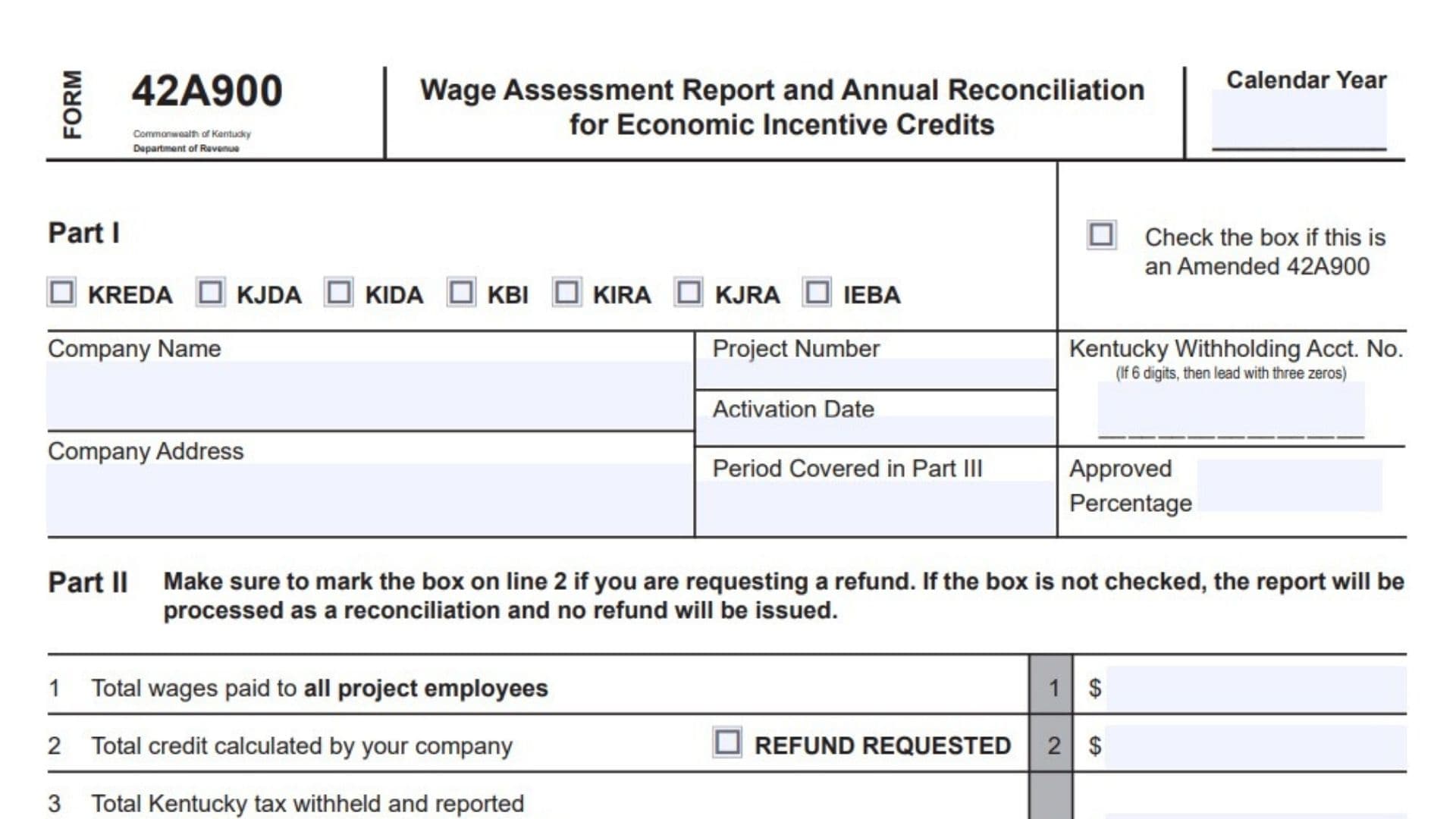
Kentucky Form 42A900, titled the Wage Assessment Report and Annual Reconciliation for Economic Incentive Credits, is used by a company that has received approval from the Kentucky Cabinet for Economic Development to apply wage assessment credits against its Kentucky withholding account. The company must prepare a Wage Assessment Report for every reporting period required by its withholding filing frequency, and each report may contain only one active economic development project. When a company has more than one approved project or more than one type of credit, it must prepare a separate report for every project and credit combination. The same form also serves as the company’s annual reconciliation, which must cover the withholding tax year from January 1 through December 31, even when the business uses a different fiscal year for accounting purposes. The credit does not reduce or change the amount reported as withheld from participating employees. The full Kentucky tax withheld from an employee’s wages should still appear in Box 17 of the employee’s W-2. If the W-2 reports an incorrect withholding amount, the company must issue a corrected W-2 to the employee and provide the corrected information to the Kentucky Department of Revenue. Each report and annual reconciliation must also include the tracking schedule connected to the approved program. Missing tracking schedules can cause a credit claim or refund request to be denied.
Who Must File Form 42A900?
A business must complete this form when it has been approved to claim wage assessment incentives through one of the economic development credit programs listed on the form.
The available program selections are:
- KREDA
- KJDA
- KIDA
- KBI
- KIRA
- KJRA
- IEBA
Select only the program that matches the company’s approval agreement. When the company has approvals under multiple programs or has multiple active projects, prepare a separate Form 42A900 for each approved credit and project.
What Must Be Included With The Filing?
Attach the tracking schedule that applies to the selected economic development program. The available tracking schedules are:
- IEBA-T
- KBI-T
- KIDA-T
- KIRA-T
- KJDA-T
- KJRA-T
- KREDA-T
Use the tracking schedule that corresponds with the program selected in Part I. Failure to provide the applicable schedule may result in the denial of the credit or refund.
The filing must also include the employee-level information requested in Part III. An alternate spreadsheet may be used when it follows the same column order and contains every required column. Leaving out columns may delay the review, verification, and application of the credit.
When Is Form 42A900 Due?
Complete the Wage Assessment Report for each period required by the company’s filing frequency.
The Annual Reconciliation is due by March 15 each year. It must report wages for the full calendar year beginning January 1 and ending December 31, even when the company operates on a fiscal-year basis.
How To File Form 42A900
Before submitting the report, confirm that Part III is complete, the totals have been transferred correctly to Part II, the appropriate tracking schedule is attached, and the contact and signature sections have been completed.
Filing By Mail
Send the completed filing to:
Kentucky Department of Revenue
Tax Credits Section
P.O. Box 181, Station 52
Frankfort, KY 40602-0181
Filing By Fax
Fax the completed filing to:
(502) 564-0058
Filing By Email
Send electronic filings and spreadsheets to:
KRC.WEBResponseEconomicDevelopmentCredits@ky.gov
The employee spreadsheet is preferably submitted in Excel format because an electronic spreadsheet can help the department verify the credit and apply it to the withholding account more efficiently.

How To Complete Form 42A900
Header Information
Calendar Year
Enter the calendar year covered by the report or annual reconciliation. For an annual reconciliation, the reporting period must run from January 1 through December 31.
Amended Form Checkbox
Check the amended return box when correcting or replacing information from a Form 42A900 that was previously submitted.
Do not check this box for an original filing.
Part I: Company And Project Information
Economic Development Credit Program
Check the box for the economic development credit program under which the company received approval.
Choose one of the following:
- KREDA
- KJDA
- KIDA
- KBI
- KIRA
- KJRA
- IEBA
Each report should cover only one active project and one approved credit. Prepare additional forms when reporting multiple projects or credits.
Company Name
Enter the full legal name of the company that received the economic development approval.
Use the same company name associated with the Kentucky withholding account and the economic development agreement.
Company Address
Enter the company’s complete mailing address.
This address may be used when the Kentucky Department of Revenue issues a refund by paper check, so verify that it is current and able to receive official correspondence.
Project Number
Enter the project number assigned to the approved economic development project.
The project number can be found in the agreement completed with the Kentucky Cabinet for Economic Development.
Activation Date
Enter the activation date of the approved project.
Use the date associated with the project’s economic development agreement.
Period Covered In Part III
Enter the beginning and ending dates represented by the employee wages reported in Part III.
The date range should match the reporting period covered by the wage, withholding, and credit calculations.
Kentucky Withholding Account Number
Enter the Kentucky withholding account number issued by the Kentucky Department of Revenue.
When the account number contains only six digits, add three zeros to the beginning so the field contains the required number of digits.
Approved Percentage
Enter the percentage approved for the state portion of the wage assessment credit.
Use the percentage shown in the economic development agreement. Do not substitute a local credit percentage or calculate a new percentage.
Part II: Wage And Credit Summary
Part II summarizes the employee-level amounts calculated in Part III.
When requesting a refund, the refund checkbox beside Line 2 must be checked. Without that selection, the filing will be handled as a reconciliation, and a refund will not be issued.
Line 1: Total Wages Paid To Project Employees
Enter the total amount from Part III, Column F.
The total must include the wages of project employees and any base employees that the agreement requires to be reported, even when those base employees are not eligible for incentive credits.
Review all employee entries before calculating the total so duplicate employees are not included.
Line 2: Total Credit Calculated By The Company
Enter the total from Part III, Column K.
This is the verified credit amount after applying the approved percentage, comparing the result with Kentucky tax withheld, and limiting the claim to the amount actually eligible.
Refund Requested Checkbox
Check the refund requested box when the company wants the amount on Line 2 refunded.
When the box is left blank, the filing will be processed only as a reconciliation. No refund will be issued, even when an amount appears on Line 2.
Line 3: Total Kentucky Tax Withheld And Reported
Enter the total Kentucky income tax withheld for every employee whose W-2 is filed under the withholding account number entered in Part I.
Use the amount withheld before applying the wage assessment credit.
Include withholding for:
- Employees included in the credit calculation
- Employees who are not eligible for the credit
- Employees working at another business location
- Other employees whose W-2 is reported under the same Kentucky withholding account
This amount should represent the complete withholding liability connected to the listed account, not only the withholding associated with project employees.
Line 4: Total Local Wage Assessment Claimed
Enter the approved local wage assessment credit for the reporting period when the company’s agreement permits a local credit.
Leave this line blank or enter zero when the company is not eligible for a local wage assessment credit.
This amount is not calculated through the employee columns in Part III. Determine it according to the local wage assessment provisions contained in the company’s agreement.
Direct Deposit Information
Complete this section only when the company checked the refund requested box on Line 2 and wants the refund deposited into a bank account.
Leave the entire direct deposit section blank when a paper refund check is preferred.
Routing Transit Number
Enter the bank’s routing transit number.
The first two digits must fall within one of these ranges:
- 01 through 12
- 21 through 32
Review the routing number carefully. An incorrect number may prevent or delay the deposit.
Account Number
Enter the complete bank account number.
Include hyphens when they are part of the account number. Do not enter spaces or other unnecessary symbols.
Confirm the account number directly from the company’s bank records rather than relying on a handwritten or previously stored number.
Type Of Account
Check exactly one account type:
- Checking
- Savings
Do not select both boxes. The selected account type must match the bank account number provided.
Authorized Contact And Signature Information
Complete every applicable contact line so the Kentucky Department of Revenue can reach the person responsible for the filing.
Signature
The authorized company representative must sign the filing.
The signer should be a person permitted to confirm that the wage, withholding, and credit information is complete and accurate.
Date
Enter the date the authorized representative signs the filing.
Name
Print the signer’s full name clearly.
Do not use a signature alone in this field.
Telephone Number
Enter a telephone number where the department can reach the responsible contact person during normal business hours.
Title
Enter the signer’s position or job title within the company.
Examples may include controller, payroll manager, tax manager, chief financial officer, owner, or authorized representative.
Enter the contact person’s current email address.
Use an address that is regularly monitored in case the department requests corrections, explanations, or additional documents.
Fax Number
Enter the company’s fax number when one is available.
Part III: Wage Assessment Spreadsheet
Part III provides the employee-by-employee information used to calculate and verify the wage assessment credit.
The spreadsheet must contain all required columns. A company may submit its own electronic spreadsheet, but it should follow the same structure, column order, and calculation format.
Company Name
Enter the same company name shown in Part I.
Use consistent spelling across the summary and spreadsheet pages.
Project Number
Enter the project number connected with the employees and wages reported on that spreadsheet.
Do not combine employees from different approved projects on the same report.
Kentucky Withholding Account Number
Enter the same Kentucky withholding account number reported in Part I.
Make sure the employee withholding included in the spreadsheet is associated with this account.
Period Ending
Enter the ending date of the reporting period.
This date must be consistent with the date range entered as the period covered in Part I.
Spreadsheet Page Number
Enter the current spreadsheet page number followed by the total number of spreadsheet pages.
For example, the first page of a three-page spreadsheet would be identified as Page 1 of 3.
Use continuous page numbering when Part III contains more than one page.
Part III Column-By-Column Instructions
Column A: Employee Name
Enter the employee’s full name.
Use a consistent name format for every employee so records can be matched and duplicate entries can be identified.
Include project employees and required base employees.
Column B: Social Security Number
Enter only the last four digits of the employee’s Social Security number.
Do not enter the employee’s complete Social Security number in this column.
Column C: State Of Residency
Enter the employee’s state of legal residence for the reporting period.
Employees residing in the following reciprocal states are not included in the wage assessment credit calculation:
- Illinois
- Indiana
- Ohio
- Michigan
- Virginia
- West Virginia
- Wisconsin
Kentucky does not generally treat withholding for residents of these reciprocal states as eligible withholding for the credit calculation.
Remote workers may be included in certain agreements approved through the Kentucky Economic Development Finance Authority. Review the project agreement before including remote employees.
Column D: Hire Date
Enter the employee’s original hire date.
Sort the spreadsheet so the employee with the oldest hire date appears first, followed by employees with progressively newer hire dates.
Include base employees in the spreadsheet. The required base number of employees must be maintained throughout the agreement period.
Remove duplicate employee records before submitting the report. Duplicate entries can cause calculation errors and processing delays.
Column E: Employee Termination Date
Enter the employee’s termination date when the employee left the company during the reporting period.
Leave the field blank when the employee remained employed through the end of the period.
When a base employee leaves the company, the employee with the next oldest hire date must move into the base group as of the former base employee’s departure date.
Because of this change, one employee may be eligible for the credit during one part of the tax year and later become a base employee who is not eligible for the credit during another part of the same year.
The spreadsheet calculations should reflect the employee’s correct status for each applicable period.
Column F: Wages For The Period
Enter the employee’s wages for the reporting period.
For KBI and KJDA projects, report taxable wages.
For the other listed economic development credits, report gross wages, subject to the wage definition required by the applicable Kentucky law and project agreement.
Include wages for:
- Eligible project employees
- Required base employees
- Base employees who are not eligible for incentive credits
The amount entered should cover only the reporting period shown on the form.
When the company was suspended from claiming the credit for part of the period, exclude wages connected to the suspended days.
Column G: State Tax Withheld For The Period
Enter the Kentucky income tax withheld from the employee’s wages during the reporting period.
Use the actual state withholding amount before applying the wage assessment credit.
The final credit allowed for an employee cannot exceed the Kentucky tax withheld for that employee.
Column H: Credit Claimed For The Period
Enter the amount of wage assessment credit the company is claiming for the employee during the reporting period.
The amount must be limited by:
- The comparison between Column I and Column G; and
- The approved costs still available under the project agreement.
Do not claim more than the lowest applicable limitation.
Before submitting the filing, investigate and correct any unexplained difference between Column H and Column K.
Column I: Wages Multiplied By The Approved Percentage
Multiply the wages entered in Column F by the approved state credit percentage entered in Part I.
Use this calculation:
Column F × Approved Percentage = Column I
Apply the same approved percentage consistently to each eligible employee unless the agreement requires a different treatment.
Column J: Lesser Of Column I Or Column G
Compare the amount in Column I with the Kentucky tax withheld in Column G.
Enter the smaller of the two amounts in Column J.
Use this calculation rule:
- When Column I is lower, enter the Column I amount.
- When Column G is lower, enter the Column G amount.
- When both amounts are equal, enter that equal amount.
This limitation prevents the calculated credit from exceeding the state income tax withheld for the employee.
Column K: Lesser Of Column J Or Column H
Compare the amount in Column J with the credit claimed in Column H.
Enter the smaller amount in Column K.
Use this calculation rule:
- When Column J is lower, enter the Column J amount.
- When Column H is lower, enter the Column H amount.
- When both amounts are equal, enter that equal amount.
Column K represents the verified credit amount for the employee.
How To Verify The Amount Claimed
After completing all employee rows, review Columns H, I, J, and K.
Confirm that:
- Column I equals Column F multiplied by the approved percentage.
- Column J contains the lower of Column I and Column G.
- Column K contains the lower of Column J and Column H.
- No employee’s credit exceeds the Kentucky tax withheld for that employee.
- The claim does not exceed the approved project costs available.
- Any difference between Column H and Column K has been reviewed and reconciled.
- The total of Column K has been entered on Part II, Line 2.
The total credit reported on Part II, Line 2 must be the eligible amount after all employee-level limitations have been applied.
Special Rules For Base Employees
Base employees must be included when required by the project agreement, even though their wages may not qualify for the incentive credit.
The company must maintain the required base employment number throughout the agreement term.
When a base employee leaves, move the employee with the next oldest hire date into the base group beginning on the former employee’s termination date. Adjust the credit calculation when an employee changes between eligible project status and ineligible base status during the year.
Special Rules For Reciprocal-State Employees
Do not include withholding from residents of Illinois, Indiana, Ohio, Michigan, Virginia, West Virginia, or Wisconsin in the credit calculation.
These states have reciprocal arrangements with Kentucky, so the employees’ withholding is not generally eligible for the wage assessment credit.
The employees may still need to appear in company payroll and withholding records, but their withholding should not be used to increase the credit.
Special Rules For Remote Workers
Remote workers may be included when the company’s agreement with the Kentucky Economic Development Finance Authority permits their inclusion.
Do not assume that every remote employee qualifies. Confirm the employee’s eligibility under the approved project agreement before including wages or withholding in the credit calculation.
Special Rules During A Suspension
When the company receives a suspension notice identifying dates during which it is not eligible for the credit, exclude wages associated with all suspended days from Part III.
Do not calculate wage assessment credits for the suspended portion of the reporting period.
When the company has a KBI project and receives a suspension notice, the company is not eligible to claim a wage assessment credit for the entire tax year.
Final Form 42A900 Filing Checklist
Before submitting the report, confirm that:
- The correct calendar year has been entered.
- The amended box has been checked when correcting a previous filing.
- The correct economic development program has been selected.
- Only one active project and one credit are included.
- The company name and mailing address are complete.
- The correct project number and activation date are entered.
- The Part III reporting period is clearly identified.
- The Kentucky withholding account number is properly formatted.
- The approved state credit percentage matches the agreement.
- Part II, Line 1 agrees with the total of Column F.
- Part II, Line 2 agrees with the total of Column K.
- The refund box is checked when a refund is requested.
- Part II, Line 3 includes Kentucky withholding for all employees under the account.
- Part II, Line 4 includes only an approved local wage assessment credit.
- Direct deposit information is complete when an electronic refund is requested.
- The correct checking or savings box is selected.
- Every required employee is included in Part III.
- Only the last four digits of each Social Security number are entered.
- Employees are arranged by hire date, with the oldest hire date first.
- Duplicate employee entries have been removed.
- Wages are reported using the correct taxable-wage or gross-wage rule.
- Reciprocal-state employees are excluded from the credit calculation.
- Suspended periods have been removed from the eligible wages.
- Columns I, J, and K have been calculated correctly.
- Differences between Columns H and K have been reconciled.
- The applicable tracking schedule is attached.
- The authorized representative has signed and dated the filing.
- The printed name, title, telephone number, email, and fax number are completed where applicable.
- All spreadsheet pages are numbered.
- The Annual Reconciliation is submitted by March 15.