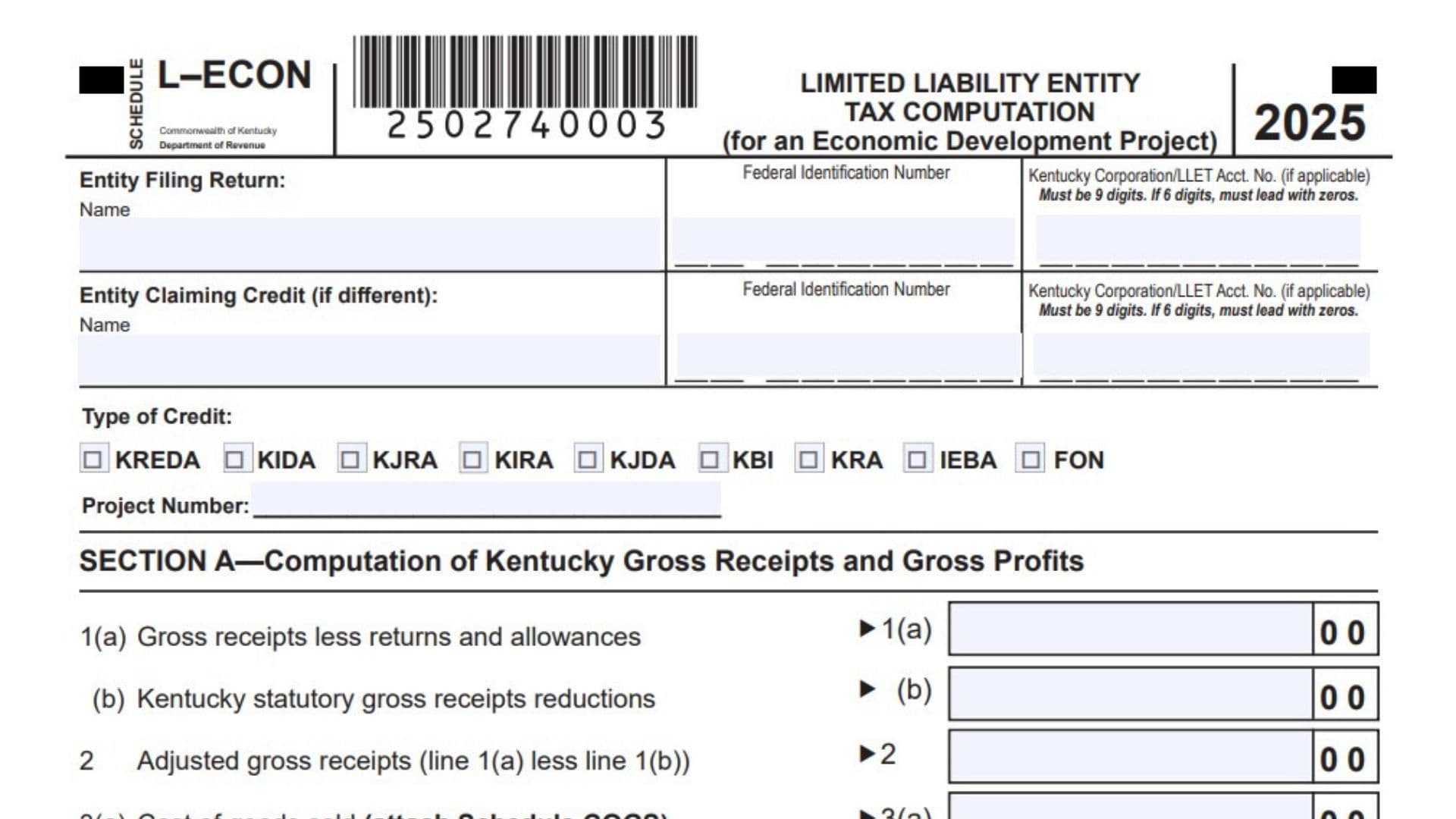
Kentucky Schedule L-ECON is used to compute the Limited Liability Entity Tax, also called LLET, that is attributable to a qualifying Kentucky economic development project. A taxpayer completes this schedule when it has one or more approved projects under programs such as the Kentucky Rural Economic Development Act, Kentucky Industrial Development Act, Kentucky Jobs Retention Agreement, Kentucky Industrial Revitalization Act, Kentucky Jobs Development Act, Kentucky Business Investment Program, Kentucky Reinvestment Act, Incentives for Energy-related Business Act, or Farming Operation Networking Project. The schedule separates project activity from the taxpayer’s overall business activity so Kentucky can determine the LLET amount connected to the economic development credit. It asks for Kentucky gross receipts, statutory reductions, adjusted gross receipts, cost of goods sold, adjusted cost of goods sold, and gross profits that relate to the project. It also asks for total gross receipts and total gross profits from all sources connected to the project calculation. After those amounts are entered, the schedule uses the gross receipts and gross profits methods to calculate LLET. The final LLET amount is the smaller of the gross receipts LLET and the gross profits LLET, unless the taxpayer qualifies for the minimum $175 entry rule. This schedule is important because the amount calculated on it must be carried to the applicable economic development schedule, and pass-through entities may also need related project income calculations for owners.
How To File Kentucky Schedule L-ECON
Attach Kentucky Schedule L-ECON to the taxpayer’s Kentucky return when the taxpayer is claiming or reporting an applicable economic development project credit. Complete one schedule for each project that needs an LLET calculation. Before filing, gather the project number, credit approval information, gross receipts records, Kentucky statutory reduction amounts, Schedule COGS figures, total project receipts, total project cost of goods sold, and the applicable economic development schedule where the final LLET amount must be reported. If the taxpayer is a pass-through entity, complete any required pass-through project income reporting so the project income can be properly assigned to partners, members, shareholders, or beneficiaries. Make sure the LLET amount from Section E is carried to the proper economic development schedule line.

How To Complete Kentucky Schedule L-ECON
Top Of Schedule
Entity Filing Return, Name: Enter the legal name of the entity that is filing the Kentucky return.
Entity Filing Return, Federal Identification Number: Enter the federal identification number for the entity filing the return.
Entity Filing Return, Kentucky Corporation/LLET Account Number: Enter the Kentucky Corporation/LLET account number for the filing entity, if applicable. The number must be 9 digits. If it has only 6 digits, add leading zeros at the beginning.
Entity Claiming Credit, Name: If the entity claiming the economic development credit is different from the entity filing the return, enter the credit-claiming entity’s legal name. If it is the same entity, use the taxpayer’s information consistently.
Entity Claiming Credit, Federal Identification Number: Enter the federal identification number of the entity claiming the credit, if different from the filing entity.
Entity Claiming Credit, Kentucky Corporation/LLET Account Number: Enter the Kentucky Corporation/LLET account number for the entity claiming the credit, if applicable. Use 9 digits, adding leading zeros if needed.
Type Of Credit, KREDA: Check this box if the project is under the Kentucky Rural Economic Development Act.
Type Of Credit, KIDA: Check this box if the project is under the Kentucky Industrial Development Act.
Type Of Credit, KJRA: Check this box if the project is under the Kentucky Jobs Retention Agreement.
Type Of Credit, KIRA: Check this box if the project is under the Kentucky Industrial Revitalization Act.
Type Of Credit, KJDA: Check this box if the project is under the Kentucky Jobs Development Act.
Type Of Credit, KBI: Check this box if the project is under the Kentucky Business Investment Program.
Type Of Credit, KRA: Check this box if the project is under the Kentucky Reinvestment Act.
Type Of Credit, IEBA: Check this box if the project is under the Incentives for Energy-related Business Act.
Type Of Credit, FON: Check this box if the project is under the Farming Operation Networking Project.
Project Number: Enter the assigned project number for the approved economic development project.
Section A: Computation Of Kentucky Gross Receipts And Gross Profits
Use Section A to report Kentucky amounts attributable to the economic development project.
Line 1(a): Gross Receipts Less Returns And Allowances: Enter the Kentucky gross receipts connected to the project after subtracting returns and allowances. Gross receipts may include sales, rent, proceeds from sales of real or tangible personal property, interest, dividends, and similar receipts connected to the project.
Line 1(b): Kentucky Statutory Gross Receipts Reductions: Enter the Kentucky gross receipts reductions that apply to the project. This includes amounts allocable to a qualified exempt organization when applicable.
Line 2: Adjusted Gross Receipts: Subtract Line 1(b) from Line 1(a). Enter the result as the project’s adjusted Kentucky gross receipts.
Line 3(a): Cost Of Goods Sold: Enter the Kentucky cost of goods sold attributable to the project from Schedule COGS. Attach Schedule COGS. Only allowable cost of goods sold activity should be included, such as manufacturing, producing, reselling, retailing, or wholesaling.
Line 3(b): Kentucky Statutory Cost Of Goods Sold Reductions: Enter the cost of goods sold reductions tied to the project, including amounts connected with gross receipts allocable to a qualified exempt organization when applicable.
Line 4: Adjusted Cost Of Goods Sold: Subtract Line 3(b) from Line 3(a). Enter the result as adjusted Kentucky cost of goods sold attributable to the project.
Line 5: Gross Profits: Subtract Line 4 from Line 2. Enter the result as Kentucky gross profits attributable to the project.
Section B: Computation Of Total Gross Receipts And Gross Profits
Use Section B to report total project-related amounts from all sources.
Line 1: Adjusted Gross Receipts: Enter total adjusted gross receipts attributable to the project from all sources. Gross receipts may include sales, rent, proceeds from the sale of real and tangible personal property, interest, dividends, and similar receipts.
Line 2: Cost Of Goods Sold: Enter the portion of the total cost of goods sold from Schedule COGS that is attributable to the project. Attach Schedule COGS.
Line 3: Gross Profits: Subtract Line 2 from Line 1. Enter the result as total gross profits attributable to the project.
Stop Rule Before Sections C And D
If Section B, Line 1 Or Section B, Line 3 Is $3,000,000 Or Less: Do not complete Sections C and D. Enter $175 on Section E, Line 1. Also enter $175 on the applicable economic development schedule, Part I, Line 2 or Line 5.
If Section B, Line 1 And Section B, Line 3 Are Above $3,000,000: Continue to Section C and complete the remaining LLET calculation.
Section C: Computation Of Gross Receipts LLET
Use Section C to calculate LLET based on adjusted gross receipts attributable to the project.
Line 1: Gross Receipts Greater Than $3,000,000 But Less Than $6,000,000: Complete this line if Section B, Line 1 is more than $3,000,000 but less than $6,000,000. Use the formula shown on the schedule: multiply Section A, Line 2 by 0.00095, then subtract the phase-out adjustment based on $2,850 and the difference between $6,000,000 and Section A, Line 2 divided by $3,000,000. If the result is less than zero, enter zero.
Line 2: Gross Receipts Of $6,000,000 Or More: Complete this line if Section B, Line 1 is $6,000,000 or more. Multiply Section A, Line 2 by 0.00095 and enter the result.
Line 3: Gross Receipts LLET Amount: Enter the amount from Line 1 or Line 2, depending on which gross receipts rule applies.
Section D: Computation Of Gross Profits LLET
Use Section D to calculate LLET based on gross profits attributable to the project.
Line 1: Gross Profits Greater Than $3,000,000 But Less Than $6,000,000: Complete this line if Section B, Line 3 is more than $3,000,000 but less than $6,000,000. Use the formula shown on the schedule: multiply Section A, Line 5 by 0.0075, then subtract the phase-out adjustment based on $22,500 and the difference between $6,000,000 and Section A, Line 5 divided by $3,000,000. If the result is less than zero, enter zero.
Line 2: Gross Profits Of $6,000,000 Or More: Complete this line if Section B, Line 3 is $6,000,000 or more. Multiply Section A, Line 5 by 0.0075 and enter the result.
Line 3: Gross Profits LLET Amount: Enter the amount from Line 1 or Line 2, depending on which gross profits rule applies.
Section E: Computation Of LLET
Line 1: Final LLET For The Economic Development Project: Enter the smaller amount from Section C, Line 3 or Section D, Line 3. If the stop rule applied because Section B, Line 1 or Section B, Line 3 was $3,000,000 or less, enter $175 instead. Also carry this amount to the applicable economic development schedule, Part I, Line 2 or Line 5.
Final Review Before Filing
Review the entity names, federal identification numbers, Kentucky Corporation/LLET account numbers, credit type, and project number before filing. Confirm that Section A includes only Kentucky amounts attributable to the project. Confirm that Section B includes the total project-related amounts from all sources. Attach Schedule COGS if cost of goods sold is entered. Apply the $175 stop rule when Section B, Line 1 or Section B, Line 3 is $3,000,000 or less. If the stop rule does not apply, complete Sections C and D carefully and use the smaller result in Section E. Finally, transfer the Section E amount to the proper line of the applicable economic development schedule.