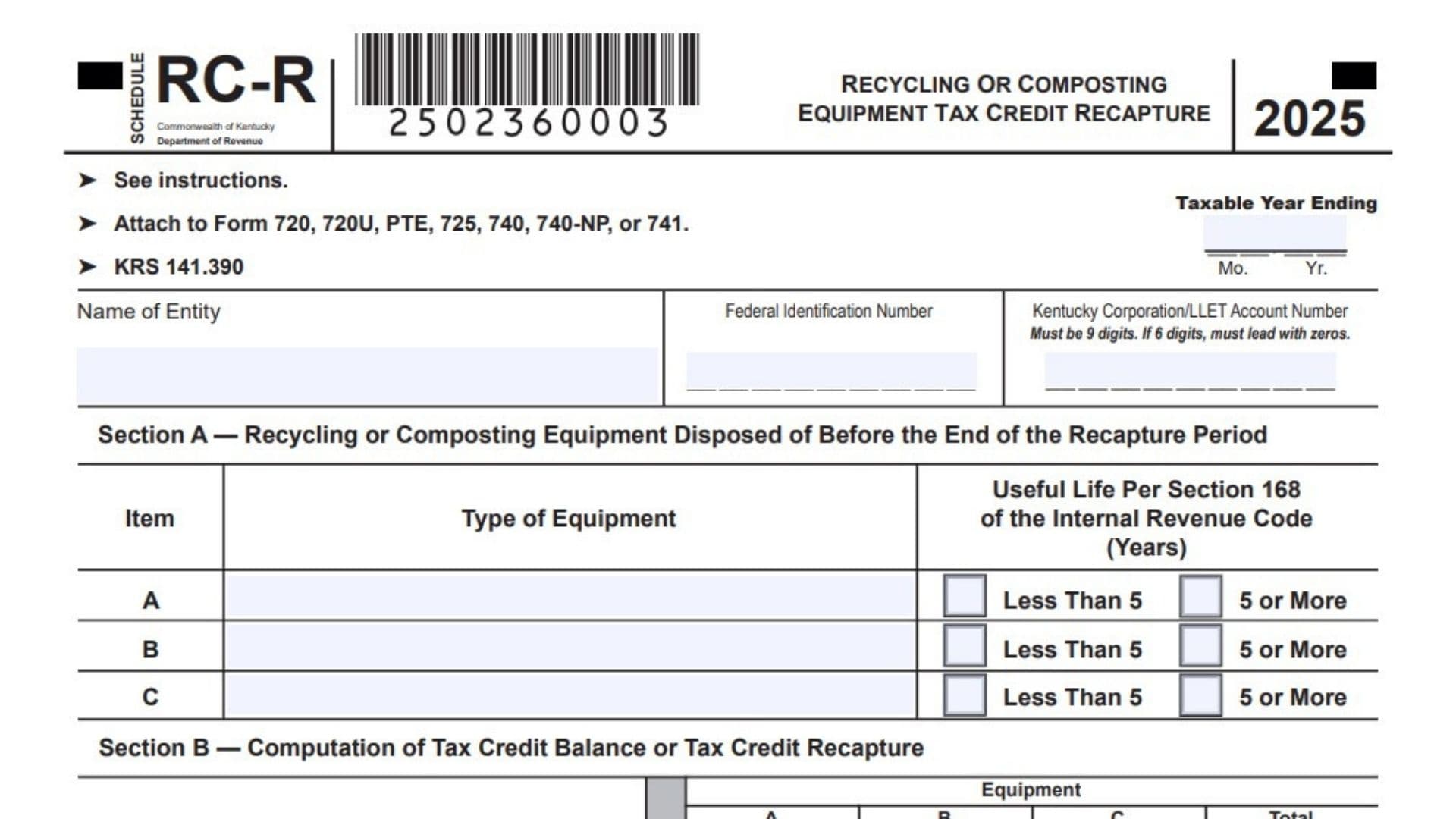
Kentucky Schedule RC-R, Recycling or Composting Equipment Tax Credit Recapture, is used when a taxpayer previously received a Kentucky recycling or composting equipment tax credit and later sold, transferred, or disposed of the qualifying equipment before the end of the required recapture period. This schedule helps calculate whether the taxpayer still has an allowable credit balance or must repay part of the credit through recapture. The form applies to equipment connected with the Kentucky recycling or composting equipment tax credit under KRS 141.390. In simple terms, Kentucky allows a tax credit for certain approved recycling or composting equipment, but if the equipment is not kept for the required period based on its useful life, the credit must be recalculated. If the credit used in earlier years is more than the recomputed allowable credit, the difference becomes a recapture amount and is added back to tax liability for the year the equipment was sold, transferred, or disposed of. If the recomputed credit is more than the credit already used, the taxpayer may be able to use the remaining balance in the year of sale, transfer, or disposition. However, any unused balance from that year cannot be carried forward to a later tax year. Kentucky Schedule RC-R is therefore important for taxpayers, corporations, pass-through entities, fiduciaries, residents, and nonresidents who claimed the recycling or composting equipment tax credit and disposed of the equipment early.
How To File Kentucky Schedule RC-R
File Kentucky Schedule RC-R with the Kentucky return that applies to the taxpayer. The schedule may be attached to Form 720, Form 720U, Form PTE, Form 725, Form 740, Form 740-NP, or Form 741. Complete the schedule for the taxable year in which the recycling or composting equipment was sold, transferred, or disposed of before the end of the recapture period. Use the equipment purchase or installation date, disposal date, original approval information, prior-year credit usage, and the allowable tax credit percentage table to calculate the correct balance or recapture amount. If more than three items of equipment were disposed of during the year, attach additional Schedule RC-R forms as needed. Pass-through entities must attach a copy of Schedule RC-R to each partner’s, member’s, shareholder’s, or beneficiary’s Kentucky Schedule K-1 when the credit or recapture information is passed through.

How To Complete Kentucky Schedule RC-R
Top Of Schedule
Taxable Year Ending: Enter the month and year for the taxable year in which the equipment was sold, transferred, or disposed of. Use the month and year format shown on the form.
Name Of Entity: Enter the full legal name of the taxpayer or entity filing the schedule.
Federal Identification Number: Enter the federal identification number for the taxpayer or entity.
Kentucky Corporation/LLET Account Number: Enter the Kentucky Corporation/LLET account number if applicable. The number must be 9 digits. If the account number has only 6 digits, add leading zeros so it becomes 9 digits.
Attach To Return: Attach the completed schedule to Form 720, 720U, PTE, 725, 740, 740-NP, or 741, depending on the taxpayer’s return type.
KRS 141.390: Use this schedule for recycling or composting equipment tax credit recapture calculations under Kentucky law.
Section A: Recycling Or Composting Equipment Disposed Of Before The End Of The Recapture Period
Use Section A to list each item of recycling or composting equipment that was sold, transferred, or disposed of before the end of its useful life under Section 168 of the Internal Revenue Code.
Item A: Type Of Equipment: Enter a clear description of the first item of equipment disposed of during the taxable year.
Item A: Useful Life Less Than 5 Years Or 5 Or More: Check the correct box to show whether the useful life of Item A is less than 5 years or 5 years or more.
Item B: Type Of Equipment: Enter a clear description of the second item of equipment disposed of during the taxable year, if applicable.
Item B: Useful Life Less Than 5 Years Or 5 Or More: Check the correct box to show whether the useful life of Item B is less than 5 years or 5 years or more.
Item C: Type Of Equipment: Enter a clear description of the third item of equipment disposed of during the taxable year, if applicable.
Item C: Useful Life Less Than 5 Years Or 5 Or More: Check the correct box to show whether the useful life of Item C is less than 5 years or 5 years or more.
Additional Equipment Items: If more than three items were sold, transferred, or disposed of during the year, complete and attach additional Schedule RC-R forms for the extra items.
Section B: Computation Of Tax Credit Balance Or Tax Credit Recapture
Complete Section B for each equipment item listed in Section A. Use Column A for Item A, Column B for Item B, and Column C for Item C. Then use the Total column where the form asks for combined amounts.
Line 1: Date Equipment Was Purchased Or Installed: Enter the purchase or installation date for each equipment item listed in Section A. Use the correct date for each item in Column A, B, or C.
Line 2: Date Equipment Was Sold, Transferred, Or Disposed: Enter the date each equipment item was sold, transferred, or otherwise disposed of.
Line 3: Number Of Full Years The Equipment Was Held: Enter the number of full years between the date on Line 1 and the date on Line 2 for each equipment item. Count only full years held.
Line 4: Taxable Year The Department Of Revenue Approved The Tax Credit: Enter the month and year when the Department of Revenue approved the recycling or composting equipment tax credit for each item.
Line 5: Allowable Tax Credit Percentage From Table: Use the allowable tax credit percentage table on the schedule. Choose the correct percentage based on how long the property was held and whether the useful life was less than 5 years or 5 years or more.
Line 6: Amount Of Tax Credit Originally Approved On Schedule RC, Column G: Enter the amount of tax credit originally approved by the Department of Revenue for each item. This is the originally approved recycling or composting equipment tax credit. In the Total column, add the Line 6 amounts from Columns A, B, and C.
Line 7: Multiply Line 6 By The Percentage On Line 5: Multiply the originally approved credit on Line 6 by the allowable percentage on Line 5 for each item. Enter the result for each item. In the Total column, add the Line 7 amounts from Columns A, B, and C.
Line 8: Recycling Tax Credit Used In Prior Years Against LLET: Enter the amount of recycling or composting equipment tax credit the taxpayer used in prior years against the limited liability entity tax. If the originally approved credit covered more than one equipment item, allocate the prior-year credit usage based on the cost of each item. In the Total column, add the Line 8 amounts from Columns A, B, and C.
Line 9: Recycling Tax Credit Used In Prior Years Against Income Tax: Enter the amount of recycling or composting equipment tax credit the taxpayer used in prior years against income tax. If the originally approved credit covered more than one equipment item, allocate the prior-year credit usage based on the cost of each item. In the Total column, add the Line 9 amounts from Columns A, B, and C.
Line 10: LLET Credit Balance: Compare Line 7 in the Total column with Line 8 in the Total column. If Line 7 is greater than Line 8, enter the difference on Line 10. This amount may be used to reduce LLET liability for the taxable year in which the sale, transfer, or disposition occurred.
Line 11: Income Tax Credit Balance: Compare Line 7 in the Total column with Line 9 in the Total column. If Line 7 is greater than Line 9, enter the difference on Line 11. This amount may be used to reduce income tax liability for the taxable year in which the sale, transfer, or disposition occurred.
Line 12: LLET Credit Recapture: Compare Line 8 in the Total column with Line 7 in the Total column. If Line 8 is greater than Line 7, enter the difference on Line 12. This is the LLET credit recapture amount and it increases the taxpayer’s tax liability for the taxable year in which the equipment was sold, transferred, or disposed of.
Line 13: Income Tax Credit Recapture: Compare Line 9 in the Total column with Line 7 in the Total column. If Line 9 is greater than Line 7, enter the difference on Line 13. This is the income tax credit recapture amount and it increases the taxpayer’s tax liability for the taxable year in which the equipment was sold, transferred, or disposed of.
Allowable Tax Credit Percentage Table
Use this table to complete Line 5.
1 Year Or Less, Less Than 5 Years Useful Life: Use 0%.
1 Year Or Less, 5 Years Or More Useful Life: Use 0%.
Between 1 And 2 Years, Less Than 5 Years Useful Life: Use 33%.
Between 1 And 2 Years, 5 Years Or More Useful Life: Use 20%.
Between 2 And 3 Years, Less Than 5 Years Useful Life: Use 67%.
Between 2 And 3 Years, 5 Years Or More Useful Life: Use 40%.
Between 3 And 4 Years, Less Than 5 Years Useful Life: This category does not apply.
Between 3 And 4 Years, 5 Years Or More Useful Life: Use 60%.
Between 4 And 5 Years, Less Than 5 Years Useful Life: This category does not apply.
Between 4 And 5 Years, 5 Years Or More Useful Life: Use 80%.
Where To Report The Recapture Amount
LLET Credit Recapture From Line 12
Form 720: Enter the Line 12 LLET credit recapture amount on Form 720, Part II, Line 2.
Form 720U: Enter the Line 12 LLET credit recapture amount on Form 720U, Schedule U9, Section A, Line 2.
Form PTE: Enter the Line 12 LLET credit recapture amount on Form PTE, Part II, Line 2.
Form 725: Enter the Line 12 LLET credit recapture amount on Form 725, Part II, Line 2.
Income Tax Credit Recapture From Line 13
Form 720: Enter the Line 13 income tax credit recapture amount on Form 720, Part III, Line 2.
Form 720U: Enter the Line 13 income tax credit recapture amount on Form 720U, Schedule U9, Section B, Line 2.
Form 740: Enter the Line 13 income tax credit recapture amount on Form 740, Page 1, Line 13.
Form 740-NP: Enter the Line 13 income tax credit recapture amount on Form 740-NP, Page 1, Line 14. Combine it with the income tax amount.
Form 741: Enter the Line 13 income tax credit recapture amount on Form 741, Line 17.
How To Reduce Remaining Schedule RC Credit Balances
LLET Credit Balance Reduction: Reduce the recycling or composting equipment tax credit balance for LLET on Schedule RC by the amount from Line 10 minus Line 12.
Income Tax Credit Balance Reduction: Reduce the recycling or composting equipment tax credit balance for income tax on Schedule RC by the amount from Line 11 minus Line 13.
No Carryforward After Disposal Year: If a credit balance remains after the year in which the equipment was sold, transferred, or disposed of, that remaining balance cannot be carried forward to another taxable year.
Pass-Through Entity Instructions
Pass-Through Entity Attachment: A pass-through entity must attach a copy of Schedule RC-R to each partner’s, member’s, shareholder’s, or beneficiary’s Kentucky Schedule K-1.
Owner-Level Schedule Requirement: Each partner, member, shareholder, or beneficiary must prepare a separate Schedule RC-R and attach it to their own Kentucky tax return.
Lines 1 Through 7 For Owners: Each owner must include their pro rata share of the equipment amounts from the pass-through entity’s Schedule RC-R, Lines 1 through 7.
Lines 8 Through 13 For Owners: Each owner must compute Lines 8 through 13 on their own Schedule RC-R based on their own prior-year credit usage and tax situation.
Owner-Level Schedule RC Reduction: Each partner, member, shareholder, or beneficiary must reduce their Schedule RC recycling or composting equipment tax credit balances for LLET and income tax. For LLET, reduce the balance by Line 10 minus Line 12. For income tax, reduce the balance by Line 11 minus Line 13.
Final Review Before Filing
Review the entity name, federal identification number, Kentucky Corporation/LLET account number, taxable year ending, equipment descriptions, useful life boxes, dates, original approved credit amounts, prior-year credit usage, and all totals before filing. Confirm that each item in Section A matches the correct column in Section B. Make sure Line 5 uses the correct percentage from the table. Check whether Lines 10 and 11 show remaining credit balances or whether Lines 12 and 13 show recapture amounts. Finally, transfer any recapture amounts to the correct Kentucky tax return line and attach additional schedules if more than three equipment items were disposed of.