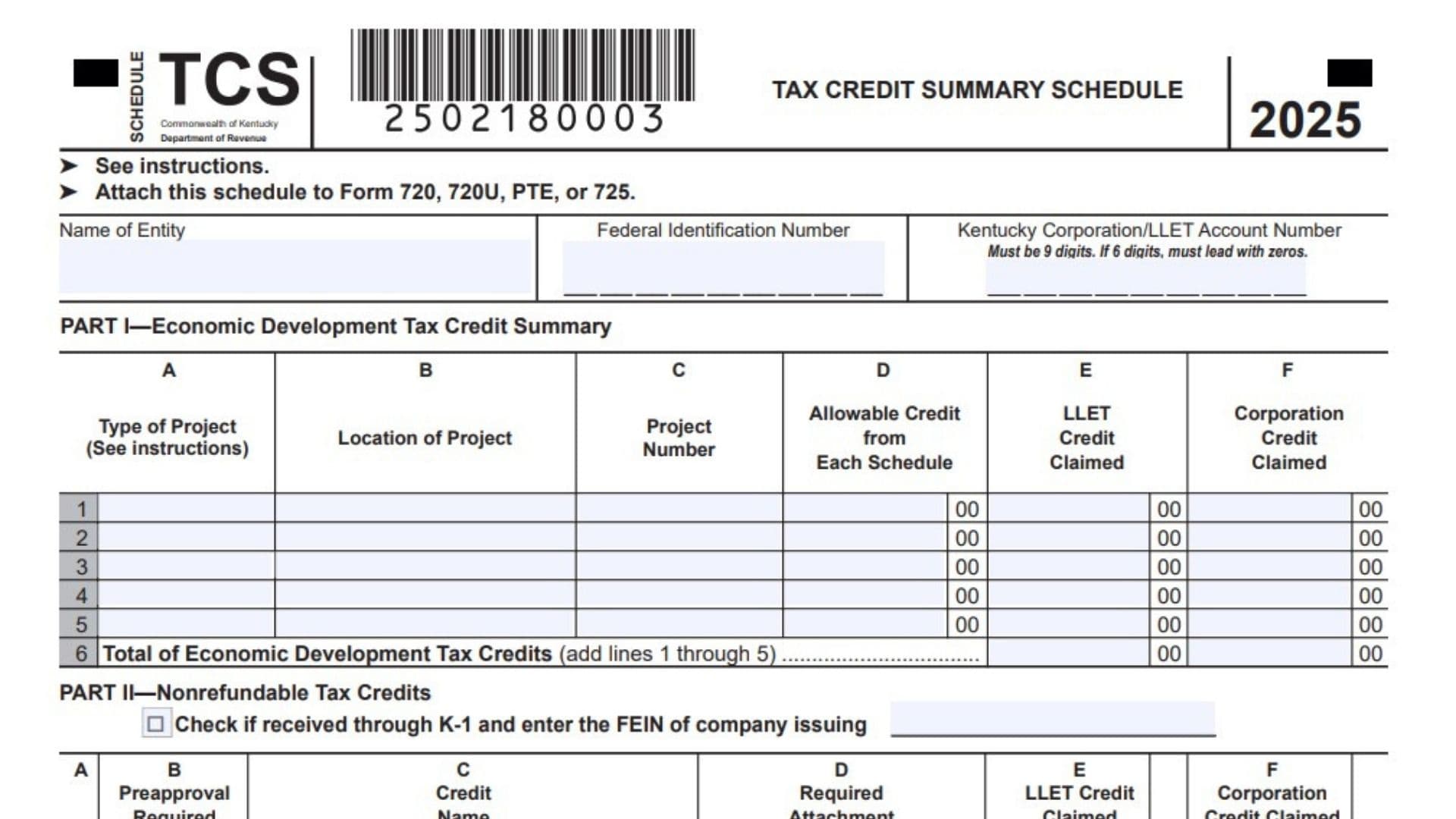
Kentucky Schedule TCS is the Tax Credit Summary Schedule used to organize and report tax credits claimed by corporations and limited liability pass-through entities in Kentucky. It brings multiple Kentucky credits into one summary schedule so the taxpayer can show which credits are being claimed, whether preapproval is required, what supporting attachment must be included, how much credit is being applied against the limited liability entity tax, and how much credit is being applied against corporation income tax. The schedule is especially important because different credits may apply to different taxes, and the amount used against LLET may not be the same as the amount used against corporation income tax. Schedule TCS also helps taxpayers follow the required credit order when more than one credit is claimed. It includes economic development tax credits, nonrefundable tax credits, total nonrefundable credits, and refundable credits. Some credits require certifications or other approval documents, and failure to include the required documents can cause the credit to be denied. This schedule is generally attached to Form 720, Form 720U, Form PTE, or Form 725, depending on the taxpayer’s Kentucky filing situation.
How To File Kentucky Schedule TCS
Complete Kentucky Schedule TCS after calculating each Kentucky tax credit on its own required schedule or certification document. First, enter the taxpayer’s identifying information at the top of the schedule, including the entity name, federal identification number, and Kentucky Corporation/LLET Account Number. Then complete Part I if the taxpayer has approved economic development projects. Complete Part II for nonrefundable tax credits, including the required attachment and the amount claimed against LLET or corporation income tax. Complete Part III by adding the total nonrefundable credits from Parts I and II. Complete Part IV if the taxpayer is claiming refundable tax credits. After all totals are entered, transfer the correct amounts to Form 720, 720U, PTE, or 725 as instructed by the schedule. Attach all required credit schedules, certifications, statements, and supporting documents before filing.
Before You Start Completing The Lines
At the top of Kentucky Schedule TCS, enter the name of the entity, the federal identification number, and the Kentucky Corporation/LLET Account Number. The Kentucky Corporation/LLET Account Number must be 9 digits. If the account number has only 6 digits, add zeros at the beginning until it becomes 9 digits. Review each credit before entering it because some credits require preapproval and a required attachment. If a credit was received through a K-1, check the K-1 box in Part II and enter the FEIN of the company that issued the K-1. If more than one K-1 credit is involved, attach a separate statement with the details.

How To Complete Kentucky Schedule TCS Line By Line
Part I: Economic Development Tax Credit Summary
Line 1: Enter the first approved economic development project. In Column A, enter the type of project. In Column B, enter the project location. In Column C, enter the project number. In Column D, enter the allowable credit from the related credit schedule. In Column E, enter the LLET credit claimed. In Column F, enter the corporation income tax credit claimed.
Line 2: Enter the second approved economic development project using the same column format. Make sure the project number, allowable credit, LLET credit, and corporation credit are entered in the correct columns.
Line 3: Use this line for the third approved economic development project. Complete Columns A through F only for a project that has the required approval and supporting schedule.
Line 4: Enter the fourth approved economic development project if applicable. Include the project type, location, project number, allowable credit, and credit amounts claimed against each tax.
Line 5: Use this line for the fifth approved economic development project. If there are fewer than five projects, leave unused project lines blank.
Line 6: Add the economic development tax credits listed on Lines 1 through 5. Enter the total LLET credit in Column E and the total corporation income tax credit in Column F.
Part II: Nonrefundable Tax Credits
K-1 Checkbox: Check this box if the credit being entered was received through a K-1. Enter the FEIN of the company that issued the K-1. Attach a statement if more than one credit was received through a K-1.
Line 1: Enter the Farming Operation Networking credit. This credit requires preapproval, and Schedule FON must be attached. Enter the LLET credit claimed in Column E and the corporation credit claimed in Column F.
Line 2: Enter the Certified Rehabilitation credit. This credit requires preapproval, and certification copies must be attached. Enter the amount claimed in the correct LLET or corporation credit column.
Line 3: Enter the Unemployment credit. This credit does not require preapproval, but Schedule UTC must be attached. Enter the credit amount claimed against LLET or corporation income tax.
Line 4: Enter the Recycling/Composting Equipment credit. This credit requires preapproval, and Schedule RC must be attached.
Line 5: Enter the Kentucky Investment Fund credit. This credit requires preapproval, and the KEDFA notification must be attached.
Line 6: Enter the Qualified Research Facility credit. This credit does not require preapproval, but Schedule QR must be attached.
Line 7: Enter the GED Incentive credit. This credit does not require preapproval, but Form DAEL-31 must be attached.
Line 8: Enter the Voluntary Environmental Remediation credit. This credit requires preapproval, and Schedule VERB must be attached.
Line 9: Enter the Biodiesel credit. This credit requires preapproval, and Schedule BIO must be attached.
Line 10: Enter the Clean Coal Incentive credit. This credit requires preapproval, and Schedule CCI must be attached.
Line 11: Enter the Ethanol credit. This credit requires preapproval, and Schedule ETH must be attached.
Line 12: Enter the Cellulosic Ethanol credit. This credit requires preapproval, and Schedule CELL must be attached.
Line 13: Enter the Railroad Maintenance & Improvement credit. This credit does not require preapproval, but Schedule RR-I must be attached.
Line 14: Enter the Railroad Expansion credit. This credit requires preapproval, and Schedule RR-E must be attached.
Line 15: Enter the Endow Kentucky credit. This credit requires preapproval, and Schedule ENDOW must be attached.
Line 16: Enter the New Markets Development Program credit. This credit requires preapproval, and Form 8874(K)-A must be attached.
Line 17: Enter the Distilled Spirits credit. This credit does not require preapproval, but Schedule DS must be attached.
Line 18: This line is reserved. Do not enter a credit amount on this line.
Line 19: Enter the Inventory, ad valorem, credit. This credit does not require preapproval, but Schedule INV must be attached.
Line 20: Enter the Renewable Chemical Production credit. This credit requires preapproval, and Schedule CHEM must be attached.
Line 21: Enter the Kentucky Qualified Broadband Investment credit. This credit requires preapproval, and Schedule KQBI must be attached.
Line 22: Add the nonrefundable tax credits from Lines 1 through 21. Enter the total LLET credits in Column E and the total corporation income tax credits in Column F.
Part III: Total Nonrefundable Tax Credits
Line 1: Add Part I, Column E, Line 6 and Part II, Column E, Line 22. Enter the total LLET credits claimed on Line 1. Also transfer this amount to Form 720, Form PTE, Form 725, Part II, Line 5, or Form 720U, Schedule U9, Section A, Line 5, as applicable.
Line 2: Add Part I, Column F, Line 6 and Part II, Column F, Line 22. Enter the total corporation income tax credits claimed on Line 2. Also transfer this amount to Form 720, Part III, Line 7, or Form 720U, Schedule U9, Section B, Line 7, as applicable.
Part IV: Total Refundable Tax Credits
Line 1: Enter the refundable Certified Rehabilitation credit. This credit requires preapproval, and certification copies must be attached. Enter the LLET credit claimed in Column E.
Line 2: Enter the Kentucky Entertainment Incentive credit. This credit requires preapproval, and certification copies must be attached. Enter the LLET credit claimed in Column E.
Line 3: Enter the Decontamination credit. This credit requires preapproval, and certification copies must be attached. Enter the LLET credit claimed in Column E.
Line 4: Add the refundable tax credits from Lines 1 through 3. Enter the total refundable tax credits on Line 4. Transfer this amount to Form 720, Part II, Line 9, Form PTE, Form 725, Part II, Line 8, or Form 720U, Schedule U9, Section A, Line 9, as applicable.
Important Rules For Completing Kentucky Schedule TCS
If more than one credit is claimed, use the credits in the order shown on Schedule TCS unless the credits are economic development project credits, which do not have to be used in a specific project order. Required certifications and attachments are very important because missing documents can cause automatic denial of the credit. Nonrefundable LLET credits cannot reduce LLET below the $175 minimum. Nonrefundable corporation income tax credits cannot reduce corporation income tax below zero. If the total credits are too high, reduce the credits starting with the last credit listed. Limited liability pass-through entities should not enter income tax or LLET credits from certain separate pass-through economic development schedules on Schedule TCS when those schedules have their own instructions.
Final Check Before Filing
Before submitting the return, confirm that every credit amount matches the related schedule or certification. Check that preapproval documents are attached when required. Review Columns E and F carefully so LLET credits and corporation income tax credits are not mixed together. Make sure Part III and Part IV totals are transferred to the correct Kentucky return lines. Attach Kentucky Schedule TCS to the proper Kentucky business return before filing.