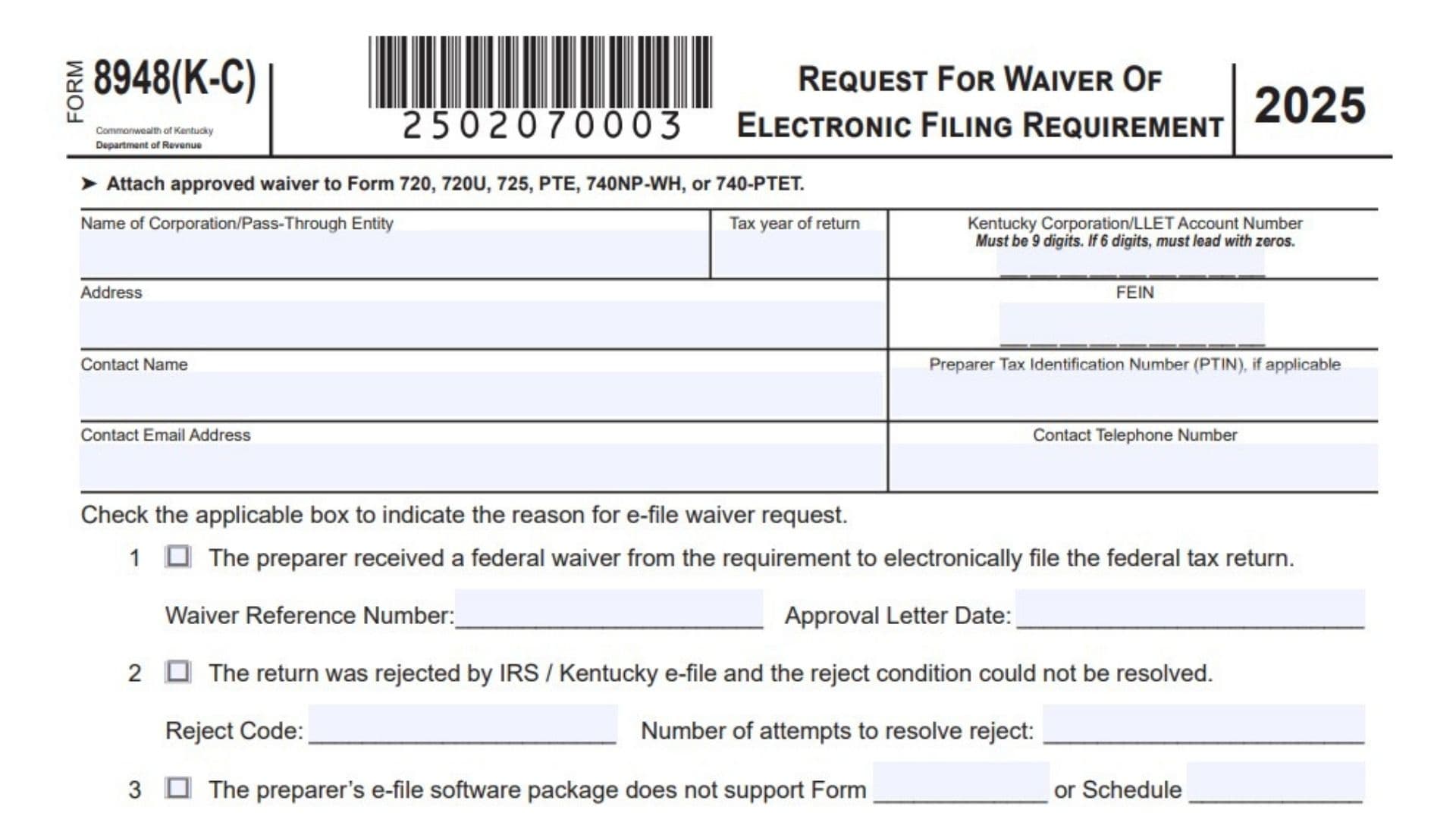
Kentucky Form 8948 (K-C) is used when a corporation or pass-through entity needs permission to file a Kentucky tax return on paper instead of filing it electronically. This form is not a general paper filing choice. It is a waiver request, so the taxpayer, preparer, or responsible party must have a valid reason why the return cannot be e-filed. The form applies to Kentucky Forms 720, 720U, 725, PTE, 740NP-WH, and 740-PTET. Common waiver reasons include having a federal e-file waiver, receiving an unresolved IRS or Kentucky e-file rejection, using software that does not support a required form or schedule, being unable to participate in e-file due to special preparer circumstances, or facing another hardship that prevents electronic filing. The request must be submitted to the Kentucky Department of Revenue before the paper return is filed. If the waiver is approved, a copy signed by the Department of Revenue must be attached to the paper-filed return. If the request is denied, the business should file the return electronically.
How To File Kentucky Form 8948 (K-C)
Complete the form before filing the Kentucky paper return. Enter the taxpayer’s business information, contact details, account number, FEIN, and the reason for requesting the waiver. If the reason requires extra details, provide clear supporting information. The form must be signed by an officer authorized to sign the return.
After completing the form, submit it by email to the Kentucky Department of Revenue for review. Use the corporation tax email address for corporation-related requests or the pass-through entity email address for pass-through entity-related requests.
Submit the request to:
KRC.WEBResponseCorporationTax@ky.gov
or
DORWEBRESPONSEPASSTHROUGHENTITY@ky.gov
Wait for the Department of Revenue to approve or deny the waiver. If approved, attach the approved waiver to the paper return. If denied, the company should file electronically.

How To Complete Kentucky Form 8948 (K-C)
Line 1: Form Title: Use this form to request a waiver from Kentucky’s electronic filing requirement for eligible corporation or pass-through entity returns.
Line 2: Tax Year: Confirm that the form is for the correct tax year before filling it out.
Line 3: Attachment Notice: After approval, attach the approved waiver to Form 720, 720U, 725, PTE, 740NP-WH, or 740-PTET.
Line 4: Name Of Corporation/Pass-Through Entity: Enter the full legal name of the corporation or pass-through entity requesting the e-file waiver.
Line 5: Tax Year Of Return: Enter the tax year for the return that cannot be filed electronically.
Line 6: Kentucky Corporation/LLET Account Number: Enter the Kentucky Corporation or LLET account number. The number must have 9 digits. If it has only 6 digits, add zeros at the beginning.
Line 7: Address: Enter the full mailing address of the corporation or pass-through entity.
Line 8: FEIN: Enter the federal employer identification number for the business.
Line 9: Contact Name: Enter the name of the person the Department of Revenue should contact about the waiver request.
Line 10: Preparer Tax Identification Number: Enter the preparer’s PTIN if a paid preparer is involved. If it does not apply, leave it blank.
Line 11: Contact Email Address: Enter a valid email address where the Department of Revenue can send a response or ask questions.
Line 12: Contact Telephone Number: Enter the phone number for the contact person.
Line 13: Reason For E-File Waiver Request: Check the box that matches the reason the return cannot be filed electronically. Choose the most accurate reason and provide the required details.
Line 14: Box 1, Federal Waiver Received: Check this box if the preparer received a federal waiver from the requirement to electronically file the federal tax return.
Line 15: Waiver Reference Number: If Box 1 is checked, enter the federal waiver reference number.
Line 16: Approval Letter Date: If Box 1 is checked, enter the date shown on the federal waiver approval letter.
Line 17: Box 2, Rejected Return: Check this box if the return was rejected by IRS e-file or Kentucky e-file and the reject problem could not be fixed.
Line 18: Reject Code: If Box 2 is checked, enter the reject code connected with the failed electronic filing attempt.
Line 19: Number Of Attempts To Resolve Reject: Enter how many times you tried to fix the reject condition before requesting the waiver.
Line 20: Box 3, Software Does Not Support Form Or Schedule: Check this box if the preparer’s e-file software cannot support a required form or schedule.
Line 21: Unsupported Form: If Box 3 is checked, enter the form number that the software does not support.
Line 22: Unsupported Schedule: If Box 3 is checked, enter the schedule name or number that the software does not support.
Line 23: Box 4, Other E-File Ineligibility Or Hardship: Use this section if the waiver request is based on a special reason listed under 4a, 4b, or 4c.
Line 24: Box 4a, Foreign Preparer Without Social Security Number: Check this box if the preparer is unable to file electronically because IRS e-file does not accept foreign preparers who live and work abroad and do not have Social Security numbers.
Line 25: Box 4b, IRS Sanction: Check this box if the preparer cannot participate in IRS or Kentucky e-file because of an IRS sanction.
Line 26: Box 4c, Other Circumstances: Check this box if another situation prevented electronic filing.
Line 27: Other Circumstances Explanation: If Box 4c is checked, describe the facts that prevented electronic filing. Explain what steps were taken to meet the e-file requirement and why those steps did not work.
Line 28: Undue Hardship Explanation: If Box 4c is checked, explain the hardship that would result if the taxpayer had to comply with the electronic filing requirement.
Line 29: Line 5, Future E-File Statement: Provide a statement explaining what the preparer will do to make sure future returns can be filed electronically.
Line 30: Perjury Declaration: Review the declaration before signing. The signer is confirming that the waiver request is true, correct, and complete to the best of their knowledge and belief.
Line 31: Officer Authorized To Sign Return: The officer authorized to sign the tax return must sign the waiver request.
Line 32: Date: Enter the date the officer signs the form.
Line 33: Submit Request: Send the completed form to the proper Kentucky Department of Revenue email address before filing the paper return.
Line 34: Department Of Revenue Use Only: Do not complete this section. The Department of Revenue will mark whether the request is approved or denied.
Line 35: Approval Or Denial Box: Leave the approved and denied boxes blank. These are completed by the Department of Revenue.
Line 36: Department Signature And Date: Leave the “By” and “Date” lines blank. These are completed by the Department of Revenue.
Line 37: Approved Waiver Attachment: If the waiver is approved, attach the approved copy to the paper-filed Kentucky return.
Line 38: Denied Waiver Result: If the waiver is denied, do not paper file based on this request. The company should file the return electronically.
Line 39: Final Review: Before submitting the waiver request, check the business name, tax year, account number, FEIN, contact information, waiver reason, required explanations, signature, and date.