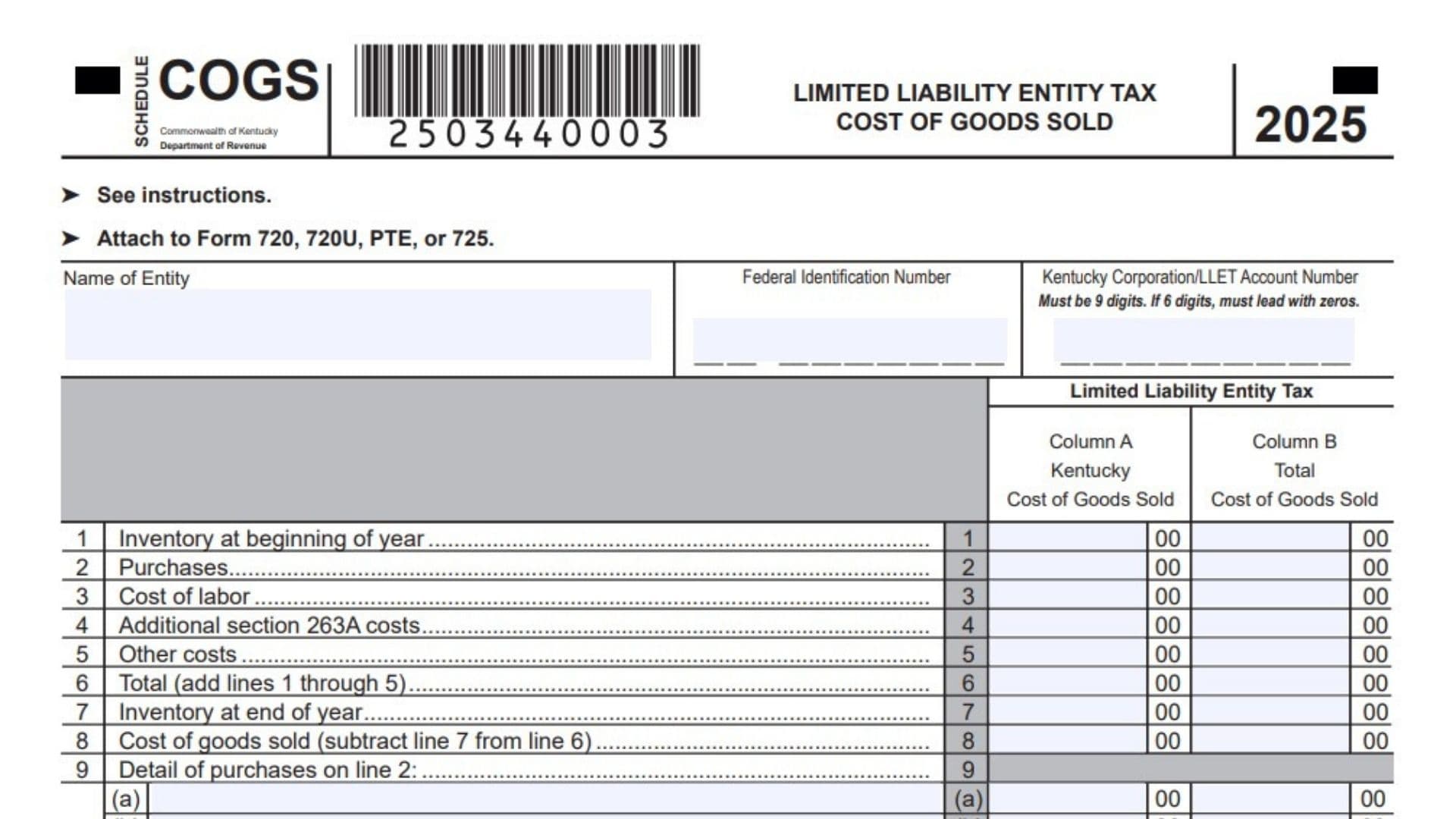
Kentucky Schedule COGS is a state tax schedule used by corporations and limited liability pass-through entities to calculate the cost of goods sold used for Kentucky Limited Liability Entity Tax, commonly called LLET. The schedule separates qualifying costs into two categories. Column A reports the cost of goods sold connected with Kentucky gross receipts, while Column B reports the entity’s total cost of goods sold from all sources. The resulting figures help determine gross profits for LLET purposes. Only businesses engaged in manufacturing, producing, reselling, retailing, or wholesaling tangible products may generally calculate cost of goods sold on this schedule. A tangible product may include real property or tangible personal property. The reported costs must be directly connected with acquiring or producing the tangible product that generated the business’s gross receipts. Businesses that provide services or sell intangible products are not permitted to claim cost of goods sold for this LLET calculation. Qualifying amounts may include beginning inventory, direct material purchases, certain direct labor, limited direct material costs associated with Section 263A, and other eligible direct material costs. General operating expenses, indirect labor, service-related costs, administrative expenses, and costs connected with intangible products should not be included. The schedule also requires detailed breakdowns of purchases, Section 263A costs, and other costs so the Kentucky Department of Revenue can confirm that the amounts claimed meet the state’s cost of goods sold requirements.
Who Should Complete Kentucky Schedule COGS?
Complete Kentucky Schedule COGS when your corporation or limited liability pass-through entity is calculating LLET based on gross profits and has qualifying costs directly associated with tangible products.
The schedule may apply to businesses involved in:
- Manufacturing tangible products
- Producing tangible products
- Buying and reselling tangible products
- Retailing tangible products
- Wholesaling tangible products
Do not calculate cost of goods sold on this schedule when the business activity consists only of providing services or selling intangible property.
A business that performs both qualifying and nonqualifying activities should include only the costs directly connected with its qualifying tangible products. Do not include expenses related to services, intellectual property, digital products, consulting, or other intangible activities.
How To File Kentucky Schedule COGS
Kentucky Schedule COGS is filed as an attachment to the applicable Kentucky business tax return. Attach the completed schedule to Form 720, Form 720U, Form PTE, or Form 725, depending on the return your entity is required to file.
Follow these steps when preparing the schedule:
- Confirm that the business conducts a qualifying manufacturing, producing, reselling, retailing, or wholesaling activity.
- Gather beginning and ending inventory records, purchase records, direct labor information, and supporting cost schedules.
- Separate amounts connected with Kentucky gross receipts from amounts connected with total gross receipts from all sources.
- Complete the entity identification section.
- Enter the qualifying cost of goods sold amounts on Lines 1 through 8.
- Provide detailed supporting entries for Lines 2, 4, and 5 on Lines 9, 10, and 11.
- Verify that every detail section equals the corresponding amount reported above it.
- Attach an additional two-column schedule when the available detail lines are not sufficient.
- Attach Schedule COGS to the applicable Kentucky return before filing.
The schedule should not be filed as a separate return. It should accompany the related Kentucky tax form.
How to Complete Kentucky Schedule COGS
How To Complete The Identification Section
Name Of Entity: Enter the complete legal name of the corporation or limited liability pass-through entity. Use the same entity name shown on the related Kentucky tax return.
Federal Identification Number: Enter the entity’s nine-digit federal employer identification number. Check the number carefully to prevent processing delays or account mismatches.
Kentucky Corporation/LLET Account Number: Enter the nine-digit Kentucky Corporation or LLET account number. If your account number contains only six digits, add three zeros at the beginning so the entry contains nine digits. For example, account number 123456 should be entered as 000123456.
How To Use Column A And Column B
Column A, Kentucky Cost Of Goods Sold: Enter qualifying amounts attributable to gross receipts earned in Kentucky. Use a consistent and supportable method when allocating costs between Kentucky and other locations.
Column B, Total Cost Of Goods Sold: Enter qualifying amounts attributable to gross receipts from all locations and sources. This column should include the Kentucky amounts reported in Column A.
Column B will normally equal or exceed Column A. The two columns may contain the same amounts when all qualifying business activity and gross receipts are connected with Kentucky.
Complete each applicable line in both columns. Do not place the total amount in both columns unless the entire qualifying cost is attributable to Kentucky.

Kentucky Schedule COGS Line By Line Instructions
Inventory, Purchases, Labor, And Other Costs
Line 1: Enter the value of qualifying inventory held at the beginning of the tax year. This will commonly equal the ending inventory reported for the previous tax year. Report the portion connected with Kentucky gross receipts in Column A and the total beginning inventory from all sources in Column B. A new business with no beginning inventory may enter zero when appropriate.
Line 2: Enter qualifying purchases of direct materials or tangible merchandise that become part of the product sold or manufactured. Include only purchases directly connected with the tangible product. Do not include office supplies, administrative purchases, service expenses, or indirect materials. Report the Kentucky amount in Column A and the total amount in Column B. Every amount entered on this line must be supported by the detailed entries on Line 9.
Line 3: Enter qualifying direct labor costs. Direct labor must be incorporated into the tangible product or be an integral part of the manufacturing process. Do not include indirect labor, management salaries, administrative wages, sales staff wages, or other payroll costs that are not directly involved in producing the tangible product. Enter the Kentucky portion in Column A and the total direct labor amount in Column B.
Line 4: Enter qualifying additional Section 263A costs. For this Kentucky calculation, include only eligible direct material costs associated with Section 263A. Do not include general indirect costs, overhead, administrative expenses, or amounts already reported on another line. Report the Kentucky amount in Column A and the total amount in Column B. Support every amount on this line with the detailed entries on Line 10.
Line 5: Enter other qualifying direct material costs incorporated into the tangible product sold or manufactured. Use this line for eligible direct material costs that are not already included on Lines 2 or 4. Do not include service-related expenses, indirect materials, overhead, marketing costs, rent, utilities, or administrative expenses. Report the Kentucky portion in Column A and the total amount in Column B. Provide a complete breakdown on Line 11.
Line 6: Add Lines 1, 2, 3, 4, and 5. Calculate the total separately for Column A and Column B. Review the entries before adding them to make sure no cost has been reported more than once.
Line 7: Enter the value of qualifying inventory remaining at the end of the tax year. Use the same inventory valuation method used in the business’s supporting accounting records. Enter the Kentucky portion in Column A and the total ending inventory from all sources in Column B.
Line 8: Subtract Line 7 from Line 6. The result is the cost of goods sold. Perform the calculation separately in Column A and Column B. Column A represents Kentucky cost of goods sold, while Column B represents total cost of goods sold from all sources.
Purchase Details
Line 9: Provide a detailed breakdown of the purchases included on Line 2. Enter a clear description for each purchase category and report the corresponding Kentucky amount in Column A and total amount in Column B. The combined amounts on Lines 9(a) through 9(k) must equal Line 2 in each column.
Line 9(a): Enter the description and amounts for the first category of qualifying purchases included on Line 2.
Line 9(b): Enter the description and amounts for the second category of qualifying purchases included on Line 2.
Line 9(c): Enter the description and amounts for the third category of qualifying purchases included on Line 2.
Line 9(d): Enter the description and amounts for the fourth category of qualifying purchases included on Line 2.
Line 9(e): Enter the description and amounts for the fifth category of qualifying purchases included on Line 2.
Line 9(f): Enter the description and amounts for the sixth category of qualifying purchases included on Line 2.
Line 9(g): Enter the description and amounts for the seventh category of qualifying purchases included on Line 2.
Line 9(h): Enter the description and amounts for the eighth category of qualifying purchases included on Line 2.
Line 9(i): Enter the description and amounts for the ninth category of qualifying purchases included on Line 2.
Line 9(j): Enter the description and amounts for the tenth category of qualifying purchases included on Line 2.
Line 9(k): Enter the description and amounts for the eleventh category of qualifying purchases included on Line 2.
If you enter an amount on Line 2, you must complete the Line 9 detail section. Purchases may be disallowed when the supporting breakdown is missing or does not equal the Line 2 total.
When more than eleven purchase categories are needed, attach a separate two-column schedule. List each additional purchase category, its Kentucky amount, and its total amount from all sources.
Additional Section 263A Cost Details
Line 10: Provide a detailed breakdown of the additional Section 263A costs included on Line 4. Enter a description for each qualifying direct material cost and report the Kentucky amount in Column A and the total amount in Column B. Lines 10(a) through 10(k) must add up to Line 4 in each column.
Line 10(a): Enter the description and amounts for the first additional Section 263A direct material cost included on Line 4.
Line 10(b): Enter the description and amounts for the second additional Section 263A direct material cost included on Line 4.
Line 10(c): Enter the description and amounts for the third additional Section 263A direct material cost included on Line 4.
Line 10(d): Enter the description and amounts for the fourth additional Section 263A direct material cost included on Line 4.
Line 10(e): Enter the description and amounts for the fifth additional Section 263A direct material cost included on Line 4.
Line 10(f): Enter the description and amounts for the sixth additional Section 263A direct material cost included on Line 4.
Line 10(g): Enter the description and amounts for the seventh additional Section 263A direct material cost included on Line 4.
Line 10(h): Enter the description and amounts for the eighth additional Section 263A direct material cost included on Line 4.
Line 10(i): Enter the description and amounts for the ninth additional Section 263A direct material cost included on Line 4.
Line 10(j): Enter the description and amounts for the tenth additional Section 263A direct material cost included on Line 4.
Line 10(k): Enter the description and amounts for the eleventh additional Section 263A direct material cost included on Line 4.
If Line 4 contains an amount, the corresponding details must be entered on Line 10. The additional Section 263A costs may be disallowed if the details are missing or if the totals do not match.
Attach a separate two-column schedule when more than eleven categories are required. The attachment should identify each additional cost and show both the Kentucky amount and the total amount.
Other Cost Details
Line 11: Provide a detailed breakdown of the other qualifying costs included on Line 5. Enter a clear description for each direct material cost and report the Kentucky amount in Column A and the total amount in Column B. The sum of Lines 11(a) through 11(k) must equal the amount reported on Line 5 in each column.
Line 11(a): Enter the description and amounts for the first category of other qualifying direct material costs included on Line 5.
Line 11(b): Enter the description and amounts for the second category of other qualifying direct material costs included on Line 5.
Line 11(c): Enter the description and amounts for the third category of other qualifying direct material costs included on Line 5.
Line 11(d): Enter the description and amounts for the fourth category of other qualifying direct material costs included on Line 5.
Line 11(e): Enter the description and amounts for the fifth category of other qualifying direct material costs included on Line 5.
Line 11(f): Enter the description and amounts for the sixth category of other qualifying direct material costs included on Line 5.
Line 11(g): Enter the description and amounts for the seventh category of other qualifying direct material costs included on Line 5.
Line 11(h): Enter the description and amounts for the eighth category of other qualifying direct material costs included on Line 5.
Line 11(i): Enter the description and amounts for the ninth category of other qualifying direct material costs included on Line 5.
Line 11(j): Enter the description and amounts for the tenth category of other qualifying direct material costs included on Line 5.
Line 11(k): Enter the description and amounts for the eleventh category of other qualifying direct material costs included on Line 5.
If Line 5 contains an amount, complete the Line 11 detail section and make sure the detailed entries match Line 5 exactly. Unsupported other costs may be disallowed.
When more than eleven other cost categories are needed, attach a separate two-column schedule showing the additional descriptions, Kentucky amounts, and total amounts.
How To Prepare An Additional Cost Schedule
An additional schedule is required when Lines 9(a) through 9(k), Lines 10(a) through 10(k), or Lines 11(a) through 11(k) do not provide enough space.
The attachment should contain:
- The entity’s legal name
- The federal identification number
- The Kentucky Corporation or LLET account number
- The related Schedule COGS line number
- A description of every additional item
- A column for Kentucky amounts
- A column for total amounts from all sources
- A total that reconciles with the amount reported on the related form line
Clearly identify whether the attachment supports Line 2, Line 4, or Line 5.
Records Needed To Complete Kentucky Schedule COGS
Before completing the schedule, gather records that support both the amount and the business purpose of every claimed cost. Useful documents may include:
- Beginning and ending inventory reports
- Purchase invoices
- Raw material records
- Merchandise purchase records
- Production records
- Direct labor reports
- Payroll allocation records
- Section 263A workpapers
- General ledger details
- Kentucky cost allocation workpapers
- Supporting schedules for multistate activity
The records should demonstrate that each claimed cost was directly connected with acquiring or producing a qualifying tangible product.
Common Kentucky Schedule COGS Mistakes
Avoid including costs associated with services or intangible products. Do not report indirect labor as direct labor. Make sure the total of Line 9 equals Line 2, the total of Line 10 equals Line 4, and the total of Line 11 equals Line 5.
Do not leave the detail sections blank when Lines 2, 4, or 5 contain amounts. Avoid claiming the same cost on more than one line. Use nine digits for the Kentucky Corporation or LLET account number, adding leading zeros when necessary.
Finally, calculate Lines 6 and 8 separately for Column A and Column B. Do not assume that Kentucky cost of goods sold equals total cost of goods sold unless all qualifying activity is attributable to Kentucky.