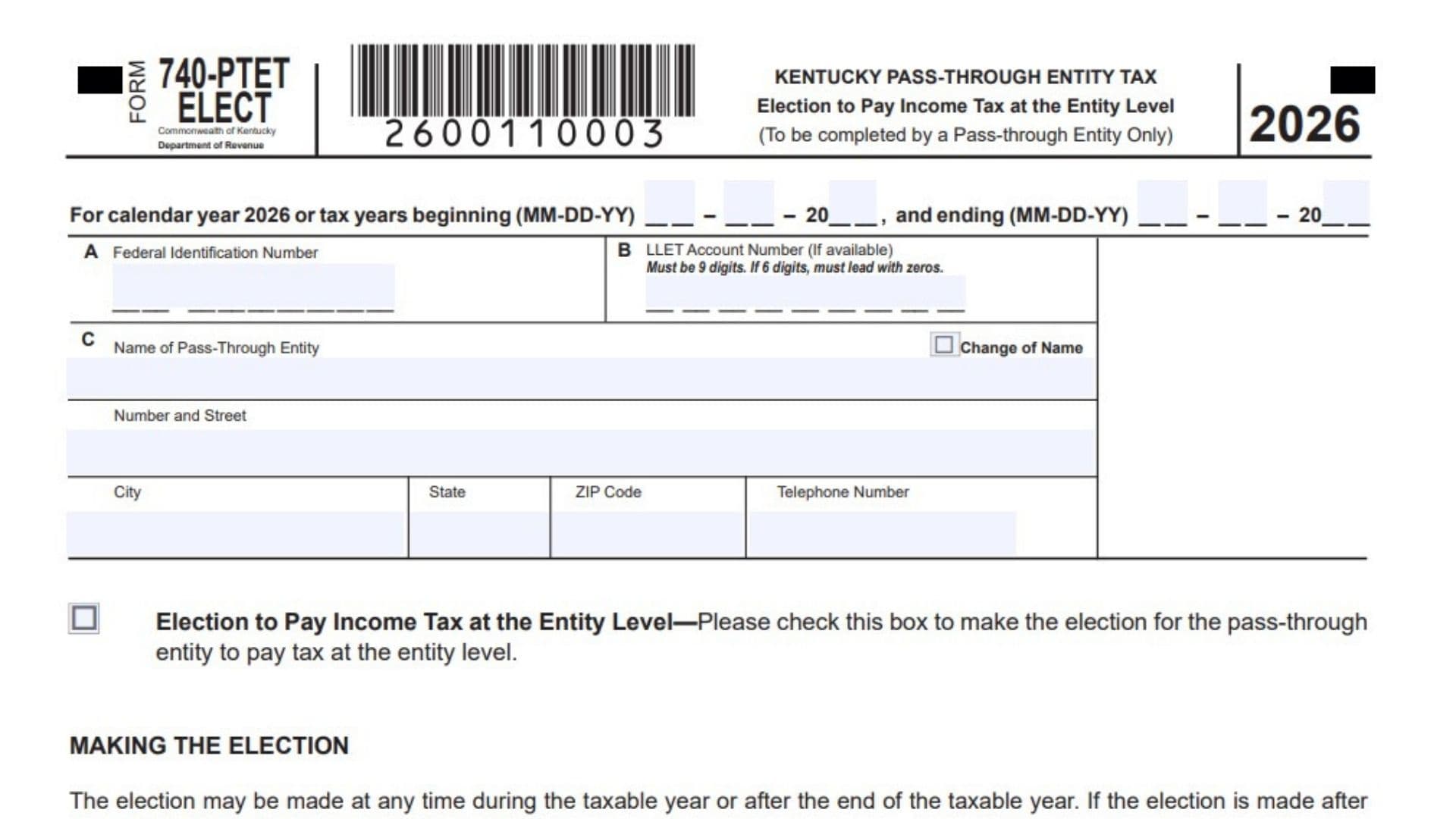
Kentucky Form 740-PTET-ELECT is the election form a pass-through entity uses to choose entity-level income tax treatment in Kentucky. It lets the business elect to pay income tax at the entity level instead of leaving the tax handling entirely at the owner level, and once the choice is made for a tax year, it is binding and cannot be undone. The form is meant for a pass-through entity only, so it should be completed by the business itself or by someone authorized to act for it. It also asks for key identifying details, the tax year covered, and the signature of the member and any paid preparer who helped complete the filing.
How To File Kentucky Form 740-PTET-ELECT
Complete the form for the correct calendar year or tax year, sign it, and mail it to the Kentucky Department of Revenue in Frankfort, Kentucky. The election can be made during the taxable year or after the year ends, but if it is filed after year-end, it must be submitted by the 15th day of the fourth month after the close of the taxable year, or by the extended due date if an extension applies. Since the election is irrevocable once made, the entity should confirm that entity-level tax treatment is the intended choice before submitting the form.

How to Complete Kentucky Form 740-PTET-ELECT
Line 1: Name Of Pass-Through Entity
Enter the legal name of the pass-through entity making the election. Use the exact business name that matches tax records.
Line 2: Change Of Name
Check this box only if the entity has changed its name. Leave it blank if there has been no name change.
Line 3: Number And Street
Write the entity’s street address here. Be sure to include the full street information.
Line 4: City, State, ZIP Code, And Telephone Number
Fill in the city, state, ZIP code, and phone number for the entity. This section should reflect the business’s current contact information.
Line 5: Federal Identification Number
Enter the entity’s federal identification number. Make sure it is accurate and belongs to the pass-through entity filing the election.
Line 6: LLET Account Number
If available, provide the Kentucky LLET account number. The form states that it must be 9 digits, and if it is only 6 digits, zeros must be added to the front.
Line 7: Tax Year Beginning And Ending Dates
Enter the calendar year or the tax year beginning and ending dates for the election. Use the date format shown on the form so the filing period is clear.
Line 8: Election To Pay Income Tax At The Entity Level Box
Check this box to make the election for the pass-through entity to pay income tax at the entity level. This is the main election on the form, so it should be selected only if the business wants entity-level tax treatment.
Line 9: Making The Election Statement
Read this section carefully before filing. It explains when the election may be made, the filing deadline if it is made after year-end, and the fact that the election is binding and irrevocable for the taxable year.
Line 10: Tax Calculation Explanation
This section explains that the income tax will be calculated at the pass-through entity level under the Kentucky tax rules cited on the form. It also states that the tax is based on ordinary income and separately stated items of income.
Line 11: Due Date Information
Review this line because it states when the pass-through entity tax is due. The tax is due on the same date as the entity’s annual return for the taxable year, even if an extension applies to other filing deadlines.
Line 12: Mail To Address
Send the completed form to the Kentucky Department of Revenue in Frankfort, KY 40619-0006. Use this mailing address exactly as shown on the form.
Line 13: Signature Of Member
The authorized member should sign here. This signature confirms the entity’s election and the accuracy of the information provided.
Line 14: Date
Enter the date the member signs the form. Use the date format requested on the form.
Line 15: Name Of Member
Print the name of the signing member. This should match the person who signed the form.
Line 16: Title
Write the member’s title or position in the entity. This helps identify the signer’s authority.
Line 17: Signature Of Preparer
If a paid preparer helped complete the form, that person should sign here. If no preparer was used, this section can remain blank.
Line 18: Date For Preparer
The preparer should enter the date of signature. This records when the form was prepared.
Line 19: Name Of Preparer Or Firm
Print the name of the preparer or the firm that prepared the return. Use the full business or individual name.
Line 20: ID Number
Enter the preparer’s identification number in this space. This identifies the person or firm responsible for preparation.
Line 21: Email And Or Telephone Number
Provide the preparer’s email address, telephone number, or both. This gives the department a way to contact the preparer if needed.
Line 22: DOR Discussion Authorization
Check yes or no to show whether the Department of Revenue may discuss the return with the preparer. Choose the option that matches the taxpayer’s preference.
Line 23: Declaration Statement
Read the declaration carefully before signing. By signing, the filer confirms that the information is true, correct, and complete to the best of their knowledge and belief.
Filing Tips
Make sure the election box is checked only if the entity truly wants to pay income tax at the entity level. Double-check the entity name, identification numbers, and tax year dates before mailing the form. Keep a copy for your records after submission, especially because this election affects how the business is taxed for the year and cannot be reversed once made.
FAQs
What Is This Form For?
It is used by a pass-through entity to elect entity-level income tax treatment in Kentucky.
Can The Election Be Changed Later?
No, once made for a taxable year, it is irrevocable.
When Must It Be Filed?
It can be filed during the taxable year or after year-end by the deadline shown on the form.
Who Signs It?
An authorized member signs it, and a paid preparer may also sign if one was used.