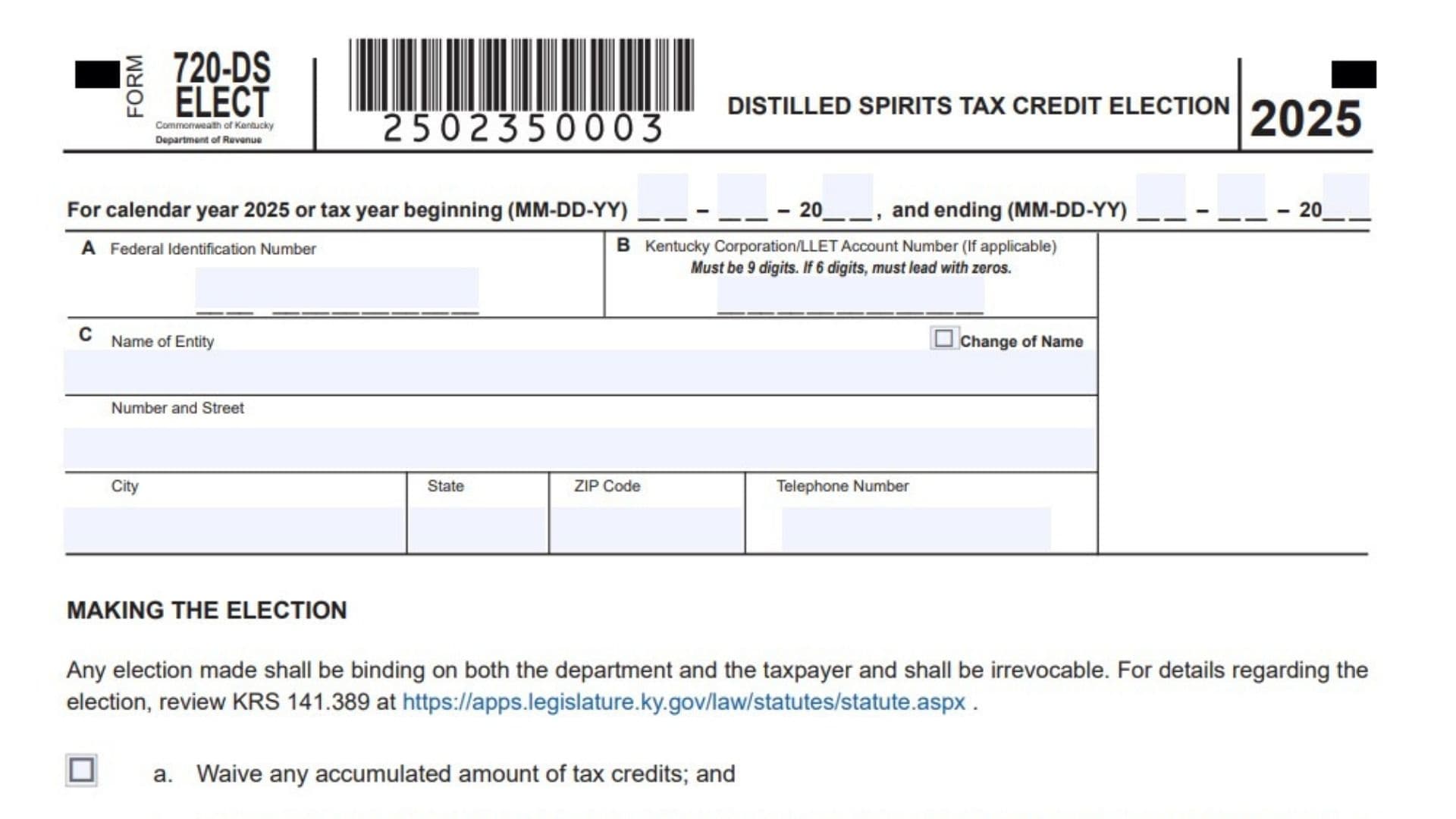
Kentucky Form 720-DS-ELECT is the state election form used by an eligible taxpayer to choose how to handle distilled spirits tax credits under Kentucky law. It is tied to a binding election, which means once the choice is made and accepted, it applies to both the taxpayer and the Department of Revenue and cannot be changed later. The form is designed for situations where a business wants to either give up accumulated tax credits in exchange for a nonrefundable credit tied to distilled spirits barrels, or waive future credits in exchange for a refundable credit on multiple taxes. Because the election affects tax treatment in a lasting way, the form is not just a routine filing, it is a formal decision that can influence how credits are claimed, reported, and applied going forward.
This form is also used to identify the taxpayer making the election, including the federal identification number, Kentucky account number if one applies, and the business name and address. It includes the signer’s declaration, preparer information if someone else helps complete it, and the mailing address for submission. In simple terms, this is the document that tells Kentucky how the taxpayer wants to handle distilled spirits tax credit eligibility under the relevant statute.
How To File Kentucky Form 720-DS-ELECT
Complete the form carefully, sign it, and mail it to the Kentucky Department of Revenue in Frankfort, Kentucky. Since the election is binding and irrevocable, the taxpayer should review the rules before submitting the form and make sure the chosen option matches the business’s tax position. The mailing section on the form shows the destination address, so the completed election can be sent directly to the department without attaching extra explanations unless they are required for the filing situation.
Before mailing, confirm that all identifying details are correct, the election box is selected, the signature is present, and the date is entered. If a paid preparer helped complete the form, the preparer section should also be filled out. A clean, fully completed form reduces the chance of delays or questions from the department.

How To Complete Kentucky Form 720-DS-ELECT
Line 1: Tax Year
Enter the calendar year or the tax year beginning and ending dates for the period covered by the election. Use the date format shown on the form and make sure the dates match the return period you are filing for.
Line 2: Federal Identification Number
Write the business’s federal identification number in the space provided. Make sure the number is accurate and matches the taxpayer entity making the election.
Line 3: Kentucky Corporation/LLET Account Number
If the business has a Kentucky Corporation or LLET account number, enter it here. The form notes that this number must be 9 digits, and if the number has only 6 digits, zeros must be added to the front to make it 9 digits.
Line 4: Name Of Entity
Enter the legal name of the business or entity making the election. This should be the exact name used for tax and legal reporting.
Line 5: Change Of Name Box
Check this box only if the entity has changed its name. If there has been no name change, leave the box blank.
Line 6: Number And Street
Fill in the street address of the entity. Use the full street address so the department can identify the filing party correctly.
Line 7: City, State, ZIP Code, And Telephone Number
Provide the city, state, ZIP code, and telephone number for the business. This helps complete the contact information section and ensures the department can reach the filer if needed.
Line 8: Making The Election Section
This section explains that the election is binding on both the taxpayer and the department and cannot be revoked after filing. Read it carefully before choosing an option because this decision carries long-term tax consequences. The form also points the filer to the Kentucky law governing the election for more detailed rules.
Line 9: Election Option A, Waive Accumulated Credits
Check this box if the taxpayer wants to waive any accumulated amount of tax credits. Choosing this option means the taxpayer will instead be allowed a nonrefundable and nontransferable tax credit for up to 25,000 barrels of distilled spirits held in a bonded warehouse or on premises for each taxable year, with the credit equal to 100 percent of the tax assessed and timely paid under the related Kentucky statutes.
Line 10: Election Option B, Refundable Credit On Multiple Taxes
Check this box if the taxpayer wants to waive all future tax credits allowed under this section. This choice allows a refundable tax credit on multiple taxes as described in the applicable Kentucky law. Select this option only if it matches the business’s intended tax treatment, since the election is permanent.
Line 11: Taxpayer Declaration
Read the declaration carefully before signing. By signing, the taxpayer confirms that the return and supporting materials have been reviewed and are true, correct, and complete to the best of the signer’s knowledge.
Line 12: Signature Of Member
The authorized member or signer should sign here. The signature must come from the person with authority to certify the election for the business.
Line 13: Date
Enter the date the form is signed. Use the date format shown on the form.
Line 14: Name Of Member
Print the name of the member who signed the form. This should match the person who signed the declaration.
Line 15: Title
Write the signer’s title or position within the entity. This identifies the person’s authority to sign on behalf of the business.
Line 16: Paid Preparer Signature
If a paid preparer completed the form, that person should sign here. Leave this section blank if no paid preparer was used.
Line 17: Paid Preparer Date
The preparer should enter the date of signature in this space. This documents when the preparer completed the return.
Line 18: Paid Preparer Name Or Firm
Print the name of the preparer or the firm that prepared the form. Use the full name for clear identification.
Line 19: ID Number
Enter the preparer’s identification number in the provided space. This helps identify the paid preparer associated with the filing.
Line 20: Email And Or Telephone Number
Provide the preparer’s email address, telephone number, or both. This gives the department a way to contact the preparer if needed.
Line 21: DOR Discussion Authorization
Check yes or no to indicate whether the Department of Revenue may discuss the return with the preparer. Choose the answer that reflects the taxpayer’s preference.
Line 22: Mail To Address
Send the completed form to the Kentucky Department of Revenue, Frankfort, KY 40619-0006. Use the mailing address exactly as shown so the form reaches the correct office.
Filing Tips
Make sure only one election option is chosen, unless the form instructions or your tax advisor indicate otherwise. Double-check the identification numbers, since mistakes in the federal ID number or Kentucky account number can slow processing. Also, because this election is permanent, it is wise to review the tax effect before signing and mailing it.
If a preparer is involved, complete the preparer section fully so the filing is consistent and easy to process. Keep a copy of the signed form for your records after mailing it. That way, the business has proof of the election and the exact version that was submitted.
FAQs
What Is This Form For?
It is used to make a binding election about Kentucky distilled spirits tax credits.
Who Should File It?
An eligible business or entity making the election should file it.
Is The Election Reversible?
No, the election is irrevocable once made.
Where Do I Mail It?
Mail it to the Kentucky Department of Revenue in Frankfort, Kentucky.