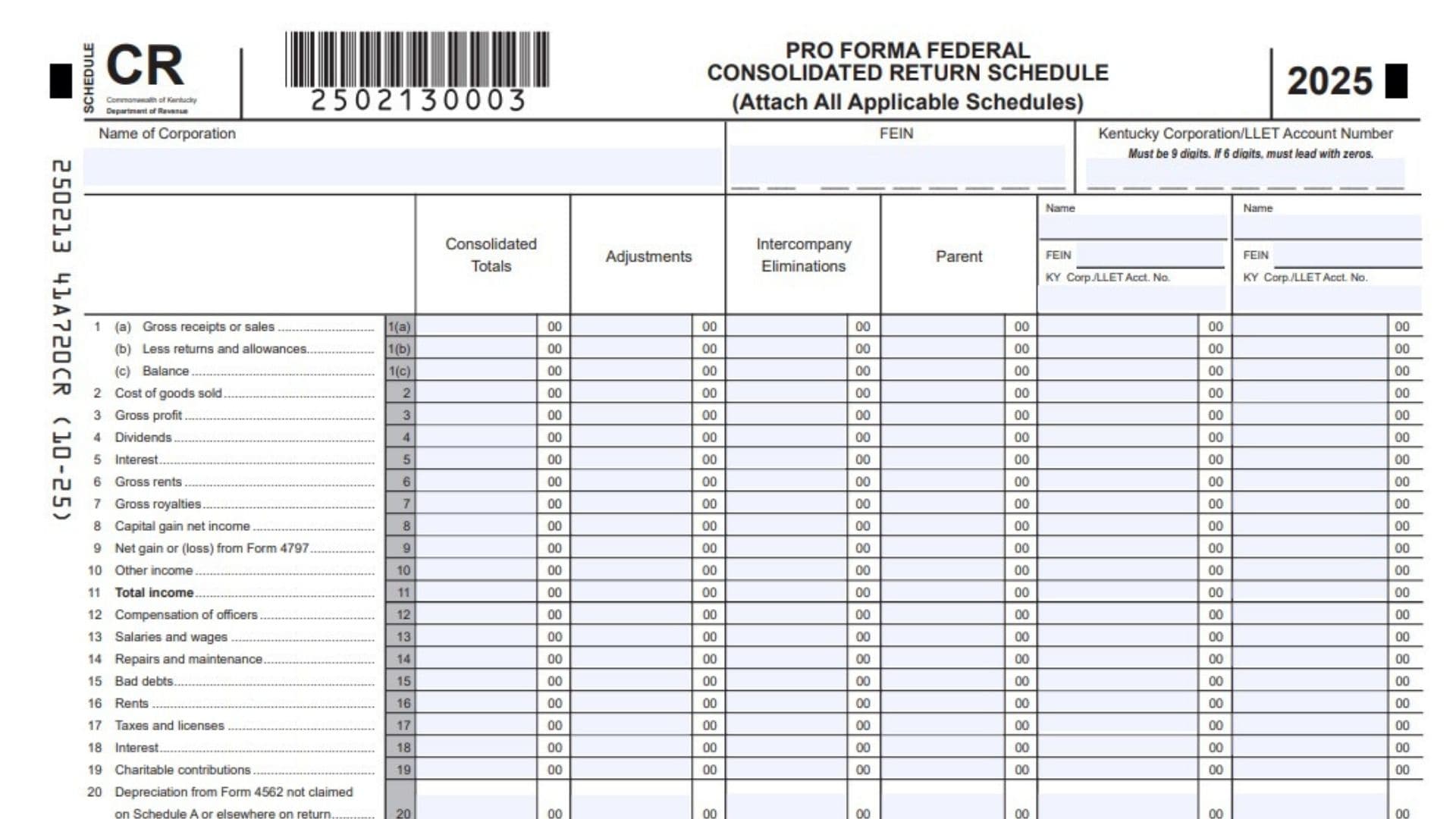
Kentucky Schedule CR is the pro forma federal consolidated return schedule that affiliated groups use when they file an elective consolidated Kentucky return under KRS 141.201. It is not the main tax return itself, but it is an attachment that supports Form 720 by showing how the group’s federal consolidated figures are built from the parent company and each subsidiary. The schedule organizes income and deduction items line by line, then shows the consolidated totals after adjustments and intercompany eliminations are applied. It is designed to make the Kentucky filing match the group’s federal-style consolidated computation while still reflecting Kentucky-specific filing requirements. The form requires identifying information for the corporation, the parent, and each subsidiary, including FEINs and Kentucky corporation or LLET account numbers when applicable. If the group has more than two subsidiaries, the continuation sheet must be used so that every member of the affiliated group is included. Because the consolidated totals depend on additions, subtractions, eliminations, and adjustments, the schedule gives Kentucky a clear picture of the group’s income and deductions before the tax return is completed.
How To File Kentucky Schedule CR
Complete Schedule CR before filing Form 720, because the schedule must be attached to the Kentucky Corporation Income Tax and LLET Return. Enter the parent and subsidiary information first, then fill in the income and deduction lines using the federal Form 1120 line references as your guide. If the affiliated group includes more than two subsidiaries, continue on page 2 until every entity is reported. Make sure the consolidated totals are calculated correctly by adding the parent and all subsidiaries and then subtracting any adjustments and intercompany eliminations. Attach all applicable supporting schedules with the form so the reported amounts can be verified. Keep a copy with the group’s tax records in case Kentucky requests support later.

How to Complete Kentucky Schedule CR
Header Information
Name Of Corporation: Enter the legal name of the corporation that is filing the consolidated return.
FEIN: Enter the corporation’s federal employer identification number.
Kentucky Corporation/LLET Account Number: Enter the Kentucky account number for the corporation. If the number has six digits, add leading zeros so the full number contains nine digits.
Name Of Subsidiary: Enter the name of each subsidiary included in the affiliated group.
Subsidiary FEIN: Enter the federal employer identification number for each subsidiary.
Subsidiary Kentucky Corp./LLET Account Number: Enter each subsidiary’s Kentucky corporation or LLET account number when applicable, using nine digits if needed.
Consolidated Totals Column: Use this column to show the combined totals for the affiliated group.
Adjustments Column: Use this column to show any necessary line-by-line adjustments.
Intercompany Eliminations Column: Use this column for amounts that must be removed because they are intercompany transactions.
Parent Column: Use this column for the parent corporation’s amounts.
Lines 1 Through 10, Income Items
Line 1(a), Gross Receipts Or Sales: Enter gross receipts or sales for the parent and each subsidiary using the federal Form 1120 rules. Record any needed adjustments and eliminations in the correct columns.
Line 1(b), Less Returns And Allowances: Enter returns and allowances connected to gross receipts or sales.
Line 1(c), Balance: Subtract line 1(b) from line 1(a) and enter the net balance.
Line 2, Cost Of Goods Sold: Enter cost of goods sold for each entity.
Line 3, Gross Profit: Enter gross profit, which is the result of line 1(c) minus line 2.
Line 4, Dividends: Enter dividend income for the parent and each subsidiary.
Line 5, Interest: Enter interest income for each entity.
Line 6, Gross Rents: Enter gross rental income.
Line 7, Gross Royalties: Enter gross royalty income.
Line 8, Capital Gain Net Income: Enter the net capital gain amount.
Line 9, Net Gain Or Loss From Form 4797: Enter the net gain or loss reported from Form 4797.
Line 10, Other Income: Enter any other income not reported on the earlier income lines and attach supporting schedules if needed.
Line 11, Total Income
Line 11, Total Income: Add lines 1 through 10 for each column and enter the total.
Lines 12 Through 26, Deduction Items
Line 12, Compensation Of Officers: Enter the compensation of officers for each entity.
Line 13, Salaries And Wages: Enter salaries and wages paid by the parent and each subsidiary.
Line 14, Repairs And Maintenance: Enter repairs and maintenance expenses.
Line 15, Bad Debts: Enter bad debt deductions.
Line 16, Rents: Enter rental expenses.
Line 17, Taxes And Licenses: Enter taxes and licenses paid or accrued.
Line 18, Interest: Enter interest expense.
Line 19, Charitable Contributions: Enter charitable contribution deductions.
Line 20, Depreciation From Form 4562 Not Claimed Elsewhere: Enter depreciation from Form 4562 that is not claimed on Schedule A or elsewhere on the return.
Line 21, Depletion: Enter depletion deductions.
Line 22, Advertising: Enter advertising expenses.
Line 23, Pension, Profit-Sharing, Etc., Plans: Enter deductions for pension, profit-sharing, and similar plans.
Line 24, Employee Benefit Programs: Enter employee benefit program expenses.
Line 25, Energy Efficient Commercial Buildings Deduction: Enter the energy efficient commercial buildings deduction.
Line 26, Other Deductions: Enter any other deductions and attach supporting detail when necessary.
Line 27 And Line 28
Line 27, Total Deductions: Add lines 12 through 26 for each column and enter the total deductions.
Line 28, Taxable Income Before NOL Deduction And Special Deductions: Subtract line 27 from line 11 for each column and enter the result.
Continuation Sheet
Use the continuation sheet if the affiliated group has more than two subsidiaries. Enter each additional subsidiary’s name, FEIN, and Kentucky Corporation/LLET account number in the spaces provided. Then complete the same income and deduction lines for those additional entities so the consolidated totals remain complete. Keep the numbering and column structure consistent with page 1 so the full affiliated group can be reviewed together.