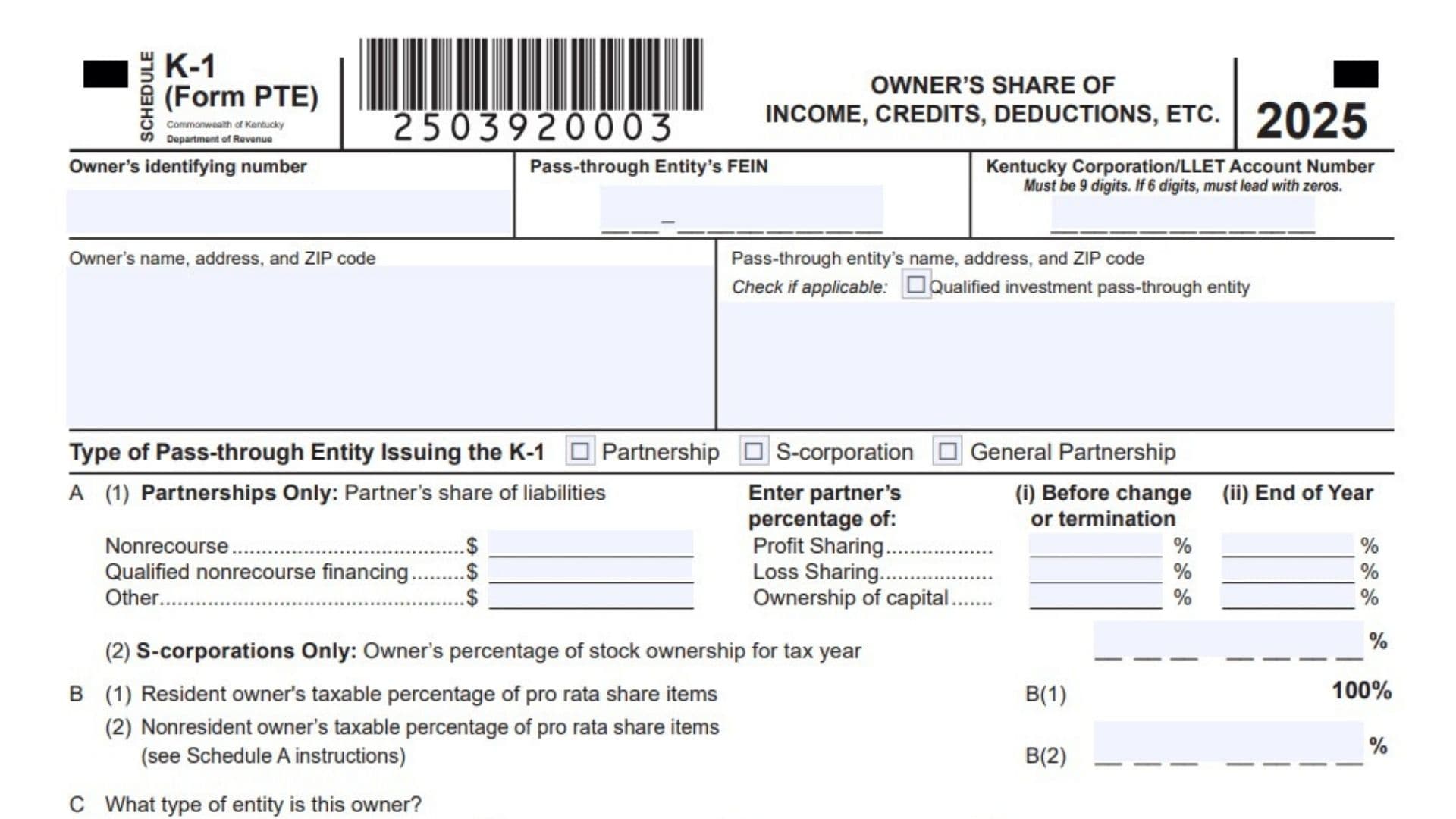
Kentucky Schedule K-1 (Form PTE) is the owner-level tax statement a Kentucky pass-through entity uses to report each owner’s share of income, losses, deductions, credits, and other tax items for the year. It applies to partnerships, S corporations, and general partnerships, and it gives each owner the Kentucky figures they need to prepare their own return correctly. The form is important because Kentucky owners, and in many cases nonresident owners, must report pass-through income whether or not the entity actually distributed cash. It also carries special Kentucky items such as LLET pass-through data, apportionment information, resident shareholder adjustments, and tax credit details that may not appear the same way on the federal K-1. The form helps the owner separate Kentucky amounts from federal amounts, apply the right percentages for resident or nonresident treatment, and track items that affect individual, fiduciary, corporate, or entity-level filings. In short, this schedule is the bridge between the pass-through entity’s tax reporting and the owner’s Kentucky tax return, so accuracy matters at every line.
How To File Kentucky Schedule K-1 (Form PTE)
The pass-through entity prepares Schedule K-1 for each owner and provides it with the owner’s tax information. The owner then uses the Kentucky amounts on the form when preparing the proper Kentucky return, such as Form 740, Form 740-NP, or Form 741, depending on the owner type. The entity should make sure all identifying numbers, ownership percentages, and Kentucky-specific allocation data are complete before issuing the schedule. If an owner is nonresident or part-year resident, the Kentucky percentages and apportionment items must be applied correctly so the owner reports only the amount required under Kentucky law. Any supporting schedules, certifications, or attachments called for by the form should be included. Keep the K-1 with the owner’s tax records because several lines feed directly into other Kentucky forms and worksheets.

How to Complete Kentucky Schedule K-1 (Form PTE)
Header Information
Type Of Pass-Through Entity Issuing The K-1: Mark the box that shows whether the issuing entity is a partnership, S corporation, or general partnership.
Owner’s Identifying Number: Enter the owner’s taxpayer identification number.
Pass-Through Entity’s FEIN: Enter the entity’s federal employer identification number.
Kentucky Corporation/LLET Account Number: Enter the Kentucky account number if one applies. If the number has only six digits, add leading zeros so it becomes nine digits.
Owner’s Name, Address, And ZIP Code: Enter the owner’s full name and mailing address.
Pass-Through Entity’s Name, Address, And ZIP Code: Enter the pass-through entity’s legal name and mailing address.
Qualified Investment Pass-Through Entity Box: Mark this box if the entity qualifies as a qualified investment pass-through entity.
Item A, Ownership And Liability Information
Item A(1), Partnerships Only, Partner’s Share Of Liabilities: Complete this section only if the entity is a partnership. Enter the partner’s share of liabilities for nonrecourse, qualified nonrecourse financing, and other liabilities. Also enter the partner’s percentages for profit sharing, loss sharing, and ownership of capital, both before a change or termination and at year end when requested.
Item A(2), S-Corporations Only, Owner’s Percentage Of Stock Ownership For Tax Year: Complete this section only if the entity is an S corporation. Enter the owner’s stock ownership percentage for the tax year.
Item B, Taxable Percentage
Item B(1), Resident Owner’s Taxable Percentage Of Pro Rata Share Items: Enter the resident owner’s taxable percentage for pro rata share items.
Item B(2), Nonresident Owner’s Taxable Percentage Of Pro Rata Share Items: Enter the nonresident owner’s taxable percentage for pro rata share items. Use the Schedule A instructions when figuring this percentage.
Item C, Owner Entity Type
Item C: Mark the box that identifies the type of owner. Choose Individual, Estate, Trust, Single Member LLC, General Partnership, Corporation, S Corporation, Other Pass-Through Entity, ESOP, or Tax Exempt. If you choose Other, write the correct type in the blank space.
Item D, Nonresident Withholding Reporting
Item D: Check this box if the nonresident owner’s income is reported on Kentucky Nonresident Income Tax Withholding on Distributive Share Income Report, Form 740NP-WH and Form PTE-WH.
Item E, K-1 Status
Item E(1), Final K-1: Check this box if this is the final Kentucky Schedule K-1 for the owner.
Item E(2), Amended K-1: Check this box if you are issuing an amended Kentucky Schedule K-1.
Section A, Line 1, Kentucky Ordinary Income Or Loss From Trade Or Business Activities: Enter the owner’s share of Kentucky ordinary income or loss from trade or business activities.
Section A, Line 2, Net Income Or Loss From Rental Real Estate Activities: Enter the owner’s share of net income or loss from rental real estate activities.
Section A, Line 3, Net Income Or Loss From Other Rental Activities: Enter the owner’s share of net income or loss from other rental activities.
Section A, Line 4(a), Interest Income: Enter the owner’s share of portfolio interest income.
Section A, Line 4(b), Dividend Income: Enter the owner’s share of portfolio dividend income.
Section A, Line 4(c), Royalty Income: Enter the owner’s share of portfolio royalty income.
Section A, Line 4(d), Net Short-Term Capital Gain Or Loss: Enter the owner’s share of net short-term capital gain or loss.
Section A, Line 4(e), Net Long-Term Capital Gain Or Loss: Enter the owner’s share of net long-term capital gain or loss.
Section A, Line 4(f), Other Portfolio Income Or Loss: Enter any other portfolio income or loss and attach a schedule describing it.
Section A, Continued, Income, Deductions, And Credits
Section A, Line 5, Guaranteed Payments To Partners: Partnerships only, enter guaranteed payments made to partners.
Section A, Line 6, IRC Section 1231 Net Gain Or Loss: Enter net gain or loss under IRC Section 1231, excluding casualty or theft amounts.
Section A, Line 7, Other Income Or Loss: Enter other income or loss and attach a schedule.
Section A, Line 8, Charitable Contributions: Enter the owner’s share of charitable contributions and attach the required schedule.
Section A, Line 9, IRC Section 179 Expense Deduction: Enter the owner’s share of the Section 179 expense deduction and attach federal Form 4562 and Kentucky Form 4562.
Section A, Line 10, Deductions Related To Portfolio Income Or Loss: Enter deductions related to portfolio income or loss and attach a schedule.
Section A, Line 11, Other Deductions: Enter any other deductions and attach a schedule.
Investment Interest
Section A, Line 12(a), Interest Expense On Investment Debts: Enter interest expense on investment debts.
Section A, Line 12(b)(1), Investment Income Included On Lines 4(a), 4(b), 4(c), And 4(f): Enter investment income amounts included in the listed portfolio lines.
Section A, Line 12(b)(2), Investment Expenses Included On Line 10: Enter investment expenses included on line 10.
Nonrefundable Tax Credits
Section A, Line 13(a): Enter the applicable nonrefundable tax credit in the first credit line.
Section A, Line 13(b): Enter the applicable nonrefundable tax credit in the second credit line.
Section A, Line 13(c): Enter the applicable nonrefundable tax credit in the third credit line.
General Partnerships Only, Refundable Tax Credits
Section A, Line 14, Certified Rehabilitation Tax Credit: General partnerships only, enter the certified rehabilitation tax credit and attach any required certification.
Section A, Line 15, Kentucky Entertainment Incentive Tax Credit: General partnerships only, enter the Kentucky Entertainment Incentive tax credit and attach any required certification.
Section A, Line 16, Decontamination Tax Credit: General partnerships only, enter the decontamination tax credit and attach any required certification.
Section A, Other Items
Section A, Line 17(a), Type Of IRC Section 59(e)(2) Expenditures: Identify the type of IRC Section 59(e)(2) expenditures.
Section A, Line 17(b), Amount Of IRC Section 59(e)(2) Expenditures: Enter the amount of IRC Section 59(e)(2) expenditures.
Section A, Line 18, Tax-Exempt Interest Income: Enter the owner’s share of tax-exempt interest income.
Section A, Line 19, Other Tax-Exempt Income: Enter other tax-exempt income.
Section A, Line 20, Nondeductible Expenses: Enter nondeductible expenses.
Section A, Line 21, Property Distributions: Enter property distributions, including cash, other than dividend distributions reported on Form 1099-DIV.
Section A, Line 22, Supplemental Information: Enter any other information that must be reported to each owner and attach a schedule if needed.
Section A, Line 23, S-Corporations Only, Total Dividend Distributions Paid From Accumulated Earnings And Profits: S corporations only, enter total dividend distributions paid from accumulated earnings and profits.
Section B, LLET Pass-Through Items
Section B, Line 1, Kentucky Gross Receipts: Enter Kentucky gross receipts attributable to the owner.
Section B, Line 2, Total Gross Receipts: Enter total gross receipts.
Section B, Line 3, Kentucky Gross Profits: Enter Kentucky gross profits.
Section B, Line 4, Total Gross Profits: Enter total gross profits.
Section B, Line 5, Limited Liability Entity Tax Nonrefundable Credit: Enter the owner’s share of the LLET nonrefundable credit.
Section C, Apportionment Pass-Through Items
Section C, Line 1, Kentucky Receipts: Enter Kentucky receipts.
Section C, Line 2, Total Receipts: Enter total receipts.
Section D, 3-Factor Apportionment
Section D, Line 1, Kentucky Property: Enter Kentucky property.
Section D, Line 2, Total Property: Enter total property.
Section D, Line 3, Kentucky Payroll: Enter Kentucky payroll.
Section D, Line 4, Total Payroll: Enter total payroll.
Section E, Line 1: Add the Kentucky Schedule K-1 amounts from Section A lines 1 through 6 and 9, plus the portions of lines 7 and 11 that apply. Add income amounts and subtract loss or deduction amounts as directed.
Section E, Line 2: Add the federal Schedule K-1 amounts from the matching federal lines, using the correct federal form, and include the amounts that do not pass through as itemized deductions.
Section E, Line 3: Enter the difference between lines 1 and 2 on the appropriate line of Schedule M. If line 1 is greater, enter the difference as an addition. If line 2 is greater, enter the difference as a subtraction.
Filing Notes For Owners
Residents generally report all Kentucky Schedule K-1 amounts on their Kentucky return, while nonresidents use the Kentucky source percentage and apportionment rules to determine what is taxable. Owners must also consider at-risk limitations, passive activity limitations, and capital loss rules where applicable, because those rules can change the amount ultimately reported on the Kentucky return. For S corporation owners, actual cash dividend distributions are reported separately and are not shown as the corporation’s dividend distributions on this Kentucky K-1. Estates and trusts use the amounts on the form for Form 741 reporting, and corporate owners use the relevant LLET credit worksheet and Kentucky taxable income rules.