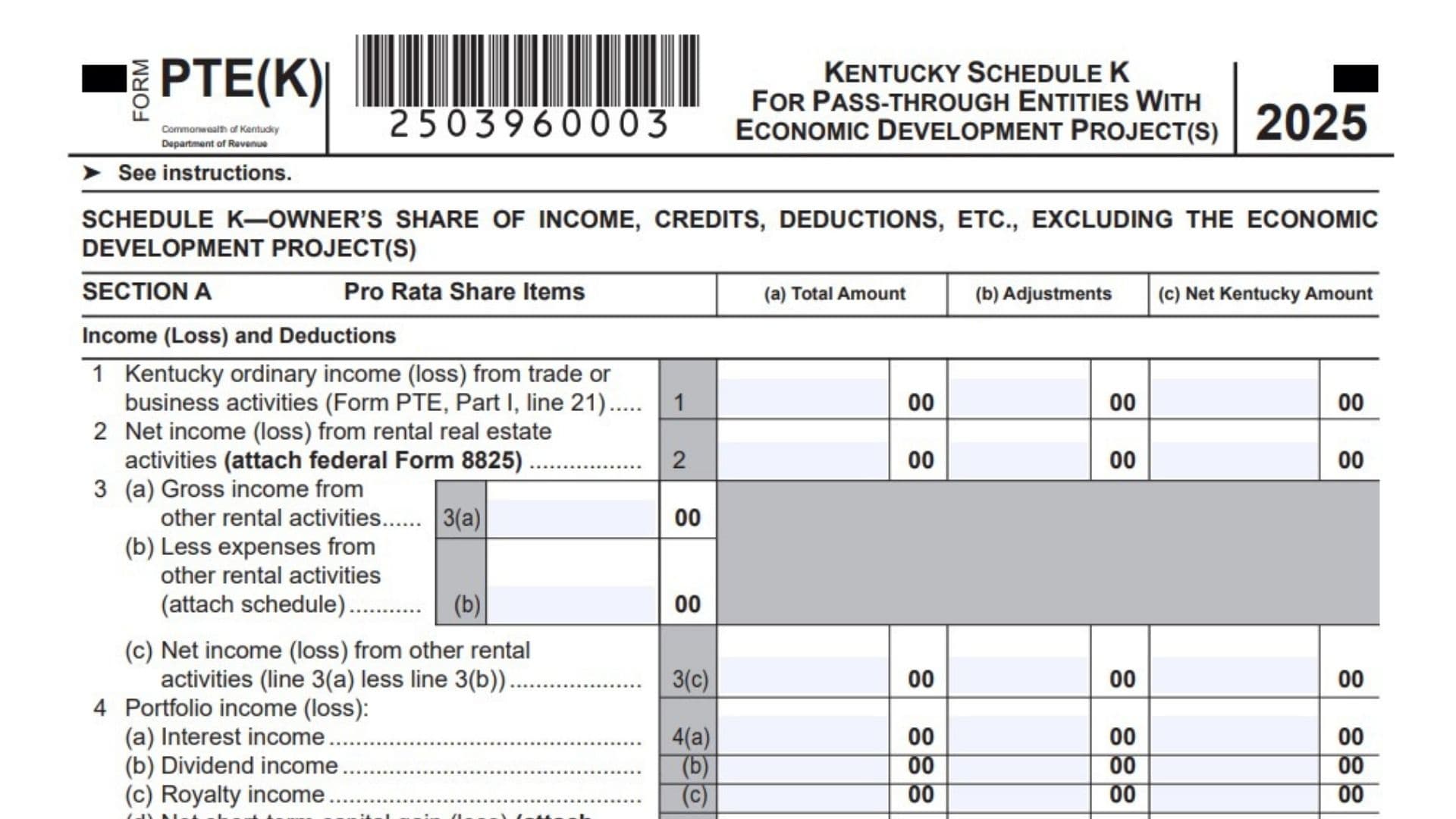
Kentucky Form PTE(K), also called Kentucky Schedule K for pass-through entities with economic development projects, is used by a pass-through entity to report the owners’ share of Kentucky income, credits, deductions, distributions, apportionment items, and other separately reported tax items when the entity has one or more qualifying Kentucky economic development projects. This form is not the same as the regular Kentucky Form PTE Schedule K because it separates the total amounts of income, credits, deductions, and other items from the amounts connected to the qualifying project or projects. The main purpose is to make sure that only the proper net Kentucky amount, after removing the project-related portion, flows through to the partners, members, or shareholders on their Kentucky Schedule K-1. A pass-through entity should use this form when it has projects connected with programs such as KREDA, KIDA, KJRA, KIRA, KJDA, KBI, KRA, IEIA, IEBA, or FON. In simple terms, Kentucky Form PTE(K) helps the entity show three things: the full amount for each tax item, the part of that item tied to the economic development project, and the remaining Kentucky amount that should be reported to the owners. Because the form affects owner-level Kentucky reporting, it should be completed carefully, supported with the proper schedules, and matched to the entity’s Kentucky return, project schedules, federal forms, and Kentucky Schedule K-1 information.
How To File Kentucky Form PTE(K)
Complete Kentucky Form PTE(K) as part of the pass-through entity’s Kentucky tax filing when the entity has one or more qualifying economic development projects. Use this form instead of the regular Kentucky Schedule K for Form PTE when the entity falls under one of the listed economic development programs.
Before filing, finish the related Kentucky Form PTE sections, Schedule L, Schedule A, and any project-specific tax computation schedules that apply. You will need those figures to complete Sections A, B, C, and D.
Attach all required supporting documents. These may include federal Form 8825, federal Schedule D, Kentucky Schedule D, federal Form 4797, Kentucky Form 4797, federal Form 4562, Kentucky Form 4562, credit certifications, project computation schedules, and separate schedules for items that need extra detail.
If the entity has more than one economic development project, prepare an added schedule that shows how the total project-related adjustment was calculated for each affected item.
After completing the form, use the net Kentucky amounts from Section A to prepare the owners’ Kentucky Schedule K-1 information. The combined owner amounts should agree with the matching net Kentucky amounts shown on this form.

How To Complete Kentucky Form PTE(K)
Section A reports income, losses, deductions, credits, and other owner-level pass-through items. Most lines use three columns.
Column (a): Total Amount: Enter the full amount for each item before removing the part connected to the economic development project. These amounts should be completed using the same general approach used for Kentucky Form PTE Schedule K.
Column (b): Adjustments: Enter the amount of each item that belongs to the economic development project or projects. If the entity has more than one project, attach a schedule showing the calculation of the total adjustment for each line.
Column (c): Net Kentucky Amount: Subtract column (b) from column (a). Enter the remaining amount in column (c). These net amounts are the figures used for the owners’ Kentucky Schedule K-1 reporting.
Important Project Rule: If the entity’s only business activity is the economic development project or projects, the amount in column (b) will usually match the amount in column (a) for each applicable item.
Income, Loss, And Deduction Lines
Line 1: Kentucky Ordinary Business Income Or Loss: Enter the Kentucky ordinary income or loss from trade or business activities. This amount comes from Form PTE, Part I, line 21.
Line 2: Net Rental Real Estate Income Or Loss: Report the net income or loss from rental real estate activities. Attach federal Form 8825 when this line applies.
Line 3(a): Gross Income From Other Rental Activities: Enter the total gross income from rental activities that are not rental real estate activities reported on line 2.
Line 3(b): Expenses From Other Rental Activities: Enter the expenses connected with the other rental activities. Attach a schedule that explains the expenses.
Line 3(c): Net Income Or Loss From Other Rental Activities: Subtract line 3(b) from line 3(a). Enter the net result as income or loss.
Line 4(a): Interest Income: Report interest income included in portfolio income.
Line 4(b): Dividend Income: Report dividend income included in portfolio income.
Line 4(c): Royalty Income: Report royalty income included in portfolio income.
Line 4(d): Net Short-Term Capital Gain Or Loss: Enter the net short-term capital gain or loss. Attach federal Schedule D and Kentucky Schedule D when they apply.
Line 4(e): Net Long-Term Capital Gain Or Loss: Enter the net long-term capital gain or loss. Attach federal Schedule D and Kentucky Schedule D when they apply.
Line 4(f): Other Portfolio Income Or Loss: Enter any other portfolio income or loss that does not fit lines 4(a) through 4(e). Attach a schedule that identifies the items.
Line 5: Guaranteed Payments To Partners: Partnerships enter guaranteed payments made to partners. This line is only for partnerships.
Line 6: IRC Section 1231 Net Gain Or Loss: Enter the IRC Section 1231 net gain or loss, except gains or losses caused by casualty or theft. Attach federal Form 4797 and Kentucky Form 4797.
Line 7: Other Income Or Loss: Enter other income or loss that is not reported on another line. Attach a schedule explaining the amount.
Line 8: Charitable Contributions: Enter charitable contributions that pass through to owners. Attach a schedule with the needed detail.
Line 9: IRC Section 179 Expense Deduction: Enter the Section 179 expense deduction. Attach federal Form 4562 and Kentucky Form 4562.
Line 10: Deductions Related To Portfolio Income Or Loss: Enter deductions that relate to portfolio income or loss. Attach a schedule that explains the deductions.
Line 11: Other Deductions: Enter any other deductions that must be separately reported and are not included on earlier lines. Attach a schedule.
Investment Interest Lines
Line 12(a): Interest Expense On Investment Debts: Enter the investment interest expense connected with investment debt.
Line 12(b)(1): Investment Income Included On Lines 4(a), 4(b), 4(c), And 4(f): Enter the amount of investment income already included on those portfolio income lines.
Line 12(b)(2): Investment Expenses Included On Line 10: Enter the investment expenses already included on line 10.
Nonrefundable Tax Credit Lines
Line 13(a): Applicable Nonrefundable Tax Credit: Write the name of the applicable nonrefundable tax credit and enter the related amounts in the proper columns.
Line 13(b): Additional Applicable Nonrefundable Tax Credit: Use this line for another applicable nonrefundable tax credit. Identify the credit and enter the related amounts.
Line 13(c): Additional Applicable Nonrefundable Tax Credit: Use this line for a third applicable nonrefundable tax credit. Identify the credit and enter the related amounts.
General Partnerships Only, Refundable Tax Credit Lines
Line 14: Certified Rehabilitation Tax Credit: General partnerships enter the refundable amount of the certified rehabilitation tax credit. Attach the required certification.
Line 15: Kentucky Entertainment Incentive Tax Credit: General partnerships enter the refundable amount of the Kentucky Entertainment Incentive tax credit. Attach the required certification.
Line 16: Decontamination Tax Credit: General partnerships enter the refundable amount of the decontamination tax credit. Attach the required certification.
Other Item Lines
Line 17(a): Type Of IRC Section 59(e)(2) Expenditures: Enter the type of IRC Section 59(e)(2) expenditure being reported.
Line 17(b): Amount Of IRC Section 59(e)(2) Expenditures: Enter the amount of the IRC Section 59(e)(2) expenditures.
Line 18: Tax-Exempt Interest Income: Enter tax-exempt interest income that must be reported to the owners.
Line 19: Other Tax-Exempt Income: Enter other tax-exempt income that is not included on line 18.
Line 20: Nondeductible Expenses: Enter expenses that are not deductible but still need to be reported to the owners.
Line 21: Total Property Distributions Other Than Certain Dividends: Enter total property distributions, including cash, but do not include dividend distributions that belong on line 22.
Line 22: Other Separately Reported Items And Amounts: Report any other items and amounts that must be separately shown to partners or shareholders. Attach a schedule that explains each item.
Line 23: Total Dividend Distributions From Accumulated Earnings And Profits: S-corporations enter total dividend distributions paid from accumulated earnings and profits. This line applies only to S-corporations.
Section B: LLET Pass-Through Items
Section B is required. It reports limited liability entity tax pass-through items and uses total amount figures.
Line 1: Kentucky Gross Receipts From Schedule L: Enter Kentucky gross receipts from Schedule L, Section A, line 2.
Line 2: Total Gross Receipts From Schedule L: Enter total gross receipts from Schedule L, Section B, line 1.
Line 3: Kentucky Gross Profits From Schedule L: Enter Kentucky gross profits from Schedule L, Section A, line 5.
Line 4: Total Gross Profits From Schedule L: Enter total gross profits from Schedule L, Section B, line 3.
Line 5: LLET Nonrefundable Credit: Enter the limited liability entity tax nonrefundable credit from Form PTE, page 3, Part II. Add lines 4 and 6 from that part, then subtract $175.
Section C: Apportionment Pass-Through Items
Section C reports receipts used for apportionment pass-through purposes.
Line 1: Kentucky Receipts From Schedule A: Enter Kentucky receipts from Schedule A, Part I, line 1.
Line 2: Total Receipts From Schedule A: Enter total receipts from Schedule A, Part I, line 2.
Section D: 3-Factor Apportionment
Section D reports property and payroll amounts used for 3-factor apportionment under KRS 141.121.
Line 1: Kentucky Property From Schedule A: Enter Kentucky property from Schedule A, Part I, line 5.
Line 2: Total Property From Schedule A: Enter total property from Schedule A, Part I, line 6.
Line 3: Kentucky Payroll From Schedule A: Enter Kentucky payroll from Schedule A, Part I, line 8.
Line 4: Total Payroll From Schedule A: Enter total payroll from Schedule A, Part I, line 9.
Final Review Before Filing
Check that every applicable line is completed, every project-related amount is properly removed in column (b), and every net Kentucky amount in column (c) is correct. Make sure required schedules, forms, and certifications are attached. Also confirm that the totals used for the owners’ Kentucky Schedule K-1 match the net Kentucky amounts reported in Section A.