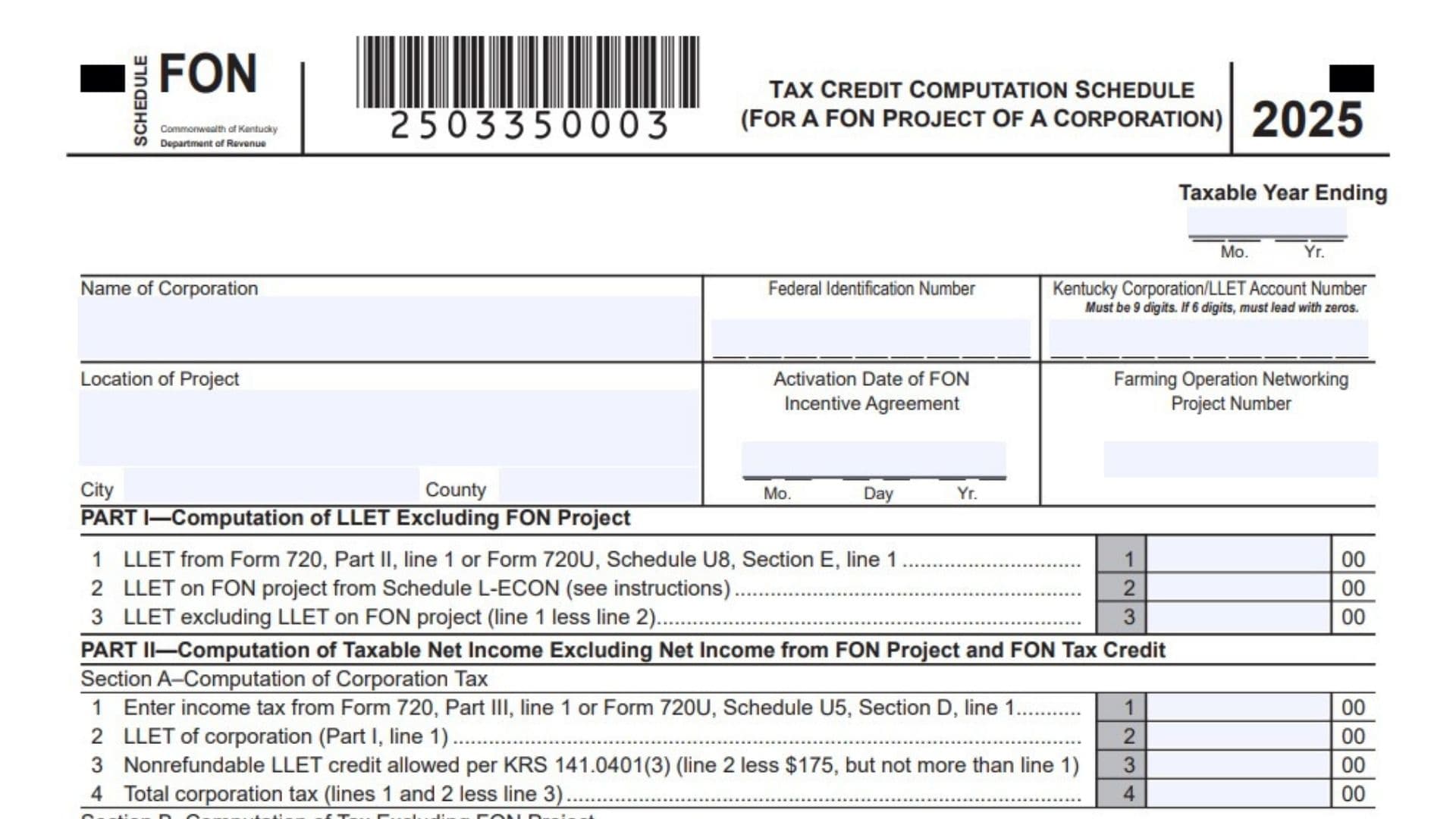
Kentucky Schedule FON is the tax credit package used by an approved business entity to report and track Farming Operation Networking incentive benefits in Kentucky. It applies only when the company has received the required approval from the Cabinet for Economic Development under KRS 141.410 to 141.414, and it is used to determine the credit allowed against Kentucky corporation income tax and, when applicable, limited liability entity tax. The package is not a general-purpose form, it is a project-based filing system that connects the approved FON project, the entity’s tax return, the project’s income and gross receipts or gross profits, and the credit tracking record that must be maintained over time. Depending on the filer type, the package may require Schedule FON for corporations, Schedule FON-SP for pass-through entities, and Schedule FON-T for all projects, with Schedule L-ECON also required where LLET is involved. Because the credit can only be used up to the limits tied to the project’s income, gross profits, or gross receipts, this schedule is both a computation form and a compliance record that helps prove how much credit was earned, how much was used, and how much may carry forward.
How To File Kentucky Schedule FON
To file Schedule FON, first confirm that the project has preliminary or final approval and that you are using the package for only one incentive project. Then complete the correct tax computation schedule for the filer type, attach the matching tracking schedule, and include any supporting schedules required for separate accounting, apportionment, or alternative methods. Corporations filing Form 720 or 720U use Schedule FON and Schedule FON-T, while pass-through entities filing Form PTE or 725 use Schedule FON-SP and Schedule FON-T. If the project involves LLET, attach Schedule L-ECON for the FON project, and if there are multiple projects or special accounting rules, attach the related statements and approval letters that support the figures on the schedule. The completed package must be attached to the Kentucky return, and the credit must also be entered on Schedule TCS in the proper columns.

How to Complete Kentucky Schedule FON
Line 1: Entity Information
Enter the name of the corporation or pass-through entity, its FEIN, Kentucky account number, project location, activation date, FON agreement information, project number, city, and county. Use the exact information tied to the approved FON project.
Part I: LLET Excluding FON Project
This section is used to calculate LLET without the FON project included. Complete it before moving to the taxable income section so the tax attributable to the project can be separated correctly.
Line 1: Income Tax From Main Return
Enter the income tax amount from Form 720, Part III, line 1, or Form 720U, Schedule U5, Section D, line 1. This is the starting tax amount for the corporation.
Line 2: Corporation LLET
Enter the corporation’s LLET amount from Part I, line 1. This line carries the LLET figure into the computation.
Line 3: Nonrefundable LLET Credit
Enter the nonrefundable LLET credit allowed under KRS 141.0401(3). Subtract $175 from line 2, but do not enter more than line 1.
Line 4: Total Corporation Tax
Add lines 1 and 2, then subtract line 3. This gives the corporation’s total tax before separating the FON project.
Part II: Taxable Net Income Excluding FON Project
This section determines taxable net income without the FON project income included. Use it to isolate the tax impact of the project.
Line 1: Taxable Net Income From Main Return
Enter taxable net income from Form 720, Part I, line 43, or Form 720U, Schedule U5, Section D, line 7. This is the total income amount before removing the FON project.
Line 2: Net Income From FON Project
Enter the net income from the FON project. If the project had a loss, enter zero instead of a negative number.
Line 3: Taxable Net Income Excluding FON Project
Subtract line 2 from line 1. If line 2 is greater than line 1, enter zero.
Line 4: Income Tax Liability Excluding FON Project
Multiply line 3 by the 5 percent tax rate. This gives the income tax tied to the non-FON portion of the business.
Line 5: LLET Excluding LLET On FON Project
Enter the LLET amount from Part I, line 3. This is the LLET amount after removing the project component.
Line 6: Reduced LLET Excluding FON Project
Subtract $175 from line 5, but do not enter more than line 4. This limits the amount allowed in the exclusion computation.
Line 7: Total Tax Excluding FON Project
Add lines 4 and 5, then subtract line 6. This gives the tax that is not attributable to the FON project.
Line 8: Tax Attributable To FON Project
Subtract Section B, line 7 from Part II, Section A, line 4. Continue to Part III and carry this amount to line 1 there.
Part III: Limitation
This part caps the credit based on the project’s tax liability and the limitation shown on Schedule FON-T. The allowable credit is always the lesser of the two amounts.
Line 1: FON Project Tax Liability
Enter the tax liability attributable to the FON project from Part II, Section B, line 8. This amount is used to test the credit limitation.
Line 2: Limitation From Schedule FON-T
Enter the limitation amount from Schedule FON-T, Column D. This is the current-year credit ceiling for the project.
Line 3: Allowable FON Tax Credit
Enter the lesser of line 1 or line 2. This is the amount of credit that can be claimed for the year.
Schedule TCS Entry
Enter the allowable credit on Schedule TCS, Part II, Column E and Column F. This is where the credit is actually reported on the tax return.
Schedule FON-SP: Entity Information
Enter the pass-through entity name, FEIN, Kentucky account number, project location, activation date, FON agreement information, project number, city, and county. This schedule is used by pass-through entities instead of the corporation schedule.
FON-SP, Part I, Line 1: Kentucky Taxable Income On FON Project
Enter the Kentucky taxable income from the FON project. If the project is the only Kentucky operation, use the income amount from Form PTE.
FON-SP, Line 2: Net Operating Loss Deduction
Enter any net operating loss deduction on the FON project. Use the project’s prior year loss carryforward if one exists.
FON-SP, Line 3: Taxable Income After NOLD
Subtract line 2 from line 1. This gives the taxable income after the net operating loss deduction.
FON-SP, Line 4: Income Tax Liability
Multiply line 3 by the 5 percent tax rate. This is the income tax on the FON project.
FON-SP, Line 5: LLET On FON Project
Enter the LLET amount from Schedule L-ECON. This line does not apply to general partnerships.
FON-SP, Line 6: Nonrefundable LLET Credit
Subtract $175 from line 5, but do not enter more than line 4. This calculation does not apply to general partnerships.
FON-SP, Line 7: Total Tax On FON Project
Add lines 4 and 5, then subtract line 6. This is the tax amount tied to the project.
FON-SP, Line 8: Limitation
Enter the limitation from Schedule FON-T, Column D. This is the maximum credit available for the year.
FON-SP, Line 9: FON Tax Credit
Enter the lesser of line 7 or line 8. This is the allowable FON credit for the pass-through entity.
FON-SP, Line 10: Tax Due On The Project
If line 7 is greater than line 9, enter the difference here as a liability of the pass-through entity. Add this amount to the related line on Form PTE or Form 725 as instructed.
Schedule FON-T Instructions
Entity Type
Check the correct entity type, such as corporation, limited liability pass-through entity, general partnership, or other. This identifies which filer is maintaining the project tracking record.
Line A: Taxable Year Ended
Enter the ending date of the taxable year for the information being reported. Use month, day, and year format.
Line B: Carry Forward Balance Of Approved Costs
For years after the first year, enter the difference between the prior year’s approved costs and the prior year’s credit claimed. If the prior year’s claimed credit matched the approved cost, enter zero.
Line C: Approved Costs For Current Taxable Year
Enter the total approved costs for the year. These are the current-year qualified project costs.
Line D: Total Approved Costs Available For Credit
Add Column B and Column C, then enter the result here. This amount is carried to Schedule FON or Schedule FON-SP depending on the filer type.
Line E: FON Tax Credit Claimed
Enter the greater of the credit claimed against LLET or income tax for the project, if applicable. If no credit was claimed, enter zero.
Filing Tips
Keep one Schedule FON package for each project, because multiple projects must be calculated separately. If separate accounting is not practical and an alternative method is approved, attach the approval letter from the Department of Revenue. If the project is an expansion of an existing operation, include the required apportionment support and approval letter for the percentage used. The credit can carry forward for up to five succeeding taxable years, so the tracking schedule should be updated and attached each year until the credit is fully used.