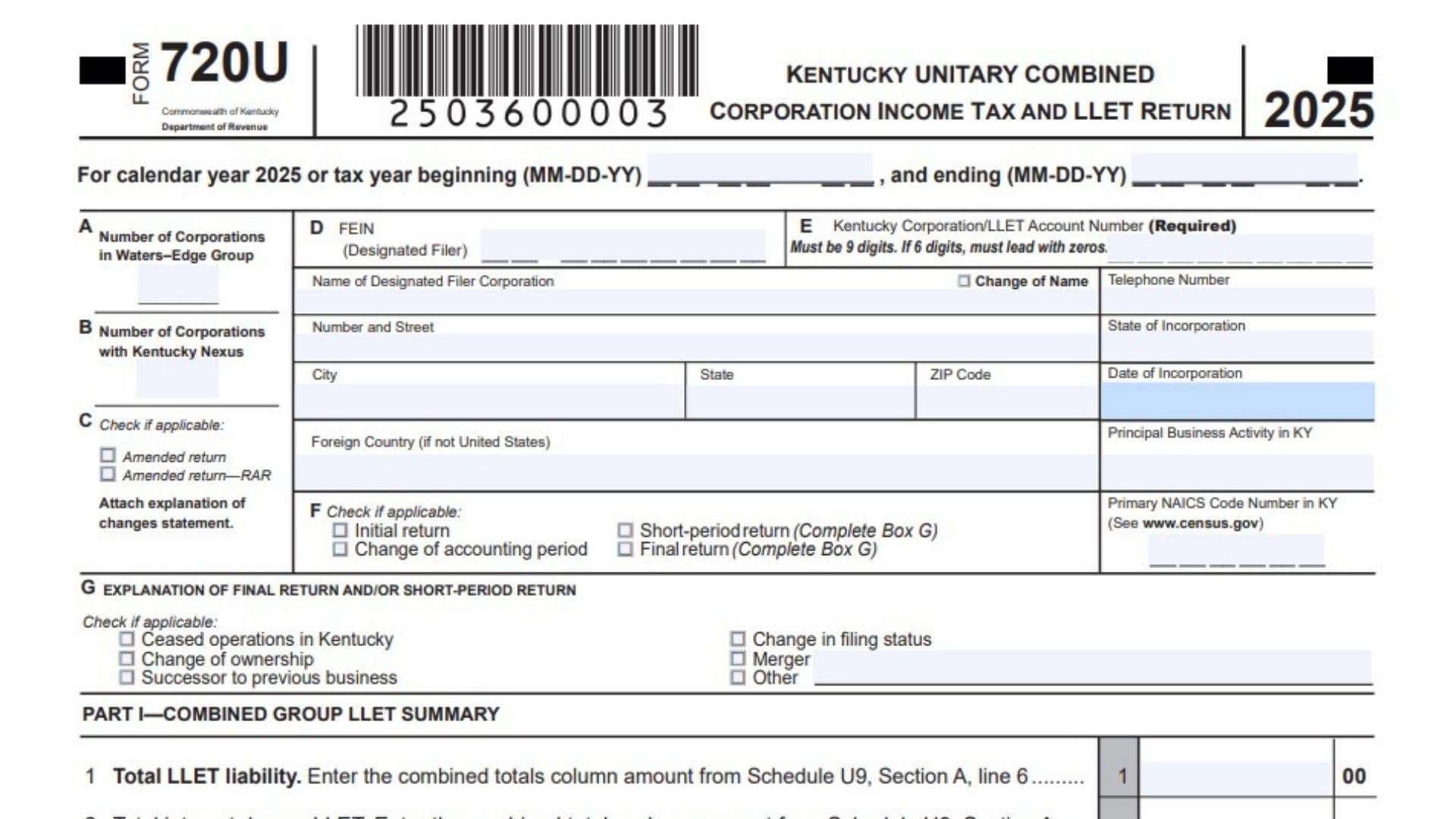
Kentucky Form 720U is the return used by a unitary group to report corporation income tax and limited liability entity tax together in one combined filing. It is designed for groups of related corporations that must report income, deductions, apportionment, credits, payments, and net operating losses on a combined basis, while still tracking each member’s share separately where required. The return includes multiple schedules that gather the group’s membership information, affiliations, federal-to-state adjustments, apportionment data, LLET computations, taxes and payments, and NOL calculations. Because of that structure, Form 720U is more than a simple tax return, it is a full reporting package that tells Kentucky who is in the group, how the income is combined, how the tax is divided, and how much is due or refundable. It also requires officer information, preparer details, and a signature declaration, so the filing must be complete, accurate, and fully supported before submission.
How To File Kentucky Form 720U
To file Form 720U, start by identifying the designated filer and making sure the group has the correct Kentucky corporation or LLET account number and federal identification number. Then complete the required schedules for the group’s members, affiliations, pro forma federal return items, income modifications, apportionment, net gains and losses, LLET, taxes and payments, and net operating losses. Each schedule feeds numbers into the main return, so the filing should be completed in order and reviewed carefully for consistency across all pages. After all applicable schedules are finished, attach them to the main return, include officer information and any required supporting statements, and have the officer and preparer sign before filing.

How to Complete Kentucky Form 720U
Line 1: Kentucky Corporation Or LLET Account Number
Enter the Kentucky Corporation/LLET account number for the designated filer. This number should match the account assigned to the filing entity.
Line 2: Federal Identification Number
Enter the designated filer’s FEIN. Make sure it is nine digits long, and if it has only six digits, add leading zeros.
Line 3: Name Of Designated Filer
Write the full legal name of the corporation designated to file the unitary return. Use the same name consistently throughout the return and schedules.
Line 4: Page Identification And Schedule References
Use the related schedules attached to Form 720U as required. This return relies on several supporting schedules, so the filer should complete the applicable ones before finalizing the main form.
U1 Schedule, Question 1: New Business
Check this box if the corporation is a new business. Answer this if the corporation has not previously operated under the same identifying information.
U1 Schedule, Question 2: Successor Business Information
If the corporation is the successor to a prior business, enter the former business name, address, and FEIN. Provide complete information so the department can connect the new filing to the predecessor entity.
U1 Schedule, Question 3: Foreign Corporation Qualification Date
If the corporation is a foreign corporation, enter the date it qualified to do business in Kentucky. Use the correct qualification date exactly as recorded.
U1 Schedule, Question 4: Books Kept By
Enter the name and address of the person or office that keeps the corporation’s books. This identifies where the records are maintained.
U1 Schedule, Question 5: Disregarded Entities
Check whether disregarded entities are included in the return. If yes, attach the required Schedule DE.
U1 Schedule, Question 6: Pass-Through Entity Membership
If the corporation was a partner or member in a pass-through entity doing business in Kentucky, list the pass-through entity names and FEINs. If there are more than three entities, attach a supporting statement.
U1 Schedule, Question 7: Other Kentucky Business Activity
Indicate whether the corporation did business in Kentucky other than through its interest in a pass-through entity. Check yes or no based on the corporation’s actual activity.
U1 Schedule, Question 8: Accounting Basis
State whether the return was prepared on a cash basis, accrual basis, or another basis. Choose the method used to prepare the filing.
U1 Schedule, Officer Information: Officer Schedule
Attach a schedule showing the name, home address, and Social Security number of the vice president, secretary, and treasurer of the designated filer corporation. If this information has changed since the last return, indicate that change on the form.
U1 Schedule, President Information
Enter the president’s name, home address, Social Security number, and the date the president became president. This identifies the current corporate officer for the filing.
U1 Schedule, Signature Of Officer
The authorized officer must sign and date the schedule. By signing, the officer confirms the return is true, correct, and complete.
U1 Schedule, Paid Preparer Information
If a paid preparer completed the return, enter the preparer’s name or firm, ID number, email or telephone number, and the date of preparation. The preparer must also sign.
U1 Schedule, Preparer Permission
Indicate whether the Department of Revenue may discuss the return with the preparer. Check yes or no.
U2 Schedule, Section A: List All Members
List every member of the unitary combined group in this section. Enter each member’s name, FEIN, year ending date, whether the member is protected by P.L. 86-272, the LLET exemption code, Kentucky LLET nexus, GFE status, new member status, voting power percentage, ownership by corporation number, and excluded corporation number if applicable.
U2 Schedule, Section B: Mergers With Members
List any mergers involving members named in Section A. Identify the entity that merged, the member it merged with, and the date of merger.
U2 Schedule, Section C: Members That Left The Group
List any members that were sold or otherwise left the group during the tax year. Show the entity sold and the entity that received it, along with the sale date.
U2 Schedule, Section D: Excluded Members
Enter the total number of excluded members and provide each excluded member’s name, FEIN, and reason for exclusion. Use the applicable reason code shown on the schedule.
U3 Schedule, Line 1(a): Gross Receipts Or Sales
Enter total gross receipts or sales for each member. This begins the pro forma federal return calculation.
U3 Schedule, Line 1(b): Returns And Allowances
Enter returns and allowances related to gross receipts or sales. Subtract this from gross receipts to determine the balance.
U3 Schedule, Line 1(c): Balance
Subtract returns and allowances from gross receipts and enter the result. This is the net amount used in later calculations.
U3 Schedule, Line 2: Cost Of Goods Sold
Enter cost of goods sold for the member. Use the proper supporting records for this figure.
U3 Schedule, Line 3: Gross Profits
Subtract cost of goods sold from line 1(c) and enter the gross profits amount. This is a key base number for the schedule.
U3 Schedule, Line 4: Dividends And Inclusions
Enter dividend income and related inclusions. Use the amount relevant to the federal pro forma return.
U3 Schedule, Line 5: Interest
Enter interest income. Include the correct amount for the combined group member.
U3 Schedule, Line 6: Gross Rents
Enter gross rents received. Use the appropriate amount shown in the member’s records.
U3 Schedule, Line 7: Gross Royalties
Enter gross royalty income. Report the amount associated with the member.
U3 Schedule, Line 8: Capital Gain Net Income
Enter capital gain net income from the federal form if applicable. Use the amount that belongs in the combined pro forma return.
U3 Schedule, Line 9: Net Gain Or Loss From Form 4797
Enter the net gain or loss from Form 4797. Include the correct figure from the supporting federal schedule.
U3 Schedule, Line 10: Other Income
Enter any other income amount that applies. Use this line for income not captured above.
U3 Schedule, Line 11: Total Income
Add lines 3 through 10 and enter the result. This gives total income before deductions.
U3 Schedule, Lines 12 Through 26: Deductions
Enter officer compensation, salaries and wages, repairs and maintenance, bad debts, rents, taxes and licenses, interest, charitable contributions, depreciation, depletion, advertising, pension and profit-sharing, employee benefit programs, energy efficient commercial buildings deduction, and other deductions on the correct lines. Each deduction should be entered in the right category.
U3 Schedule, Line 27: Total Deductions
Add lines 12 through 26. This is the combined total of all listed deductions.
U3 Schedule, Line 28: Taxable Income Before NOL And Special Deductions
Subtract total deductions from total income and enter the result. This shows taxable income before special adjustments.
U3 Schedule, Line 29: Deferred Intercompany Income Adjustment
Enter any adjustments needed to recognize deferred income from intercompany transactions. This line reflects timing corrections required by the schedule.
U3 Schedule, Line 30: Other Federal Law Adjustments
Enter any other adjustments required by federal law and attach an explanation. Use this line for adjustments not already listed.
U3 Schedule, Line 31: Modified Federal Taxable Income
Add lines 28 through 30. This gives modified federal taxable income for the schedule.
U4 Schedule, Line 1: Modified Federal Taxable Income
Carry over the amount from Schedule U3, line 31. This becomes the starting point for Kentucky modifications.
U4 Schedule, Lines 2 Through 18: Additions
Enter additions for state and local obligation interest, state taxes based on net or gross income, depreciation adjustment, deductions tied to nontaxable income, related party expenses, captive REIT dividend paid deduction, loss from Form 4797, federal depletion, federal contribution deductions, Terminal Railroad Corporation adjustments, federal passive activity loss, taxable loss of exempt corporations, Internal Revenue Code adjustments, other additions, and Revenue Agent Report adjustments. Use explanations where requested.
U4 Schedule, Line 19: Total Additions
Add lines 1 through 18. This gives the total amount of additions before subtractions.
U4 Schedule, Lines 20 Through 33: Subtractions
Enter subtraction items such as U.S. obligation interest, dividends and other nontaxable inclusions, depreciation adjustment, capital gain from Schedule U3, gain from Form 4797, coal disposal royalty adjustment, Terminal Railroad Corporation adjustments, Kentucky allowable passive activity loss, Kentucky allowable depletion, Internal Revenue Code adjustments, other subtractions, and Revenue Agent Report adjustments. Attach explanations where required.
U4 Schedule, Line 34: Kentucky Net Income
Subtract lines 20 through 33 from line 19 and enter the result. This is Kentucky net income for the group.
U5 Schedule, Section A, Line 1: Combined Totals Amount
Enter the combined totals column amount from Schedule U4, line 34. This starts the apportionment calculation.
U5 Schedule, Section A, Line 2: Nonapportionable Income Or Loss
Enter any income, less expenses or losses, that is not part of apportionable income. Use the correct nonapportionable total.
U5 Schedule, Section A, Line 3: Kentucky Apportionable Income Or Loss
Subtract line 2 from line 1 and enter the result. This is the apportionable income or loss of the combined group.
U5 Schedule, Section A, Line 4: Apportionment Method Code
Enter the code for the apportionment method used. Use the code that matches the group’s calculation method.
U5 Schedule, Section A, Line 5(a): Kentucky Receipts Of Corporation
Enter the corporation’s Kentucky receipts. This is part of the receipts factor.
U5 Schedule, Section A, Line 5(b): Intercompany Eliminations
Enter intercompany eliminations that apply to Kentucky receipts. Use this line to remove internal transactions.
U5 Schedule, Section A, Line 5(c): Kentucky Receipts Of Pass-Through Entities
Enter Kentucky receipts from pass-through entities and attach Schedule U6 if needed. Include these amounts when required by the instructions.
U5 Schedule, Section A, Line 5(d): Kentucky Receipts
Subtract line 5(b) from line 5(a) and add line 5(c). This gives total Kentucky receipts.
U5 Schedule, Section A, Line 6(a): Total Receipts Of Corporation
Enter the corporation’s total receipts. This is the starting point for total receipts.
U5 Schedule, Section A, Line 6(b): Intercompany Eliminations
Enter eliminations that apply to total receipts. Remove internal amounts as needed.
U5 Schedule, Section A, Line 6(c): Total Receipts Of Pass-Through Entities
Enter total receipts from pass-through entities and attach Schedule U6 if applicable.
U5 Schedule, Section A, Line 6(d): Total Receipts
Subtract line 6(b) from line 6(a) and add line 6(c). This gives total receipts for the combined group.
U5 Schedule, Section A, Line 7: Apportionment Factor
Divide line 5(d) by line 6(d) and express the result as a percentage rounded to the fourth decimal place. This percentage is the apportionment factor.
U5 Schedule, Section B, Line 1: Combined Group Apportionable Income Or Loss
Enter the amount from Section A, line 3. This carries the combined group apportionable amount forward.
U5 Schedule, Section B, Line 2: Kentucky Charitable Contribution Deduction
Subtract the allowed Kentucky charitable contribution deduction, if any. Use the deduction permitted by the instructions.
U5 Schedule, Section B, Line 3: Apportionable Income Or Loss After Charitable Deduction
Subtract line 2 from line 1 and enter the result. This is the adjusted apportionable amount.
U5 Schedule, Section B, Line 4: Member’s Kentucky Taxable Share
Multiply line 3 by the apportionment factor from Section A, line 7. This gives the member’s Kentucky taxable share.
U5 Schedule, Section C, Line 1: Total Nonapportionable Income Or Loss
Enter the total nonapportionable income or loss, including interest, rents, royalties, and net capital gains or losses. Follow the schedule categories closely.
U5 Schedule, Section C, Line 1(f): Related Expenses
Attach a schedule showing related expenses for the nonapportionable items. These expenses reduce the nonapportionable total.
U5 Schedule, Section C, Line 2: Net Nonapportionable Income Or Loss
Subtract related expenses from total nonapportionable income or loss. This amount should match the combined totals amount on Section A, line 2.
U5 Schedule, Section C, Line 3: Kentucky Nonapportionable Income Or Loss
Enter the Kentucky portion of nonapportionable income or loss. Use the Kentucky-specific allocation amounts.
U5 Schedule, Section C, Line 3(f): Related Expenses
Attach a schedule of related expenses for Kentucky nonapportionable items. These expenses are subtracted in the next line.
U5 Schedule, Section C, Line 4: Kentucky Net Nonapportionable Income Or Loss
Subtract related expenses from Kentucky nonapportionable income or loss. This gives the Kentucky net amount.
U5 Schedule, Section C, Line 5: Distinct Business Activity Income Or Loss
Enter income or loss from distinct business activity conducted wholly by the taxpayer member and separately apportioned. Attach a statement for support.
U5 Schedule, Section D, Line 1: Member’s Net Nonapportionable And Separately Apportioned Income Or Loss
Add Section C, lines 4 and 5, plus the amount from Schedule U7, Section A, line 9. This combines the member’s nonapportionable and separately apportioned items.
U5 Schedule, Section D, Line 2: Member’s Kentucky Taxable Share
Enter the amount from Section B, line 4. This is the member’s portion of apportionable income or loss.
U5 Schedule, Section D, Line 3: Net Income Or Loss
Add lines 1 and 2. This gives the member’s net income or loss before charitable allocation and NOLD.
U5 Schedule, Section D, Line 4: Charitable Contribution Deduction Remaining
Enter the charitable contribution deduction remaining to be allocated to the member. Use the amount allowed by the instructions.
U5 Schedule, Section D, Line 5: Taxable Net Income Or Loss
Subtract line 4 from line 3. This is the taxable net income or loss before NOLD.
U5 Schedule, Section D, Line 6: Net Operating Loss Deduction
Enter the NOLD amount from Schedule U10, Section D, line 16. This line reflects the allowed deduction.
U5 Schedule, Section D, Line 7: Taxable Net Income Or Loss After NOLD
Subtract line 6 from line 5. This is the taxable net income or loss after the NOLD.
U5 Schedule, Section D, Line 8: Income Tax Due
Multiply line 7 by 5 percent and enter the result. This is the member’s income tax due from the schedule.
U6 Schedule, Columns A Through K: Pass-Through Entity Apportionment
Enter the pass-through entity name, FEIN, corporate partner or member or shareholder information, distributive share, total unitary income, proportion ratio, related receipts, apportionment, and Kentucky receipts amounts. This schedule is used when a corporation has pass-through entity apportionment included in the combined group.
U7 Schedule, Section A, Lines 1 Through 4: Kentucky Net Gains And Losses
Enter Kentucky net short term capital gains or losses, net long term capital gains or losses, net IRC Section 1231 gains or losses, and net involuntary conversion gains or losses. These are the base amounts for the gains and losses schedule.
U7 Schedule, Section A, Lines 5 Through 8: Apportioned And Allocated Gains And Losses
Calculate apportioned, allocated, and combined amounts for each type of gain or loss listed. Follow the schedule’s formulas and combine the amounts correctly for each line set.
U7 Schedule, Section A, Line 9: Member’s Net Kentucky Gain Or Loss
Add the totals from lines 5(d), 6(d), 7(d), and 8(d) under the rules in the instructions. This amount is used in the net income calculations on Schedule U5.
U8 Schedule, Section A, Line 1: Gross Receipts Less Returns And Allowances
Enter gross receipts after subtracting returns and allowances. This is the first gross receipts figure for Kentucky receipts.
U8 Schedule, Section A, Line 1(a): Intercompany Eliminations
Enter eliminations for intercompany amounts in Kentucky gross receipts. Use this line to remove internal activity.
U8 Schedule, Section A, Line 2: Additional Kentucky Gross Receipts
Enter additional Kentucky gross receipts from Schedule L-C for each member that is a partner or member of a pass-through entity or general partnership doing business in Kentucky.
U8 Schedule, Section A, Line 3: Total Kentucky Gross Receipts
Subtract line 1(a) from line 1 and add line 2. This gives total Kentucky gross receipts.
U8 Schedule, Section A, Line 4: Kentucky Cost Of Goods Sold
Enter Kentucky cost of goods sold and attach Schedule COGS for each entity as required.
U8 Schedule, Section A, Line 5: Kentucky Gross Profits
Subtract cost of goods sold from gross receipts. This gives Kentucky gross profits before additional pass-through amounts.
U8 Schedule, Section A, Line 6: Additional Kentucky Gross Profits
Enter additional Kentucky gross profits from Schedule L-C for qualifying members. Include these amounts in the Kentucky profit calculation.
U8 Schedule, Section A, Line 7: Total Kentucky Gross Profits
Add lines 5 and 6. This is the total Kentucky gross profits figure for Section A.
U8 Schedule, Section B, Line 1: Total Gross Receipts Less Returns And Allowances
Enter total gross receipts after subtracting returns and allowances. This is the first total receipts amount.
U8 Schedule, Section B, Line 1(a): Intercompany Eliminations
Enter intercompany eliminations for total receipts. Remove internal amounts where required.
U8 Schedule, Section B, Line 2: Additional Total Gross Receipts
Enter additional total gross receipts from Schedule L-C for qualifying pass-through entity or general partnership members.
U8 Schedule, Section B, Line 3: Total Gross Receipts
Subtract line 1(a) from line 1 and add line 2. This gives total gross receipts from all sources.
U8 Schedule, Section B, Line 4: Cost Of Goods Sold
Enter the total cost of goods sold for each entity and attach Schedule COGS as required.
U8 Schedule, Section B, Line 5: Gross Profits
Subtract cost of goods sold from total gross receipts. This gives total gross profits before additional pass-through amounts.
U8 Schedule, Section B, Line 6: Additional Total Gross Profits
Enter additional total gross profits from Schedule L-C for qualifying members.
U8 Schedule, Section B, Line 7: Total Gross Profits
Add lines 5 and 6. If this line or Section B, line 3 is less than $3,000,000, stop and enter $175 in Section E, line 1.
U8 Schedule, Section C, Line 1: Gross Receipts Computation
If the member’s gross receipts are greater than $3,000,000 but less than $6,000,000, compute the amount using the schedule’s formula. If the receipts are $6,000,000 or more, use the alternate formula shown on the schedule.
U8 Schedule, Section C, Line 3: Gross Receipts Computation Result
Enter the amount from line 1 or line 2, depending on which formula applies. This is the gross receipts amount used to compute LLET.
U8 Schedule, Section D, Line 1: Gross Profits LLET Computation
If gross profits are greater than $3,000,000 but less than $6,000,000, compute the amount using the schedule’s formula. If gross profits are $6,000,000 or more, use the alternate formula.
U8 Schedule, Section D, Line 3: Gross Profits Computation Result
Enter the amount from line 1 or line 2. This is the gross profits amount used to compute LLET.
U8 Schedule, Section E, Line 1: LLET Liability
Enter the lesser of Section C, line 3 or Section D, line 3 for each member. If the amount is less than $175, enter the minimum $175.
U9 Schedule, Section A, Line 1: Amount From Schedule U8
Enter the amount from Schedule U8, Section E, line 1. This begins the LLET section of the taxes and payments schedule.
U9 Schedule, Section A, Line 2: Tax Credit Recapture
Enter any tax credit recapture amount related to LLET. Include this only if it applies.
U9 Schedule, Section A, Line 3: Total
Add lines 1 and 2. This gives the starting LLET total before credits.
U9 Schedule, Section A, Line 4: Nonrefundable LLET Credit From Kentucky Schedule K-1
Enter any nonrefundable LLET credit passed through from Kentucky Schedule K-1. Use the applicable amount.
U9 Schedule, Section A, Line 5: Nonrefundable Tax Credits
Attach Schedule TCS and enter the nonrefundable tax credits allowed against LLET. Use only qualifying credits.
U9 Schedule, Section A, Line 6: LLET Liability
Enter the greater of line 3 less lines 4 and 5, or the $175 minimum. This gives the final LLET liability.
U9 Schedule, Section A, Line 7: Reserved For Future Use
Leave this line blank unless future instructions provide otherwise.
U9 Schedule, Section A, Line 8: Estimated Tax Payments
Enter estimated tax payments made for LLET. Include only amounts credited to the year being reported.
U9 Schedule, Section A, Line 9: Refundable Tax Credits
Attach Schedule TCS and enter refundable tax credits allowed for LLET. Use the correct supported amount.
U9 Schedule, Section A, Line 10: Reserved For Future Use
Leave this line blank unless future instructions say otherwise.
U9 Schedule, Section A, Line 11: Extension Payment
Enter any extension payment made for LLET. Use the amount actually paid with the extension.
U9 Schedule, Section A, Line 12: Prior Year’s Tax Credit
Enter the prior year’s tax credit amount. Include only what the schedule allows.
U9 Schedule, Section A, Line 13: Income Tax Overpayment From Section B
Enter any income tax overpayment carried from Section B, line 21. This amount may offset LLET due.
U9 Schedule, Section A, Line 14: Amount Credited From Other Members To LLET
Enter amounts credited from other members to LLET, using the referenced lines in the schedule. This reflects shared payments or credits.
U9 Schedule, Section A, Line 15: LLET Paid On Original Return
Enter the amount of LLET paid on the original return. Use the actual paid amount.
U9 Schedule, Section A, Line 16: LLET Overpayment On Original Return
Enter any LLET overpayment from the original return. Include only the carryover amount shown in the records.
U9 Schedule, Section A, Line 17: Estimated Tax Penalty Due
Enter the estimated tax penalty due and attach Form 2220-K if required. Use the proper penalty amount.
U9 Schedule, Section A, Line 18: LLET And Estimated Tax Penalty Due
Add line 6, line 16, and line 17, then subtract lines 8 through 15. This gives the total LLET and estimated tax penalty due by the member.
U9 Schedule, Section A, Line 19: LLET Overpayment
Add lines 8 through 15 and subtract lines 6, 16, and 17. This shows any LLET overpayment.
U9 Schedule, Section A, Line 20: Credited To Member’s 2025 Interest Due On LLET
Enter the amount credited to the member’s 2025 interest due on LLET. This reduces the available overpayment or credit balance.
U9 Schedule, Section A, Line 21: Credited To Member’s 2025 Penalty Due On LLET
Enter the amount credited to the member’s 2025 penalty due on LLET. Use this only if the amount applies.
U9 Schedule, Section A, Line 22: LLET, Interest, And Penalties Due By Member With Return
Add line 18 plus lines 20 and 21. If this line is completed, skip lines 23 through 27.
U9 Schedule, Section A, Line 23: Credited To Member’s 2025 Income Tax
Enter any amount credited to the member’s 2025 income tax. Use the amount the schedule allows.
U9 Schedule, Section A, Line 24: Credited To Other Members’ 2025 LLET
Enter any amount credited to other members’ 2025 LLET. This supports intermember allocation.
U9 Schedule, Section A, Line 25: Credited To Other Members’ 2025 Income Tax
Enter any amount credited to other members’ 2025 income tax. Use the amount actually credited.
U9 Schedule, Section A, Line 26: Credited To Member’s 2026 LLET
Enter any amount carried forward to the member’s 2026 LLET. This is the future-year credit amount.
U9 Schedule, Section A, Line 27: Amount To Be Refunded
Enter the amount to be refunded if an overpayment remains after credits and offsets. Follow the instructions carefully to avoid misstatement.
U9 Schedule, Section B, Line 1: Income Tax
Enter the amount from Schedule U5, Section D, line 8. This begins the income tax portion of the taxes and payments schedule.
U9 Schedule, Section B, Line 2: Tax Credit Recapture
Enter any tax credit recapture amount related to income tax. Include this only if required.
U9 Schedule, Section B, Line 3: Tax Installments On LIFO Recapture
Enter any tax installments on LIFO recapture if applicable. Use the proper amount from the instructions.
U9 Schedule, Section B, Line 4: Total
Add lines 1 through 3. This gives the precredit income tax total.
U9 Schedule, Section B, Line 5: Nonrefundable LLET Credit From Corporation LLET Credit Worksheet
Enter the nonrefundable LLET credit from the corporation LLET credit worksheet. Use the correct worksheet amount.
U9 Schedule, Section B, Line 6: Nonrefundable LLET Credit
Enter the amount from Section A, line 6 less $175. This line reflects the allowed nonrefundable credit calculation.
U9 Schedule, Section B, Line 7: Nonrefundable Tax Credits
Attach Schedule TCS and enter any nonrefundable tax credits applied against income tax. Include only qualifying credits.
U9 Schedule, Section B, Line 8: Net Income Tax Liability
Subtract lines 5 through 7 from line 4, but do not go below zero. This gives the net income tax liability.
U9 Schedule, Section B, Line 9: Estimated Tax Payments
Enter estimated tax payments made for income tax. Use only the payments associated with the return year.
U9 Schedule, Section B, Line 10: Extension Payments
Enter extension payments made for income tax. Include the correct amount only.
U9 Schedule, Section B, Line 11: Prior Year’s Tax Credit
Enter any prior year’s tax credit applied to income tax. Use the amount carried forward or allowed.
U9 Schedule, Section B, Line 12: LLET Overpayment From Section A
Enter the LLET overpayment amount from Section A, line 23. This may reduce income tax due.
U9 Schedule, Section B, Line 13: Amount Credited From Other Members To Income Tax
Enter amounts credited from other members to income tax as allowed by the schedule. This reflects shared credit activity.
U9 Schedule, Section B, Line 14: Income Tax Paid On Original Return
Enter the amount of income tax paid on the original return. Use the actual paid amount.
U9 Schedule, Section B, Line 15: Income Tax Overpayment On Original Return
Enter any income tax overpayment from the original return. Use the carryover amount shown in the records.
U9 Schedule, Section B, Line 16: Income Tax Due
Add line 8 and line 15, then subtract lines 9 through 14. This gives the income tax due by the member.
U9 Schedule, Section B, Line 17: Income Tax Overpayment
Add lines 9 through 14 and subtract lines 8 and 15. This shows any income tax overpayment.
U9 Schedule, Section B, Line 18: Credited To Member’s 2025 Interest Due On Income Tax
Enter the amount credited to the member’s 2025 interest due on income tax. Use the correct offset amount.
U9 Schedule, Section B, Line 19: Credited To Member’s 2025 Penalty Due On Income Tax
Enter the amount credited to the member’s 2025 penalty due on income tax. Include this only if applicable.
U9 Schedule, Section B, Line 20: Income Tax, Interest, And Penalties Due By Member With Return
Add line 16 plus lines 18 and 19. If this line is completed, skip lines 21 through 25.
U9 Schedule, Section B, Line 21: Credited To Member’s 2025 LLET
Enter any amount credited to the member’s 2025 LLET. This amount reduces what remains available.
U9 Schedule, Section B, Line 22: Credited To Other Members’ 2025 Income Tax
Enter amounts credited to other members’ 2025 income tax. Use the amount allocated under the schedule rules.
U9 Schedule, Section B, Line 23: Credited To Other Members’ 2025 LLET
Enter amounts credited to other members’ 2025 LLET. This reflects the allocation of credits among members.
U9 Schedule, Section B, Line 24: Credited To Member’s 2026 Income Tax
Enter any amount carried to the member’s 2026 income tax. This is the future-year credit amount.
U9 Schedule, Section B, Line 25: Amount To Be Refunded
Enter the amount to be refunded if an income tax overpayment remains after all offsets and credits. Use the net refundable amount.
U10 Schedule, Part I, Section A, Line 1: Current Year Taxable Net Income
Enter the corporation’s current year taxable net income from Schedule U5, Section D, line 5. If there is a current-year loss, follow the instructions for that situation.
U10 Schedule, Part I, Section A, Line 2: Pre-2018 NOL Carryforward
Enter the corporation’s share of post-apportioned NOL carryforward from tax years beginning before January 1, 2018. Use the correct carryforward amount.
U10 Schedule, Part I, Section A, Line 3: Lesser Of Lines 1 Or 2
Enter the lesser of line 1 or line 2. This is the amount of pre-2018 NOL used this year.
U10 Schedule, Part I, Section A, Line 4: Remaining Taxable Net Income After Pre-2018 NOLD
Subtract line 2 from line 1 and enter zero if the result is negative. This shows the income remaining after the pre-2018 deduction.
U10 Schedule, Part I, Section A, Line 5: Pre-2018 NOL Carryforward Before Sharing
If line 2 is greater than line 1, subtract line 1 from line 2 and enter the remainder here. This becomes the carryforward amount before sharing.
U10 Schedule, Part I, Section B, Line 6: Current Year Net Operating Loss
Enter the current-year net operating loss as a positive number from Schedule U5, Section D, line 5. If needed, continue with the next lines as instructed.
U10 Schedule, Part I, Section B, Line 7: Post-2017 NOL Carryforward
Enter the corporation’s share of post-apportioned NOL carryforward from tax years beginning after December 31, 2017. Use the correct carryforward balance.
U10 Schedule, Part I, Section B, Line 8: Maximum Deductible Post-2017 NOL
If line 4 is greater than zero, multiply line 4 by 80 percent. Otherwise, enter zero. This is the maximum post-2017 NOL that can be used this year.
U10 Schedule, Part I, Section B, Line 9: Allowable Post-2017 NOL Deduction
Enter the lesser of line 7 or line 8. This is the allowable post-2017 NOL deduction for the corporation.
U10 Schedule, Part I, Section B, Line 10: Remaining Taxable Net Income After Post-2017 NOL
Subtract line 9 from line 4. This is the taxable net income left after post-2017 NOL is applied.
U10 Schedule, Part I, Section B, Line 11: Post-2017 NOL Carryforward Before Sharing
If line 7 is greater than line 9, subtract line 9 from line 7. If the corporation reported a current-year loss, add lines 6 and 7. This is the carryforward before sharing.
U10 Schedule, Part I, Section C, Line 12: Amount From Line 10
Enter the amount from line 10. This is the starting point for NOL sharing between combined group members.
U10 Schedule, Part I, Section C, Line 13: Maximum Shared NOL Deduction
If line 12 is greater than zero, multiply line 1 by 50 percent. Otherwise, enter zero. This limits the shared NOL deduction unless the corporation was in the same combined group when the NOL was generated.
U10 Schedule, Part I, Section C, Line 14: Shared NOL Utilized
Enter the amount of shared NOL actually used by the corporation. Attach a supporting statement showing which member’s NOL was shared and used.
U10 Schedule, Part I, Section C, Line 15: Remaining Taxable Net Income After Shared NOL
Subtract line 14 from line 12. This shows taxable net income after shared NOL is deducted.
U10 Schedule, Part I, Section D, Line 16: Total Net Operating Loss Deduction
Add lines 3, 9, and 14 and enter the result on Schedule U5, Section D, line 6. This is the total NOLD for the corporation.
U10 Schedule, Part II, Section A, Line 1: Pre-2018 NOL Carryforward After Sharing
Enter the amount from Part I, Section A, line 5. This becomes the pre-2018 carryforward after sharing.
U10 Schedule, Part II, Section A, Line 2: NOL Shared With Other Members
Enter the amount of pre-2018 NOL shared with other members. Use the amount described in the instructions.
U10 Schedule, Part II, Section A, Line 3: Pre-2018 NOL Carryforward After Sharing
Subtract line 2 from line 1. This is the remaining pre-2018 carryforward after sharing.
U10 Schedule, Part II, Section B, Line 1: Post-2017 NOL Carryforward After Sharing
Enter the amount from Part I, Section B, line 11. This becomes the post-2017 carryforward after sharing.
U10 Schedule, Part II, Section B, Line 2: NOL Shared With Other Members
Enter the amount of post-2017 NOL shared with other members. Use the correct shared amount.
U10 Schedule, Part II, Section B, Line 3: Post-2017 NOL Carryforward After Sharing
Subtract line 2 from line 1. This is the remaining post-2017 carryforward after sharing.