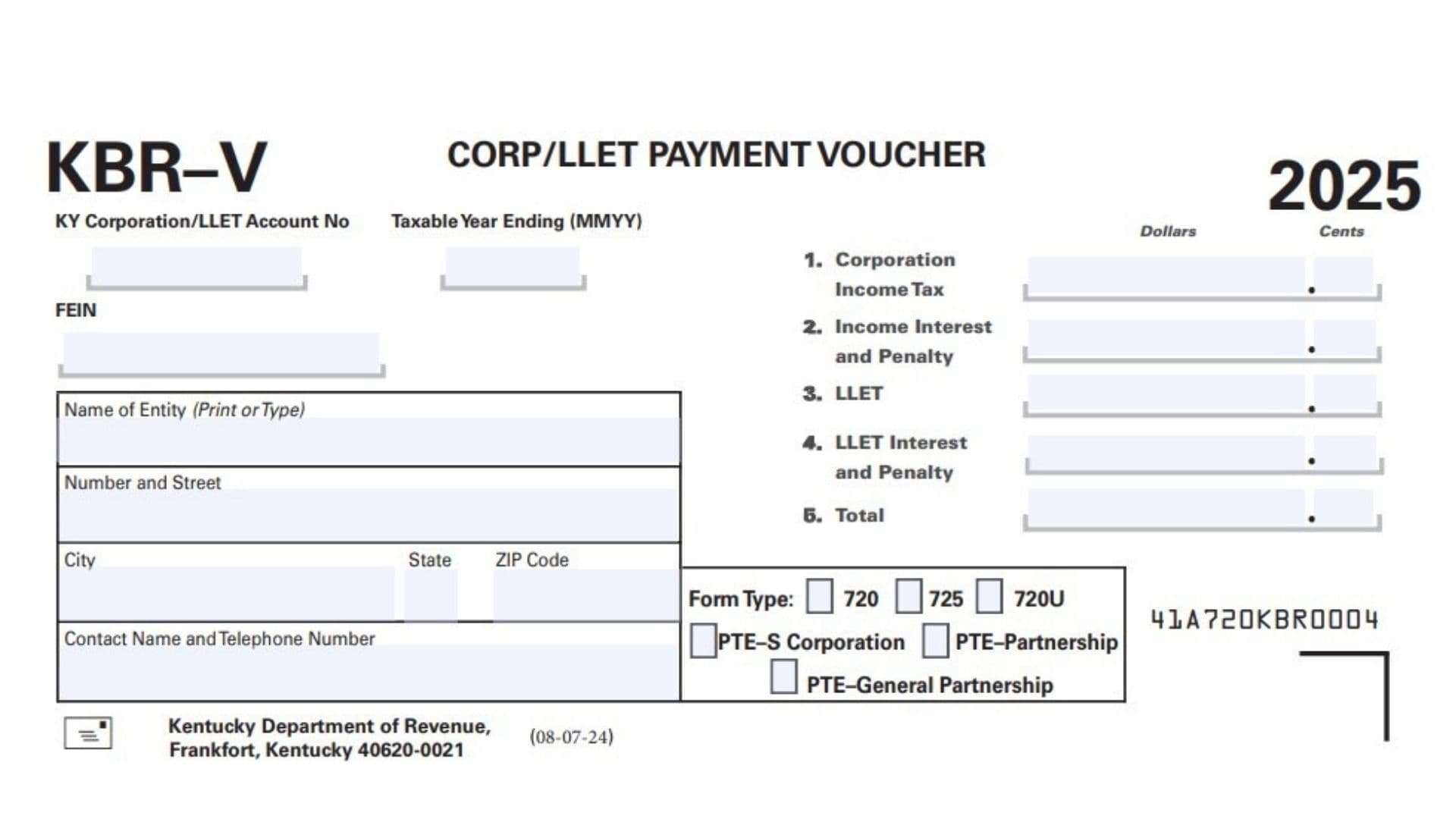
This article explains Kentucky KBR-V CORP/LLET Payment Voucher, which is a payment slip used to send corporation income tax or limited liability entity tax payments to Kentucky along with the proper identifying information for the business or pass-through entity. It is designed to help the Kentucky Department of Revenue apply a payment to the right account, tax type, and taxable year, especially when a company owes corporation income tax, LLET, interest, or penalty. The form asks for the Kentucky corporation or LLET account number, FEIN, legal entity name, mailing address, contact information, and the exact breakdown of the payment being submitted. It also includes fields for the tax year ending date, form type, and entity classification, so the payment can be routed correctly for corporations, S corporations, partnerships, and general partnerships. In short, this voucher is the matching document that helps ensure the payment is credited properly and without delays.
How To File Kentucky KBR-V CORP/LLET Payment Voucher
To file this voucher, complete all identifying information first, then enter the payment amounts on the correct numbered lines. Make sure the account number, FEIN, entity name, and tax year ending date are accurate before sending anything in. You should also check the correct form type and taxpayer category so the payment can be applied to the right return type. After entering the tax, interest, penalty, and total, detach the voucher if needed and mail it to the Kentucky Department of Revenue at the address shown on the form, along with the payment itself.

How to Complete Kentucky KBR-V CORP/LLET Payment Voucher
Line 1: Kentucky Corporation Or LLET Account Number
Enter the Kentucky Corporation/LLET account number assigned to the business or entity. This number helps the state match the payment to the proper account.
Line 2: Taxable Year Ending
Write the ending date of the taxable year in month, day, and year format. This should match the return period the payment is meant to cover.
Line 3: FEIN
Enter the federal employer identification number for the entity. Use the correct FEIN so the payment is posted to the right taxpayer record.
Line 4: Name Of Entity
Print or type the full name of the business or entity making the payment. Use the exact legal name used on the return.
Line 5: Number And Street
Enter the full street address or rural route for the entity. Do not leave out the street number or suite information if it applies.
Line 6: City, State, And ZIP Code
Fill in the city, state, and ZIP code for the mailing address. This should be the same address that corresponds to the entity’s records.
Line 7: Contact Name And Telephone Number
Provide the name and phone number of the person who can answer questions about the payment. This should be someone familiar with the filing.
Line 8: Corporation Income Tax
Enter the amount of corporation income tax being paid. Use this line only for the corporation income tax portion of the liability.
Line 9: Income Interest And Penalty
Enter any interest and penalty due on the corporation income tax amount. Include only the amount that applies to that tax.
Line 10: LLET
Enter the amount of limited liability entity tax being paid. This is the main LLET payment amount before any extra charges.
Line 11: LLET Interest And Penalty
Enter any interest and penalty related to the LLET amount. Use the correct total for late payment or other applicable charges.
Line 12: Total
Add the amounts from the tax and related interest and penalty lines and enter the total payment due. Make sure the total is correct before mailing the voucher.
Form Type: 720, 725, Or 720U
Check the box for the form type that applies to the return being paid. Select 720, 725, or 720U based on the filing category.
Entity Type: PTE S Corporation
Check this box if the payment is for a pass-through entity treated as an S corporation. Use this option only if it matches the entity’s tax status.
Entity Type: PTE Partnership
Check this box if the payment is for a pass-through entity treated as a partnership. Select it only when that classification is correct.
Entity Type: PTE General Partnership
Check this box if the payment is for a pass-through entity that is a general partnership. This box should reflect the actual type of taxpayer.
Filing Tips
Before mailing the voucher, review every number carefully so the payment is credited without problems. The account number, FEIN, form type, and taxable year ending date are especially important because they guide processing. Keep a copy of the completed voucher and payment details for your records in case you need to confirm how the payment was applied.