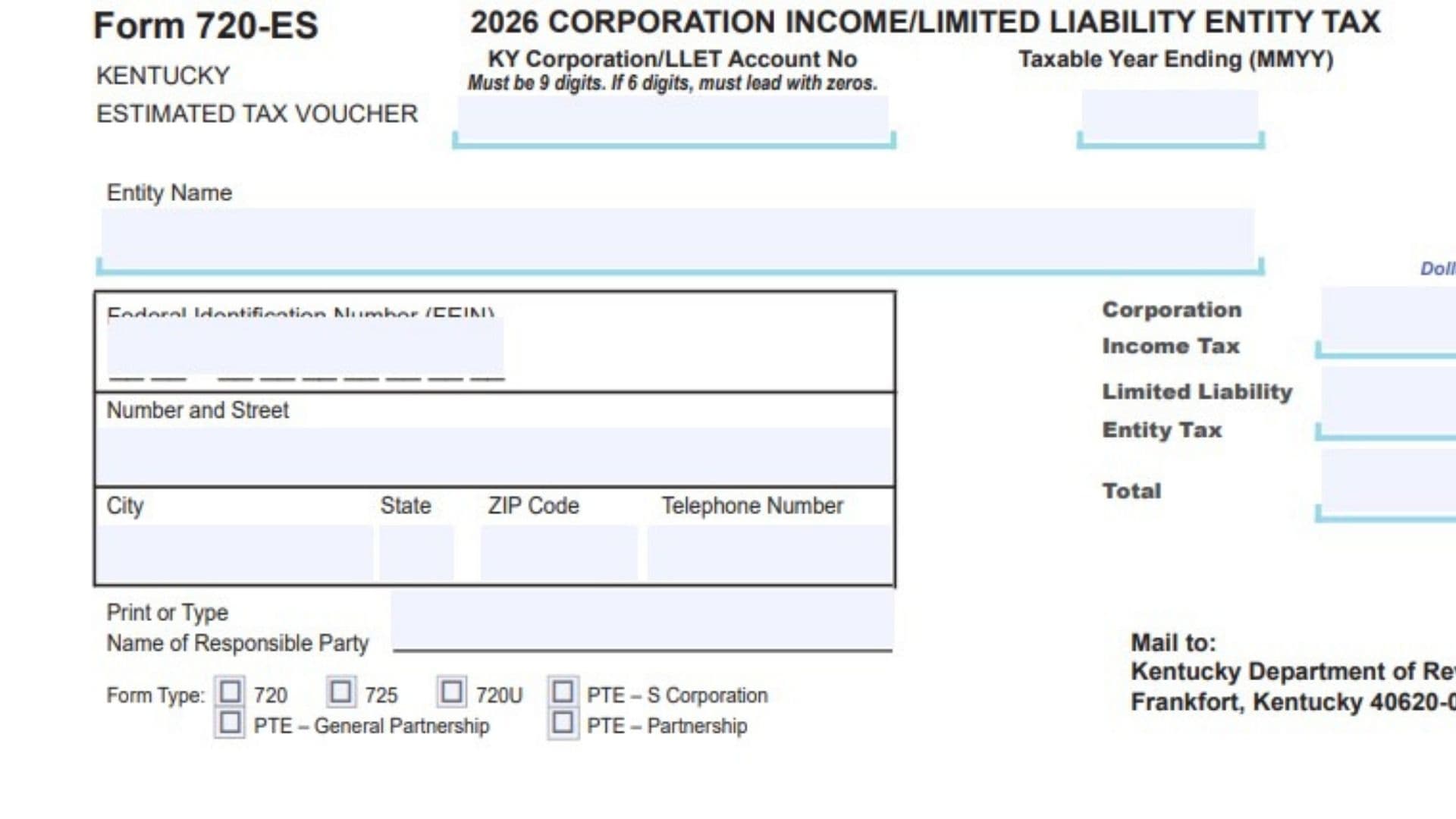
Kentucky Form 720-ES is an estimated tax voucher used by corporations and certain limited liability entities to send estimated tax payments to the Kentucky Department of Revenue during the tax year. It is generally used when a business expects to owe Kentucky corporation income tax, limited liability entity tax, or both, and wants to pay those amounts in advance instead of waiting until the annual return is filed. This voucher works as a payment slip that identifies the business, shows the type of return the payment applies to, and tells the state how much of the payment should be applied to corporation income tax, limited liability entity tax, and the total amount enclosed. It also helps the state match the payment to the correct taxpayer account, taxable year, and entity type. If the form is filled out incorrectly, the payment may be delayed, misapplied, or posted to the wrong account, so each entry should be completed carefully and consistently with the business’s tax records. Businesses commonly use this form when making periodic estimated payments for Kentucky Form 720, Form 725, Form 720U, or certain pass-through entity filings listed on the voucher.
How To File Kentucky Form 720-ES
To file the voucher, first complete all required identification and payment fields, then prepare a check for the amount you are paying. The payment should match the total entered on the voucher, and the voucher should be mailed with the check to the Kentucky Department of Revenue at the address printed on the form. Do not include any check stubs with the mailing. The check and the voucher should be enclosed together, but the check should not be attached to a check stub or combined with extra payment paperwork. Before mailing, review the entity name, FEIN, Kentucky account number, taxable year ending, form type, and tax amounts so the payment can be applied correctly.

How To Complete Kentucky Form 720-ES
Line 1: Enter the Kentucky Corporation or LLET account number in the space provided. This account number should match the number assigned to the business by the Kentucky Department of Revenue.
Line 2: Enter the taxable year ending date in MMYY format. Use the month and year for the end of the tax year the estimated payment applies to.
Line 3: Enter the entity name exactly as it appears in the business tax records. Use the full legal name so the payment can be matched to the correct account.
Line 4: Enter the federal identification number, also called the FEIN. Make sure the number is complete and accurate.
Line 5: Enter the business street address in the Number and Street field. Use the mailing address associated with the entity unless the business uses a different address for tax correspondence.
Line 6: Enter the city, state, ZIP code, and telephone number. Make sure all parts are complete so the department has correct contact information for the entity.
Line 7: Enter the name of the responsible party. This should be the person responsible for the tax matter or the person the department should associate with the filing.
Line 8: Select the correct form type by checking the appropriate box. Choose only the return type that matches the payment you are making, such as 720, 725, 720U, PTE, S Corporation, PTE, General Partnership, or PTE, Partnership.
Line 9: Enter the amount of Kentucky corporation income tax being paid with this voucher in the Corporation Income Tax field. Write the amount in dollars and cents.
Line 10: Enter the amount of limited liability entity tax being paid in the Limited Liability Entity Tax field. Write the amount in dollars and cents.
Line 11: Enter the total payment in the Total field. This amount should equal the combined total of the corporation income tax amount and the limited liability entity tax amount, if both apply.
Line 12: Review the TRAN CODE area if it is preprinted or used internally. If your filing instructions require an entry there, use the correct code. Otherwise, leave it as shown on the voucher.
Line 13: Make sure the Kentucky account number is entered in the proper format. It must be 9 digits. If the number you have is only 6 digits, add leading zeros at the beginning so the full entry contains 9 digits.
Line 14: Confirm that all amounts are written in the dollars and cents format shown on the form. Do not round incorrectly or leave out cents formatting if the voucher requires it.
Line 15: Check that the total payment on the voucher matches the amount on the check. Any mismatch can cause posting delays or payment processing issues.
Line 16: Prepare an unattached check payable for the total amount due. The payment should be enclosed with the voucher.
Line 17: Do not include check stubs with the submission. Only send the completed voucher and the separate check.
Line 18: Mail the completed voucher and payment to:
Kentucky Department of Revenue
Frankfort, Kentucky 40620-0021
Filing Tips
Make sure the business name, FEIN, Kentucky account number, and taxable year all match the entity’s tax records. If the payment is for a specific return type, verify that the correct box is checked before mailing the voucher.
If the entity is paying both corporation income tax and limited liability entity tax, double check that each amount is entered in the correct field and that the total equals both amounts combined. Keeping a copy of the completed voucher and check details for internal records can also help if you need to trace the payment later.