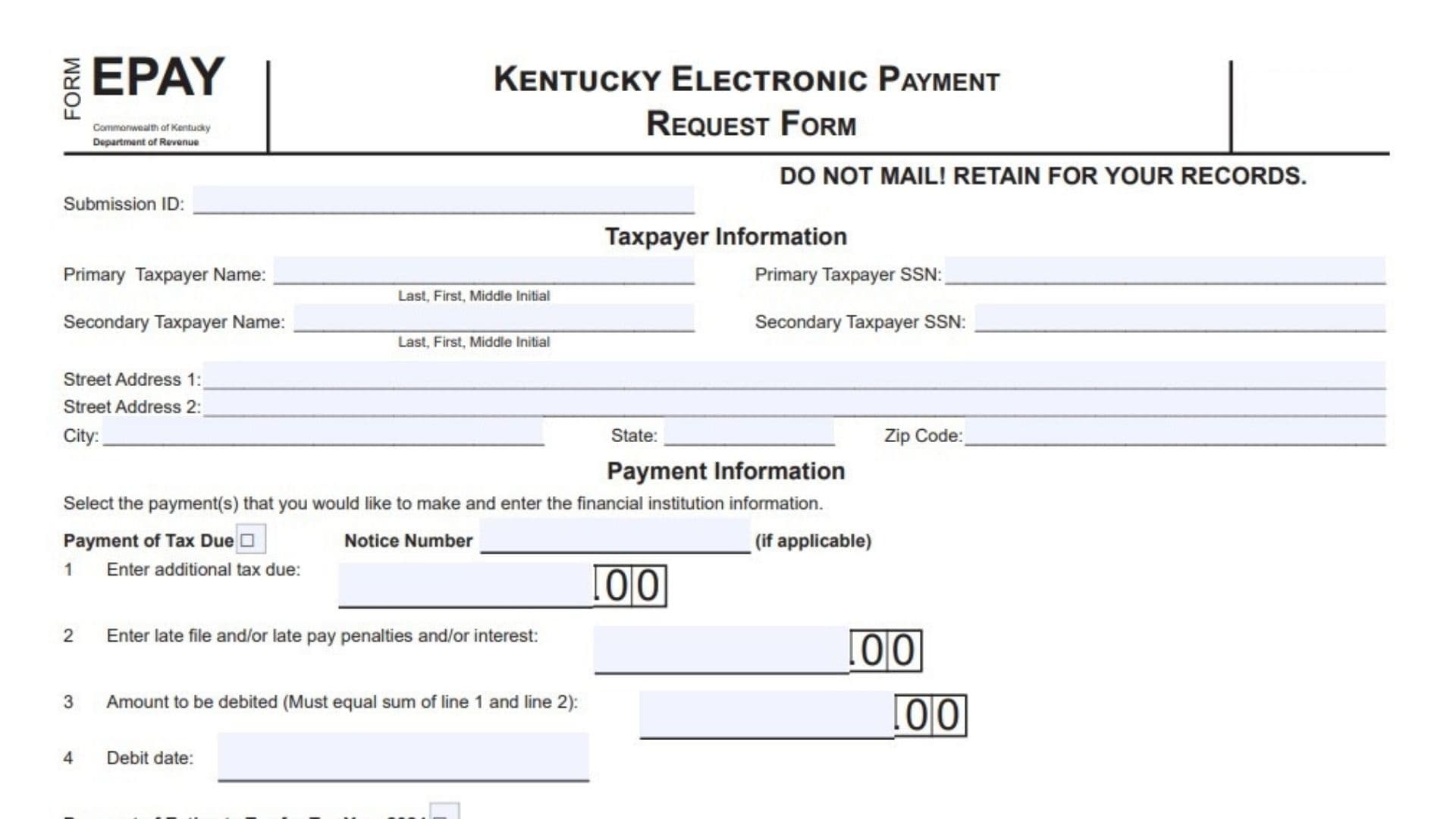
Kentucky Form EPAY serves as the official authorization document that allows the Kentucky Department of Revenue and its financial agent to withdraw funds electronically from your bank account via ACH debit for paying owed taxes or scheduled estimated tax payments separate from your individual income tax return filing. This form streamlines the process for Kentucky residents and businesses who need to settle tax balances, penalties, interest, or make quarterly estimated payments without writing checks or using other payment methods. Designed for electronic submission only, it captures essential taxpayer details, payment specifics, bank routing and account information, and required signatures to ensure secure and compliant transactions. Whether you are addressing a tax due notice, covering late filing penalties, or planning ahead with 2024 estimated tax payments on specific dates like April 15, June 17, September 16, or January 15, 2025, Form EPAY handles it all through a structured format. Taxpayers complete it alongside electronic filing software, retain the copy for records, and never mail it to avoid processing delays. For those using an Electronic Return Originator or paid preparer, the form includes dedicated sections to verify account details and confirm compliance with state guidelines. This keeps everything organized, reduces errors, and supports timely payments that help avoid additional fees while funding essential Kentucky services like schools, roads, and public safety.
How to File Kentucky Form EPAY
Complete the form electronically using compatible tax software, obtain all required signatures before submission, and retain your copy for at least three years without mailing it anywhere. Electronic Return Originators must secure taxpayer signatures, keep the form on file, and provide taxpayers with their signed copy.

How to Complete Kentucky Form EPAY
Submission ID:
Enter the 20-digit Submission Identification Number assigned by your tax preparation software.
Primary Taxpayer Name:
Provide your last name, first name, and middle initial.
Primary Taxpayer SSN:
Enter your Social Security Number.
Secondary Taxpayer Name:
List the secondary taxpayer’s last name, first name, and middle initial if applicable.
Secondary Taxpayer SSN:
Enter the secondary taxpayer’s Social Security Number if applicable.
Street Address 1:
Write your primary street address.
Street Address 2:
Add any additional address details such as apartment number.
City:
Enter your city name.
State:
Fill in your state abbreviation.
Zip Code:
Provide your complete ZIP code.
Payment of Tax Due:
Check this box if making a payment for taxes owed.
Notice Number:
Enter the notice number from your tax bill if one applies.
Line 1:
Input the additional tax amount you owe.
Line 2:
Add any late filing, late payment penalties, or interest amounts.
Line 3:
Calculate and enter the total debit amount, which must match the sum of line 1 and line 2.
Line 4:
Specify the debit date in month, day, year format when funds should be withdrawn.
Payment of Estimate Tax for Tax Year 2024:
Check this box if scheduling estimated tax payments.
Line 5:
Select one or more payment dates by checking the boxes for April 15, 2024, June 17, 2024, September 16, 2024, or January 15, 2025.
Line 6:
Enter the equal amount to debit from your account for each selected date on line 5.
Line 7:
Provide your financial institution’s nine-digit routing transit number, starting with 01 through 12 or 21 through 32.
Line 8:
Enter your depositor account number, up to 17 digits long.
Line 9:
Check the box for Savings or Checking account type.
Line 10:
Indicate if the account is outside the United States by selecting Yes or No. Note that payments from foreign accounts cannot be processed.
Declaration of Taxpayer:
Read the authorization statement carefully. It confirms permission for the Kentucky Department of Revenue to debit your account for taxes or estimated payments until you cancel it. Contact them at (502) 564-4581 at least two business days before the debit date to revoke a payment.
Primary Taxpayer Signature (PIN):
Sign your name or enter your PIN and add the date.
Secondary Taxpayer Signature (PIN):
Have the secondary taxpayer sign or enter their PIN and add the date if applicable.
Declaration and Signature of Electronic Return Originator and Paid Preparer:
Electronic Return Originators and preparers must complete this section to verify taxpayer account details match the form and confirm they provided required copies and followed state rules.
ERO’s Signature:
The Electronic Return Originator signs here and dates it.
Also paid preparer:
Check this box if the ERO also serves as the paid preparer.
ERO’s Name:
Print the Electronic Return Originator’s full name.
ERO Firm Name:
Enter the firm’s name and FEIN.
ERO Street Address 1:
Provide the firm’s primary street address.
ERO Street Address 2:
Add any secondary address line.
ERO City:
Fill in the city.
ERO State:
Enter the state abbreviation.
ERO Zip Code:
Provide the ZIP code.
Paid Preparer’s Signature:
The paid preparer signs and dates if different from the ERO.
Paid Preparer’s Name:
Print the paid preparer’s name and ID number.
Paid Preparer’s Business Name:
Enter the business name and FEIN.
Paid Preparer Street Address 1:
List the business primary street address.
Paid Preparer Street Address 2:
Add any additional address details.
Paid Preparer City:
Enter the city name.
Paid Preparer State:
Fill in the state abbreviation.
Paid Preparer Zip Code:
Provide the ZIP code.