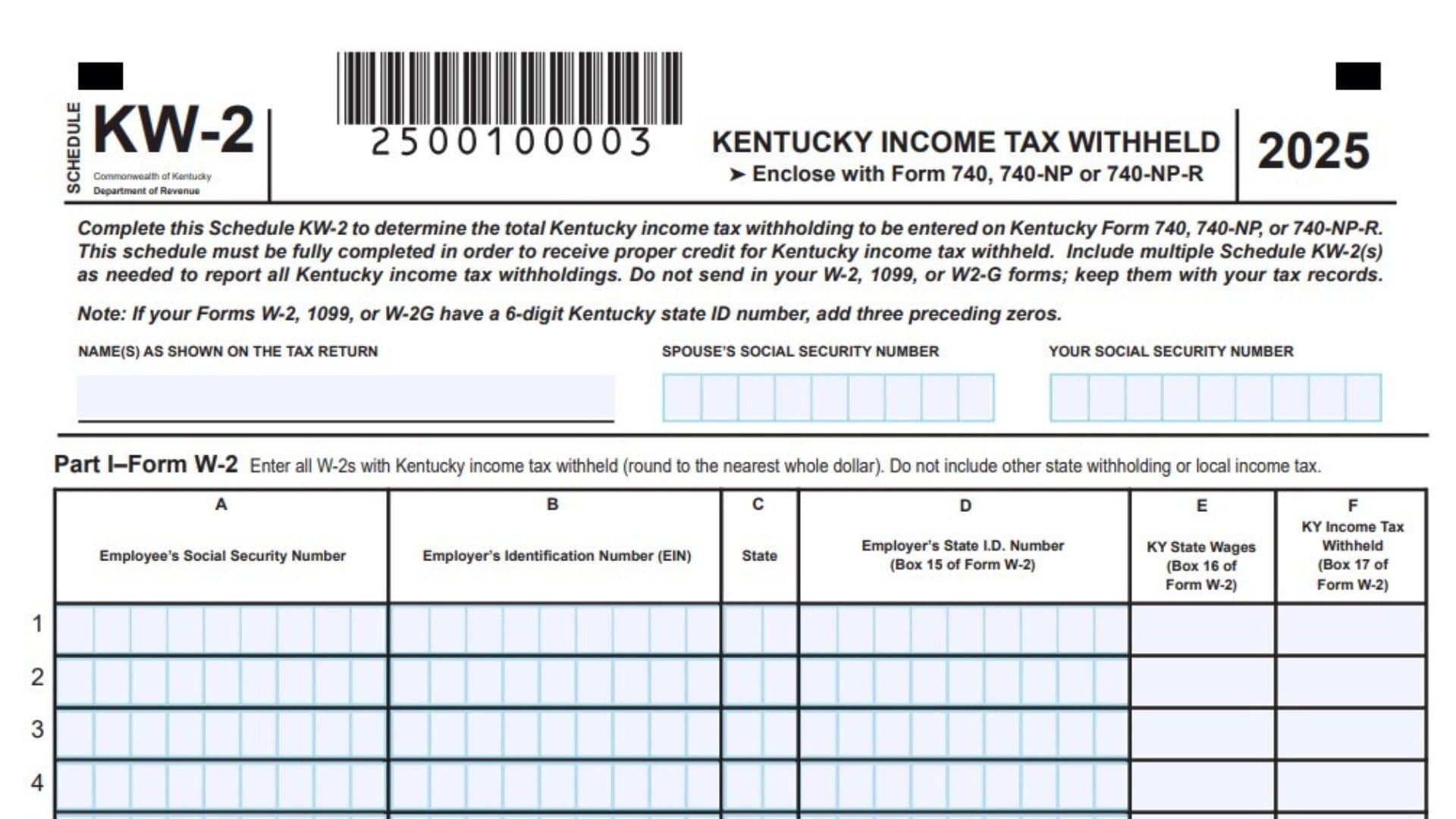
Kentucky Schedule KW-2 is the form individuals use to summarize all Kentucky income tax withheld from their wages and certain other income, and to report that total on their Kentucky individual income tax return. It acts as a Kentucky withholding reconciliation schedule for your personal return, gathering information from every Form W-2, 1099, and W-2G that shows Kentucky income tax withheld. Instead of attaching your W-2s and 1099s, you list the details from those forms onto Schedule KW-2 so the Department of Revenue can verify the amount of Kentucky tax that should be credited to you. You can include multiple Schedule KW-2 forms if you have many employers or payers, and the form must be filled out completely so you receive full credit for the Kentucky tax that was withheld from your income.

How to Complete Kentucky Schedule KW-2
General Top Section Information
Line 1: Your Social Security Number
Enter your Social Security Number exactly as it appears on your federal income tax return. This identifies the withholding schedule with your Kentucky individual return.
Line 2: Spouse’s Social Security Number
If you are filing a joint Kentucky return, enter your spouse’s Social Security Number in this box. Leave this line blank if you are not filing jointly.
Line 3: Name(s) As Shown On The Tax Return
Write your full name, and your spouse’s name if filing jointly, exactly as it appears on your Kentucky individual income tax return. This should match the name fields on Form 740, 740-NP, or 740-NP-R so the forms can be matched correctly.
Part I – Form W-2 Kentucky Income Tax Withheld
In Part I you list every Form W-2 that shows Kentucky income tax withheld. Round all dollar amounts to the nearest whole dollar. Do not include any other state withholding or local income tax amounts in this section.
Line 4: Employee’s Social Security Number (Column A)
For each W-2 you are reporting, enter the employee’s Social Security Number exactly as it appears on that W-2. If you are only reporting your own W-2s, this will generally be your Social Security Number on each line.
Line 5: Employer’s Identification Number (EIN) (Column B)
From each W-2, copy the employer’s federal Employer Identification Number into Column B. This is the EIN listed on the W-2 for that specific employer.
Line 6: Kentucky State Wages (Box 16 Of Form W-2) (Column C)
In Column C, enter the amount of Kentucky state wages shown in Box 16 of the W-2 for each employer. Use a separate line for each W-2 that has Kentucky wages.
Line 7: Kentucky Income Tax Withheld (Box 17 Of Form W-2) (Column D)
In Column D, enter the Kentucky income tax withheld from each W-2. This is the amount shown in Box 17 on that W-2. This is the figure that will ultimately be added into your total Kentucky income tax withheld.
Line 8: Employer’s State I.D. Number (Box 15 Of Form W-2) (Column E)
In Column E, enter the employer’s Kentucky state identification number from Box 15 of the W-2. If the Kentucky state ID number on your W-2 has six digits, you should treat it for Kentucky purposes as having three leading zeros so that it fits as a nine digit number.
Line 9: State (Column F)
In Column F, enter the two letter state abbreviation corresponding to the withholding shown on that W-2 line. For Kentucky withholding, this should be KY on each line you include.
Line 10: Total From All W-2s (Column F, Line 11)
After you have entered all W-2 information on the available lines in Part I, total the Kentucky income tax withheld amounts in Column D for all the W-2 lines. Enter this combined total on the line labeled “Total from all W-2s” in Column F at line 11. This is the subtotal of Kentucky tax withheld from your wage income.
Part II – Form 1099 And W-2G Kentucky Income Tax Withheld
In Part II you list every Form 1099 and W-2G that shows Kentucky income tax withheld. As with Part I, round all amounts to the nearest whole dollar.
Line 11: Recipient’s Social Security Number (Column A)
For each form 1099 or W-2G, enter the recipient’s Social Security Number in Column A. This will typically be your Social Security Number if you are the taxpayer reporting the income.
Line 12: Payer’s Identification Number (EIN) (Column B)
In Column B, enter the payer’s federal Employer Identification Number from the 1099 or W-2G. Use a separate line for each different payer.
Line 13: Kentucky Income Amount (Column C)
In Column C, enter the amount of Kentucky income shown on the 1099 or W-2G that is subject to Kentucky withholding. This may be labeled as state income or shown as Kentucky source income on those forms.
Line 14: Kentucky Income Tax Withheld (Column D)
In Column D, enter the amount of Kentucky income tax withheld on each 1099 or W-2G. Use the figure shown for Kentucky withholding on the form for that payer.
Line 15: Payer’s State I.D. Number (Column E)
In Column E, enter the payer’s Kentucky state identification number as it appears on the 1099 or W-2G. If the Kentucky state ID is shorter than nine digits, treat it consistently with any instructions you have received so it can be read as a complete ID number.
Line 16: State (Column F)
In Column F for each line, enter KY to indicate that the withholding is for Kentucky income tax.
Line 17: Total From All 1099s And W-2Gs (Column F, Line 17)
Once you have listed all applicable 1099 and W-2G forms in Part II, total the Kentucky income tax withheld amounts in Column D for all those lines. Enter this sum in the line labeled “Total from all 1099s and W-2Gs” in Column F at line 17. This gives you the subtotal of Kentucky tax withheld from non wage income such as certain payments or gambling winnings.
Part III – Totals And Amount To Enter On Tax Return
Part III combines the totals from Part I and Part II and gives you the final total Kentucky income tax withheld that you will transfer to your Kentucky individual income tax return.
Line 18: Total Kentucky Income Tax Withheld (Column F, Line 18)
On line 18 in Column F, enter the combined total of Kentucky income tax withheld by adding the totals you calculated on line 11 and line 17, both from Column F. This figure represents all Kentucky income tax withheld from your W-2 wages along with all Kentucky withholding from your 1099 and W-2G forms. After you compute this combined amount on Schedule KW-2, enter the same total Kentucky income tax withheld on your Kentucky individual income tax return in the line designated for total Kentucky withholding. For Form 740 and Form 740-NP, this will be line 31(a). For Form 740-NP-R, this will be line 1.
By completing every line and column of Schedule KW-2 in this way, you fully report your Kentucky income tax withholding and ensure that all amounts taken from your pay and other income are credited properly on your Kentucky tax return.