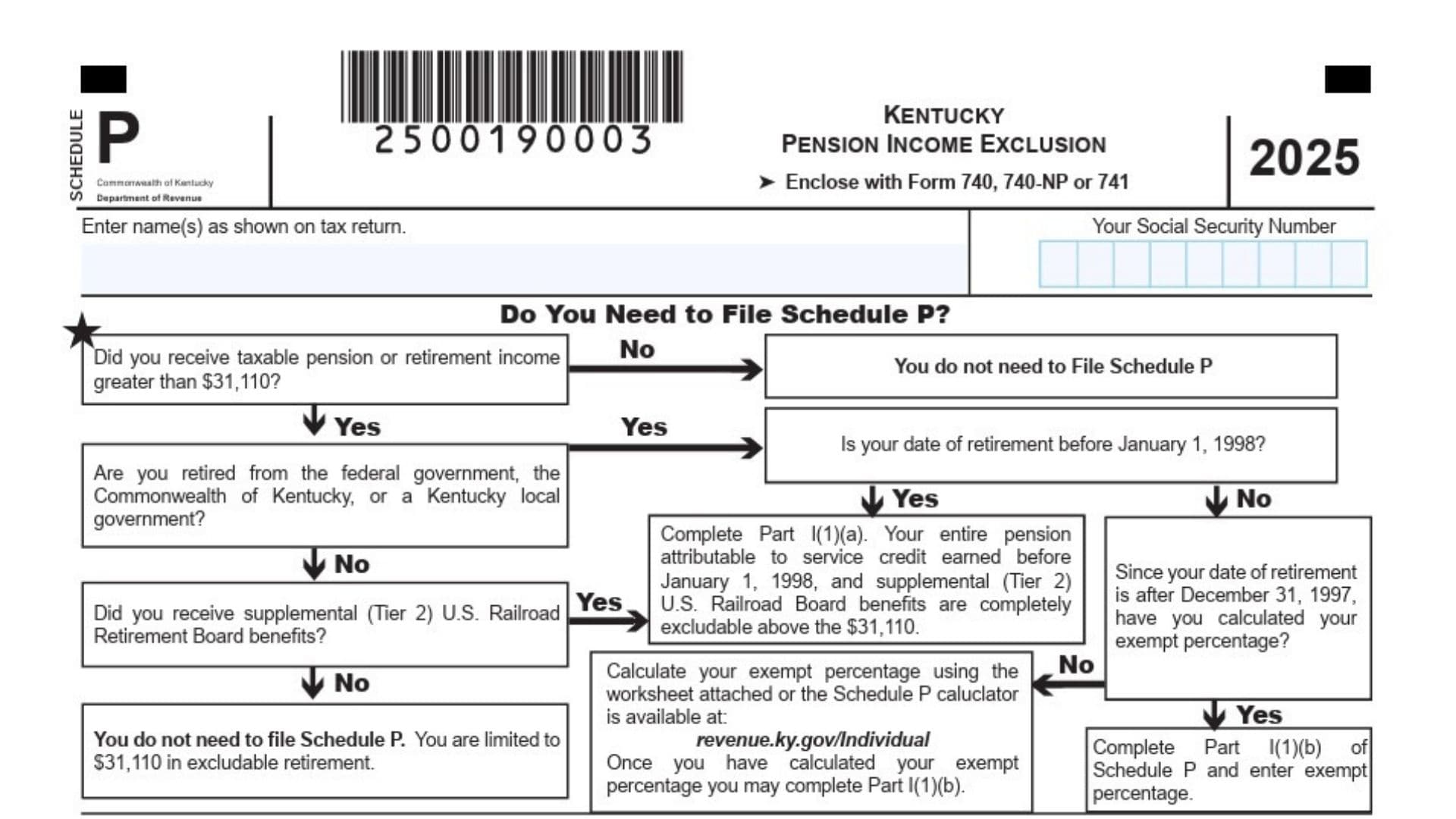
Kentucky Schedule P (Form 740) is used to figure out how much qualifying pension and retirement income you can subtract from your Kentucky taxable income when you file your state return. It is mainly for taxpayers who receive retirement income such as pensions, annuities, IRA distributions, certain deferred compensation amounts, disability retirement income, and other retirement plan payments that meet Kentucky’s rules. This schedule becomes especially important when part of your retirement income may be fully exempt because it came from federal, Kentucky state, or Kentucky local government service connected to service credit earned before January 1, 1998, or when you need to apply Kentucky’s annual retirement income exclusion to other taxable retirement benefits. In practical terms, the form helps you separate retirement income into two groups, income that qualifies for a special exemption and income that may still qualify for the general exclusion amount. It also helps married taxpayers calculate each spouse’s exclusion separately, because this benefit is figured on an individual basis even when a joint return is filed. If you are filing Form 740, Form 740-NP, or Form 741 and you have taxable retirement income, this schedule may be the key form that determines how much of that income Kentucky allows you to leave out of state taxation.
How To File Kentucky Schedule P (Form 740)
File Schedule P together with the Kentucky return it belongs to, usually Form 740, Form 740-NP, or Form 741. Enter your name exactly as it appears on the return and provide your Social Security Number before completing the schedule.
If you are married, compute the exclusion separately for yourself and your spouse in the appropriate columns, then combine the final allowed amounts only where the return tells you to do so. After completing the schedule, carry the final exclusion amount to the correct line on the related Kentucky return.
Use the worksheet portion only if you retired in 2025 or if you have never calculated your exempt percentage in an earlier year. Keep the worksheet with your records because the percentage can be used again in later years for the same pension.

How To Complete Kentucky Schedule P (Form 740)
Before filling in the numbered lines, list the payer names in the spaces provided and complete the taxpayer and spouse sections as needed. If you have more than one qualifying governmental pension, make sure the income and dates are matched to the correct person and payer.
Part I is for exempt retirement income tied to certain governmental service and certain Tier 2 railroad retirement benefits. Part II is for other taxable retirement income not already included in Part I, and Part III combines the allowable amounts to determine the total Kentucky pension exclusion for the year.
Line 1: Start Part I by reporting qualifying exempt retirement income. This part is only for federally taxable pension income paid by the federal government, the Commonwealth of Kentucky, or a Kentucky local government, plus supplemental Tier 2 U.S. Railroad Retirement Board benefits included in taxable pension income, and qualifying federal or Kentucky disability retirement income tied to service credit earned before January 1, 1998. Do not place deferred compensation income in Part I.
Line 1(a): Use this line if the retirement date was before January 1, 1998. Enter the amount of qualifying pension income that is fully exempt under the rule for service connected to that earlier retirement period. Put the amount in the correct column for yourself or your spouse.
Line 1(b): Use this line if the retirement date was after December 31, 1997. Enter the amount of pension income that is attributable to service credit earned before January 1, 1998. To get this amount, multiply the taxable pension by the exempt percentage you calculated for that pension. Enter the result as the exempt amount in the correct taxpayer column, and enter the exempt percentage in the exempt percentage space.
Line 1(c): Add line 1(a) and line 1(b). This total is the amount of exempt retirement income from Part I for that taxpayer.
Line 2: Enter all other taxable retirement income that was not already included on line 1(c). This generally includes taxable retirement income reported on the federal return from pensions or retirement payments, plus other disability retirement income or deferred compensation amounts that belong here. If there are pension or IRA basis difference amounts that must be included, add those as well. This line is for non-exempt retirement income that may still qualify for the general exclusion.
Line 3: Compare the amount on line 2 with $31,110 and enter the smaller amount. This is the maximum amount of other retirement income you may exclude for the year under this part of the schedule.
Line 4: Add line 1(c) and line 3. This gives you the total pension income exclusion for the year. Transfer this amount to the appropriate line of the Kentucky return you are filing.
Entries And Columns
Name(s): Write the taxpayer name or names exactly the same way they appear on the Kentucky return. This keeps the schedule tied to the correct filing.
Your Social Security Number: Enter the Social Security Number requested at the top of the schedule. Make sure the number matches the main return.
Column A, Column B: Use one column for the taxpayer and the other for the spouse. Each person must figure their own exclusion separately, even on a joint return.
Yourself, Spouse: Put each amount in the correct person’s section. Do not combine both spouses’ retirement income too early.
Names Of Payers: List the retirement payers for each person in the spaces provided. This helps identify which pension or retirement source supports each amount entered.
Date Of Retirement: Enter the retirement date for the pension being reported. This date matters because it determines whether line 1(a) or line 1(b) applies.
Exempt Percentage: If retirement occurred after December 31, 1997, enter the percentage that represents the part of the pension tied to service earned before January 1, 1998. Use that percentage to determine the exempt amount.
Taxable Pension: Enter the taxable pension amount used in the calculation for the applicable pension. This amount is the starting point for computing the exempt portion when line 1(b) applies.
Total: Where the form provides a total line within Part I, add the relevant entries for that subsection before moving to line 1(c). Make sure the total matches the correct taxpayer column.
Worksheet Instructions For Retirees After December 31, 1997
The worksheet is used only to calculate the exempt percentage for a governmental pension when the taxpayer retired after December 31, 1997, and has not already calculated that percentage. Complete a separate worksheet for each pension if more than one pension requires the calculation.
Worksheet Line 1: Enter the total number of months of service credit, including purchased service credit. This is your full service credit used by the retirement system.
Worksheet Line 2: Enter the number of months of service credit earned after December 31, 1997. Include sick leave credited at retirement and purchased military or other service that was earned after December 31, 1997. Do not include air-time, which is purchased credit unrelated to prior work history.
Worksheet Line 3: Subtract line 2 from line 1. The result is the total months of service before January 1, 1998.
Worksheet Line 4: Divide line 3 by line 1. The result is your exempt percentage. Enter that percentage in the exempt percentage column on line 1(b), then use it to calculate the exempt amount of the pension.
How The Form Works In Plain English
The schedule first asks whether part of your retirement income is specially exempt because of older governmental service credit. Then it looks at the rest of your taxable retirement income and allows a separate exclusion up to the annual limit.
This means some taxpayers can exclude more than just the standard retirement exclusion if they qualify for the governmental pension exemption. The key is to sort each retirement payment into the right category before entering amounts on the lines.
Definitions You Need To Understand
Service Credit: This is the number of months or years your retirement system uses to calculate retirement benefits. It is the foundation for the exempt percentage calculation.
Purchased Service Credit: This is service credit you voluntarily bought under the retirement system, such as military service or prior service with the same or a similar system. It is credited based on the dates the service relates to.
Purchased Service Credit, Air-Time: This is a special kind of purchased credit that is not tied to prior work history and may be allowed by certain plans for up to five years. It is not counted as service earned after December 31, 1997, for the worksheet calculation.
Common Filing Tips
Keep each pension separate when needed, especially if only one of them qualifies for the exempt percentage calculation. If your retirement system already gave you the exempt amount or exempt percentage, use that information carefully and place it in the correct area.
If you are a nonresident or part-year resident filer, only include pension income received while a Kentucky resident when that rule applies. Review every amount before transferring the final exclusion to your Kentucky return so the schedule and the return stay consistent.