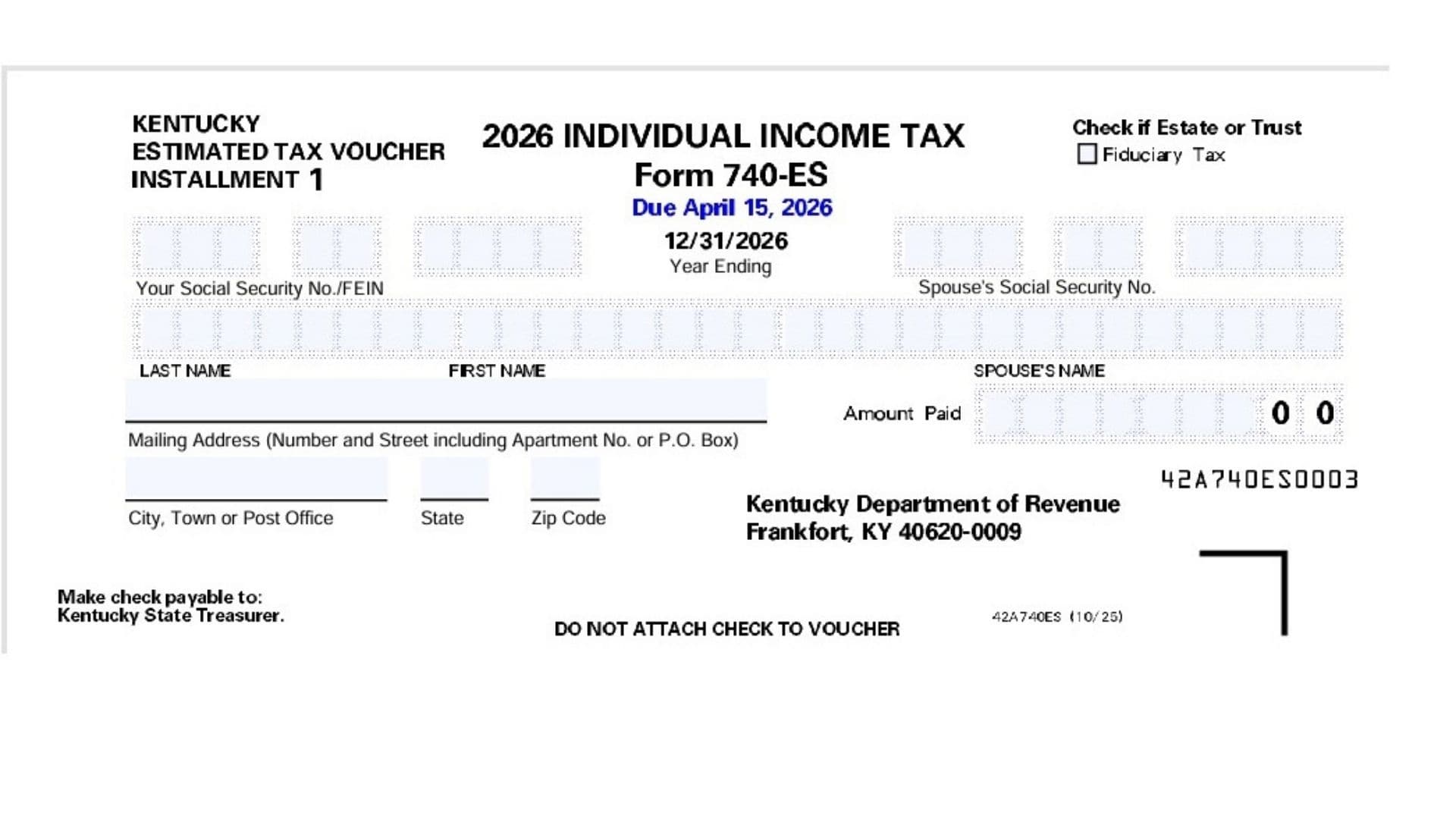
The Kentucky Form 740-ES is the official Individual Income Tax Estimated Tax Voucher used by taxpayers to submit quarterly prepaid income tax installments to the Kentucky Department of Revenue. The state requires taxpayers to make these estimated payments if they expect their final tax liability to exceed a certain threshold and do not have enough taxes automatically withheld from their paychecks by an employer. This typically applies to independent contractors, freelancers, small business owners, individuals with significant investment income, or those handling fiduciary taxes for an estate or trust. The document consists of four separate payment vouchers corresponding to the four standard quarterly tax deadlines throughout the year: April 15, June 15, September 15, and January 15 of the following year. By using these vouchers, you ensure that your payments are correctly routed and credited to your specific Social Security Number or Federal Employer Identification Number, which ultimately helps you avoid underpayment penalties when you file your final annual return.
How To File Kentucky Form 740-ES
To file your estimated tax payment using the Form 740-ES, you must completely fill out the specific voucher that corresponds to the current quarterly installment period. Once the voucher is filled out, you must write a check or obtain a money order for the exact amount you are paying, making it payable directly to the “Kentucky State Treasurer.” It is crucial that you do not staple, paperclip, or otherwise permanently attach your check to the voucher itself. Place the loose check and the completed voucher into an envelope and mail it to the Kentucky Department of Revenue, Frankfort, KY 40620-0009. You must ensure the envelope is postmarked by the specific due date printed on the voucher to avoid any late fees.

How To Complete Kentucky Form 740-ES
Because the Form 740-ES consists of four identical vouchers designed for different quarterly deadlines, you only need to fill out the single voucher that applies to your current payment. The instructions below cover the data fields required on each voucher from top to bottom.
Line 1: Locate the box labeled “Your Social Security No./FEIN” at the top right side of the voucher. Enter your nine-digit Social Security Number here. If you are submitting this payment on behalf of an estate or trust, enter your Federal Employer Identification Number instead.
Line 2: Look immediately to the right for the box labeled “Spouse’s Social Security No.” If you are married and plan to file a joint income tax return, you must enter your spouse’s Social Security Number here.
Line 3: Find the box labeled “Amount Paid” located just beneath your identification numbers. Write the exact dollar amount of the estimated tax payment you are submitting for this specific quarter.
Line 4: Look for the checkbox indicating “Check if Estate or Trust Fiduciary Tax.” You must mark this box only if you are using the FEIN you provided to pay taxes on behalf of an estate or a trust rather than an individual taxpayer.
Line 5: In the space designated for “LAST NAME,” write your full legal last name exactly as it will appear on your final tax return.
Line 6: In the space designated for “FIRST NAME,” write your legal first name and middle initial if applicable.
Line 7: In the space designated for “SPOUSE’S NAME,” provide your spouse’s full name if you are filing jointly and included their Social Security Number above.
Line 8: On the line for “Mailing Address,” enter your current street address, including any apartment, suite, or P.O. Box numbers.
Line 9: On the final line, fill in your current City, Town, or Post Office.
Line 10: In the designated box next to your city, enter your two-letter State abbreviation.
Line 11: In the final box, enter your five-digit Zip Code.