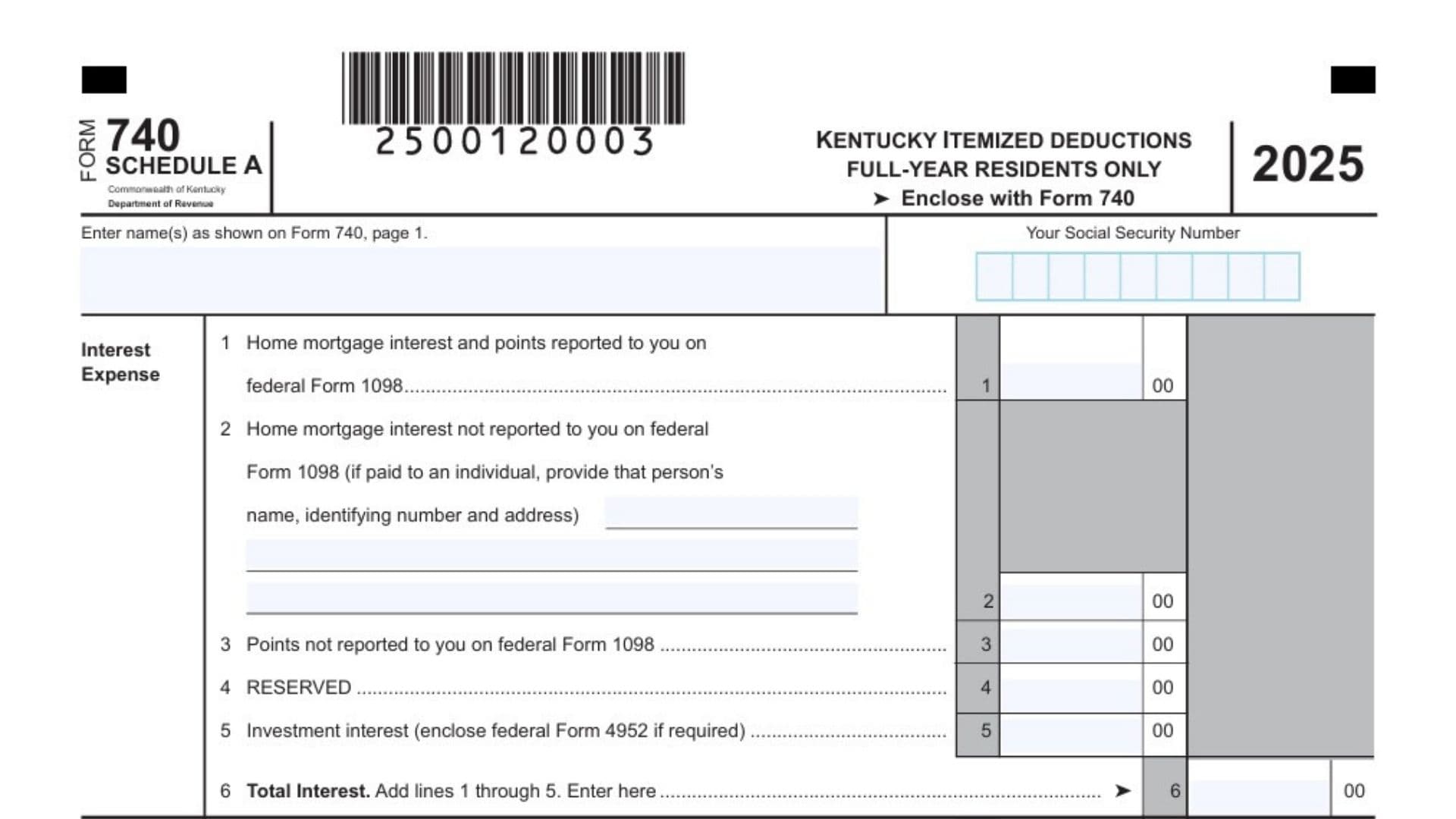
The Kentucky Schedule A (Form 740) is an essential tax document used exclusively by full-year residents of Kentucky to calculate and claim itemized deductions on their annual state income tax return. While the state offers a standard deduction that many taxpayers choose to take, itemizing your deductions can often result in a significantly lower tax liability if your total eligible expenses exceed the state’s standard deduction threshold, which is set at $3,270 for the taxable year. By utilizing this form, you can legally deduct a variety of specific personal expenses, such as home mortgage interest, charitable contributions, and certain allowable miscellaneous costs like gambling losses. It is important to note that Kentucky enforces special rules for married couples; if one spouse decides to itemize their deductions, the other spouse is legally required to do the same, regardless of whether they file separately or jointly. This form provides a highly structured framework to gather all these qualifying financial expenses, ensuring that you receive the maximum tax benefit allowable under state law while maintaining full compliance with the Department of Revenue regulations.
How To Kentucky Schedule A (Form 740)
To properly file your Kentucky Schedule A, you must fill out the document completely and attach it directly to your primary state tax return, which is the Form 740. Make sure your name and Social Security Number are clearly printed at the top of the schedule exactly as they appear on your main return. Depending on the specific deductions you claim, you may also need to attach corresponding federal documents, such as federal Form 4952 for investment interest or federal Form 8283 for large noncash charitable gifts. Once your Schedule A and all required supporting documentation are assembled, you simply submit them together with your Form 740. This entire package can be filed electronically through an approved e-filing software provider or mailed as physical paper copies directly to the Kentucky Department of Revenue.

How To Complete Kentucky Schedule A (Form 740)
Line 1: Enter the total amount of home mortgage interest and points you paid during the year that were officially reported to you by your financial institution on federal Form 1098.
Line 2: Record any home mortgage interest you paid that was not reported to you on a federal Form 1098. If you paid this interest directly to a private individual rather than a bank, you must write that person’s name, address, and identifying number in the blank space provided.
Line 3: Write down any points or loan origination fees you paid that were not included on a federal Form 1098. These fees must meet specific criteria regarding the purchase, building, or improvement of your primary residence to be fully deductible in the year they were paid.
Line 4: This line is currently reserved for future use. You should leave this space completely blank.
Line 5: Enter your deductible investment interest expense. If you are legally required to calculate this figure using federal Form 4952, make sure to attach a copy of that completed form to your tax return.
Line 6: Calculate your total interest expense by adding the amounts you entered from lines 1 through 5. Enter the final combined sum here.
Line 7: Report all of the charitable contributions you made to qualifying organizations using cash, checks, or out-of-pocket expenses related to volunteer work.
Line 8: Enter the total value of any charitable contributions you made using property, clothing, furniture, or items other than cash. If the total value of these noncash gifts exceeds $500, you are required to complete and enclose federal Form 8283.
Line 9: Record the value of any qualified artistic charitable contributions you donated during the year. You must attach a copy of a formal written appraisal to support the deduction amount claimed on this line.
Line 10: Input any charitable contribution carryover amounts from previous tax years that you were previously unable to deduct because they exceeded your adjusted gross income limits.
Line 11: Add the amounts from lines 7 through 10 to determine your total charitable contributions. Enter the combined figure here.
Line 12: Write down your allowable gambling losses for the year. You are only permitted to deduct these losses up to the total amount of your reported gambling winnings.
Line 13: Report any other qualifying miscellaneous deductions, such as federal estate tax on income in respect of a decedent, amortizable bond premiums on bonds acquired before October 1986, or unrecovered investments in a pension. You must list the specific type and exact amount for each expense in the provided area.
Line 14: Calculate your total other miscellaneous deductions by adding the amounts from line 12 and line 13 together. Enter the total here.
Line 15: Determine your total itemized deductions before any spouse allocation by adding the final totals from line 6, line 11, and line 14. Enter this overall sum here.
Line 16: If you are married filing separately on a combined return and need to divide your deductions, enter the total itemized deductions from line 15 here to begin the calculation process.
Line 17: Calculate the percentage of the taxpayer’s income in Column A relative to the total combined income of both spouses. Enter this specific percentage here.
Line 18: Calculate the percentage of the spouse’s income in Column B relative to the total combined income of both spouses. Enter this specific percentage here.
Line 19: Multiply the total deductions on line 16 by the percentage you calculated on line 17. Enter this amount here and transfer the figure to Form 740, line 10, Column A.
Line 20: Multiply the total deductions on line 16 by the percentage you calculated on line 18. Enter this amount here and transfer the figure to Form 740, line 10, Column B.