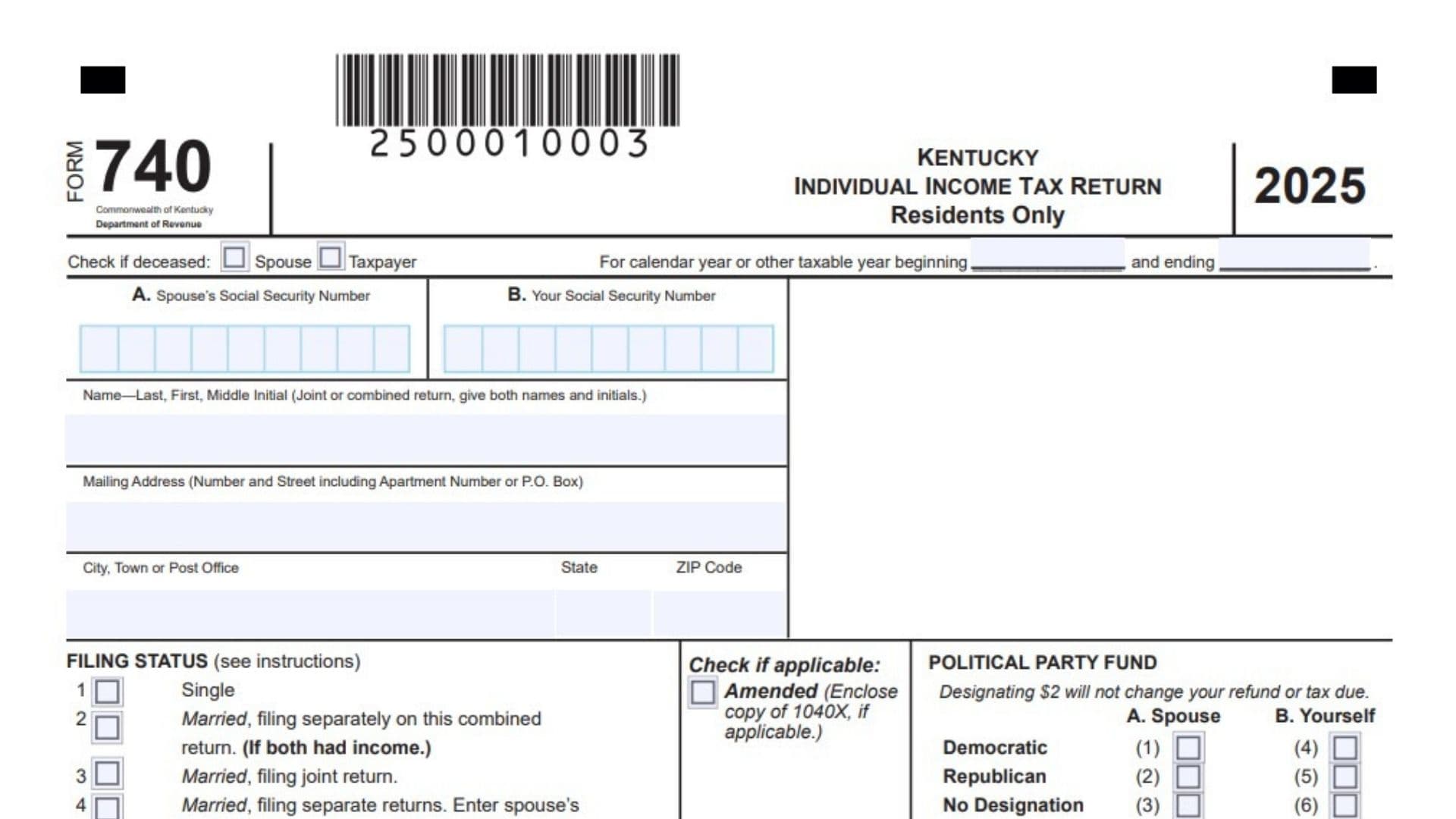
Kentucky Form 740 is the resident individual income tax return for people who were full-year Kentucky residents. It is the main state return used to report income, Kentucky adjustments, deductions, credits, tax payments, and refund or balance due information for the year. The form starts with federal income, adjusts it for Kentucky tax rules, calculates Kentucky adjusted gross income and taxable income, applies the state tax and credits, and then compares the tax liability against withholding and other payments. It also allows taxpayers to report use tax, estimated tax payments, certain refundable credits, and optional charitable fund contributions from an overpayment. In simple terms, Form 740 is the standard Kentucky state income tax return for full-year residents.
Who Should File Kentucky Form 740
You generally file Form 740 if you were a full-year resident of Kentucky for the tax year. If you were a nonresident or part-year resident, a different Kentucky return may apply instead.
This form is also used by married taxpayers filing jointly, separately on a combined return, or separately on separate returns, depending on the filing choice made on the form.
How To File Kentucky Form 740
- Gather your federal return and all supporting tax documents.
- Complete the identification and filing status section at the top of the return.
- Enter income, adjustments, deductions, and credits on the proper lines.
- Report withholding, estimated payments, and refundable credits.
- Calculate whether you owe tax or are due a refund.
- Sign and date the return.
- Attach required schedules and any required copy of your federal return.
- Mail the return with payment if tax is due, or file it as a refund or no-payment return if no balance is due.

How to Complete Kentucky Form 740
Top Of The Form
Spouse’s Social Security Number: Enter the spouse’s Social Security number if required by your filing status.
Your Social Security Number: Enter your Social Security number.
Name: Enter your full name. If filing jointly or on a combined return, enter both names and initials.
Mailing Address: Enter your mailing address, including apartment number or post office box if applicable.
City, Town Or Post Office: Enter your city or town.
State: Enter your state.
ZIP Code: Enter your ZIP code.
Filing Status: Check the box that applies to your return. The form includes options for Single, Married Filing Separately on a Combined Return, Married Filing Joint Return, and Married Filing Separate Returns.
Political Party Fund: If you want, choose the political party designation for yourself and your spouse where applicable. This does not affect your refund or tax due.
Amended Return Box: Check this if you are filing an amended return. If applicable, include a copy of the federal amended return.
Deceased Box: Check the proper box if the taxpayer or spouse is deceased.
Taxable Year Dates: If your return is for a fiscal year rather than a calendar year, enter the beginning and ending dates.
Page 1
Line 5: Enter the amount from federal Form 1040 or 1040-SR, line 11. This is your starting federal adjusted gross income figure. If the total of Columns A and B is 42,760 or less, review the family size tax credit rules.
Line 6: Enter additions from Schedule M, line 6.
Line 7: Add lines 5 and 6.
Line 8: Enter subtractions from Schedule M, line 17.
Line 9: Subtract line 8 from line 7. This is your Kentucky adjusted gross income.
Line 10: If you itemize, enter your Kentucky itemized deductions from Kentucky Schedule A. If you do not itemize, enter 3,270 in the appropriate column or columns.
Line 11: Subtract line 10 from line 9. This is your taxable income.
Line 12: Compute the tax by multiplying line 11 by 4 percent, unless Schedule J applies and gives a different tax amount.
Line 13: Enter tax from the applicable special tax schedules or recapture forms, including Form 4972-K, Schedule RC-R, Schedule DS-R, or Angel Investor Recapture, if applicable.
Line 14: Add lines 12 and 13.
Line 15: Enter the amounts from Schedule ITC, Section A, lines 25E and 25F.
Line 16: Subtract line 15 from line 14. If line 15 is larger than line 14, enter zero.
Line 17: Enter personal tax credit amounts from Schedule ITC, Section B.
Line 18: Subtract line 17 from line 16. If line 17 is larger than line 16, enter zero.
Line 19: Add the tax amounts in Columns A and B from line 18 and enter the total here. Then continue to page 2.
Page 2
Line 20: Check the box that matches your total family size.
Line 21: Multiply line 19 by the family size tax credit decimal amount from Schedule ITC.
Line 22: Subtract line 21 from line 19.
Line 23: Enter the Education Tuition Tax Credit from Form 8863-K, line 17.
Line 24: Enter the child and dependent care credit. This is calculated from federal Form 2441, line 11, multiplied by 20 percent.
Line 25: This line is reserved. Leave it blank unless later instructions tell you otherwise.
Line 26: Subtract lines 23 through 25 from line 22. If the result is zero or less, enter zero. This is your income tax liability.
Line 27: Enter Kentucky use tax due on taxable internet, mail-order, or other out-of-state purchases.
Line 28: Add lines 26 and 27. This is your total tax liability.
Line 29: If this is an amended return, enter the overpayment shown on the original return.
Line 30: Add lines 28 and 29.
Line 31a: Enter Kentucky income tax withheld as shown on the enclosed Schedule KW-2.
Line 31b: Enter 2025 Kentucky estimated tax and extension payments.
Line 31c: Enter the refundable certified rehabilitation credit.
Line 31d: Enter the refundable entertainment incentive tax credit.
Line 31e: Enter the refundable development area tax credit.
Line 31f: Enter the refundable decontamination tax credit.
Line 31g: Enter the refundable pass-through entity tax credit from Form PTET-CR, line 9.
Line 31h: If this is an amended return, enter the amount paid with the original return plus any additional payments made after filing.
Line 32: Add lines 31a through 31h.
Line 33: If line 30 is larger than line 32, subtract line 32 from line 30. This is additional tax due.
Line 34a: Enter estimated tax penalty. Check the box if Form 2210-K is attached.
Line 34b: Enter interest due.
Line 34c: Enter late payment penalty.
Line 34d: Enter late filing penalty.
Line 35: Add lines 34a through 34d.
Line 36: If the total of lines 30 and 35 is more than line 32, subtract line 32 from that total. This is the amount you owe.
Line 37: If line 32 is more than line 30, subtract lines 30 and 35 from line 32. This is the amount you overpaid.
Page 3 Refund And Contribution Area
Line 38a: Enter the amount you want to contribute to the Nature and Wildlife Fund.
Line 38b: Enter the amount you want to contribute to the Child Victims Trust Fund.
Line 38c: Enter the amount you want to contribute to the Veterans Program Trust Fund.
Line 38d: Enter the amount you want to contribute to the Breast Cancer Research Education Trust Fund.
Line 38e: Enter the amount you want to contribute to the Farms To Food Banks Trust Fund.
Line 38f: Enter the amount you want to contribute to the Local History Trust Fund.
Line 38g: Enter the amount you want to contribute to Special Olympics Kentucky.
Line 38h: Enter the amount you want to contribute to the Pediatric Cancer Research Trust Fund.
Line 38i: Enter the amount you want to contribute to the Rape Crisis Center Trust Fund.
Line 38j: Enter the amount you want to contribute to the Court Appointed Special Advocate Trust Fund.
Line 38k: Enter the amount you want to contribute to the YMCA Youth Association Fund.
Line 39: Add lines 38a through 38k.
Line 40: Enter the amount of line 37 that you want credited to your 2026 estimated tax. Credit forwards are not available for amended returns.
Line 41: Subtract lines 39 and 40 from line 37. This is the amount to be refunded to you.
Signature Section
Taxpayer Signature: Sign and date the return.
Taxpayer Identification Number: Enter the requested driver’s license number or state-issued identification number if required.
Telephone Number: Enter your daytime telephone number.
Spouse Signature: If filing jointly or on a combined return where required, the spouse should sign and date the return.
Preparer Signature: If a paid preparer completed the return, the preparer should sign and date it.
Preparer Information: Enter the preparer’s firm name or employer, identification number, email, and telephone number.
Preparer Authorization: Mark whether the Department of Revenue may discuss the return with the preparer.
What To Attach
Attach any schedules and forms needed to support the return. If you received farm, business, or rental income or loss, include a complete copy of your federal Form 1040. If that federal copy is not required, check the box provided on the form.
Common Mistakes To Avoid
- Using the resident return when you were actually a part-year resident or nonresident.
- Forgetting to include Schedule M when additions or subtractions apply.
- Claiming both itemized deductions and the standard deduction.
- Missing Schedule KW-2 when reporting Kentucky withholding.
- Leaving out refundable credits or amended return payment amounts.
- Forgetting to add penalties and interest when they apply.
- Failing to sign the return.
Simple Filing Checklist
- Enter identification and address information.
- Check the correct filing status.
- Complete lines 5 through 19 on page 1.
- Complete lines 20 through 37 on page 2.
- Complete lines 38 through 41 on page 3 if you have an overpayment.
- Sign and date the return.
- Attach required schedules and supporting forms.
- Mail it with payment if needed, or as a refund or no-payment return if no tax is due.
If you want, I can also rewrite this in the exact format you asked for earlier, like:
Line 5: …
Line 6: …
Line 7: …