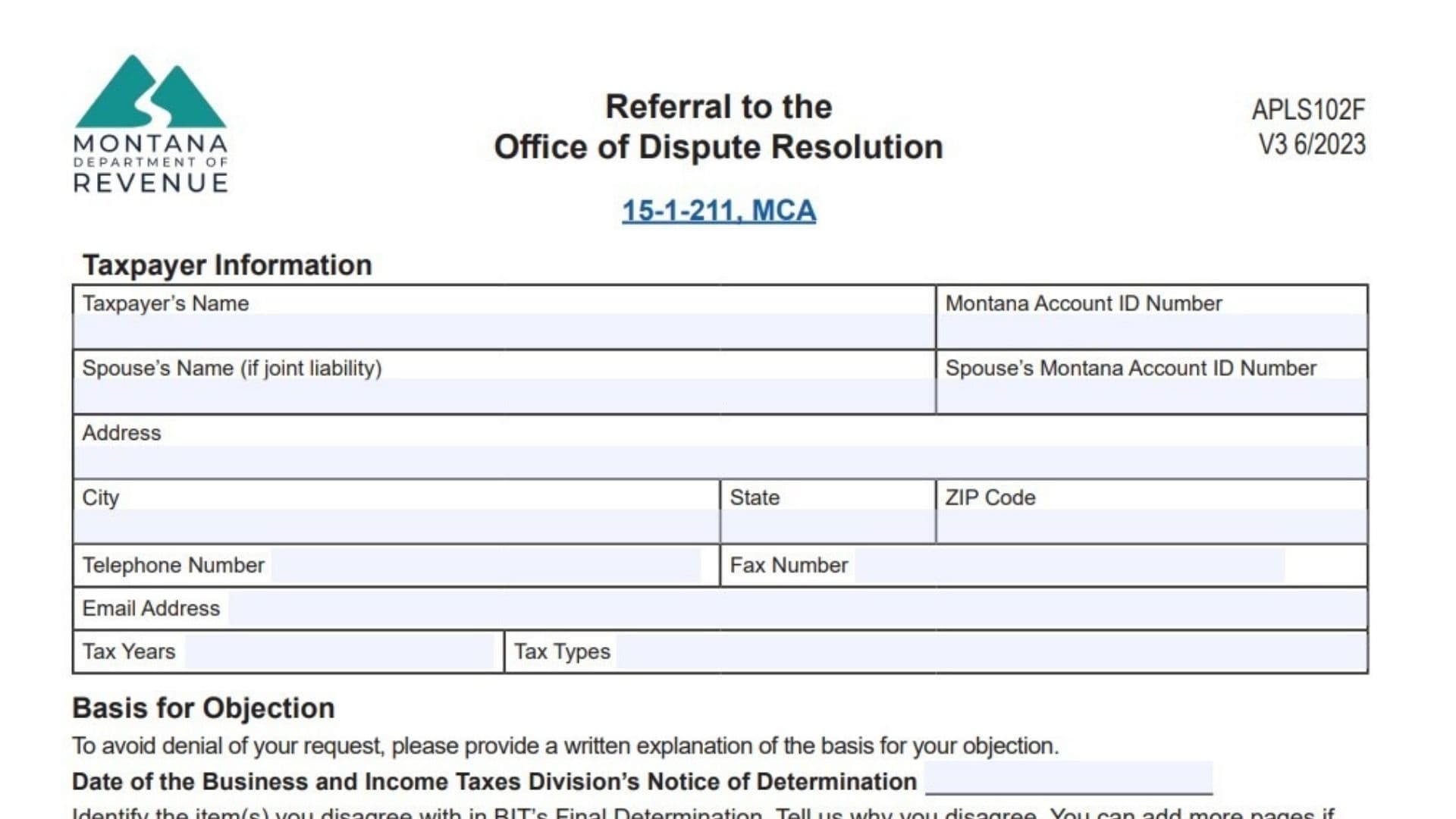
Montana Form AC-101 is an official document utilized by taxpayers to formally appeal a final determination made by the Department of Revenue’s Business and Income Taxes Division (BIT). When individuals or businesses disagree with a tax adjustment and have already completed an informal review, this form escalates the case to the independent Office of Dispute Resolution (ODR). By submitting this paperwork within 45 days of the BIT’s notice, taxpayers secure their right to an impartial hearing before an Administrative Law Judge. These judges operate independently from agency performance metrics such as promotions or compensation, ensuring a fair assessment based entirely on the case evidence and record. The form also allows appellants to choose whether to represent themselves or hire a legal or tax professional to advocate on their behalf at any time during the proceedings.
How To File Montana Form AC-101
Taxpayers have two primary methods for submitting the completed form and any supporting documentation. The most direct option is to email the digitized form and attachments to DORDisputeresolution@mt.gov. Alternatively, the physical paperwork can be mailed to the Montana Department of Revenue, Office of Dispute Resolution, P.O. Box 5805, Helena, MT 59604-5805. It is critical to submit this appeal within 45 days of the date printed on the BIT’s final determination notice. Failing to meet this deadline may result in the ODR considering the appeal untimely and denying the request, unless the taxpayer can demonstrate reasonable cause for the delay.

How To Complete Montana Form AC-101
Taxpayer Information
- Taxpayer’s Name: Enter your full legal name or registered business name precisely as it appears on official tax documents.
- Montana Account ID Number: Input your unique state-issued account identifier.
- Spouse’s Name (If Joint Liability): If the disputed tax adjustment involves a jointly filed return, write your spouse’s full legal name here.
- Spouse’s Montana Account ID Number: Provide the corresponding state account identifier for your spouse.
- Address, City, State, ZIP Code: Fill out your complete and current physical or mailing address.
- Telephone Number, Fax Number, Email Address: Supply reliable contact details so the Office of Dispute Resolution can communicate with you regarding your case.
- Tax Years: Specify the exact tax years that are currently under dispute.
- Tax Types: Define the specific categories of taxes you are appealing, such as income or corporate taxes.
- 15-1-211, MCA: This section does not require input; it simply references the Montana Code Annotated statute governing taxpayer rights and disputes.
Authorized Representative
- Name Of Representative: If you are utilizing a lawyer, accountant, or other professional, print their full name. You must have a Form POA or a Federal Form 2848 on file for them to legally act on your behalf, which can be found at MTRevenue.gov or the TransAction Portal.
- Telephone Number: Provide the direct phone line for your chosen representative.
- Email Address: Enter the professional email address of your representative.
Basis For Objection
- Date Of The Business And Income Taxes Division’s Notice Of Determination: Write the exact date stamped on the final determination letter you received.
- Items You Disagree With (Lines 1, 2, 3): Clearly itemize the specific adjustments, penalties, or findings from the final determination that you are actively contesting.
- Reasons You Disagree With The Adjustment (Lines 1, 2, 3): Provide a detailed written explanation outlining why you believe the agency’s findings are incorrect. Providing this explanation is mandatory to avoid the denial of your request, and you may attach extra pages and documents if more space is needed.
- Office Of Dispute Resolution Bypass Checkbox: Check this specific box only if you intend to intentionally bypass the impartial review and hearing process provided by the ODR.
Declaration
- Signature Of Taxpayer Or Authorized Representative: Sign the document manually or electronically to verify the provided information.
- Title: If you are applying on behalf of a corporate entity, state your official role, such as owner or president.
- Date: Write the current date of your signature.
- Spouse’s Signature (If Joint Liability): If addressing a joint tax liability, the spouse must also provide their signature.
- Date: The spouse must enter the date they signed the document.