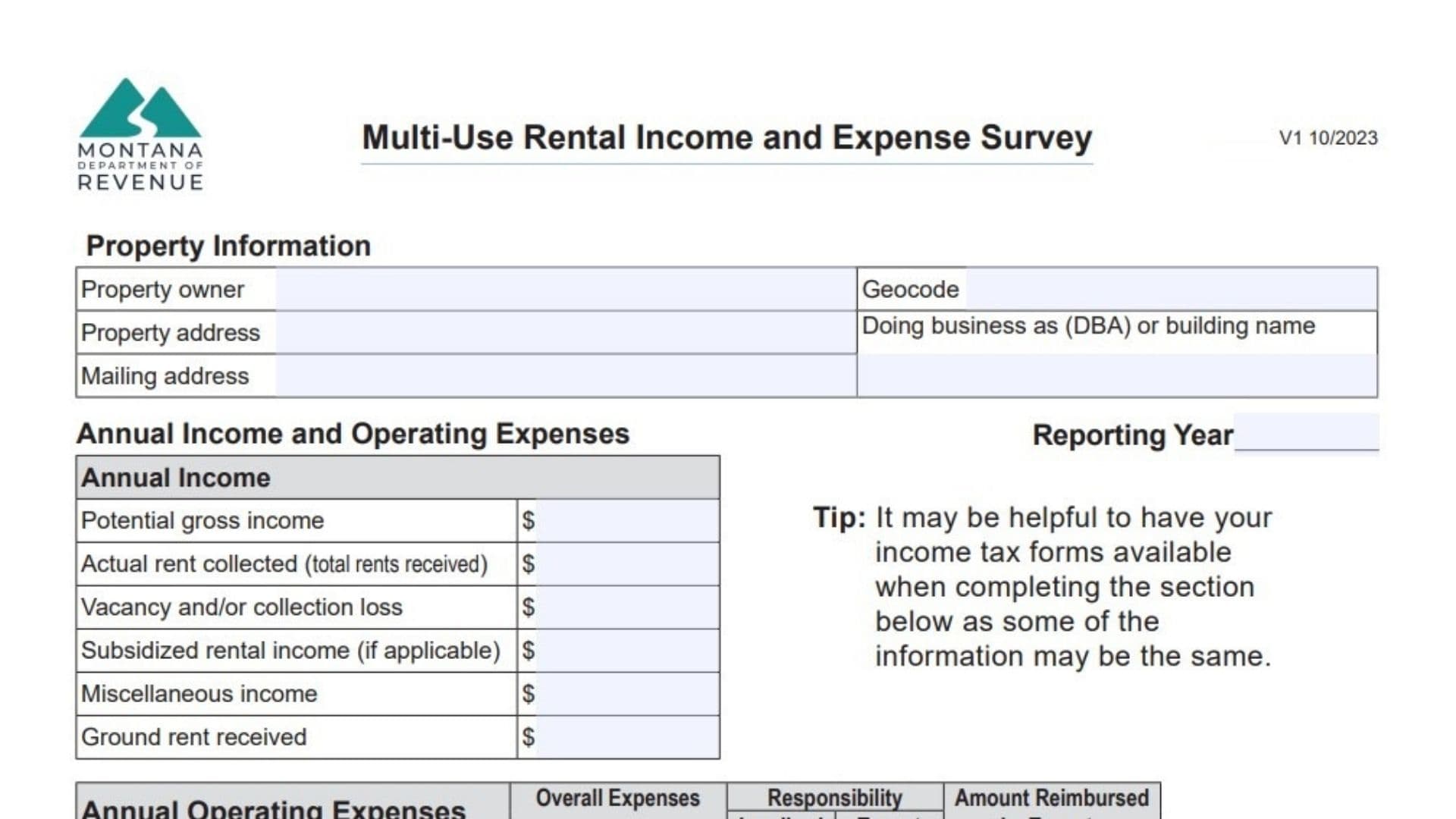
When the Montana Department of Revenue assesses property values, it relies on accurate market data, and for owners of diverse rental properties, the Montana Form IE-MU is the primary tool for providing that data. This form, officially titled the “Multi-Use Rental Income and Expense Survey,” is designed to capture a detailed financial snapshot of properties that generate income through various means—whether it’s an apartment complex, a mini-warehouse facility, a mobile home park, or a mixed-use commercial building with retail and office space. Unlike simpler residential forms, this document digs deep into both revenue streams and operating costs, asking owners to break down income from rents, parking, and concessions, while also itemizing expenses like management fees, utilities, and maintenance. Completing this survey helps ensure your property is valued fairly based on its actual income potential rather than just physical characteristics. It acts as a direct line of communication between you and the state appraisers, allowing you to explain vacancies, rent concessions, or unusual expenses that might otherwise be overlooked in a standard assessment.
What Is Montana Form IE-MU
The Montana Form IE-MU is a comprehensive six-page survey used to gather income and expense data for income-producing properties. It is not a tax return, but an information request used for property valuation purposes. The form is structured to accommodate a wide variety of property types, with specific sections dedicated to:
- General Income & Expenses: High-level financials applicable to all properties.
- Apartment Rentals: Unit counts, bedroom/bathroom mixes, and rent rolls.
- Mini-Warehouses: Unit sizes, climate control features, and occupancy rates.
- Mobile Home/RV Parks: Space rentals, utility inclusions, and seasonal operation details.
- General Commercial Use: Office, retail, and restaurant lease terms.
It includes a glossary of terms on the final page to clarify exactly what the state means by “Net Leasable Area” or “Capital Expenses,” ensuring standardized reporting across all property owners.
How To File Montana Form IE-MU
This form is typically sent to property owners by the Montana Department of Revenue as part of the appraisal process, often during revaluation cycles or when an appeal is filed. While there isn’t a strict “due date” like income taxes, it is crucial to return it promptly to ensure your assessment reflects current market conditions. The completed form should be mailed back to the local Department of Revenue office indicated on the request letter you received. You can also contact the department at (406) 444-6900 for specific submission instructions if you downloaded the form voluntarily. Keep a copy for your records, as this data can be vital if you ever need to contest your property tax assessment.

How To Complete Montana Form IE-MU
Page 1: Property Information & Financial Overview
- Property Details: Enter the Owner Name, Property Address, Geocode (if known), and DBA name.
- Annual Income: Report the Reporting Year and fill in totals for “Potential Gross Income” (what you’d make at 100% occupancy), “Actual Rent Collected,” and losses from vacancy. Don’t forget secondary income sources like laundry or vending machines under “Miscellaneous.”
- Operating Expenses: Breakdown your costs into two columns: Landlord (what you pay) and Tenant (what is reimbursed). Common categories include Advertising, Insurance, Management Fees, Utilities, and Maintenance.
- Tip: Have your federal Schedule E or 8825 tax form handy, as many line items will match.
Page 2: Apartment Rental Data
- Unit Mix: List each unit type by bedroom/bathroom count. Enter the monthly rent per unit and check “Yes” or “No” for utility inclusion.
- Parking: If you charge separately for garages or carports, list those counts and rents here.
- Occupancy: Calculate and enter the average occupancy percentage for the year.
Page 3: Mini-Warehouse (Self-Storage) Data
- Unit Breakdown: List units by size (e.g., 10×10), count, and monthly rent. Check boxes if they have temperature control or electricity.
- Outdoor Storage: If you rent parking spots for boats/RVs, list the number of spaces and rates (daily/monthly).
- Amenities: Check off features like gated access or on-site management.
Page 4: Mobile Home Or RV Park Data
- Mobile Home Spaces: List rents for singlewide vs. doublewide lots. Note if utilities are included.
- RV/Tent/Cabin: If you operate a campground or seasonal park, list the number of sites, daily rates, and total days of operation per year.
- Services: List any additional fees charged for services.
Page 5: General Commercial Use (Office/Retail)
- Rent Roll: List each tenant by name. Include their level (floor), leased square footage, annual base rent, and lease dates.
- Lease Type: Specify if leases are Gross, Triple Net (NNN), etc.
- Improvement Allowances: If you paid for tenant build-outs, list the amounts paid by the landlord vs. the tenant.
Certification
- Sign and Date: The form must be signed by the person completing it (owner, manager, or accountant). Provide your title, phone number, and email address for follow-up questions.