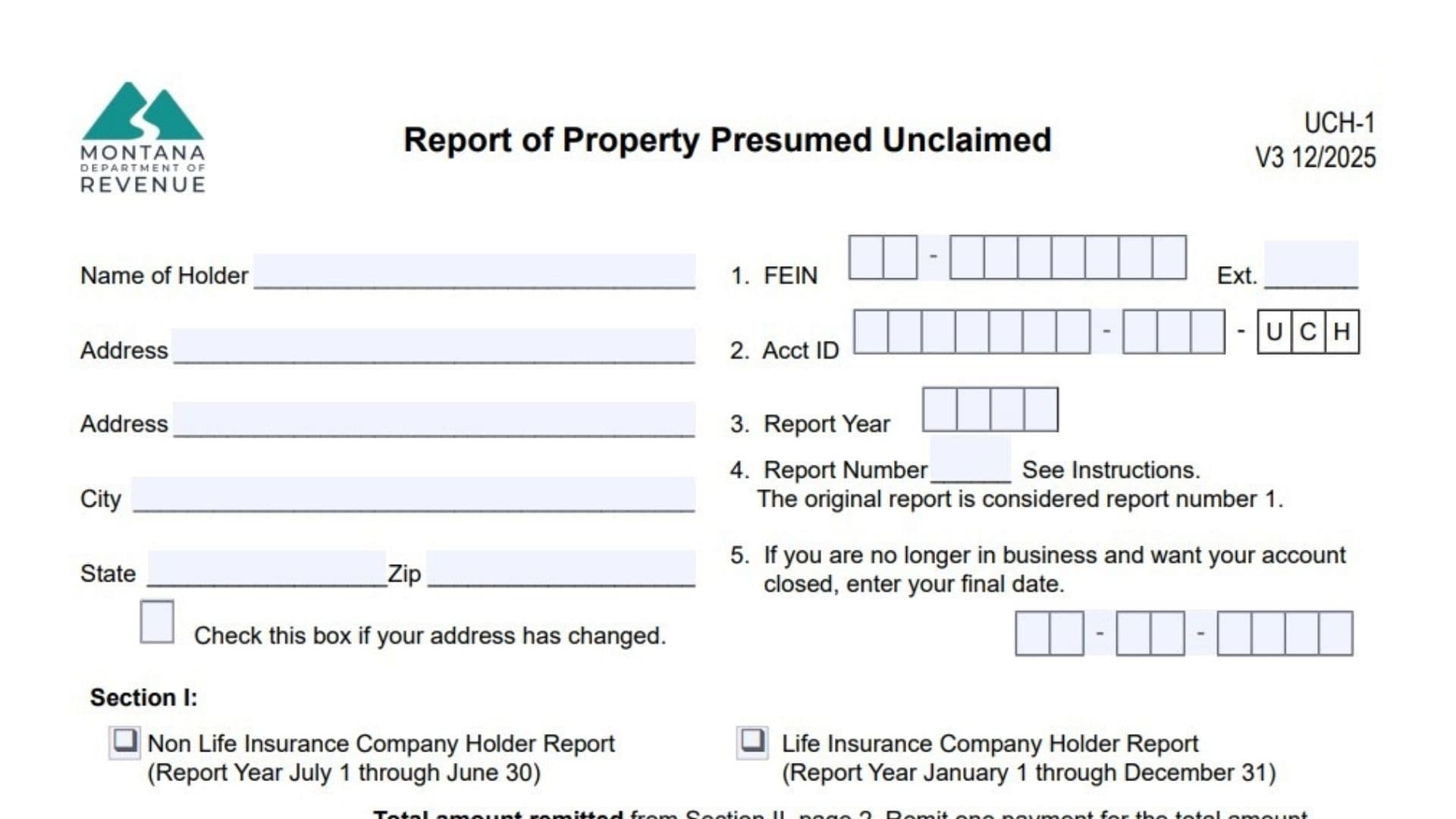
Form UCH-1 is used by holders to report unclaimed property—any financial asset where an owner hasn’t generated activity during a specified period. Unclaimed property includes uncashed checks, savings/checking accounts, payroll (wages, bonuses, commissions), credit balances, money orders, customer deposits, traveler’s checks, stocks and bonds, insurance proceeds, certificates of deposit, and other intangible interests or benefits.
Key Responsibilities And Deadlines
Holders must send written notice to the apparent owner (for property valued over $50) not more than 120 days and not less than 60 days before filing the report. Life insurance companies must file by May 1 covering the prior January 1–December 31 period; all other holders must file by November 1 covering the prior July 1–June 30 period.
Where To File Montana Form UCH-1
Mail the completed form to:
Montana Department of Revenue
PO Box 5805
Helena MT 59604-5805
Electronic filing is also available via the Montana TransAction Portal (TAP) at revenue.mt.gov/unclaimed-property.

How To Complete Montana Form UCH-1
Form Header And Holder Identification
Name Of Holder: Enter the legal name of the entity holding the unclaimed property.
Address (Two Lines) / City / State / Zip: Enter the holder’s complete mailing address.
Check Box If Address Has Changed: If your address changed since the last report, check the box provided.
Line 1 – FEIN – Ext.: Enter your federal employer identification number; if filing for more than one location, add the extension number for the specific location reporting.
Line 2 – Acct ID: If you know your Montana unclaimed property Account ID, enter it here.
Line 3 – Report Year: Enter the year in which the report period ends (for life insurance companies, that’s the calendar year; for all others, that’s the year ending June 30).
Line 4 – Report Number: If this is your first report of the year, enter 1; if you file additional reports during the same year, number them sequentially (2, 3, etc.) and make sure not to re-list property from earlier reports.
Line 5 – Final Date: If you’re no longer in business and want your account closed, enter the date your business ceased operations.
Section I: Report Type And Summary Totals
Check One Report Type: Check either “Non Life Insurance Company Holder Report” (July 1–June 30 report year) or “Life Insurance Company Holder Report” (January 1–December 31 report year).
Total Amount Remitted From Section II: Enter the dollar total of all cash amounts you’re remitting (the sum of all amounts from Section II, page 2), and make one payment for that total.
Payment Options: You can pay by e-check on the TransAction Portal (TAP), by scheduling an ACH Credit payment through your bank, or by sending a check with the completed UCH-1 payment voucher.
Total Number Of Properties Reported On Section II: Enter the count of individual property items listed in Section II.
Total Number Of Shares Reported On Section III: Enter the total share count from Section III (if you’re reporting securities).
Contact Information
Name Of Contact / Phone / Email / Address / City / State / ZIP: Provide current contact details for the person the department should reach with questions.
Certification And Signature
Certification Statement: This is the legal declaration that the report is true and complete, that the property is in your possession or control and presumed unclaimed under Montana law (70-9-801 through 70-9-829, MCA), and that you sent required written notice to apparent owners per Montana law (70-9-808(5), MCA).
Name Of Officer Or Holder Authorized To Sign Report (Please Print): Print the signer’s name.
Signature / Date: The authorized officer or holder representative signs and dates the form.
Title / Phone / Fax: Enter the signer’s title and contact phone/fax numbers.
Section II – Property Detail (Page 2)
Section II is where you list individual unclaimed property items (you may photocopy page 2 or use a compliant computer printout if you need more lines).
Column 1 – NAUPA Property Type Code: Enter the appropriate NAUPA code for the property (a complete code list with dormancy periods is included in the form instructions).
Column 2 – Date Of Last Transaction / Date Payable (MMDDYYYY): Enter the last activity date or payable date for the property in the format shown.
Column 3 – Amount Due To Owner: Enter the dollar amount owed for that property.
Column 4 – Owner Social Security Number Or Federal Employee Identification Number (No Dashes Or Slashes): Enter the owner’s SSN or FEIN without formatting characters.
Column 5 – Owner Name (Last Name, First Name, Middle Initial): List the owner’s name in the order specified; special naming rules apply for insurance policies (insured/annuitant and beneficiary), custodial/trustee accounts (owner first, custodian/trustee second), and cashier’s checks/money orders (payee first, remitter second).
Column 6 – Last Known Mailing Address (Street, City, State, Zip Code): Provide the owner’s last known full address.
Total Amount Remitted: At the bottom of Section II, total the amounts from Column 3 and enter that sum; this should match the total remitted figure entered on page 1.
Section III – Securities Detail (Page 3)
Section III is used when you’re reporting securities (stocks/bonds) where shares are involved.
CUSIP Number: Enter the CUSIP number for the securities being reported.
Column 1 – NAUPA Property Type Code: Enter the property code for the security.
Column 2 – Date Of Last Transaction / Date Payable (MMDDYYYY): Enter the last transaction/payable date for the security.
Column 3 – Number Of Shares: Enter the share count for each owner.
Column 4 – Owner Social Security Number Or Federal Identification Number: Enter the owner’s identifier without dashes or slashes.
Column 5 – Owner Name (Last Name, First Name, Middle Initial): List owners in alphabetical order by last name.
Column 6 – Last Known Mailing Address: Provide the full mailing address.
Total Number Of Shares: Sum the share counts and enter the total; this should match the total shares figure on page 1.
Special Notes And Rules
- Property owed to an unlocatable mineral owner under a trust created in a Montana District Court per 82-1-302, MCA, is payable based on lease/agreement terms, and a form is not required to remit that property.
- Dormancy charges may be deducted from mineral property only if a valid written contract allows the charge and the holder regularly imposes and reverses/cancels it per 70-9-806, MCA.
- All property must be reported and remitted; owner detail is not required when the owner is unknown.
- If you use a computer printout, it must match the Section II/III format exactly (at least 10-point font), or processing will be delayed.
Reporting And Delivering Securities (Pages 8–9)
If you’re remitting stock or mutual funds, your report isn’t complete until you provide evidence the property was transferred to Montana. Five days before delivery, email an Excel document with issue name, CUSIP, ticker symbol, number of shares, and delivering-party DTC number to MontanaCustody@kelmarassoc.com and DORUCPSecurities@mt.gov. Stock should be delivered via ACATS when possible; mutual funds follow similar protocols; physical certificates are only used when electronic methods aren’t available.
If you need a walkthrough for a specific property type (wages, checking accounts, insurance proceeds, mineral royalties, etc.), tell me which NAUPA code or category, and I’ll give you a focused example for that situation.