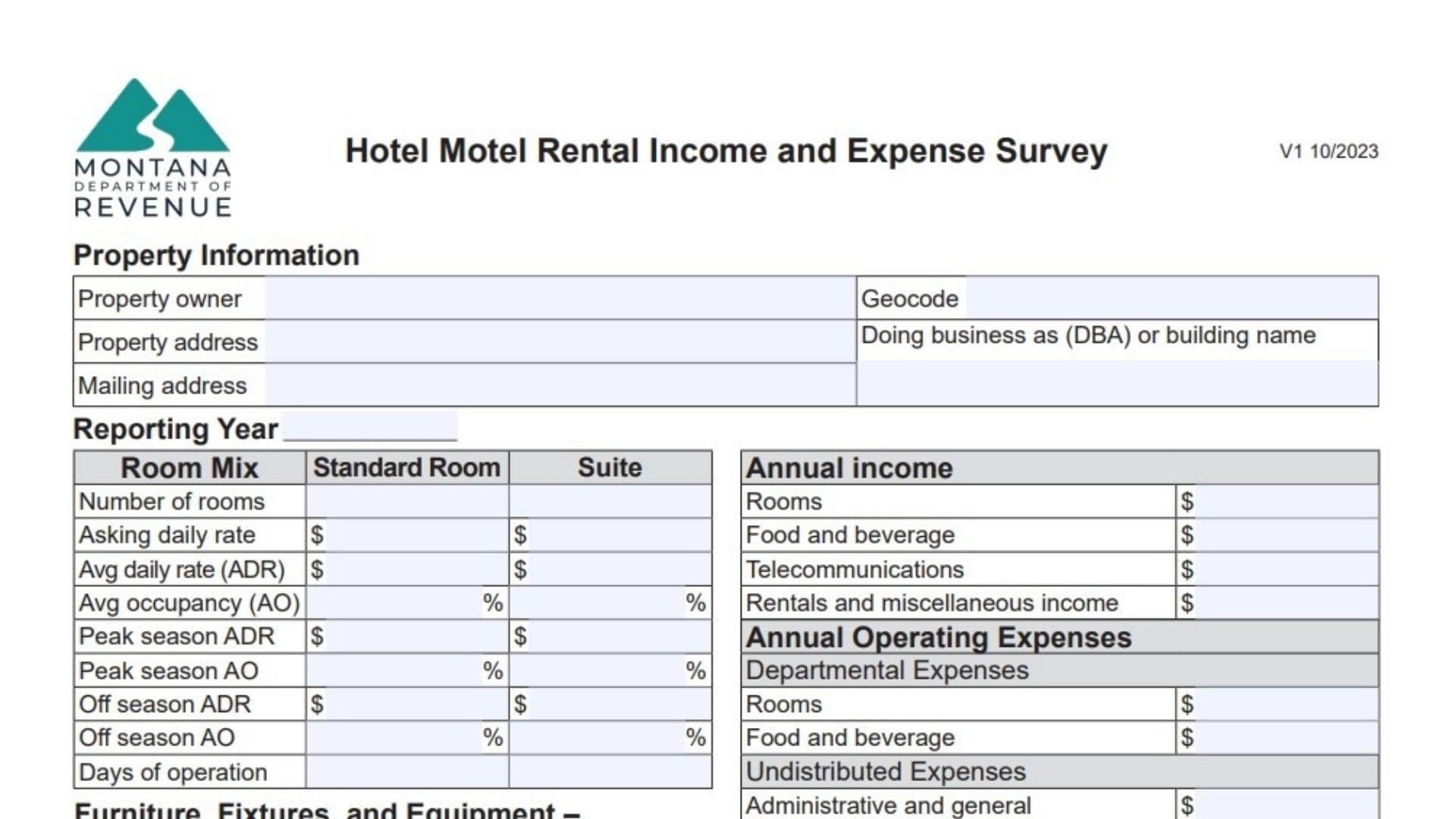
The Montana Hotel Motel Rental Income and Expense Survey Form is a data collection tool used by the Montana Department of Revenue to gather actual financial and operational information from lodging properties (hotels and motels) across the state. Instead of calculating tax due, this form serves as a market survey: it asks property owners to voluntarily report their annual income, operating expenses, occupancy rates, and room mix details. The Department uses this data to build accurate valuation models for property tax assessments, ensuring that commercial property appraisals reflect real-world market conditions, expense ratios, and income potential. By collecting specific figures on room revenue, food and beverage income, utility costs, franchise fees, and occupancy patterns (peak vs. off-season), the state can better understand the economic environment for hospitality businesses in different regions.
How To File It
You can submit the completed survey to the Montana Department of Revenue. While the form itself doesn’t explicitly list a mailing address on the face page, it provides a contact number (406-444-6900) for questions. Typically, these forms are returned to the local Department of Revenue office that requested the information or mailed to the central Property Assessment Division in Helena. Ensure the form is signed, dated, and includes valid contact information (phone/email) so the appraiser can reach you if clarification is needed.

How To Complete Montana Hotel Motel Rental Income And Expense Survey Form
Property Information
Property Owner
Enter the legal name of the property owner.
Geocode
Enter the property’s geocode (this is the unique 17-digit identifier assigned by the Department of Revenue).
Property Address
Enter the physical address of the hotel or motel.
Doing Business As (DBA) Or Building Name
Enter the trade name the hotel operates under (e.g., “Main Street Inn”).
Mailing Address
Enter the address where mail should be sent.
Reporting Year
Enter the calendar or fiscal year for which you are providing data (e.g., 2024).
Annual Operating Expenses
This section asks for your actual expenses for the reporting year.
Departmental Expenses
- Rooms: Enter total costs attributed to accommodations (housekeeping, laundry, guest supplies, front desk/housekeeping wages).
- Food And Beverage: Enter operating expenses for restaurants, lounges, bars, and complimentary breakfasts.
Undistributed Expenses
- Administrative And General: Enter professional fees, office supplies, legal fees, postage, and admin payroll.
- Telecommunications: Enter costs for phone, internet, and cable services.
- Marketing: Enter costs for advertising (online, print, direct mail) and promotions.
- Franchise Fees: Enter fees paid to a brand/franchise for naming rights and exposure.
- Utilities: Enter costs for electricity, gas, water, sewer, and trash.
- Property Operations And Maintenance: Enter costs for routine upkeep, landscaping, snow removal, and maintenance staff salaries.
Fixed Expenses
- Rent For Land Or Equipment: Enter lease payments for the ground or equipment (like bar equipment).
- Insurance: Enter the annual property insurance premium.
- Property Tax: Enter the total property taxes paid.
- Depreciation Expenses: Enter the annual non-cash expense for asset value loss.
- Mortgage Interest: Enter interest paid to financial institutions on the property loan.
- Management: Enter management fees or salaries paid for property management.
- Reserves For Replacement: Enter the allowance set aside for replacing short-lived items.
- Capital Expenses: Enter major one-time costs (roof replacement, additions, parking lot paving) that aren’t annual.
- Other Expense: Enter any other valid expenses not listed above.
Annual Income
Rooms
Enter income generated exclusively from room rentals.
Food And Beverage
Enter income from restaurants, bars, lounges, or food pantry sales.
Telecommunications
Enter income from guest phone, internet, or movie rentals.
Rentals And Miscellaneous Income
Enter income from meeting rooms, retail space, vending machines, laundry machines, or other sources.
Survey Sign-Off
Survey Completed By / Date / Title / Phone / Email Address
The person filling out the form must sign, date, and provide their contact details.
Clarification Box
Use the space provided to explain any irregularities or unusual spikes/drops in your income or expense figures.
Furniture, Fixtures, And Equipment (FF&E)
Personal Property List
List items not permanently attached to the building but essential for business (beds, desks, TVs, computers).
Install Cost / Depreciated Cost
For each item or category, enter the original installation cost and the current depreciated value.
Room Mix And Statistics
This section analyzes your inventory and performance.
Columns: Standard Room vs. Suite
Enter data separately for standard rooms and suites.
- Number Of Rooms: Enter the count of each room type.
- Asking Daily Rate: Enter the published or rack rate.
- Avg Daily Rate (ADR): Enter the actual average rate collected.
- Avg Occupancy (AO): Enter the occupancy percentage for the year.
- Peak Season ADR / AO: Enter the average rate and occupancy percentage during your busiest season.
- Off Season ADR / AO: Enter the average rate and occupancy percentage during your slowest season.
- Days Of Operation: Enter the number of days the property was open during the year.
Quick FAQs
Is This Form Mandatory?
While often voluntary, providing this data helps ensure your property tax assessment is based on accurate market evidence rather than estimated models that might overvalue your property.
What If I Don’t Have Exact Figures For “Reserves”?
Enter your best estimate or the amount you actually set aside in your accounting records for future replacements; if you don’t reserve cash, you may leave it blank or note it.
Where Do I Find My Geocode?
Your geocode is on your property tax bill or assessment notice; it’s the 17-digit number starting with county code.